
1. Wprowadzenie
Thank you for choosing the Moxie KX1 Bluetooth Handsfree Car Kit. This device is designed to provide a safe and convenient way to manage calls and enjoy music wirelessly while driving. Please read this manual carefully before using the device to ensure proper operation and to maximize its performance and lifespan.
2. Koniec produktuview
2.1 Składniki
- Moxie KX1 Bluetooth Handsfree Car Kit
- Kabel ładujący USB
- Adapter ładowarki samochodowej
- Instrukcja obsługi
2.2 Układ urządzenia i sterowanie
Familiarize yourself with the buttons and indicators on your KX1 device:
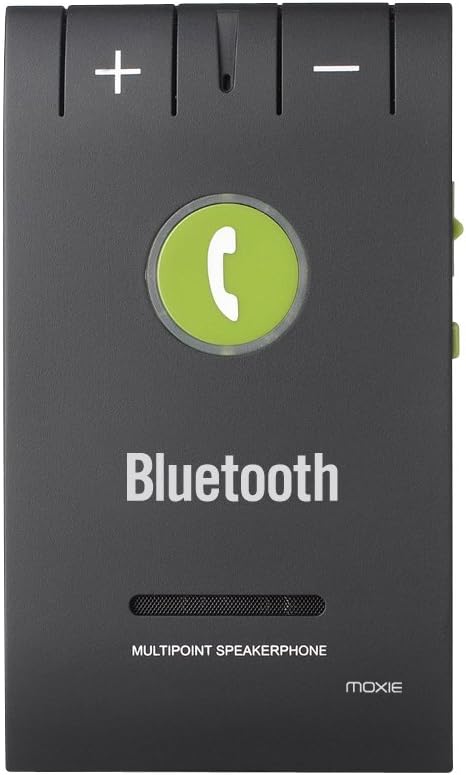
Obraz 1: Front panel of the Moxie KX1, highlighting the volume controls (+ and -), the central call button, and the 'Bluetooth' indicator.
| Kontrola | Funkcjonować |
|---|---|
| Przycisk + | Increase Volume / Next Track (during music playback) |
| - Przycisk | Decrease Volume / Previous Track (during music playback) |
| Call Button (Center) | Answer/End Call, Redial, Voice Assistant Activation, Play/Pause Music |
| Power Switch (Side) | Włączanie/wyłączanie zasilania |
| Charging Port (Side) | Connect USB charging cable |
3. Specyfikacje
| Funkcja | Szczegół |
|---|---|
| Wersja Bluetooth | V4.0 + EDR |
| Częstotliwość pracy | ISM (Ralink 3070) |
| Zasięg Bluetooth | Do 10 metrów (33 stóp) |
| Obsługiwane Profiles | HFP (profesjonalny zestaw głośnomówiący)file), HSP (zestaw słuchawkowy Profile), AVRCP (Zdalne sterowanie audio/wideo Profile) |
| Połączenie wielopunktowe | Connects to 2 phones simultaneously |
| Historia urządzenia | Stores pairing history for up to 8 devices |
| Czas rozmowy | Około 15 godzin |
| Czas czuwania | Około 1000 godzin |
| Czas ładowania | Około 2 godzin |
| Redukcja szumów | DSP (Digital Signal Processing) for noise and echo cancellation |
| Typ baterii | Bateria litowa 3.7 V, 750 mAh |
| Wymiary | Wymiary: 98 x 57 x 45 mm |
| Waga | 64 gramów |
| Kompatybilne urządzenia | Acer Liquid M320, M330, Z320, Z330, Blackberry Priv, HTC One A9, Huawei G8, Lenovo IdeaTab A10-70, Microsoft Lumia 550, Sony Xperia C5 Ultra (and other Bluetooth-enabled devices) |
4. Konfiguracja
4.1 Ładowanie urządzenia
Before first use, fully charge your Moxie KX1. Connect the provided USB charging cable to the device's charging port and the other end to a USB power source (e.g., car charger adapter, computer USB port). The indicator light will show charging status (e.g., red for charging, off or blue for fully charged).

Obraz 2: Strona view of the Moxie KX1, illustrating the location of the charging port and the ON/OFF power switch.
Pełne naładowanie trwa zazwyczaj około 2 godzin.
4.2 Parowanie z urządzeniem Bluetooth
- Ensure the KX1 is fully charged and powered off.
- Slide the power switch to the 'ON' position. The device will automatically enter pairing mode, indicated by a flashing blue/red light.
- Włącz Bluetooth w telefonie komórkowym i wyszukaj dostępne urządzenia.
- Select "Moxie KX1" from the list of found devices.
- Jeśli zostaniesz poproszony o podanie hasła, wpisz „0000”.
- Once paired, the indicator light will turn solid blue, and you may hear a confirmation tone.
The KX1 will automatically attempt to reconnect to the last paired device when powered on.
4.3 Montaż urządzenia
The Moxie KX1 comes with a magnetic clip for easy attachment to your car's sun visor.

Obraz 3: Tył view of the Moxie KX1, displaying the integrated magnetic clip designed for secure attachment to a car's sun visor.
- Attach the magnetic clip securely to the back of the KX1.
- Slide the clip onto your car's sun visor, ensuring it is firmly in place and does not obstruct your view.
5. Instrukcja obsługi
5.1 Włączanie/wyłączanie zasilania

Obraz 4: Szczyt view of the Moxie KX1, clearly showing the ON/OFF slide switch for device power control.
- Włączanie: Slide the power switch to the 'ON' position. The device will announce "Power On" and attempt to connect to the last paired device.
- Aby wyłączyć: Slide the power switch to the 'OFF' position. The device will announce "Power Off".
5.2 Wykonywanie i odbieranie połączeń
- Odbieranie połączenia: When a call comes in, the device will announce the incoming number. Press the Przycisk dzwonienia raz odpowiedzieć.
- Zakończenie połączenia: Podczas połączenia naciśnij Przycisk dzwonienia once to end the call.
- Odrzucenie połączenia: When a call comes in, press and hold the Przycisk dzwonienia for approximately 2 seconds to reject the call.
- Ponowne wybieranie ostatniego numeru: In standby mode, double-press the Przycisk dzwonienia aby ponownie wybrać ostatnio wybierany numer.
- Aktywacja Asystenta Głosowego: W trybie gotowości naciśnij i przytrzymaj Przycisk dzwonienia for approximately 2 seconds to activate your phone's voice assistant (e.g., Siri, Google Assistant).
5.3 Odtwarzanie muzyki
Once paired, you can stream music from your phone through the KX1 speaker.
- Odtwórz/Pauza: Naciśnij Przycisk dzwonienia raz, aby odtworzyć lub wstrzymać odtwarzanie muzyki.
- Następny utwór: Naciśnij Przycisk + raz.
- Poprzedni utwór: Naciśnij - Przycisk raz.
- Regulacja głośności: Naciśnij i przytrzymaj + or - Przycisk aby dostosować głośność.
5.4 Połączenie wielopunktowe
The Moxie KX1 supports connecting to two Bluetooth devices simultaneously.
- Pair the first phone as described in Section 4.2.
- After the first phone is paired, disable Bluetooth on the first phone.
- The KX1 will re-enter pairing mode (flashing blue/red light).
- Pair the second phone as described in Section 4.2.
- Once the second phone is paired, re-enable Bluetooth on the first phone. Both phones should now be connected to the KX1.
When two phones are connected, the KX1 will manage calls from both devices. Music playback will typically come from the last connected or active device.
6. Konserwacja
- Czyść urządzenie miękką, suchą ściereczką. Nie używaj środków czyszczących o właściwościach ściernych ani rozpuszczalników.
- Unikaj wystawiania urządzenia na działanie ekstremalnych temperatur, wilgoci lub bezpośredniego światła słonecznego.
- Przechowuj urządzenie w chłodnym i suchym miejscu, jeśli nie będziesz go używać przez dłuższy czas.
- Nie należy podejmować prób samodzielnego demontażu lub naprawy urządzenia, gdyż spowoduje to utratę gwarancji.
7. Rozwiązywanie Problemów
| Problem | Możliwe rozwiązanie |
|---|---|
| Urządzenie nie włącza się. | Ensure the device is charged. Connect to a power source and allow it to charge for at least 30 minutes before attempting to power on again. |
| Nie można sparować z telefonem. |
|
| Brak dźwięku lub słaba jakość dźwięku. |
|
| Calls are not clear (echo/noise). | Ensure the microphone is not obstructed. Try adjusting the position of the KX1 on the sun visor. The DSP technology should minimize most background noise. |
| Problemy z połączeniem wielopunktowym. | Ensure both phones have Bluetooth enabled and are within range. Re-follow the multipoint pairing instructions in Section 5.4. |
8. Informacje dotyczące bezpieczeństwa
- Do not operate the device while driving if it distracts you. Always prioritize road safety.
- Trzymaj urządzenie z dala od wody, wilgoci i ekstremalnych temperatur.
- Nie upuszczaj, nie przekłuwaj ani nie rozmontowuj urządzenia.
- Przechowywać w miejscu niedostępnym dla dzieci.
- Baterię i urządzenie należy utylizować zgodnie z lokalnymi przepisami.
9. Gwarancja i wsparcie
Moxie products are designed for reliability and performance. For warranty information or technical support, please refer to the contact details provided with your purchase or visit the official Moxie webStrona. Zachowaj dowód zakupu na wypadek roszczeń gwarancyjnych.