
1. Wprowadzenie
This manual provides detailed instructions for the installation, operation, and maintenance of your TENVIS JPT3815W-HD Wireless IP Camera. Please read this manual carefully before using the product to ensure proper setup and functionality. This camera is designed for surveillance and home security, offering high-definition video, two-way audio, and remote monitoring capabilities.
2. Koniec produktuview
Familiarize yourself with the components and ports of your TENVIS JPT3815W-HD camera.
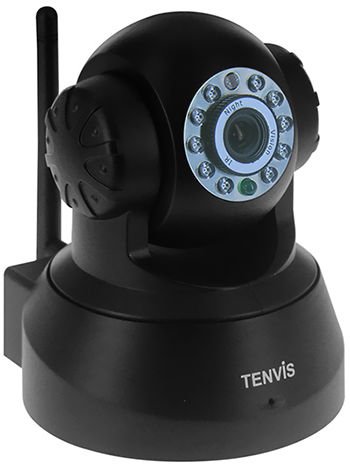
Obraz 2.1: Przód i tył view of the TENVIS JPT3815W-HD camera. The front features the HD 720P lens, IR LEDs for night vision, and a microphone. The rear includes the power input, Ethernet port, MicroSD card slot (supports up to 32GB), and a reset button. A Wi-Fi antenna is visible on the side.
Główne cechy:
- Rozdzielczość HD 720P: Captures video at 1280 x 720 pixels.
- Funkcjonalność panoramowania/pochylania: Obrót w poziomie o 340° i pochylenie w pionie o 110° umożliwiają pokrycie dużego obszaru.
- Widzenie nocne: Equipped with 10 IR-LEDs for clear visibility up to 10 meters in low light conditions.
- Dwukierunkowy dźwięk: Wbudowany mikrofon i głośnik umożliwiające komunikację.
- Detekcja ruchu: Configurable alerts via email and snapshot uploads to FTP.
- Połączenie bezprzewodowe: Supports IEEE802.11b/g/n Wi-Fi standards.
- Obsługa kart MicroSD: Slot for local storage up to 32GB.
- P2P and ONVIF 2.2 Protocol: Ensures broad compatibility and easy setup.
3. Konfiguracja
3.1 Początkowe włączenie zasilania
- Connect the power adapter (DC 5V/2.0A) to the camera's power input port.
- Plug the power adapter into a wall outlet. The camera will power on and begin its self-test sequence.
3.2 Połączenie sieciowe
Kamera obsługuje połączenia przewodowe (Ethernet) i bezprzewodowe (Wi-Fi).
Połączenie przewodowe:
- Podłącz jeden koniec kabla Ethernet do portu Ethernet aparatu.
- Podłącz drugi koniec kabla Ethernet do routera lub przełącznika sieciowego.
Połączenie bezprzewodowe:
- Upewnij się, że kamera jest włączona.
- Install the TENVIS mobile application on your iOS or Android device.
- Follow the in-app instructions to add the camera and configure its Wi-Fi settings. This typically involves scanning a QR code on the camera or entering the camera's UID.
- Select your Wi-Fi network and enter the password. The camera will connect to the wireless network.
3.3 Instalacja karty MicroSD
- Locate the MicroSD card slot on the camera (refer to Image 2.1).
- Gently insert a MicroSD card (up to 32GB) into the slot until it clicks into place.
- Format the MicroSD card through the camera's settings in the mobile application or web interfejs zapewniający optymalną wydajność.
4. Instrukcja obsługi
4.1 Na żywo View i kontrola
Access the live video feed through the TENVIS mobile application or a compatible web browser (Microsoft IE7+, Mozilla Firefox, Google Chrome, Apple Safari).
- Panoramowanie/pochylanie: Use the controls in the app or web interface to remotely adjust the camera's horizontal (340°) and vertical (110°) viewkąty.
- Zoom cyfrowy: Utilize the 5x digital zoom feature to magnify specific areas of the live feed.
- Dwukierunkowy dźwięk: Tap the microphone icon in the app to speak through the camera's speaker, and listen to audio from the camera's built-in microphone.
4.2 Rejestrowanie i przechowywanie
The camera supports continuous recording, scheduled recording, and motion-triggered recording to a MicroSD card.
- Configure recording settings within the camera's interface.
- Nagrane footage może być ponownieviewed and downloaded via the mobile application or web interfejs.
4.3 Detekcja ruchu i alerty
The camera can detect motion and trigger alerts.
- Włącz wykrywanie ruchu w ustawieniach kamery.
- Configure alert actions, such as sending email notifications with snapshots or uploading alarm snapshots to an FTP server.
- Dostosuj czułość wykrywania ruchu, aby zminimalizować liczbę fałszywych alarmów.
4.4 Widzenie nocne
The camera automatically switches to night vision mode in low light conditions, utilizing its infrared LEDs to provide clear black and white video up to 10 meters.
5. Konserwacja
5.1 Czyszczenie
- Przed czyszczeniem upewnij się, że aparat jest wyłączony.
- Do czyszczenia korpusu aparatu należy używać miękkiej, suchej ściereczki.
- Do czyszczenia soczewek należy używać ściereczki i specjalnego środka czyszczącego, aby uniknąć zarysowań.
- Nie używaj żrących chemikaliów ani ściernych środków czyszczących.
5.2 aktualizacji oprogramowania sprzętowego
Periodically check the TENVIS official website or your mobile application for available firmware updates. Keeping your camera's firmware updated ensures optimal performance, security, and access to new features. Follow the provided instructions carefully when performing updates.
5.3 Zarządzanie magazynem
- Regularly back up important recordings from the MicroSD card to another storage device.
- Format the MicroSD card periodically to maintain performance and free up space.
6. Rozwiązywanie Problemów
6.1 Brak zasilania
- Sprawdź, czy zasilacz jest prawidłowo podłączony do aparatu i gniazdka elektrycznego.
- Sprawdź, czy gniazdko elektryczne jest sprawne.
- Ensure you are using the correct DC 5V/2.0A power adapter.
6.2 Cannot Connect to Network
- wired: Ensure the Ethernet cable is properly connected to both the camera and the router. Check router status.
- Bezprzewodowy: Verify your Wi-Fi password is correct. Ensure the camera is within range of your Wi-Fi router. Restart the camera and router.
- If using P2P, ensure your internet connection is stable.
6.3 Słaba jakość wideo
- Check your network bandwidth. Insufficient bandwidth can cause choppy or low-resolution video.
- Clean the camera lens if it appears dirty.
- Ensure adequate lighting for optimal image quality during the day.
6.4 Detekcja ruchu nie działa
- Verify that motion detection is enabled in the camera settings.
- Dostosuj ustawienia czułości.
- Check the configured alert actions (email, FTP) and ensure their settings are correct.
6.5 Resetowanie kamery
If the camera is unresponsive or you need to restore factory settings, locate the reset button (refer to Image 2.1). With the camera powered on, press and hold the reset button for approximately 10-15 seconds until the camera reboots. This will revert all settings to their default values.
7. Specyfikacje
| Kategoria | Specyfikacja |
|---|---|
| Nazwa modelu | JPT3815W-HD |
| Czujnik obrazu | Omnivision9712/100W CMOS |
| Rozdzielczość wyświetlacza | 1280x720 (720P) |
| Min. oświetlenie | 0.1 luks |
| Długość ogniskowej obiektywu | f:3.6mm |
| Otwór | F2.5 |
| Kąt View | 80° |
| Kompresja wideo | H.264 |
| Szybkość klatek | 25fps (maximum) |
| Obsługiwane rozdzielczości | 720P(1280x720), VGA(640x360), QVGA(320x180) |
| Pan / Tilt Angle | Poziomo: 340°, Pionowo: 110° |
| Diody LED podczerwieni | 10 szt. |
| Odległość widzenia nocnego | 10 metrów |
| Zoom cyfrowy | 5x |
| Audio | Two-way Audio, Built-in Mic & Speaker, G.711/G.726 |
| Sieć Ethernetowa | 10/100 Mb/s |
| standard bezprzewodowy | IEEE802.11b/g/n |
| Bezpieczeństwo sieci bezprzewodowej | WEP, WPA, WPA2 |
| Protokóły sieciowe | IP, TCP, UDP, HTTP, SMTP, FTP, DHCP, DDNS, RTSP, ICMP, NTP, UPNP, RTP, P2P, ONVIF, WPS |
| Wsparcie systemu operacyjnego | Microsoft Windows XP/7, Mac OS, iOS, Android |
| Obsługa przeglądarki | IE7+, Mozilla Firefox, Google Chrome, Apple Safari |
| Składowanie | MicroSD card, up to 32GB |
| Zasilacz | Prąd stały 5 V/2.0 A |
| Pobór mocy | 4W/6W |
| Temperatura pracy | -10°C ~ +50°C (14°F ~ 124°F) |
| Wilgotność robocza | 10% ~ 80% bez kondensacji |
| Poziom wodoodporności | Not Water Resistant (Indoor/Outdoor usage refers to general application, but not direct exposure to elements without protection) |
| Współczynnik kształtu | Kopuła |
| Kolor | Czarny |
8. Informacje o gwarancji
The TENVIS JPT3815W-HD Wireless IP Camera comes with a Limited 1-year warranty from the date of purchase. This warranty covers manufacturing defects and malfunctions under normal use. It does not cover damage caused by misuse, accidents, unauthorized modifications, or improper installation. Please retain your proof of purchase for warranty claims.
9. Wsparcie
For further assistance, technical support, or inquiries regarding your TENVIS JPT3815W-HD camera, please refer to the official TENVIS website or contact their customer service. Ensure you have your product model number and purchase details ready when seeking support.