
1. Wprowadzenie
This manual provides instructions for the proper use and care of your DeltaTrak 11047 Digital Lollipop Min/Max Probe Thermometer. This device is designed for accurate temperature measurement in various applications, featuring a digital display and Min/Max temperature recording capabilities.
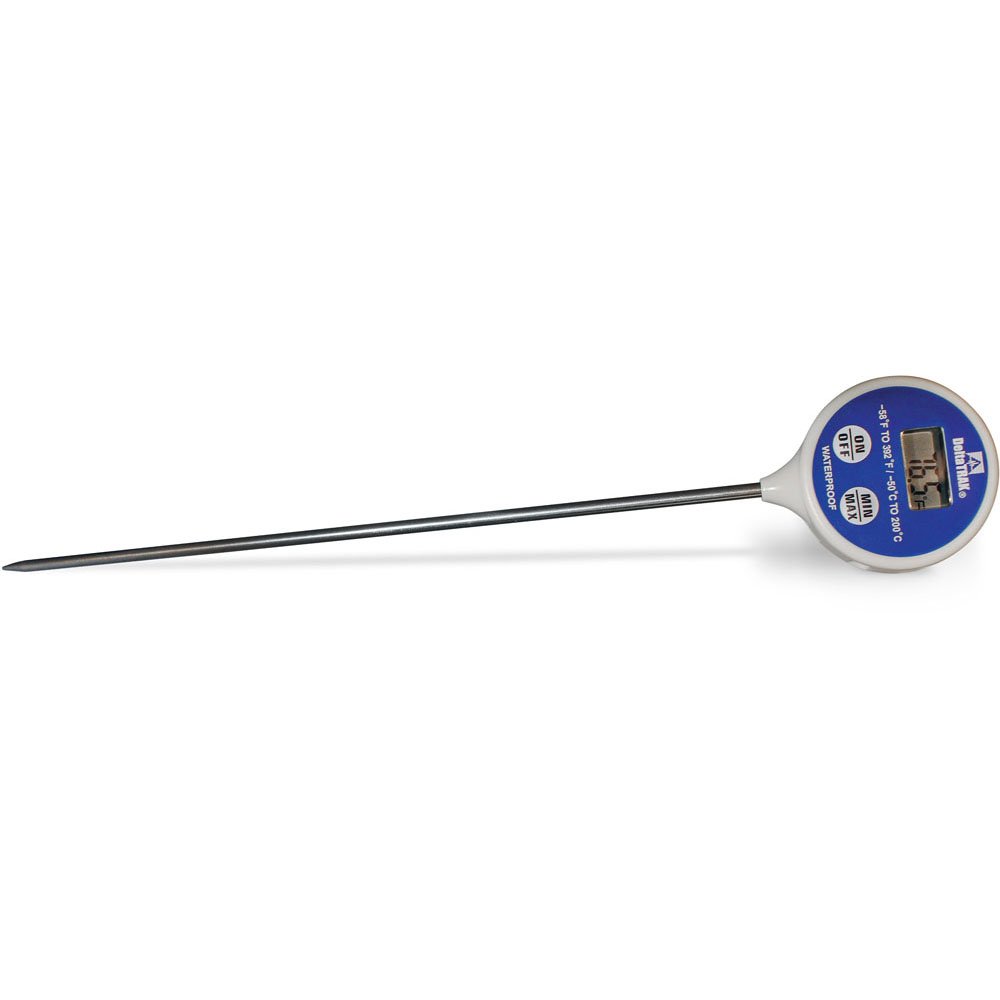
Rysunek 1: DeltaTrak 11047 Digital Lollipop Min/Max Probe Thermometer. This image shows the thermometer with its digital display and probe.
2. Informacje dotyczące bezpieczeństwa
Please read all safety instructions before using the thermometer to ensure safe operation and prevent damage to the device or injury to yourself.
- Do not expose the thermometer to extreme temperatures outside its specified operating range.
- Do not immerse the main body of the thermometer in water or other liquids. The probe is designed for immersion, but the display unit is not waterproof.
- Przechowywać w miejscu niedostępnym dla dzieci.
- Do not attempt to disassemble or modify the thermometer. This will void the warranty and may cause damage.
- Zutylizuj baterie zgodnie z lokalnymi przepisami.
3. Konfiguracja
3.1. Instalacja baterii
The DeltaTrak 11047 thermometer requires batteries for operation (not included). Follow these steps to install them:
- Znajdź pokrywę komory baterii znajdującą się z tyłu termometru.
- Otwórz komorę baterii za pomocą małego śrubokręta lub monety.
- Insert the required batteries, ensuring correct polarity (+ and -). Refer to the markings inside the compartment.
- Załóż pokrywę komory baterii i mocno ją dokręć.
3.2. Pierwsze włączenie zasilania
Po zainstalowaniu baterii naciśnij przycisk WŁ./WYŁ. button to power on the device. The display will show the current temperature.
4. Instrukcja obsługi
4.1. Pomiar temperatury
- Sprawdź, czy termometr jest włączony.
- Insert the stainless steel probe into the substance or environment you wish to measure. Ensure the probe tip is fully immersed or positioned correctly for accurate readings.
- Wait for the temperature reading on the digital display to stabilize. This usually takes a few seconds.
4.2. Funkcja temperatury min./maks.
The thermometer can record the minimum and maximum temperatures measured during a session.
- Naciśnij MINIMUM MAKSIMUM button once to display the maximum temperature recorded since the last reset.
- Naciśnij MINIMUM MAKSIMUM button a second time to display the minimum temperature recorded.
- Naciśnij MINIMUM MAKSIMUM button a third time to return to the current temperature display.
- To reset the Min/Max values, press and hold the MINIMUM MAKSIMUM button for approximately 3 seconds while in Min or Max display mode.
4.3. Unit Selection (°C/°F)
Aby przełączać się między stopniami Celsjusza (°C) i Fahrenheita (°F):
- Zlokalizuj ° C / ° F button, usually found near the display or battery compartment.
- Press this button to toggle between the two temperature units.
5. Konserwacja
5.1. Czyszczenie
As per product care instructions, the thermometer should be cleaned by wiping it. Use a damp cloth with mild soap or a sanitizing wipe to clean the probe and the body of the thermometer. Do not use abrasive cleaners or immerse the main unit in water.
5.2. Przechowywanie
When not in use, store the thermometer in a clean, dry place at room temperature. Ensure the probe is clean and dry before storage. The thermometer often comes with a protective sheath for the probe; use this to prevent damage.
5.3. Wymiana baterii
If the display becomes dim or the thermometer stops functioning, it may be time to replace the batteries. Follow the battery installation steps in Section 3.1.
6. Rozwiązywanie Problemów
| Problem | Możliwa przyczyna | Rozwiązanie |
|---|---|---|
| Brak wyświetlacza lub wyświetlacz jest przyciemniony | Baterie rozładowane lub słabe; nieprawidłowa instalacja baterii. | Wymień baterie, zwracając uwagę na prawidłową biegunowość. |
| Niedokładne odczyty | Probe not fully immersed; probe damaged; thermometer outside operating range. | Ensure probe is correctly positioned; check for visible damage; use within specified temperature range. |
| Termometr się nie włącza | Batteries not installed; power button malfunction. | Install or replace batteries; if problem persists, contact support. |
7. Specyfikacje
- Marka: DeltaTrak
- Numer modelu: 11047
- Kod UPC: 700779110473
- Materiał zewnętrzny: Glass (Note: This likely refers to the display or a component, the probe is typically stainless steel)
- Specyfikacja spełniona: NIST
- Waga przedmiotu: 36.3 gramów
- Wymiary opakowania: Wymiary 26.8 x 5.41 x 2.79 cm
- Zawartość zestawu: Termometr
- Instrukcje dotyczące pielęgnacji produktu: Wytrzeć
- Baterie: Nie wliczone
8. Gwarancja i pomoc techniczna
8.1. Informacje o gwarancji
DeltaTrak products are manufactured to high-quality standards. For specific warranty details regarding your DeltaTrak 11047 thermometer, please refer to the warranty card included with your purchase or visit the official DeltaTrak webZachowaj paragon jako dowód zakupu na wypadek reklamacji.
8.2. Obsługa klienta
If you encounter any issues not covered in this manual or require further assistance, please contact DeltaTrak customer support. Contact information can typically be found on the product packaging or the official DeltaTrak webstrona.
Więcej informacji znajdziesz na stronie: www.deltatrak.com