
1. Wprowadzenie
The Motorola Talkabout T465 Rechargeable Two-Way Radio Bundle is designed for clear and dependable communication, ideal for outdoor adventures, emergencies, and staying connected when cellular service is unavailable. This manual provides essential information for setting up, operating, and maintaining your T465 radios.
2. Informacje dotyczące bezpieczeństwa
Before using your Motorola Talkabout T465 radios, please read all safety instructions carefully. Failure to do so may result in injury or damage to the product.
- Bezpieczeństwo baterii: Use only approved Motorola rechargeable batteries or 3 AA alkaline batteries. Do not mix battery types. Dispose of batteries properly.
- Ostrzeżenie dotyczące propozycji 65: Ten produkt może zawierać chemikalia, o których w stanie Kalifornia wiadomo, że powodują raka i wady wrodzone lub inne szkody rozrodcze.
- Ochrona słuchu: Use the lowest volume necessary to hear clearly. Prolonged exposure to loud volumes may cause hearing damage.
- Ingerencja: Turn off your radio in areas where two-way radios are prohibited, such as hospitals or aircraft.
3. Zawartość opakowania
Your Motorola Talkabout T465 bundle includes:
- 2 x T465 Two-Way Radios
- 2 x Micro-USB Wall Charging Cables
- 2 x Rechargeable NiMH Battery Packs (or use 2 AA batteries per radio)
- 2 x paski
- 2 x Earbuds with Push-to-Talk (PTT) Microphone
- 1 x Carry Case
- User Guide and Accessory Sheet (English and French)
4. Konfiguracja
4.1 Instalacja baterii
Your T465 radios can be powered by either the included rechargeable NiMH battery packs or 3 AA alkaline batteries (not included). To install:
- Upewnij się, że radio jest wyłączone.
- Remove the battery compartment cover on the back of the radio.
- Insert the NiMH battery pack or 3 AA batteries, observing the polarity markings.
- Replace the battery compartment cover, ensuring it clicks securely into place to maintain water resistance.
4.2 Ładowanie akumulatorów
To charge the rechargeable NiMH battery packs:
- Connect the Micro-USB charging cable to the charging port on the side of the radio.
- Plug the other end of the cable into a standard USB wall adapter.
- The battery indicator on the radio display will show charging status. A full charge typically takes 8.5 hours.
4.3 Mocowanie zaczepu do paska
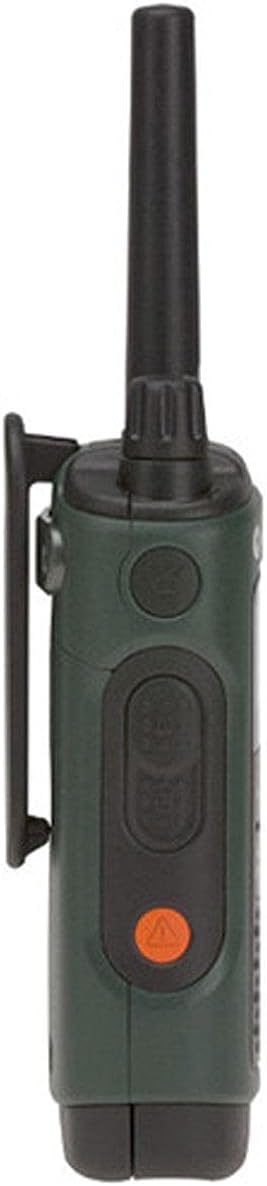
To attach the belt clip, align the clip with the slots on the back of the radio and slide it down until it locks into place.

5. Obsługa radia
5.1 Włączanie/wyłączanie zasilania i regulacja głośności
- Włączanie: Rotate the On/Off/Volume knob clockwise until you hear a click and the display illuminates.
- Wyłączone: Rotate the On/Off/Volume knob counter-clockwise until you hear a click and the display turns off.
- Dostosuj głośność: Rotate the On/Off/Volume knob to increase or decrease the listening volume.
5.2 Wybór kanału
Your T465 radio has 22 channels. To select a channel:
- Naciśnij Menu button until the channel number flashes.
- Użyj Up or W dół przyciski umożliwiające wybór interesującego Cię kanału.
- Naciśnij Menu ponownie lub przycisk PTT aby potwierdzić swój wybór.
5.3 kodów prywatności
Privacy codes help reduce interference by filtering out transmissions from other users on the same channel. Your T465 radios offer 121 privacy codes.
- Naciśnij Menu button twice until the privacy code number flashes.
- Użyj Up or W dół buttons to select your desired privacy code.
- Naciśnij Menu ponownie lub przycisk PTT przycisk aby potwierdzić. Uwaga: Aby móc się komunikować, oba radia muszą pracować na tym samym kanale i używać tego samego kodu prywatności.
5.4 Przycisk „Naciśnij i mów” (PTT).
The PTT button is located on the side of the radio. It has two power settings:
- Wysoka moc: Press the upper part of the PTT button for maximum range. This consumes more battery.
- Niska moc: Press the lower part of the PTT button for shorter range, conserving battery life.
To transmit, press and hold the PTT button, speak clearly into the microphone, and release the button to listen.
5.5 Call/Page Tone
To send a call tone to alert other radios in your group, briefly press the Call button (often a musical note icon) on the front of the radio.
5.6 Blokada klawiatury
To prevent accidental changes to your settings, press and hold the Menu button until the lock icon appears on the display. Repeat to unlock.

6. Zaawansowane funkcje
6.1 NOAA Weather Radio and Alerts
Your T465 radio can receive NOAA Weather Radio broadcasts, providing real-time weather information and alerts.
- Naciśnij Tryb button until the weather channel icon appears.
- Użyj Up or W dół przyciski umożliwiające wybór kanału pogodowego.
- The radio can be set to automatically alert you to severe weather conditions. Consult the full user guide for detailed setup of weather alerts.
6.2 Emergency Alert Button
The T465 features an orange Emergency Alert button on the side. Pressing and holding this button will activate an audible alert on your radio and other compatible Motorola radios within range, set them to maximum volume, and enable hands-free transmission (VOX) for a period, allowing you to speak without holding the PTT button.
6.3 Wbudowana latarka
The radio includes a built-in LED flashlight for convenience in low-light conditions. To activate, press the dedicated flashlight button (often located on the top or side). Press again to turn off.
6.4 VibraCall™ Alert
For discreet communication, the VibraCall™ feature provides a silent vibrating alert instead of an audible tone. This is useful in quiet environments or when you need to avoid startling game during hunting.
7. Konserwacja
Proper care ensures the longevity and performance of your T465 radios.
- Czyszczenie: Użyj miękkiego, damp cloth to clean the radio's exterior. Do not use abrasive cleaners or solvents.
- Pielęgnacja baterii: Store batteries in a cool, dry place. If not using the radios for an extended period, remove alkaline batteries to prevent leakage. Recharge NiMH batteries periodically to maintain their capacity.
- Wodoodporność: The T465 is rated IP44 waterproof, meaning it is protected against splashing water from any direction. Ensure all ports and battery covers are securely closed to maintain water resistance. Do not submerge the radio.
8. Rozwiązywanie Problemów
If you encounter issues with your T465 radios, try the following:
- Brak zasilania: Check battery installation and charge level. Replace alkaline batteries if depleted.
- Słaby zasięg/zakłócenia: Ensure both radios are on the same channel and privacy code. Move to an area with fewer obstructions (e.g., buildings, dense foliage). Range can be significantly reduced by terrain and conditions.
- Cannot Hear Other Radios: Verify volume is up. Check that privacy codes match. Ensure radios are within range.
- Radio się nie ładuje: Check USB cable connection and wall adapter. Ensure battery pack is correctly inserted.
9. Specyfikacje
| Funkcja | Szczegół |
|---|---|
| Marka | Rozwiązania Motoroli |
| Numer modelu | T465 |
| Kolor | Zielony |
| Liczba kanałów | 22 |
| Protokół łączności | GMRS |
| Typ tunera | UHF |
| Maksymalny zasięg rozmów | 35 Miles (actual range varies by terrain and conditions) |
| Poziom wodoodporności | Wodoodporny (IP44) |
| Źródło zasilania | Rechargeable NiMH Battery Pack (included) or 3 AA batteries (not included) |
| Średnia żywotność baterii | 8.5 godzin |
| Wymiary produktu | 1.37" gł. x 2.26" szer. x 7.54" wys. |
| Waga przedmiotu | 1.9 funtów |
10. Gwarancja i wsparcie
10.1 Informacje o gwarancji
The Motorola Talkabout T465 Two-Way Radio Bundle comes with a 1-roczna ograniczona gwarancja from the date of purchase. This warranty covers defects in materials and workmanship under normal use. For full terms and conditions, please refer to the warranty card included in your package or visit the Motorola Solutions webstrona.
10.2 Obsługa klienta
For technical assistance, troubleshooting not covered in this manual, or warranty claims, please contact Motorola Solutions customer support. Contact information can typically be found on the Motorola Solutions website or on the accessory sheet included with your product.
11. Filmy produktowe
Motorola Talkabout T465 Product Overview
Ten film przedstawia ogólny przeglądview of the Motorola Talkabout T465 Two-Way Radio Bundle, highlighting its rugged design, features for outdoor use, and various applications like hunting, camping, and emergencies. It showcases the IP54 weatherproofing, VibraCall™ alert, PTT power boost, dual power options, NOAA weather channels, emergency alert button, and built-in flashlight.
Motorola T4XX Series User Instructions - How To Guide
This instructional video demonstrates how to operate Motorola T4XX series radios, including powering on, adjusting volume, selecting channels, using privacy codes, and understanding the various buttons and features. It also covers battery installation and charging options, providing a practical guide for new users.