
1. Wprowadzenie
The PowerDrive PD3000 is a 3000 Watt power inverter designed to convert 12V DC power from your vehicle's battery into 115V AC household power. This unit provides 3000 Watts of continuous AC power and has a high surge capacity of up to 6000 Watts to accommodate devices with high starting power requirements. It features integrated Bluetooth wireless technology for remote monitoring and control via a mobile application, along with a removable control panel for flexible placement. This manual provides essential information for the safe and efficient operation of your PowerDrive PD3000 inverter.
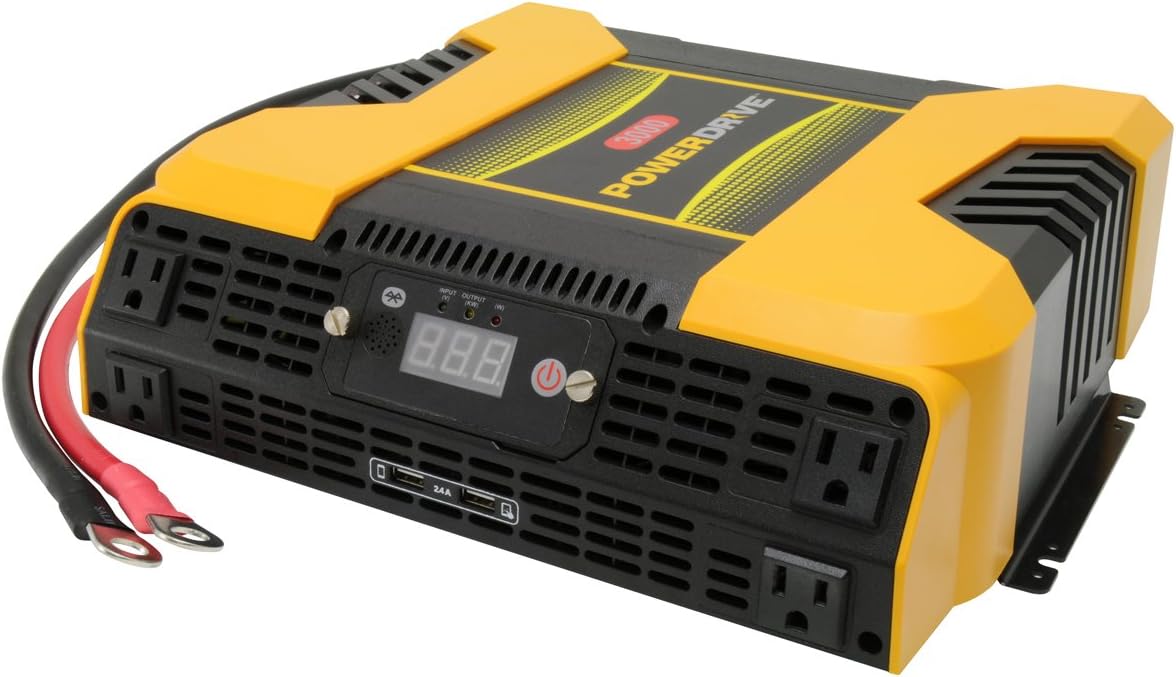
Figure 1.1: PowerDrive PD3000 3000 Watt Power Inverter, front view with outlets and display.
2. Informacje dotyczące bezpieczeństwa
Please read and understand all safety instructions before installing or operating the inverter. Failure to follow these instructions may result in electrical shock, fire, serious injury, or property damage.
- Ryzyko porażenia prądem elektrycznym: Nie otwierać falownika casing. Wewnątrz nie ma żadnych części, które mogłyby być naprawiane przez użytkownika. Wszelkie prace serwisowe należy zlecać wykwalifikowanemu personelowi serwisowemu.
- Zagrożenie pożarem: Do not operate the inverter near flammable materials, gases, or vapors. Ensure adequate ventilation around the inverter.
- Bezpieczeństwo baterii: Connect the inverter only to a 12V DC battery system. Ensure battery terminals are clean and connections are secure. Wear eye protection and gloves when working with batteries.
- Wentylacja: Upewnij się, że falownik jest zainstalowany w dobrze wentylowanym pomieszczeniu. Nie blokuj otworów wentylacyjnych.
- Zabezpieczenie przed przeciążeniem: Do not exceed the inverter's continuous power rating of 3000 Watts. Overloading can damage the inverter and connected devices.
- Wilgoć: Do not expose the inverter to rain, moisture, or spray.
3. Zawartość opakowania
Sprawdź, czy po rozpakowaniu znajdują się wszystkie elementy:
- PowerDrive PD3000 Power Inverter Unit
- Instrukcja obsługi
- Kable akumulatorowe (czerwony i czarny)
- Zdejmowany panel sterowania z kablem
4. Funkcje produktu
The PowerDrive PD3000 inverter offers a range of features for versatile power conversion:
- Wysoka moc wyjściowa: Delivers 3000 Watts of continuous AC power with a 6000 Watt surge capacity.
- Wiele gniazdek prądu zmiennego: Equipped with four (4) 3-prong AC outlets to support various devices.
- Porty ładowania USB: Includes two (2) USB power ports (shared 2400mA total output) for charging mobile devices.
- Łączność Bluetooth: Allows remote access to features and settings via a free downloadable mobile application.
- Zdejmowany panel sterowania: Detachable control panel enables remote monitoring and testing, offering installation flexibility.
- Trwała konstrukcja: Features a robust ABS PVC composite housing designed to protect internal electronic components.
- Zabezpieczenia: Incorporates audible alarms and automatic shut-off triggers for low battery, high battery, and overload conditions.

Figure 4.1: Front panel of the PowerDrive PD3000 showing AC outlets, USB ports, and digital display.
5. Konfiguracja i instalacja
Prawidłowa instalacja ma kluczowe znaczenie dla bezpiecznej i wydajnej pracy falownika.
5.1 Montaż falownika
- Choose a dry, well-ventilated location away from direct sunlight, heat sources, and flammable materials.
- Ensure there is sufficient space around the inverter for air circulation, especially around the cooling fans.
- Mount the inverter securely using appropriate hardware (not included) to prevent movement during operation.
5.2 Podłączanie do źródła zasilania prądem stałym 12 V
Ważny: Ensure the inverter is turned OFF before making any connections.
- Połącz CZERWONY (positive) battery cable to the CZERWONY (positive) terminal on the inverter. Tighten securely.
- Podłącz drugi koniec CZERWONY (positive) battery cable to the pozytywny (+) terminal of your 12V DC battery. Tighten securely.
- Połącz CZARNY (negative) battery cable to the CZARNY (negative) terminal on the inverter. Tighten securely.
- Podłącz drugi koniec CZARNY (negative) battery cable to the negatywny (-) terminal of your 12V DC battery. Tighten securely.
- Verify all connections are tight and free from corrosion. Loose connections can cause overheating and damage.

Figure 5.1: PowerDrive PD3000 Inverter showing battery cable connections.

Rysunek 5.2: Tył view of the PowerDrive PD3000 showing cooling fans and battery terminals.
5.3 Removable Control Panel Installation
The control panel can be used directly on the inverter or detached for remote operation.
- To use remotely, gently pull the control panel from the inverter.
- Connect the provided cable to the port on the back of the detached control panel and to the corresponding port on the inverter.
- Mount the control panel in a convenient location for monitoring and control.

Figure 5.3: PowerDrive PD3000 Inverter with its control panel detached for remote use.
6. Instrukcja obsługi
6.1 Włączanie/wyłączanie
- After ensuring all battery connections are secure, press and hold the power button on the inverter or the remote control panel for approximately 1-2 seconds.
- The digital display will illuminate, and the inverter will begin providing AC power.
- Aby wyłączyć, naciśnij i przytrzymaj przycisk zasilania ponownie, aż wyświetlacz się wyłączy.
6.2 Connecting AC Devices
- Plug your 115V AC devices into the 3-prong AC outlets on the front of the inverter.
- Zapewnij całkowitą moctagMoc wszystkich podłączonych urządzeń nie przekracza 3000 watów.
- For devices with high starting loads (e.g., motors, compressors), ensure their surge wattage is within the inverter's 6000 Watt surge capacity.
6.3 Korzystanie z portów ładowania USB
- Connect your USB-powered devices (e.g., smartphones, tablets) to the USB ports.
- The two USB ports share a total output of 2400mA (2.4A).
6.4 Understanding the Digital Display and Indicators
The digital display shows real-time information such as input voltage or output wattage. Indicator lights provide status feedback:
- Wejście LED: Indicates the status of the DC input power.
- Wyjście LED: Indicates the status of the AC output power.
- Dioda błędu: Illuminates to indicate an error condition (e.g., overload, low/high voltagmi).
7. Łączność Bluetooth
The PowerDrive PD3000 features Bluetooth wireless technology, allowing you to monitor and control the inverter using a compatible smartphone application.
7.1 Downloading the Mobile App
- Szukaj the official PowerDrive inverter app on your smartphone's app store (e.g., Apple App Store, Google Play Store).
- Pobierz i zainstaluj aplikację.
7.2 Pairing with Your Inverter
- Upewnij się, że Bluetooth jest włączony w Twoim smartfonie.
- Turn on the PowerDrive PD3000 inverter.
- Open the PowerDrive mobile app. The app should automatically detect nearby PowerDrive inverters.
- Follow the on-screen prompts within the app to pair with your PD3000 inverter.
7.3 Funkcje aplikacji
Po sparowaniu aplikacja umożliwia:
- Objętość wejścia monitoratage i moc wyjściowatage.
- View inverter status and fault codes.
- Remotely turn the inverter on or off.
- Adjust certain settings (refer to the app's help section for details).

Figure 7.1: Smartphone displaying the PowerDrive mobile application interface.
8. Konserwacja
Regularna konserwacja zapewnia optymalną wydajność i długą żywotność falownika.
- Czyszczenie: Okresowo czyść zewnętrzną część falownika suchą, miękką ściereczką. Nie używaj płynnych środków czyszczących ani rozpuszczalników.
- Wentylacja: Upewnij się, że wentylatory chłodzące i otwory wentylacyjne są wolne od kurzu i zanieczyszczeń. W razie potrzeby usuń zatory sprężonym powietrzem.
- Znajomości: Regularly check battery cable connections for tightness and corrosion. Clean terminals with a wire brush if corrosion is present.
- Składowanie: Jeśli falownik będzie przechowywany przez dłuższy czas, należy odłączyć go od akumulatora i przechowywać w chłodnym, suchym miejscu.
9. Rozwiązywanie Problemów
This section addresses common issues you might encounter with your PowerDrive PD3000 inverter.
9.1 Typowe problemy i rozwiązania
- Falownik się nie włącza:
- Sprawdź, czy połączenia akumulatora są dobrze dokręcone i mają prawidłową biegunowość.
- Upewnij się, że pojemność bateriitage is above 10.5V DC (Low Battery Shut Down Point).
- Sprawdź, czy przycisk zasilania jest naciśnięty i przytrzymany przez wymagany czas.
- Brak wyjścia prądu przemiennego:
- Check if the inverter is powered on and the Output LED is illuminated.
- Ensure the connected AC device is functioning correctly.
- Check for an overload condition (Fault LED illuminated). Reduce the load.
- Audible Alarm / Fault LED On:
- Alarm niskiego poziomu baterii: Activates at 11 ± 0.3V DC. Recharge or replace the battery. The inverter will shut down at 10.5 ± 0.3V DC.
- High Battery Shut Down: Occurs at 15.5 ± 0.5V DC. Check the charging system of your vehicle.
- Przeciążać: Całkowita moctage of connected devices exceeds 3000 Watts. Disconnect some devices.
- Powyżej temperatury: Inverter is overheating. Ensure proper ventilation and reduce load.
- Problemy z połączeniem Bluetooth:
- Ensure Bluetooth is enabled on your smartphone and the inverter is powered on.
- Restart the mobile app and try pairing again.
- Ensure your smartphone is within range of the inverter.
10. Specyfikacje
| Specyfikacja | Wartość |
|---|---|
| Model | PD3000 |
| Continuous AC Power Output | 3000 watów |
| Szczytowa moc udarowa | 6000 watów |
| Objętość wejścia DCtage | 12.8 V |
| Objętość wyjścia ACtage | 115 V |
| Częstotliwość wyjściowa AC | 58Hz-62Hz |
| Wyjście USB | 5V / 2 (Shared 2400mA) |
| Wydajność (maksymalna) | >88% |
| Wydajność (pełne obciążenie) | >84% |
| Battery Drain (No AC Load) | <0.6A |
| Wyzwalacz alarmu niskiego poziomu baterii | 11 ± 0.3 V prądu stałego |
| Punkt wyłączenia z powodu niskiego poziomu naładowania baterii | 10.5 ± 0.3 V prądu stałego |
| Punkt wyłączenia akumulatora wysokiego poziomu | 15.5 ± 0.5 V prądu stałego |
| Odzyskiwanie tomówtage po Under Voltage Wyłączanie | 12 ± 0.3 V prądu stałego |
| Waga przedmiotu | 12.14 funta |
| Wymiary produktu | 16.2 x 16.3 x 7.6 cala |
11. Gwarancja i wsparcie
For warranty information or technical support, please refer to the documentation included with your purchase or visit the official PowerDrive webZachowaj dowód zakupu na wypadek roszczeń gwarancyjnych.