
1. Koniec produktuview
The Mophie Powerstation Plus 2X is a portable power bank designed to provide on-the-go charging for your electronic devices. Equipped with a 5,000 mAh internal battery, it ensures your devices remain charged and ready when traditional power outlets are unavailable. This powerstation features an integrated Micro USB cable for convenient charging of compatible devices.
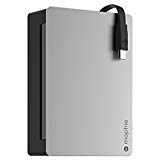
Obraz 1.1: Przód view of the Mophie Powerstation Plus 2X portable charger, showcasindzięki kompaktowej konstrukcji i zintegrowanemu kablowi.
2. Zawartość opakowania
Sprawdź, czy w przesyłce znajdują się wszystkie elementy:
- Mophie Powerstation Plus 2X Portable Charger
- Integrated Micro USB Charging Cable
- Instrukcja obsługi (ten dokument)
3. Konfiguracja
3.1 Initial Charging of the Powerstation
Before first use, fully charge your Mophie Powerstation Plus 2X. This ensures optimal battery performance.
- Connect the integrated Micro USB cable to a compatible USB power adapter (not included) or a computer's USB port.
- Podłącz zasilacz USB do gniazdka ściennego.
- The LED indicator lights on the powerstation will illuminate, indicating the charging status. All lights will be solid when fully charged.
Notatka: Pełne naładowanie może potrwać kilka godzin, w zależności od źródła zasilania.
4. Instrukcja obsługi
4.1 Ładowanie urządzenia
To charge your mobile device using the Powerstation Plus 2X:
- Locate the integrated Micro USB cable on the Powerstation.
- Connect the Micro USB connector to your compatible device's charging port.
- The Powerstation should automatically begin charging your device. If not, press the power button on the Powerstation once to initiate charging.
- Monitor your device's screen to confirm it is charging.
Notatka: The Powerstation is designed to provide power to devices that accept Micro USB input. For other devices, an appropriate adapter or cable (not included) may be required if the Powerstation has an additional USB-A output port.
4.2 Sprawdzanie poziomu baterii
To check the remaining battery charge of your Powerstation:
- Press the power button on the Powerstation once.
- The LED indicator lights will illuminate, showing the current charge level.
5. Kontrolki LED
The LED lights on your Mophie Powerstation Plus 2X provide information about its battery status:
- Światła stałe: Indicate the current charge level. More solid lights mean more charge.
- Migające światła: Indicate that the Powerstation is currently charging. The number of flashing lights corresponds to the charge level being reached.
- Bez świateł: The Powerstation is either off, fully discharged, or not actively charging/being charged.
6. Konserwacja
Proper care will extend the life of your Powerstation Plus 2X:
- Czyszczenie: Use a soft, lint-free cloth to wipe the surface of the Powerstation. Avoid abrasive cleaners or solvents.
- Składowanie: Store the Powerstation in a cool, dry place away from direct sunlight and extreme temperatures. For long-term storage, ensure the battery is charged to approximately 50%.
- Pielęgnacja baterii: To maintain battery health, fully charge and discharge the Powerstation at least once every three months if not in regular use.
7. Rozwiązywanie Problemów
If you encounter issues with your Mophie Powerstation Plus 2X, refer to the following common solutions:
- Powerstation not charging: Ensure the charging cable is securely connected to both the Powerstation and the power source. Try a different USB power adapter or wall outlet.
- Device not charging from Powerstation: Ensure your device is compatible with Micro USB input. Check that the integrated cable is fully inserted into your device. Press the power button on the Powerstation to activate charging.
- Powolne ładowanie: Ensure you are using a high-quality USB power adapter for charging the Powerstation. For charging your device, ensure the device's charging port is clean and the cable is not damaged.
- No LED lights: The Powerstation may be fully discharged. Connect it to a power source and allow it to charge for at least 30 minutes before checking the lights again.
If problems persist, contact Mophie customer support for further assistance.
8. Specyfikacje
| Funkcja | Specyfikacja |
|---|---|
| Numer modelu | 2942_PWRSTION-5C |
| Pojemność baterii | 5,000 mAh |
| Waga przedmiotu | 3.2 uncji (0.2 funta) |
| Wymiary opakowania | 8.27 x 4.49 x 1.18 cala |
| Technologia łączności | USB |
| Interfejs dysku twardego | USB 1.1 |
| UPC | 810472029429 |
| Producent | Mophie |
| Data pierwszej dostępności | 12 grudnia 2014 r. |
9. Informacje dotyczące bezpieczeństwa
Please read and follow these safety guidelines to prevent damage to your Powerstation Plus 2X or injury:
- Do not expose the Powerstation to extreme temperatures (above 45°C or below 0°C).
- Do not expose to moisture or immerse in water.
- Do not attempt to disassemble, open, or service the Powerstation.
- Trzymać z dala od dzieci.
- Dispose of the Powerstation responsibly according to local regulations for battery disposal.
- Avoid dropping or subjecting the Powerstation to strong impacts.
10. Gwarancja i wsparcie
For warranty information, technical support, or to register your product, please visit the official Mophie webOdwiedź witrynę lub skontaktuj się z działem obsługi klienta. Zachowaj dowód zakupu na wypadek reklamacji.
Mophie Official Webstrona: www.mophie.com


