
1. Wprowadzenie
This manual provides essential information for the installation, operation, and maintenance of your FSP Group Mini ITX/Flex ATX 300W Power Supply, model FSP300-60LG-5K. This unit is designed to provide stable and efficient power for compact PC systems, featuring 80 Plus Bronze certification for energy efficiency and reliable performance at altitudes up to 5000 meters.
2. Informacje dotyczące bezpieczeństwa
OSTRZEŻENIE: Ryzyko porażenia prądem. Nie otwierać zasilacza. Wewnątrz nie ma żadnych części, które mogłyby być naprawiane przez użytkownika.
- Przed instalacją lub konserwacją należy upewnić się, że zasilanie jest odłączone od gniazdka prądu zmiennego.
- Aby zapobiec przegrzaniu, zasilacz należy zainstalować w dobrze wentylowanym pomieszczeniu.
- Use only the provided power cord or a certified equivalent.
- Nie wystawiaj urządzenia na działanie wilgoci i ekstremalnych temperatur.
- This product is designed for use with compatible computer components. Refer to your system's documentation for compatibility.
3. Zawartość opakowania
Sprawdź, czy w opakowaniu znajdują się wszystkie elementy:
- FSP300-60LG-5K Flex ATX 300W Power Supply Unit
- Przewód zasilający AC
- Dokumentacja (niniejszy podręcznik)

Image: Contents of the FSP300-60LG-5K package, including the power supply unit, AC power cord, and brown cardboard box.
4. Koniec produktuview
The FSP300-60LG-5K is a compact Flex ATX power supply featuring a 40mm ball-bearing fan for cooling and a comprehensive set of connectors for various system components.

Obraz: widok z góry view of the FSP300-60LG-5K power supply unit, showing its compact form factor and product label.
4.1 Złącza
The power supply includes the following connectors:
- Main 24-Pin ATX Connector: Do zasilania płyty głównej.
- P4-Pin Connector: For CPU power.
- Serial-ATA (SATA) Connectors (x3): For SATA hard drives, SSDs, and optical drives.
- Molex 4-Pin Connectors (x2): Do starszych urządzeń peryferyjnych lub wentylatorów obudowy.

Image: The FSP300-60LG-5K power supply unit with its various power cables, including 24-pin ATX, P4, SATA, and Molex connectors, spread out for clear viewing.
4.2 Układ chłodzenia
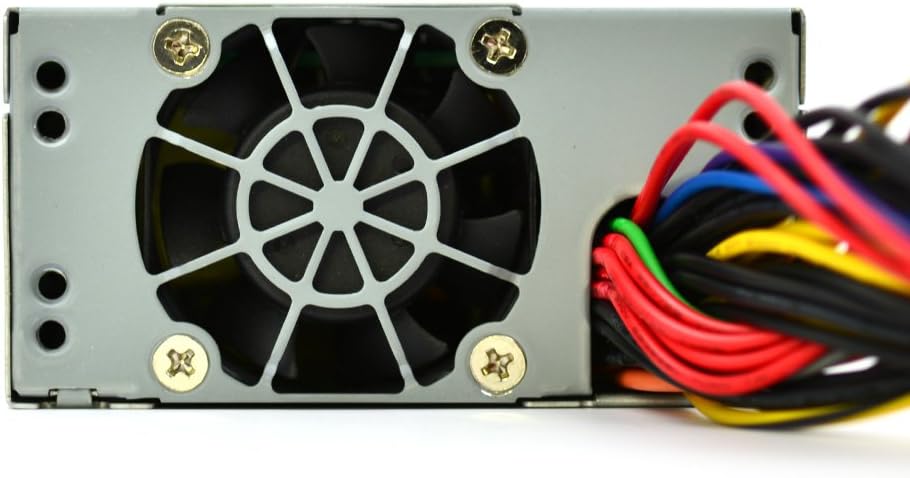
The unit features a single 40mm ball-bearing fan designed to provide efficient cooling while maintaining low noise levels. Proper airflow within the PC chassis is crucial for optimal performance and longevity.

Obraz: Zbliżenie view of the FSP300-60LG-5K power supply, highlighting the 40mm cooling fan and the bundled power cables exiting the unit.
5. Konfiguracja i instalacja
Follow these steps to install the FSP300-60LG-5K power supply into your system:
- Przygotuj swój system: Ensure your computer is powered off and unplugged from the wall outlet. Open your computer case to access the power supply bay.
- Montaż zasilacza: Carefully slide the FSP300-60LG-5K into the Flex ATX power supply bay of your chassis. Secure it with the appropriate screws.
- Podłącz zasilanie płyty głównej: Connect the 24-Pin ATX connector to the corresponding port on your motherboard. Ensure it clicks into place.
- Podłącz zasilanie procesora: Connect the P4-Pin connector to the CPU power port on your motherboard.
- Podłącz urządzenia peryferyjne: Connect the SATA power connectors to your hard drives, SSDs, or optical drives. Use the Molex connectors for any other compatible peripherals or case fans.
- Zarządzaj kablami: Ułóż kable w uporządkowany sposób, aby poprawić przepływ powietrza i estetykę obudowy.
- Zamknij obudowę i podłącz zasilanie prądem zmiennym: Close your computer case. Connect the AC power cord to the power supply's inlet and then to a grounded wall outlet.
Obraz: szczegółowy view of the FSP300-60LG-5K power supply's rear panel, showing the AC power input socket and the hexagonal ventilation grille.
6. Instrukcja obsługi
After successful installation, you can power on your system. The FSP300-60LG-5K will automatically provide power to your components. The 40mm fan will operate to cool the unit. No specific user interaction is required for the power supply's operation beyond system power control.
7. Konserwacja
Regularna konserwacja pomaga zapewnić długowieczność i optymalną wydajność zasilacza:
- Usuwanie kurzu: Periodically clean dust from the power supply's fan and ventilation grilles using compressed air. Ensure the system is powered off and unplugged before cleaning.
- Wentylacja: Ensure that the computer case has adequate airflow and that the power supply's intake and exhaust vents are not obstructed.
- Zarządzanie kablami: Keep internal cables tidy to prevent interference with airflow.
8. Rozwiązywanie Problemów
Jeśli masz problemy z zasilaniem, zapoznaj się z poniższymi typowymi procedurami rozwiązywania problemów:
- Brak zasilania:
- Sprawdź, czy przewód zasilający jest prawidłowo podłączony do zasilacza i gniazdka ściennego.
- Sprawdź, czy gniazdko ścienne jest sprawne.
- Ensure all internal power connectors (24-Pin ATX, P4-Pin, SATA, Molex) are firmly seated.
- Niestabilność systemu/losowe wyłączanie się systemu:
- This could indicate insufficient power or overheating. Ensure the power supply is adequately ventilated.
- Sprawdź, czy wymagania dotyczące mocy Twojego systemu nie przekraczają mocy zasilacza wynoszącej 300 W.
- Nadmierny hałas wentylatora:
- A certain level of fan noise is normal, especially under load.
- If the noise is unusually loud or grinding, check for dust accumulation in the fan. If the issue persists, contact support.
If these steps do not resolve the issue, contact FSP Group technical support.
9. Specyfikacje
| Funkcja | Opis |
|---|---|
| Marka | FSP |
| Numer modelu | FSP300-60LG-5K |
| Współczynnik kształtu | Flex ATX |
| Moc wyjściowatage | 300 watów |
| Efektywność | 80 Plus Brąz |
| Wejście AC | 90-264 V |
| Metoda chłodzenia | Air (40mm ball-bearing fan) |
| Wymiary (dł. x szer. x wys.) | 5.9 x 3.2 x 1.6 cala |
| Waga | 2.2 funta |
| Główne złącza | 24-Pin ATX, P4-Pin |
| Peripheral Connectors | 3x Serial-ATA, 2x Molex 4-Pin |
| Ochrona | OVP (ponad voltage Protection), Line input fuse protection |
| Certyfikaty | CE, FCC, cUL, CCC, TUV, CB, RoHS, Lead-Free, Green Product (G.P) |
| Średni czas między awariami (MTBF) | 100,000 hours at full load at 25℃ |
| Ocena wysokości | 5km (5000 meters) |
10. Gwarancja i wsparcie
For warranty information and technical support, please refer to the official FSP Group website or contact your local FSP Group distributor. Keep your purchase receipt for warranty claims.