
Wstęp
Dziękujemy za zakupasing the GPX 9-inch Portable DVD Player, Model PD901BDLP. This manual provides essential information for the safe and efficient operation of your device. Please read it thoroughly before use and retain it for future reference.
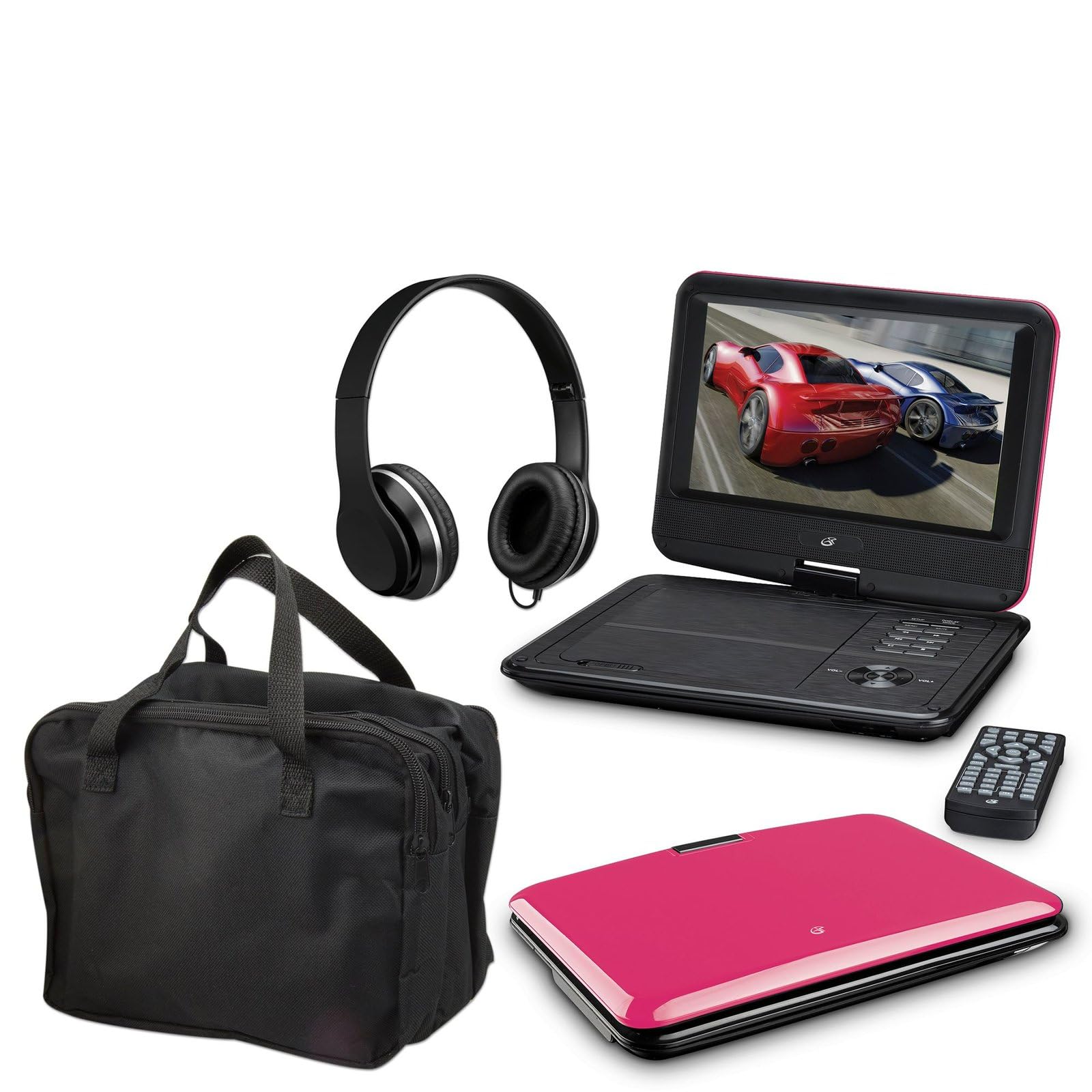
Image: The GPX 9-inch Portable DVD Player in its closed position, showcasing its vibrant pink top casing and sleek design.
Zawartość opakowania
Sprawdź, czy w przesyłce znajdują się wszystkie elementy wymienione poniżej:
- GPX 9-inch Portable DVD Player (Model PD901BDLP)
- Pilot zdalnego sterowania (wymaga 2 baterii AAA, dołączone)
- Zasilacz AC/DC
- Zasilacz samochodowy 12V
- 3.5mm-to-RCA audio/video cable
- Etui transportowe
- Słuchawki
- Instrukcja obsługi (ten dokument)
Cechy produktu
- 9-calowy ekran LCD o rozdzielczości 800x480
- Screen tilts and swivels for versatile viewkąty
- Rechargeable lithium polymer battery with up to 2 hours of battery life
- Wbudowane głośniki stereo
- Gniazdo słuchawkowe do prywatnego słuchania
- RCA output for connection to external displays
- Supports DVD, DVD-R/RW, DVD+R/RW, CD, CD-R/RW, JPEG, MP3 formats
Organizować coś
1. Ładowanie akumulatora
Before first use, fully charge the internal lithium polymer battery. Connect the AC/DC power adapter to the DC IN port on the DVD player and plug the other end into a standard wall outlet. The charging indicator light will illuminate. Charging typically takes approximately 3-4 hours for a full charge, providing up to 2 hours of playback.
2. Instalacja baterii w pilocie
Open the battery compartment on the back of the remote control. Insert two (2) AAA batteries, ensuring correct polarity (+/-). Close the compartment securely.
3. Connecting to a Television (Optional)
Do view content on a larger screen, use the included 3.5mm-to-RCA audio/video cable. Connect the 3.5mm end to the AV OUT port on the DVD player. Connect the RCA (red, white, yellow) ends to the corresponding AV INPUT ports on your television. Select the correct AV input source on your TV.
4. Using the Car Adapter (Optional)
For in-car use, connect the 12V car adapter to the DC IN port on the DVD player and plug the other end into your vehicle's cigarette lighter socket.
Instrukcja obsługi
1. Włączanie/wyłączanie zasilania
Naciśnij i przytrzymaj MOC button on the player or remote control to turn the device on or off.
2. Wkładanie płyty DVD
- Gently open the DVD player lid.
- Place a DVD disc onto the spindle with the label side facing up.
- Delikatnie naciśnij środek dysku, aż wskoczy na swoje miejsce.
- Close the lid. The player will automatically begin reading the disc.
3. Regulacja ekranu
The LCD screen can be tilted and swiveled to achieve the optimal viewing angle. Carefully adjust the screen to your preferred position.
4. Podstawowe elementy sterujące odtwarzaniem
- ODTWÓRZ/PAUZA: Press to start or pause playback.
- ZATRZYMYWAĆ SIĘ: Naciśnij, aby zatrzymać odtwarzanie.
- POMIŃ (<< / >>): Press to skip to the previous or next chapter/track.
- FF/REW: Press and hold to fast forward or rewind.
- GŁOŚNOŚĆ (+/-): Dostosuj głośność dźwięku.
5. Korzystanie ze słuchawek
Plug the included headphones into the SŁUCHAWKI jack for private listening. The built-in speakers will automatically mute when headphones are connected.
Konserwacja
- Czyszczenie ekranu: Use a soft, lint-free cloth to gently wipe the LCD screen. Do not use liquid cleaners or abrasive materials.
- Czyszczenie podajnika płyt: Utrzymuj tackę na płyty w czystości, usuwając kurz i zanieczyszczenia. W razie potrzeby użyj miękkiej szczotki lub sprężonego powietrza.
- Pielęgnacja baterii: To prolong battery life, avoid fully discharging the battery frequently. If storing the player for an extended period, charge it periodically.
- Składowanie: Store the DVD player in a cool, dry place away from direct sunlight and extreme temperatures. Use the included carrying case for protection during transport.
Rozwiązywanie problemów
| Problem | Rozwiązanie |
|---|---|
| Odtwarzacz się nie włącza. | Ensure the battery is charged or the AC/DC adapter is securely connected to a working power outlet. Check the power switch. |
| Nie wykryto dysku. | Verify the disc is inserted correctly with the label side up and seated properly on the spindle. Ensure the disc is clean and free of scratches. Try a different disc. |
| Brak dźwięku. | Check the volume level. Ensure headphones are not plugged in if you intend to use the built-in speakers. If connected to a TV, check the TV's volume and input settings. |
| Pilot nie działa. | Check and replace the AAA batteries in the remote. Ensure there are no obstructions between the remote and the player's IR sensor. |
| Obraz jest zniekształcony lub rozmazany. | Clean the disc. Adjust the screen angle. If connected to a TV, check the AV cable connections. |
Specyfikacje
- Model: PD901BDLP
- Rozmiar ekranu: 9 cali
- Typ wyświetlacza: LCD
- Rozdzielczość natywna: 800x480
- Typ nośnika: DVD, DVD-R/RW, DVD+R/RW, CD, CD-R/RW, JPEG, MP3
- Bateria: Akumulator litowo-polimerowy
- Czas pracy baterii: Do 2 godzin
- Łączność: 3.5mm AV Out, Headphone Jack, DC In
- Pobór mocy: AC/DC Adapter, 12V Car Adapter
- Waga: Około 1.9 funtów (0.86 kg)
- Kolor: Różowy
- Kod UPC: 047323179044
Gwarancja i wsparcie
This GPX Portable DVD Player is covered by a 90-dniowa ograniczona gwarancja producenta od daty pierwotnego zakupu. Niniejsza gwarancja obejmuje wady materiałowe i wykonawcze wynikające z normalnego użytkowania.
For warranty service or technical support, please refer to the contact information provided with your product packaging or visit the official GPX webZachowaj paragon jako dowód zakupu.
Aby uzyskać więcej informacji, odwiedź stronę GPX Store on Amazon.