
Wstęp
This manual provides comprehensive instructions for the setup, operation, maintenance, and troubleshooting of your Proscan CRK83X PSVR82 TV Remote Control. This remote is designed to work seamlessly with various Proscan TV and VCR models, offering a direct replacement or compatible control solution.
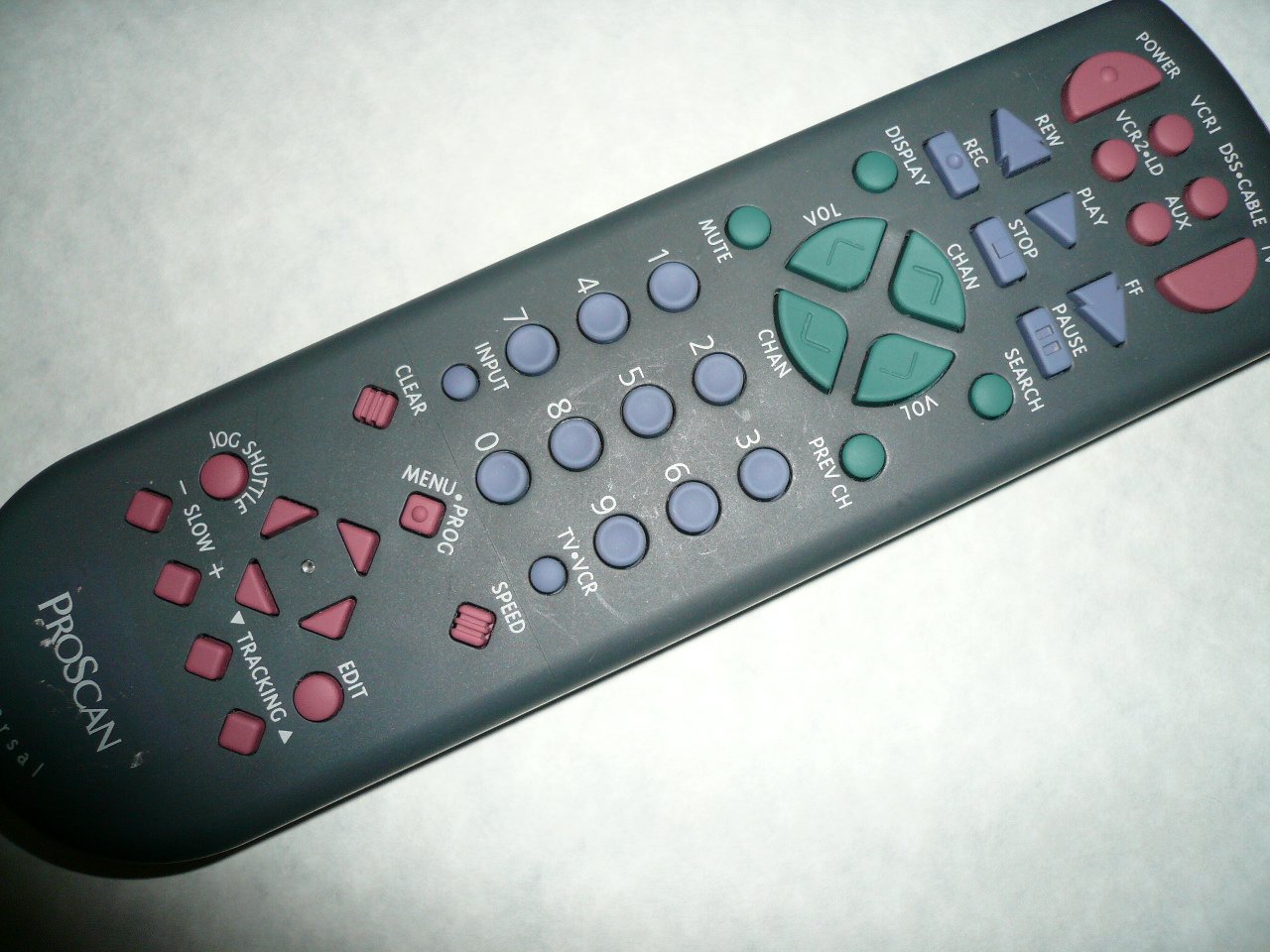
An image showing the Proscan CRK83X PSVR82 TV Remote Control, highlighting its ergonomic design and button layout. The remote is dark gray with purple and teal buttons, clearly labeled for various functions.
Organizować coś
1. Instalacja baterii
- Znajdź pokrywę komory baterii z tyłu pilota.
- Aby otworzyć pokrywę, przesuń ją w dół lub naciśnij zatrzask.
- Włóż dwie (2) baterie AAA (nie ma ich w zestawie), upewniając się, że bieguny dodatni (+) i ujemny (-) są prawidłowo ustawione względem oznaczeń wewnątrz komory.
- Załóż pokrywę komory baterii, wsuwając ją z powrotem na miejsce, aż do zatrzaśnięcia.
2. Początkowe użycie
The Proscan CRK83X PSVR82 remote control is typically pre-programmed for compatible Proscan TV and VCR models. No complex programming steps are usually required for initial use with supported devices. Simply point the remote at your device and press the desired function button.
This remote is compatible with a wide range of models, including but not limited to: P5VR74, PAVR57, PCVR72, PRVR71, PSDR72, PSDR73, PSNKVSR72, PSNPSVR57, PSNPSVR65, PSNPSVR70, PSNPSVR71, PSNPSVR72, PSNPSVR73, PSNPSVR74, PSNPSVRR73, PSNR65, PSNVR74, PSRV65, PSRV71, PSRV72, PSRV74, PSRVR65, PSRVR71, PSUR70, PSUR72, PSV174, PSV65, PSV71, PSV72, PSVDR73, PSVER72, PSVH57, PSVP71, PSVR22, PSVR27, PSVR57, PSVR61, PSVR62, PSVR65, PSVR72L, PSVR72VCR, PSVR75, PSVR79, PSVR83, PSVT73, PSVV73, PSZR65, PSZR71, PSZR73, PVSR73, R65, RCU800, RSVR73, SPVR65, SSVR62, VR653HF, VR730, VR730HF.
Instrukcja obsługi
Familiarize yourself with the buttons and their functions for optimal control of your television and VCR.
| Nazwa przycisku | Funkcjonować |
|---|---|
| MOC | Turns the connected device (TV/VCR) on or off. |
| VCR1, DSS/CABLE, VCR2/LD, AUX | Selects the input source for the television or VCR. |
| NIEMY | Wycisza lub wyłącza wyciszenie wyjścia audio. |
| GŁOŚNOŚĆ +/- | Reguluje poziom głośności w górę lub w dół. |
| CHAN +/- | Zmienia kanał w górę lub w dół. |
| POPRZEDNI ROZ | Przełącza do poprzedniego viewed kanał. |
| WYŚWIETLACZ | Displays on-screen information such as channel number or time. |
| REK | Initiates recording on the VCR. |
| REW | Rewinds the tape during VCR playback. |
| GRAĆ | Starts playback of a tape or disc. |
| FF | Fast forwards the tape during VCR playback. |
| ZATRZYMYWAĆ SIĘ | Zatrzymuje odtwarzanie lub nagrywanie. |
| PAUZA | Wstrzymuje odtwarzanie lub nagrywanie. |
| SZUKAJ | Activates search function, typically for VCR content. |
| Klawiatura numeryczna (0-9) | Bezpośrednie wprowadzanie numerów kanałów lub wyborów menu. |
| WEJŚCIE | Przełącza się pomiędzy dostępnymi źródłami danych wejściowych. |
| JASNE | Clears entered numbers or menu selections. |
| MENU / PROG | Accesses the on-screen menu or programming functions. |
| Telewizor-magnetowid | Toggles control between TV and VCR modes. |
| JOG-SHUTTLE | Provides frame-by-frame or variable speed control for VCR playback. |
| WOLNO +/- | Adjusts slow-motion speed during VCR playback. |
| PRĘDKOŚĆ | Adjusts playback speed, typically for VCR. |
| TRACKING ▲/▼ | Adjusts the VCR tracking for optimal picture quality. |
| REDAGOWAĆ | Activates editing functions, typically for VCR. |
Konserwacja
Czyszczenie pilota
- Przetrzyj pilota miękką, suchą ściereczką.
- W przypadku uporczywych zabrudzeń, delikatnieampPrzetrzyj ściereczkę wodą lub delikatnym, nieściernym środkiem czyszczącym. Nie rozpylaj środka czyszczącego bezpośrednio na pilota.
- Unikaj stosowania silnych środków chemicznych, rozpuszczalników i ściernych gąbek czyszczących, ponieważ mogą one uszkodzić powierzchnię pilota lub jego wewnętrzne podzespoły.
Wymiana baterii
Replace batteries when the remote's response becomes sluggish or it stops functioning. Refer to the "Battery Installation" section under Setup for detailed instructions.
Zużyte baterie należy zawsze utylizować w sposób odpowiedzialny, zgodnie z lokalnymi przepisami.
Rozwiązywanie problemów
| Problem | Możliwa przyczyna / rozwiązanie |
|---|---|
| Pilot nie działa. |
|
| Praca zdalna odbywa się okresowo. |
|
| Niektóre przyciski nie reagują. |
|
Specyfikacje
- Marka: PROSKAN
- Model: CRK83X PSVR82
- Producent: proscan
- Zgodne urządzenia: Television (and various Proscan VCR models as listed in Setup section)
- Technologia łączności: Podczerwony
- Rodzaj kontrolera: Sterowanie przyciskami
- Dodatek specjalny: Ergonomiczna konstrukcja
- ASIN: B00P82T2LS
- Data pierwszej dostępności: 4 listopada 2014 r.
Gwarancja i wsparcie
Specific warranty information for the Proscan CRK83X PSVR82 TV Remote Control is not provided in this manual. Please refer to the product packaging or contact your retailer for details regarding warranty coverage.
For further assistance or technical support, please contact the manufacturer or your point of purchase. No specific support contact details are available in this document.