
Wstęp
The TC Electronic T2 Reverb effects pedal provides a diverse range of reverb effects for guitar and other instruments. This manual details the pedal's features, setup procedures, operational guidelines, maintenance tips, troubleshooting steps, and technical specifications to ensure optimal performance.
Produkt ponadview
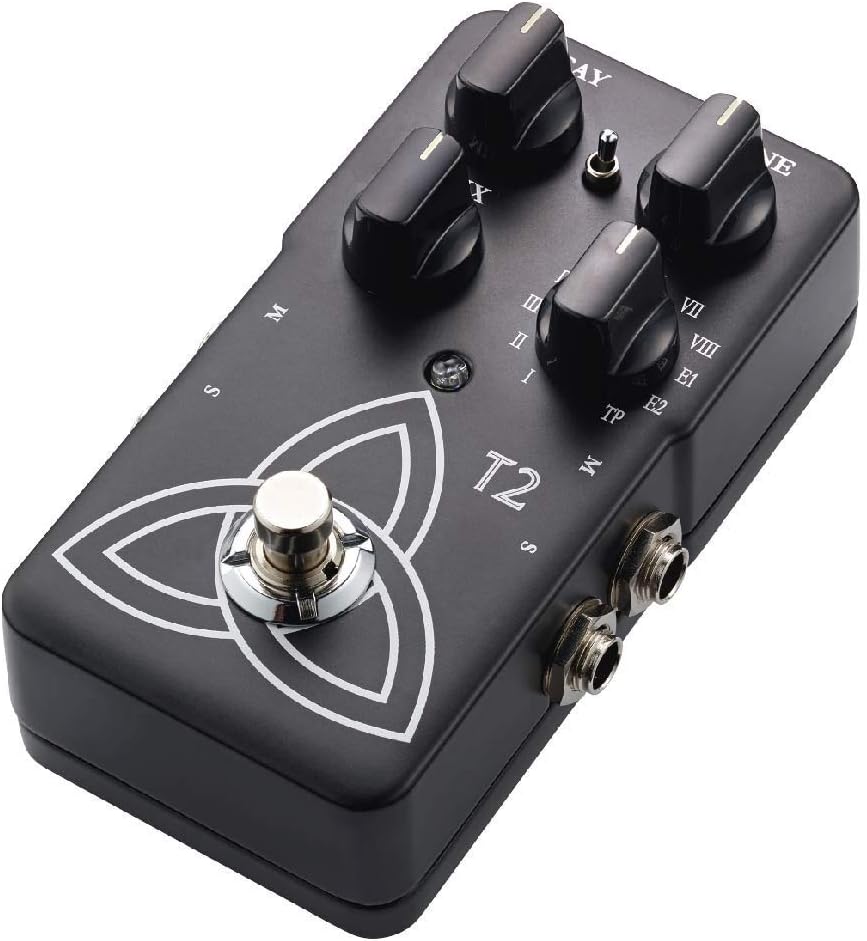
The T2 Reverb pedal features intuitive controls for shaping your sound and a robust design for reliable use. Familiarize yourself with the pedal's components:
- Gałka DECAY: Steruje długością ogona pogłosu.
- Pokrętło TONE: Adjusts the brightness or darkness of the reverb.
- Pokrętło MIX: Balances the ratio between the dry (unaffected) signal and the wet (effected) signal.
- Reverb Type Selector: A rotary switch to select from various reverb algorithms (I-VIII, E1, E2, TP).
- Przełącznik nożny: Włącza lub omija efekt.
- Gniazda wejściowe/wyjściowe: For connecting your instrument and ampliyfikator.
- Pobór mocy: For connecting a 9V DC power supply.

Organizować coś
- Podłączenie zasilania: Connect a 9V DC power adapter (center negative, not included) to the power input jack. Alternatively, the pedal can be powered by a 9V battery (not included) by opening the battery compartment.
- Podłączenie instrumentu: Connect your instrument (e.g., guitar) to the input jack on the right side of the pedal using a standard 1/4-inch instrument cable.
- Amplifier Połączenie: Podłącz gniazdo wyjściowe po lewej stronie pedału do swojego amplifier's input using a standard 1/4-inch instrument cable.
- Stereo Operation (Optional): For stereo output, connect the second output jack to a second amplifier or stereo input device.
Przed włączeniem zasilania upewnij się, że wszystkie połączenia są zabezpieczone amplifier and pedal.
Instrukcja obsługi
Podstawowa obsługa
- Włączanie: Once connected, press the footswitch to engage the effect. The LED indicator will illuminate. Press again to bypass the effect.
- Selecting Reverb Type: Rotate the Reverb Type Selector knob to choose from the available reverb algorithms (I through VIII, E1, E2). Each setting offers a distinct reverb character.
- Adjusting Reverb Parameters:
- Użyj ROZKŁAD knob to control the duration of the reverb.
- Użyj TON knob to adjust the frequency content of the reverb, making it brighter or darker.
- Użyj MIESZAĆ knob to blend the dry signal with the reverb effect. A higher setting increases the effect's prominence.
TonePrint Feature
The "TP" setting on the Reverb Type Selector activates the TonePrint feature. TonePrint allows you to upload custom-tuned reverb sounds created by artists or design your own using the TC Electronic TonePrint app. Connect your pedal to a computer via USB (cable not included) or beam TonePrints wirelessly from your smartphone to the pedal's pickup.
Konserwacja
- Czyszczenie: Do czyszczenia zewnętrznej części pedału używaj miękkiej, suchej ściereczki. Unikaj środków czyszczących o właściwościach ściernych i rozpuszczalników.
- Wymiana baterii: If using battery power, replace the 9V battery when the LED indicator dims or the effect performance degrades. To replace, open the battery compartment on the underside of the pedal.
- Składowanie: Store the pedal in a dry environment, away from extreme temperatures and direct sunlight, when not in use. Disconnect power and remove the battery if storing for extended periods.
Rozwiązywanie problemów
| Problem | Możliwa przyczyna | Rozwiązanie |
|---|---|---|
| Brak dźwięku lub słaby sygnał | Incorrect cable connections, dead battery, faulty power supply, volume knobs on instrument/amp odrzucił. | Check all cable connections. Replace battery or verify power supply. Ensure instrument and amplifier volumes are set appropriately. |
| Niechciany hałas lub buczenie | Ground loop, faulty cables, interference from other electronics, improper power supply. | Use shielded cables. Try a different power outlet or isolated power supply. Move pedal away from other electronic devices. |
| Effect not engaging (LED off) | No power, faulty footswitch. | Verify power connection and battery status. If problem persists, contact support. |
| TonePrint not loading | Incorrect app usage, connection issues. | Ensure the TonePrint app is updated and the pedal is correctly connected (USB or beaming). Refer to the TonePrint app's instructions for detailed guidance. |
Specyfikacje
- Model: T2
- Waga przedmiotu: 1 funt (około 454 gramów)
- Wymiary produktu: 4.61 x 2.48 x 2.91 cala (11.7 x 6.3 x 7.4 cm)
- Źródło zasilania: Zasilacz 9 V DC (biegun ujemny w środku) lub bateria 9 V
- Tomtage: 9 wolty
- Format sygnału: Analog
- Interfejs sprzętowy: HP-HSC
Gwarancja i wsparcie
TC Electronic products are covered by a limited warranty. For detailed warranty information, product support, or service inquiries, please visit the official TC Electronic webOdwiedź stronę internetową lub skontaktuj się bezpośrednio z działem obsługi klienta. Zachowaj dowód zakupu na wypadek reklamacji.
Urzędnik Webstrona: www.tcelectronic.pl