
1. Informacje dotyczące bezpieczeństwa
Please read this manual carefully before operating the GAIN EXPRESS Digital Car Window Tint Meter WTM-1100. Retain this manual for future reference.
- Nie należy podejmować prób demontażu ani modyfikacji urządzenia. Może to spowodować unieważnienie gwarancji i uszkodzenie.
- Trzymaj urządzenie z dala od wody i nadmiernej wilgoci.
- Unikaj wystawiania urządzenia na działanie ekstremalnych temperatur lub bezpośredniego światła słonecznego przez dłuższy czas.
- Use only the specified battery type (AAA alkaline batteries) for power.
- Handle the measuring probes with care to prevent damage to the optical components.
- Ensure proper alignment of the probes during measurement to obtain accurate readings.
2. Koniec produktuview
The GAIN EXPRESS WTM-1100 is a portable digital window tint meter designed for accurately measuring the Visible Light Transmission (VLT) through various transparent or translucent materials, including automotive windows, filmed glass, and other samples. While the product title mentions capabilities for UV IR Rejection and Spectrum Testing, the primary measurement detailed in the specifications is Visible Light Transmission at 550 nanometers. It features a clear LCD display, one-key calibration, and a compact design for ease of use.
Główne cechy:
- Dokładny pomiar: Precisely measures Visible Light Transmission (VLT) from 0% to 100%.
- Wszechstronne zastosowania: Suitable for automotive, aerospace, glass products, plastic sheets, and more.
- Wyświetlacz cyfrowy: Features a 10mm LCD display for clear reading results.
- Wysoka rozdzielczość: Provides accurate and reliable readings with high resolution.
- Przenośna konstrukcja: Solid structure, small size, and lightweight for easy carrying and use.
- Tryb ciągłego pomiaru: Allows for ongoing measurements.
- Wewnętrzne źródło światła: Enables use in various lighting conditions, day or night.
- One-Key Calibration: Simplifies the calibration process for user convenience.
- Optional PC Connectivity: Can be connected to a PC via an optional RS232C cable and software (not included) for expanded functionality.

Figure 2.1: GAIN EXPRESS Digital Car Window Tint Meter WTM-1100. This image shows the main unit of the tint meter, highlighting its compact design and digital display.

Figure 2.2: Labeled components of the WTM-1100 Tint Meter. This image identifies the RS-232 port, display, calibration key, power key, and measuring probes.
3. Konfiguracja
3.1 Instalacja baterii
The WTM-1100 meter is powered by four AAA alkaline batteries. To install or replace batteries:
- Znajdź pokrywę komory baterii z tyłu urządzenia.
- Otwórz pokrywę.
- Insert four AAA alkaline batteries, ensuring correct polarity (+/-).
- Dokładnie zamknij pokrywę komory baterii.

Figure 3.1: Battery compartment. This image shows the open battery compartment on the back of the device, ready for battery insertion.
3.2 Power On and Self-Calibration
After battery installation, the device will perform a self-calibration upon power-on. This ensures accuracy without manual adjustment.
- Naciśnij Moc button to turn on the instrument.
- The instrument will automatically self-calibrate. During this process, the display will show initial values and then settle to 100% VLT (or similar initial values depending on the model variant).
- Once self-calibration is complete, the device is ready for use.
Video 3.1: LS162 Transmission Meter Instruction Guide. This video demonstrates the battery installation, power-on sequence, and automatic self-calibration of a similar transmission meter, showing the display settling to initial values.
4. Instrukcja obsługi
4.1 Wykonywanie pomiaru
To measure the light transmission of a sampna:
- Ensure the device is powered on and has completed its self-calibration.
- Carefully insert the material (e.g., window, film) into the test slot between the transmitter and receiver probes.
- Ensure the two markings on the probe are properly aligned for accurate results.
- The measured Visible Light Transmission (VLT) percentage will be displayed instantly on the LCD.
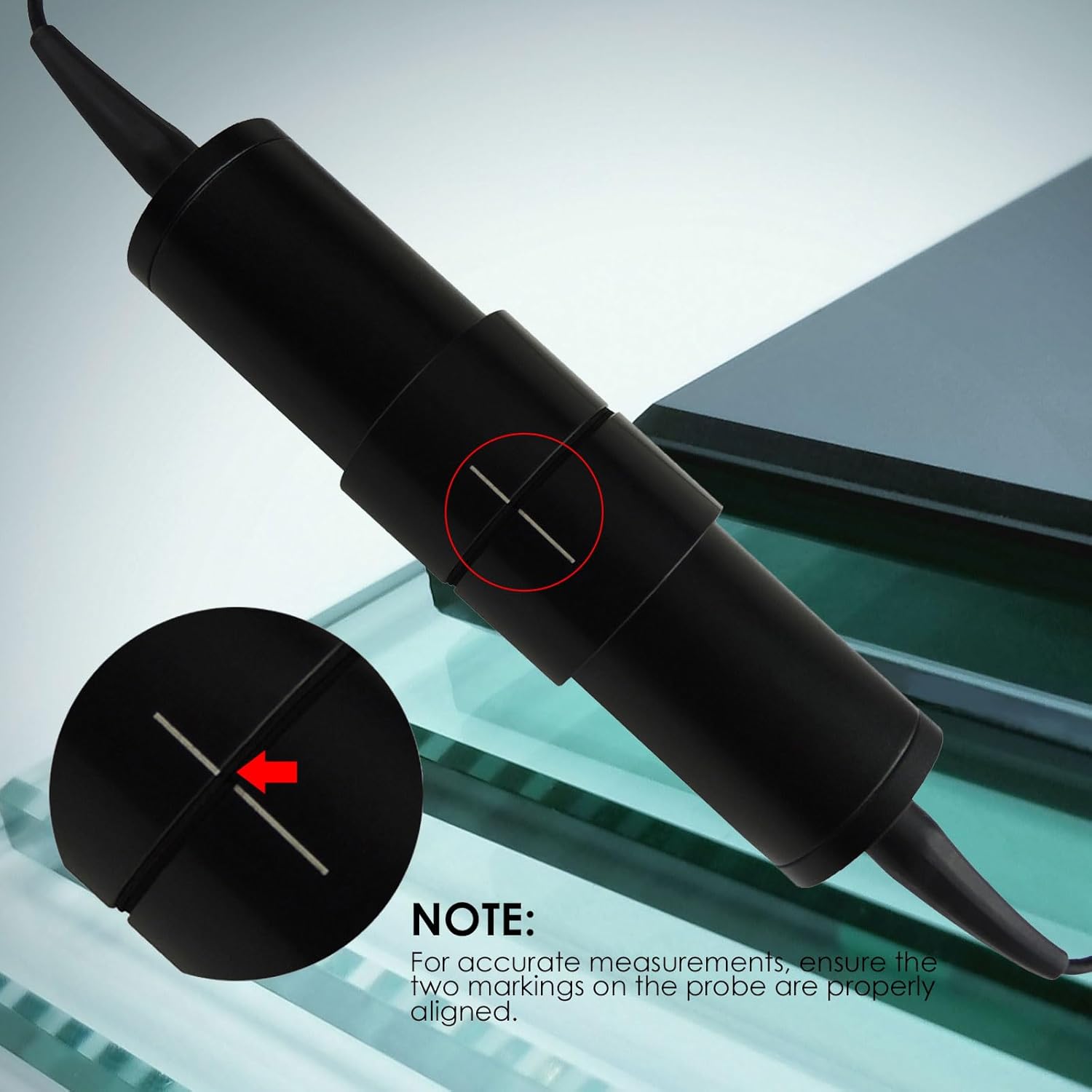
Figure 4.1: Proper probe alignment. This image illustrates how to align the two markings on the measuring probe to ensure accurate readings.
Video 4.1: Window Tint Meter Operation. This video demonstrates the process of placing a window between the transmitter and receiver to obtain a tint measurement.
4.2 Checking Calibration
To quickly verify the accuracy of the device's calibration:
- Use the included reference sample (test sheet) if available.
- Place the receiver probe on top of the test sheet.
- Compare the value shown on the LCD with the specified value on the test sheet. They should match closely.
Video 4.2: Calibration Check. This video shows how to verify the meter's accuracy by comparing its reading with a reference sample.
4.3 Funkcja zatrzymania danych
The device features a data hold function to freeze the current reading on the display.
- Po wykonaniu pomiaru naciśnij krótko przycisk DATA TRANS button (or equivalent data hold button) to lock the displayed value.
- The "HOLD" indicator may appear on the screen.
- To release the hold and return to live measurement, short press the button again.

Figure 4.2: One-key calibration. This image highlights the 'CAL' button, which is used for calibration or data hold depending on the model variant.
Video 4.3: Data Hold Function. This video demonstrates how to use the data hold function to lock a measurement on the display.
4.4 RS232C Connectivity (Optional)
The WTM-1100 can be connected to a PC for data transfer and analysis using an optional RS232C cable and software (not included).
- Locate the RS-232 port on the device.
- Connect the RS232C cable (purchased separately) from the device to your PC.
- Install the appropriate software on your PC to enable data communication.

Figure 4.3: RS232C port. This image shows the RS232C port located on the side of the device for optional PC connectivity.
5. Konserwacja
5.1 Czyszczenie
- Wytrzyj zewnętrzną część urządzenia miękką, suchą ściereczką.
- Nie należy używać środków czyszczących o właściwościach ściernych ani rozpuszczalników, ponieważ mogą one uszkodzićasing lub wyświetlacz.
- Keep the optical components of the probes clean and free from dust or smudges. Use a soft, lint-free cloth specifically designed for optics if necessary.
5.2 Wymiana baterii
When the low battery indicator appears on the display, replace the batteries as described in Section 3.1. Always replace all four batteries at once with new AAA alkaline batteries.
5.3 Przechowywanie
Store the device in a dry, cool place, away from direct sunlight and extreme temperatures. The recommended storage environment is -70 to 50 degrees Celsius with less than 80% relative humidity (non-condensing).
6. Rozwiązywanie Problemów
| Problem | Możliwa przyczyna | Rozwiązanie |
|---|---|---|
| Urządzenie nie włącza się. | Rozładowane lub nieprawidłowo zainstalowane baterie. | Sprawdź biegunowość baterii. Wymień baterie na nowe alkaliczne AAA. |
| Niedokładne lub niespójne odczyty. |
|
|
| Display shows "Low Battery" or similar. | Baterie są słabe. | Replace all four AAA alkaline batteries. |
7. Specyfikacje
| Parametr | Wartość |
|---|---|
| Numer modelu | WTM-1100 |
| Typ pomiaru | Miernik transmisji |
| Rezolucja | 0.1 |
| Dokładność | ≤ 2% |
| Długość fali | 550 Nanometers (Visible Light) |
| Zakres pomiaru | 0~100% Light Transmission |
| Sample Grubość | Less than 18mm / 0.4 inch |
| Źródło zasilania | Battery Powered (4 x AAA alkaline batteries) |
| Minimalna objętość roboczatage | 1.5 wolty |
| Górna ocena temperatury | 50 stopni Celsjusza |
| Środowisko operacyjne | 0-50°C, <80% RH (No condensation) |
| Środowisko przechowywania | -70-50°C, <80% RH |
| Waga przedmiotu | 100 gram |
| Wymiary produktu (dł. x szer. x wys.) | 25.4 x 5.1 x 20.3 centymetrów |
| Interfejs | RS-232C (optional, not included) |

Figure 7.1: Specifications. This image provides a visual summary of the key technical specifications for the WTM-1100.

Figure 7.2: Dimensions. This image shows the physical dimensions of the main unit and the probe.
8. Gwarancja i wsparcie
GAIN EXPRESS products are manufactured to high-quality standards. For warranty information and technical support, please refer to the warranty card included with your product or contact your retailer. Keep your purchase receipt as proof of purchase.
For further assistance, please visit the GAIN EXPRESS store on Amazon or contact their customer service directly.
Producent: Gain Express Holdings Ltd
Miejsce prowadzenia działalności: To Kwa Wan, Kowloon, 000, HK