
1. Wprowadzenie
This manual provides detailed instructions for the installation, operation, and maintenance of your ASUS X99-DELUXE motherboard. The ASUS X99-DELUXE is an ATX motherboard designed for high-performance computing, supporting Intel LGA 2011-3 processors and DDR4 memory.

Rysunek 1: Widok z góry na dół view of the ASUS X99-DELUXE Motherboard, showing the CPU socket, RAM slots, and heatsinks.
2. Główne cechy
- ASUS OC Socket: Designed to enhance 8-core CPU and DDR4 performance beyond standard X99 expectations.
- Obsługa pamięci DDR4: Features a special memory overclocking design, supporting DDR4 memory speeds up to 3200MHz (O.C.).
- Dual M.2 X4 Support: Provides two M.2 slots with PCIe 3.0 x4 interface, enabling data transfer speeds up to 32Gb/s for compatible NVMe SSDs.
- Fan Extension Card: Includes an extension card for advanced PC cooling management.
- Optymalizacja 5-etapowa: Utilizes Dual Intelligent Processors 5 for system optimization, including performance tuning, power saving, digital power control, and fan control.
- BIOS UEFI: Features a media-acclaimed Unified Extensible Firmware Interface (UEFI) BIOS for intuitive system configuration.
- SATA Express: Supports SATA Express for storage speeds up to 10Gb/s.
3. Konfiguracja i instalacja
Przed rozpoczęciem instalacji upewnij się, że system jest wyłączony i odłączony od źródła zasilania. Trzymaj płytę główną za krawędzie, aby uniknąć wyładowań elektrostatycznych.
3.1. CPU Installation (LGA 2011-3 Socket)
- Ostrożnie otwórz mechanizm mocujący gniazdo procesora.
- Dopasuj trójkątny znak na procesorze do odpowiadającego mu znaku na gnieździe.
- Ostrożnie umieść procesor w gnieździe, nie używając siły.
- Close the retention mechanism to secure the CPU. Ensure no pins are bent during this process.

Rysunek 2: Kątowy view of the ASUS X99-DELUXE Motherboard, highlighting the LGA 2011-3 CPU socket.
3.2. Instalacja pamięci (DDR4)
The motherboard supports DDR4 memory modules. Refer to the motherboard manual for specific memory configurations and supported speeds.
- Otwórz zaciski na obu końcach gniazda DIMM.
- Dopasuj wycięcie na module pamięci DDR4 do wypustki w gnieździe DIMM.
- Wsuń moduł mocno do gniazda, aż zatrzaski zatrzasną się na swoim miejscu.
3.3. Storage Device Installation (M.2, SATA)
Install M.2 SSDs into the dedicated M.2 slots and SATA drives to the SATA ports. The motherboard supports SATA 3 (6Gb/s) and SATA Express.
3.4. Podłączanie urządzeń peryferyjnych
Connect your display, keyboard, mouse, and other peripherals to the rear I/O panel. The motherboard provides various USB ports, Ethernet ports, and audio jacks.
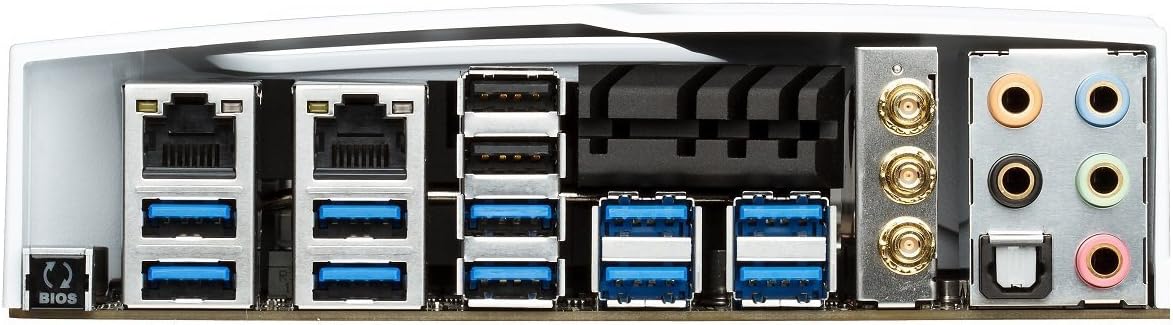
Figure 3: Rear I/O panel of the ASUS X99-DELUXE Motherboard, showing USB ports, Ethernet, and audio jacks.
4. Instrukcja obsługi
4.1. UEFI BIOS Configuration
The UEFI BIOS allows you to configure system settings, boot options, and hardware parameters. To enter the BIOS, press the USUNĄĆ klawisz podczas uruchamiania systemu.
- Tryb EZ: Provides a simplified interface for basic settings.
- Tryb zaawansowany: Offers comprehensive control over all motherboard features, including overclocking and fan control.
4.2. Instalacja sterownika
After installing your operating system (e.g., Windows XP, as listed in specifications, and newer OS versions), install the necessary drivers for the motherboard chipset, audio, network, and other integrated components. These are typically provided on a support DVD or available for download from the ASUS webstrona.
4.3. 5-Way Optimization
The 5-Way Optimization feature, accessible through ASUS software, automatically tunes your system for optimal performance, power efficiency, digital power delivery, and fan acoustics based on your usage. It is recommended to manage overclocking and fan settings directly within the BIOS for more precise control.
5. Konserwacja
Regularna konserwacja pomaga zapewnić długowieczność i stabilną pracę płyty głównej.
- Usuwanie kurzu: Okresowo czyść płytę główną i elementy chłodzące sprężonym powietrzem, usuwając z nich kurz. Przed czyszczeniem upewnij się, że system jest wyłączony i odłączony od zasilania.
- Kontrola połączenia: Verify that all cables and components are securely seated.
- Aktualizacje BIOS-u: Sprawdź pomoc techniczną ASUS website for the latest BIOS updates to improve compatibility and performance. Follow update instructions carefully.
6. Rozwiązywanie Problemów
If you encounter issues with your ASUS X99-DELUXE motherboard, consider the following troubleshooting steps:
- Brak zasilania/brak rozruchu:
- Sprawdź, czy wszystkie kable zasilające (24-pinowy ATX, 8-pinowy CPU) są solidnie podłączone.
- Verify the power supply unit (PSU) is functioning correctly.
- Sprawdź połączenie przełącznika zasilania na panelu przednim z płytą główną.
- Brak wyświetlacza:
- Confirm the graphics card is properly seated in its PCIe slot and has adequate power.
- Sprawdź, czy kabel monitora jest prawidłowo podłączony do karty graficznej.
- Jeżeli to możliwe, przetestuj urządzenie przy użyciu innego kabla wyświetlacza lub monitora.
- Niestabilność/awarie systemu:
- Check RAM modules for proper seating; try reseating them or testing one module at a time.
- Ensure CPU cooler is correctly installed and making good contact with the CPU. Monitor CPU temperatures.
- Przywróć ustawienia BIOS-u do domyślnych.
- Bent CPU Socket Pins:
Bent pins in the CPU socket can cause severe system malfunctions or prevent booting. This type of damage is typically not covered under warranty. Exercise extreme caution during CPU installation to avoid bending pins.
7. Specyfikacje
| Kategoria | Specyfikacja |
|---|---|
| Marka | ASUS |
| Nazwa modelu | X99-DELUXE |
| Gniazdo procesora | LGA 2011-3 |
| Kompatybilne procesory | Intel Core i7 (LGA 2011-3) |
| Typ chipsetu | Intel® X99 |
| Technologia pamięci RAM | DDR4 |
| Prędkość zegara pamięci | Do 3200 MHz (OC) |
| Dostępne gniazda pamięci | 8 |
| Maksymalny rozmiar pamięci RAM | 64 GB |
| Interfejs karty graficznej | PCI Express |
| Total PCIe Ports | 5 |
| Total SATA Ports | 8 |
| Obsługiwany standard magistrali systemowej | SATA 3 |
| Porty USB 2.0 | 2 (internal headers, total ports may vary) |
| Łączna liczba portów USB | Various (including USB 3.0 on rear I/O) |
| Liczba portów Ethernet | 1 (Dual Gigabit LAN) |
| Typ głównego złącza zasilania | 24-pinowe ATX |
| Kompatybilne urządzenia | Komputer osobisty |
| Platforma | Windows XP (and newer OS versions) |
| Waga przedmiotu | 4.44 funta (ok. 2.01 kg) |
8. Gwarancja i wsparcie
Aby uzyskać informacje dotyczące gwarancji i pomocy technicznej, zapoznaj się z oficjalną stroną ASUS webOdwiedź witrynę ASUS lub skontaktuj się z działem obsługi klienta ASUS. Zachowaj dowód zakupu na wypadek roszczeń gwarancyjnych.
Wsparcie ASUS Webstrona: https://www.asus.com/support/
Note: Damage resulting from improper installation, misuse, or unauthorized modifications may void your product warranty.