
Wstęp
This manual provides detailed instructions for the setup, operation, and maintenance of your iBall Tarang F5 5.1 Speakers for PC. Please read this manual thoroughly before using the product to ensure proper functionality and to prevent damage.
Zawartość opakowania
Sprawdź, czy w przesyłce znajdują się wszystkie wymienione poniżej elementy:
- 1 x jednostka subwoofera
- 5 x głośników satelitarnych
- 1 x Pilot zdalnego sterowania
- Audio Connection Cables (RCA to 3.5mm, RCA to RCA)
- Instrukcja obsługi (ten dokument)
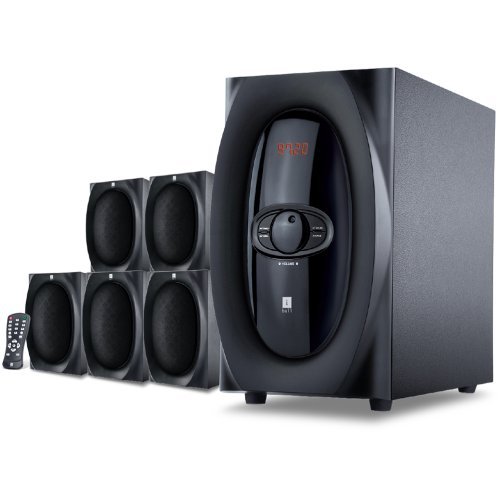
Obraz: Ponadview of the iBall Tarang F5 5.1 Speaker System, showing the subwoofer and five satellite speakers.
Instrukcje konfiguracji
- Pozycjonowanie głośników: Place the subwoofer on a stable surface, preferably on the floor. Arrange the five satellite speakers around your listening area for optimal 5.1 surround sound. Typically, one center speaker, two front left/right, and two rear left/right speakers.
- Connecting Satellite Speakers: Connect each satellite speaker to the corresponding output ports on the rear panel of the subwoofer unit. Ensure correct polarity (positive to positive, negative to negative) if applicable, or match color-coded connectors.
- Connecting Audio Source:
- For PC/MP3 Player (2.1Ch or 5.1Ch input): Use the provided audio cables to connect the audio output of your device to the "Audio Input" ports on the subwoofer. For 5.1 channel input, ensure your source device supports 5.1 output and connect all relevant channels (Front L/R, Rear L/R, Center/Sub). For 2.1 channel, connect to the stereo input.
- For USB/SD/MMC Card: Insert your USB drive or SD/MMC card into the designated slot on the front panel of the subwoofer.
- Podłączenie zasilania: Connect the power cord to the subwoofer unit and then plug it into a standard AC power outlet.
- Włączanie: Turn on the main power switch located on the rear or front panel of the subwoofer. The LED display should illuminate.

Image: Illustrative diagram of the subwoofer's rear panel, detailing connections for satellite speakers and various audio input sources.
Instrukcja obsługi
Front Panel Controls and Remote Control
The iBall Tarang F5 can be operated using the controls on the front panel of the subwoofer or via the included full-function remote control.
- Włączanie/wyłączanie: Naciśnij MOC button on the remote or the main power switch on the unit.
- Wybór źródła wejściowego: Naciśnij WEJŚCIE button on the remote or front panel to cycle through available sources: 2.1Ch, 5.1Ch, USB, SD/MMC, FM Radio. The selected source will be displayed on the LED screen.
- Regulacja głośności: Użyj Objętość + I TOM- buttons on the remote or the master volume knob on the front panel to adjust the overall volume.
- Regulacja basów/wysokich tonów: Użyj dedykowanego BAS+/BAS- I POTÓRNY+/POTROIĆ- buttons on the remote control to fine-tune audio output.
- Funkcja wyciszenia: Naciśnij NIEMY button on the remote to temporarily silence the audio. Press again to unmute.
USB/SD/MMC Playback
When a USB drive or SD/MMC card is inserted, the system will automatically switch to the USB/SD input mode and begin playing compatible audio files. Use the remote control for playback functions:
- Odtwórz/Pauza: Naciśnij ODTWÓRZ/PAUZA przycisk.
- Następny / poprzedni utwór: Użyj NASTĘPNY I POPRZEDNI pikolak.
Obsługa radia FM
Aby skorzystać z funkcji radia FM:
- Switch the input source to FM tryb za pomocą WEJŚCIE przycisk.
- Automatyczne skanowanie: Naciśnij i przytrzymaj ODTWÓRZ/PAUZA przycisk (lub dedykowany SKANDOWAĆ button if available on the remote) to automatically scan and save available FM stations.
- Strojenie ręczne: Użyj NASTĘPNY I POPRZEDNI buttons to manually tune to specific frequencies or navigate through saved stations.
Konserwacja
- Czyszczenie: Do czyszczenia powierzchni głośników należy używać miękkiej, suchej ściereczki. Nie należy używać płynnych środków czyszczących, aerozoli ani rozpuszczalników, ponieważ mogą one uszkodzić wykończenie lub elementy wewnętrzne.
- Wentylacja: Aby zapobiec przegrzaniu, upewnij się, że otwory wentylacyjne subwoofera nie są zablokowane.
- Umieszczenie: Unikaj umieszczania głośników w bezpośrednim świetle słonecznym, w pobliżu źródeł ciepła lub w miejscach o dużej wilgotności lub zapyleniu.
- Przewód zasilający: Regularnie sprawdzaj przewód zasilający pod kątem uszkodzeń. W przypadku uszkodzenia, zaprzestań użytkowania i skontaktuj się z obsługą klienta.
Rozwiązywanie problemów
| Problem | Możliwa przyczyna | Rozwiązanie |
|---|---|---|
| Brak zasilania | Przewód zasilający nie jest podłączony; Wyłącznik zasilania jest wyłączony; Gniazdo zasilania jest uszkodzone | Upewnij się, że przewód zasilający jest prawidłowo podłączony. Włącz zasilanie. Sprawdź gniazdko elektryczne, podłączając do niego inne urządzenie. |
| Brak dźwięku | Incorrect input source; Volume too low; Audio cables loose/damaged; Mute function active | Select the correct input source. Increase volume. Check all audio cable connections. Deactivate mute. |
| Zniekształcony dźwięk | Volume too high; Source audio quality poor; Speaker cables loose | Reduce volume. Test with a different audio source. Check satellite speaker connections. |
| Pilot nie działa | Batteries depleted; Obstruction between remote and unit; Remote sensor blocked | Replace remote control batteries. Ensure clear line of sight to the subwoofer's IR sensor. |
| Słaby odbiór FM | Antena nie jest prawidłowo rozłożona/ustawiona; obszar o słabym sygnale | Extend and adjust the FM antenna for better reception. Try auto-scanning again. |
Specyfikacje
| Funkcja | Szczegół |
|---|---|
| Marka | iBall |
| Model | Tarang F5 |
| Konfiguracja kanałów | Dźwięk przestrzenny 5.1 |
| Subwoofer Driver Size | 5.25 cali |
| Satellite Driver Size | 3 cali (każdy) |
| Impedancja subwoofera | 8 omy |
| Impedancja satelitarna | 4 omy |
| Kompatybilne urządzenia | Computers, MP3 Players, SD Cards |
| Technologia łączności | USB, RCA (for 2.1Ch/5.1Ch input) |
| Cechy specjalne | FM Radio, USB/SD/MMC Playback, Remote Control, LED Display, Wooden Cabinets |
| Źródło zasilania | AC |
| Tworzywo | Drewno |
| Waga przedmiotu | 8 kilogramów |
| Wymiary opakowania (szer. x wys. x gł.) | Wymiary 40.4 x 34.2 x 32.8 cm |
Gwarancja i wsparcie
Your iBall Tarang F5 5.1 Speakers are covered by a limited warranty from the date of purchase. Please refer to the warranty card included in your package for specific terms and conditions.
For technical support, service, or warranty claims, please contact iBall customer service:
- Webstrona: www.iball.co.in/support (Example link, rzeczywisty link może się różnić)
- E-mail: support@iball.co.in (Exampe-mail, rzeczywisty adres e-mail może się różnić)
- Telefon: 1800-XXX-XXXX (Example number, actual number may vary)
Please have your product model number (Tarang F5) and proof of purchase ready when contacting support.
