
1. Koniec produktuview
The Soundstream VR-930B is a single DIN car DVD player featuring a 9.3-inch motorized LCD touchscreen display and Bluetooth connectivity. This unit supports playback of various media types including CD, CD-R/RW, DVD, DVD-R/RW, MP3, WMA, and AAC. It includes a front USB input and a front SD card slot for expanded media options. The device also offers AM/FM radio tuning and MP3 ID3 Tag Display for track information.
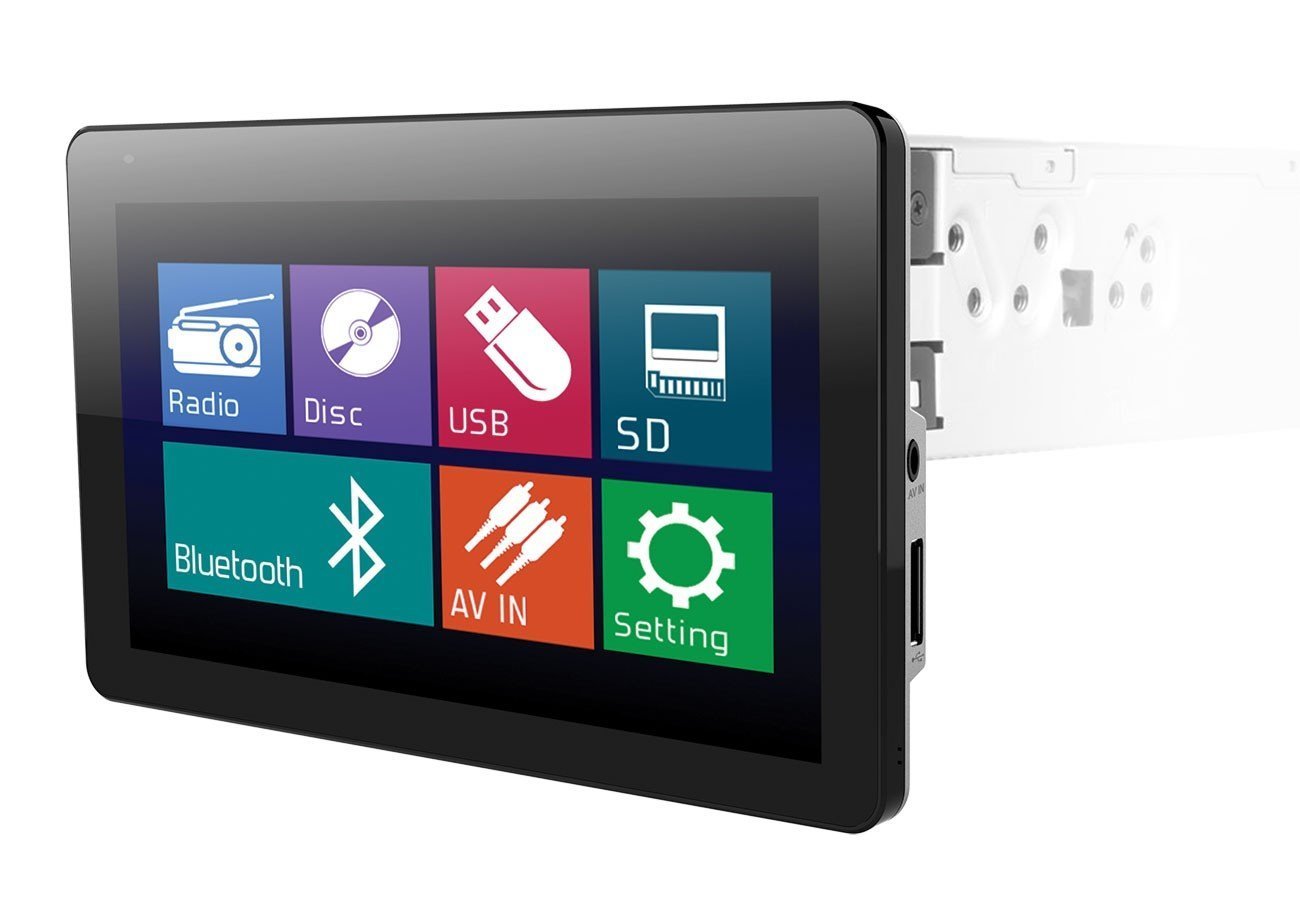
Image: The Soundstream VR-930B car DVD player, showcasing its large 9.3-inch motorized LCD touchscreen display in a vehicle dashboard.
Główne cechy:
- Single DIN chassis with a 9.3-inch motorized LCD touchscreen display.
- Bluetooth for audio streaming and hands-free calling.
- Media playback from CD, DVD, USB, and SD cards.
- AM/FM tuner with MP3 ID3 Tag Wyświetlacz.
- Maximum power output of 52 watts x 4 channels.
- Removable faceplate for security.
- Includes a wireless remote control.
2. Informacje dotyczące bezpieczeństwa
Read all instructions carefully before installation and operation. Failure to follow these instructions may result in damage to the unit, vehicle, or personal injury. Always ensure the vehicle is parked and the parking brake is engaged when operating features that require visual attention, such as DVD playback or extensive menu navigation. Do not operate the unit in a manner that distracts you from driving safely. Consult a professional for installation if you are unsure about any wiring or mounting procedures.
3. Zawartość opakowania
Verify that all items are present in the package before beginning installation. The typical package includes:
- Soundstream VR-930B Head Unit
- Wiązka przewodów
- Bezprzewodowy pilot zdalnego sterowania
- Sprzęt montażowy
- Instrukcja obsługi (ten dokument)
4. Konfiguracja
4.1 Instalacja
The VR-930B is designed for single DIN dashboard openings. Professional installation is highly recommended to ensure proper wiring and functionality. Incorrect installation can lead to damage to the unit or vehicle electrical system. Ensure the vehicle's battery is disconnected before starting any installation work.
4.2 Schemat okablowania
Refer to the detailed wiring diagram provided in the separate installation guide or on the unit's chassis for specific connections. Key connections include power (constant 12V, accessory 12V, ground), speaker outputs, antenna, parking brake sensor, and reverse gear input.
4.3 Pierwsze włączenie zasilania
After installation, reconnect the vehicle battery. Press the power button on the unit or remote control. The unit should power on and display the Soundstream logo. Follow any on-screen prompts for initial setup, such as language selection or clock setting.
5. Instrukcja obsługi
5.1 Podstawowe sterowanie
- Przycisk zasilania: Naciśnij, aby włączyć/wyłączyć urządzenie.
- Volume Knob/Buttons: Dostosuj poziom wyjściowy dźwięku.
- Przycisk trybu: Cycle through available audio sources (Radio, DVD, USB, SD, Bluetooth, AUX).
- Przycisk menu: Access the main system settings and options.
5.2 Odtwarzanie DVD/CD
Insert a DVD or CD into the disc slot. The unit will automatically detect the disc and begin playback. Use the on-screen controls or remote control for functions such as Play, Pause, Stop, Skip Track/Chapter, and Fast Forward/Rewind. Ensure the parking brake is engaged for video playback.
5.3 Łączność Bluetooth
Aby sparować urządzenie Bluetooth:
- Włącz Bluetooth w swoim urządzeniu mobilnym.
- On the VR-930B, select the Bluetooth source.
- Szukaj available devices on your mobile phone. The unit's name will typically appear as "Soundstream VR-930B" or similar.
- Select the unit and enter the default PIN (usually "0000") if prompted.
Once paired, you can stream audio from your device or make/receive hands-free calls through the unit.
5.4 Odtwarzanie multimediów USB/SD
Insert a USB drive into the front USB port or an SD card into the front SD card slot. The unit will automatically switch to the respective source and display the media files. Navigate through folders and select files using the touchscreen or remote control. Supported formats include MP3, WMA, and AAC.
5.5 Obsługa radia (AM/FM)
Select the Radio source. Use the 'Seek' or 'Tune' functions to find radio stations. You can save your favorite stations as presets for quick access. Press the 'Band' button to switch between AM and FM bands.
5.6 Obsługa ekranu dotykowego
The 9.3-inch LCD is a resistive touchscreen. Use light pressure with your fingertip or a stylus to interact with on-screen icons and menus. The motorized screen allows for angle adjustment to optimize viewing.
6. Konserwacja
6.1 Czyszczenie urządzenia
Wipe the unit's surface and touchscreen with a soft, dry cloth. For stubborn dirt, use a slightly damp cloth with a mild, non-abrasive cleaner. Avoid using harsh chemicals or solvents, as they can damage the finish or screen. Ensure the unit is powered off before cleaning.
6.2 Pielęgnacja dysków
Handle discs by their edges to avoid fingerprints and scratches. Store discs in their cases when not in use. Clean dirty discs with a soft, lint-free cloth, wiping from the center outwards. Do not use abrasive cleaners or solvents on discs.
7. Rozwiązywanie Problemów
If you encounter issues with your VR-930B, refer to the table below for common problems and solutions.
| Problem | Możliwa przyczyna | Rozwiązanie |
|---|---|---|
| Urządzenie nie włącza się. | Nieprawidłowe okablowanie; Przepalony bezpiecznik; Niski poziom naładowania akumulatora pojazdu. | Sprawdź połączenia zasilania i uziemienia. Sprawdź bezpieczniki pojazdu. Upewnij się, że akumulator jest naładowany. |
| Brak dźwięku. | Głośność jest zbyt niska; Wyciszenie jest włączone; Przewody głośnikowe są odłączone. | Increase volume. Deactivate mute. Check speaker wiring connections. |
| Disc error. | Dirty or scratched disc; Unsupported disc format. | Clean the disc. Try a different disc. Ensure disc format is supported. |
| Brak połączenia Bluetooth. | Bluetooth nie jest włączony w urządzeniu; Urządzenie nie jest w trybie parowania; Zakłócenia. | Ensure Bluetooth is on and visible. Put unit in pairing mode. Move closer to the unit. |
| Video not playing. | Parking brake not engaged; Incorrect video format. | Ensure parking brake is fully engaged. Check video file zgodność formatu. |
8. Specyfikacje
Below are the technical specifications for the Soundstream VR-930B:
| Funkcja | Specyfikacja |
|---|---|
| Numer modelu | VR-930B |
| Rozmiar wyświetlacza | 9.3 cali |
| Typ wyświetlacza | Motorized LCD Touchscreen |
| Rozdzielczość wyświetlacza | 800x480 |
| Maksymalna moc wyjściowa | 52 W x 4 kanały |
| Obsługiwane typy nośników | CD+RW, CD-R, MP3, DVD, DVD-R/RW, WMA, AAC |
| Technologia łączności | Bluetooth, USB |
| Źródło zasilania | 12 V |
| Waga produktu | 2.8 funtów |
| GTIN / UPC | 709483047792 |
9. Informacje o gwarancji
Produkty Soundstream są projektowane i produkowane zgodnie z najwyższymi standardami jakości. Produkt objęty jest ograniczoną gwarancją na wady materiałowe i wykonawcze. Czas trwania i warunki gwarancji mogą się różnić w zależności od regionu i sprzedawcy. Prosimy zachować dowód zakupu na wypadek roszczeń gwarancyjnych. Szczegółowe informacje dotyczące gwarancji można znaleźć w karcie gwarancyjnej dołączonej do produktu lub skontaktować się z działem obsługi klienta Soundstream.
10. Obsługa klienta
For technical assistance, troubleshooting beyond this manual, or warranty inquiries, please contact Soundstream customer support. Visit the official Soundstream website for contact information, FAQs, and additional resources. When contacting support, please have your product model number (VR-930B) and proof of purchase readily available.