
APEX AL-A300ATX
Instrukcja obsługi zasilacza APEX AL-A300ATX 300W ATX12V
Model: AL-A300ATX
1. Wprowadzenie
This manual provides essential information for the safe and efficient installation, operation, and maintenance of your APEX AL-A300ATX 300W ATX12V Power Supply. Please read this manual thoroughly before installation and retain it for future reference.
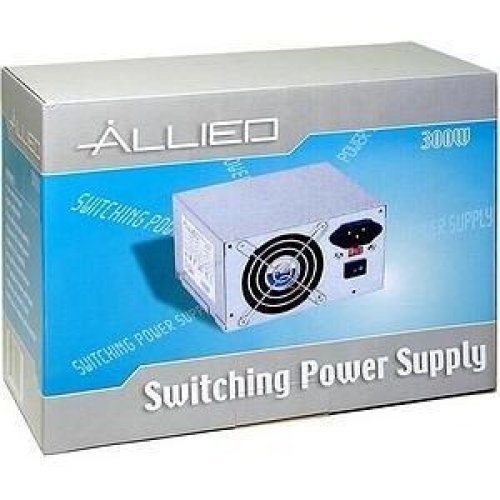
Image: The AL-A300ATX 300W ATX12V Power Supply shown in its retail packaging, indicating it is a "Switching Power Supply" from "ALLIED".
2. Informacje dotyczące bezpieczeństwa
Always observe the following safety precautions to prevent injury or damage to the power supply or other components:
- Przed instalacją lub demontażem należy upewnić się, że zasilacz jest odłączony od gniazdka sieciowego.
- Nie otwierać zasilacza casing. Wysoka objętośćtages are present inside, even when disconnected. There are no user-serviceable parts.
- Install the power supply in a well-ventilated area. Do not block ventilation openings.
- Unikaj narażania zasilacza na działanie wilgoci i ekstremalnych temperatur.
- Use only the cables provided or approved for use with this power supply.
- If the power supply is damaged or malfunctioning, discontinue use immediately and contact support.
3. Zawartość opakowania
Sprawdź, czy w opakowaniu znajdują się wszystkie elementy:
- APEX AL-A300ATX 300W ATX12V Power Supply Unit
- AC Power Cord (may vary by region)
- Śruby montażowe
- Instrukcja obsługi (ten dokument)
4. Konfiguracja i instalacja
Follow these steps to install the power supply into your computer system:
- Przygotowanie:
- Wyłącz komputer i odłącz przewód zasilający od gniazdka ściennego.
- Otwórz obudowę komputera. Szczegółowe instrukcje znajdziesz w instrukcji obsługi obudowy komputera.
- Jeśli wymieniasz istniejący zasilacz, odłącz wszystkie kable od starego zasilacza i wyjmij go z obudowy.
- Montaż zasilacza:
- Carefully slide the AL-A300ATX power supply into the designated PSU bay in your computer case.
- Dopasuj otwory na śruby w zasilaczu do otworów w obudowie.
- Zamocuj zasilacz za pomocą dostarczonych śrub montażowych.
- Kable połączeniowe:
- 24-Pin ATX Main Power Connector: Connect this large connector to the corresponding port on your motherboard. Ensure it clicks into place.
- CPU Power Connector (4-pin or 8-pin): Connect the appropriate CPU power cable to the CPU power port on your motherboard.
- Złącza zasilania SATA: Connect these flat connectors to your SATA hard drives, SSDs, and optical drives.
- Molex (Peripheral) Connectors: Connect these 4-pin connectors to older drives or case fans if needed.
- PCI-E Power Connectors (if applicable): If your graphics card requires additional power, connect the appropriate PCI-E power cable from the PSU to the graphics card. This model is listed with a "24 Pin" PCI-Express Connector Configuration, implying the main ATX connector.
- Zarządzanie kablami: Ułóż kable w uporządkowany sposób, aby poprawić przepływ powietrza i estetykę obudowy.
- Kontrola końcowa: Sprawdź dokładnie wszystkie połączenia, aby upewnić się, że są bezpieczne.
- Zamknij sprawę: Close your computer case and secure it.
5. Instrukcja obsługi
After successful installation, follow these steps to power on your system:
- Podłącz zasilanie sieciowe: Plug the AC power cord into the power supply's inlet and then into a grounded wall outlet or surge protector.
- Przycisk zasilania: Locate the power switch on the back of the power supply (usually a rocker switch labeled "I" for ON and "O" for OFF). Ensure it is in the "ON" (I) position.
- Włącz komputer: Press the power button on your computer case. The system should now power on.
To turn off your computer, always use the operating system's shutdown procedure. Do not use the power supply's switch for regular shutdowns, as this can lead to data loss or system instability.
6. Konserwacja
Proper maintenance helps ensure the longevity and optimal performance of your power supply:
- Czyszczenie kurzu: Periodically (every 3-6 months, depending on environment) clean dust from the power supply's fan and ventilation grilles using compressed air. Ensure the computer is powered off and unplugged before cleaning.
- Przepływ powietrza: Ensure that the computer case has adequate airflow and that the power supply's fan is not obstructed.
- Zarządzanie kablami: Maintain tidy cable routing to prevent obstruction of airflow.
7. Rozwiązywanie Problemów
Jeśli masz problemy z zasilaniem, zapoznaj się z poniższymi typowymi problemami i ich rozwiązaniami:
| Problem | Możliwa przyczyna | Rozwiązanie |
|---|---|---|
| Komputer się nie włącza. |
|
|
| System włącza się, ale natychmiast się wyłącza. |
|
|
| Wentylator pracuje głośno lub nie obraca się. |
|
|
If the problem persists after attempting these solutions, contact APEX customer support or a qualified technician.
8. Specyfikacje
| Funkcja | Szczegół |
|---|---|
| Nazwa modelu | AL-A300ATX |
| Marka | WIERZCHOŁEK |
| Moc wyjściowatage | 300 watów |
| Współczynnik kształtu | ATX12V |
| Kompatybilne urządzenia | Komputer osobisty |
| Typ złącza | ATX (24 Pin PCI-Express Connector Configuration) |
| Metoda chłodzenia | Powietrze |
| Minimalna objętość wejściowatage | 110 V (AC) |
| Waga przedmiotu | 3.64 funta |
| Wymiary opakowania | 9.6 x 7.2 x 4.1 cala |
| Data pierwszej dostępności | 22 kwietnia 2014 r. |
9. Gwarancja i wsparcie
For information regarding warranty coverage, technical support, or service, please refer to the official APEX webOdwiedź stronę internetową lub skontaktuj się bezpośrednio z działem obsługi klienta. Zachowaj paragon jako dowód zakupu.
APEX Contact Information: Please visit the official APEX webstrona zawierająca najnowsze dane kontaktowe i zasoby pomocy.
Ask a question about this manual
Ask about setup, troubleshooting, compatibility, parts, safety, or missing instructions. Manuals+ will review the question and use this page’s manual context to help answer it.