
PROSCAN PKCR2713_AMZ
PROSCAN ELITE PKCR2713AMZ Under Counter CD Player with Clock Radio and Bluetooth
Model: PKCR2713_AMZ
Wstęp
The PROSCAN ELITE PKCR2713AMZ is a versatile under-counter audio system designed to provide entertainment and convenience in your kitchen or workspace. Featuring a CD player, FM radio, and Bluetooth connectivity, this unit allows you to enjoy your favorite music from various sources. Its space-saving design and intuitive controls make it a practical addition to any home.
Co jest w pudełku
Przed rozpoczęciem instalacji sprawdź, czy wszystkie elementy są obecne:
- PROSCAN ELITE PKCR2713AMZ Under Counter CD Player
- Mounting Kit (includes template and hardware)
- W pełni funkcjonalny pilot zdalnego sterowania
- Zasilacz sieciowy
Konfiguracja i instalacja
Follow these steps to properly install your under-counter CD player:
- Wybierz lokalizację: Select a flat, sturdy surface under a kitchen cabinet. Ensure there is adequate space for the unit and access to a power outlet.
- Przygotowanie do montażu: Use the provided mounting template to mark the drilling locations under your cabinet. Note: Some users have reported the template may not be perfectly accurate; verify measurements before drilling.
- Wywierć otwory pilotażowe: Carefully drill pilot holes at the marked locations.
- Zamontuj płytę montażową: Secure the mounting plate to the underside of the cabinet using the provided screws.
- Montaż urządzenia: Slide the PROSCAN ELITE unit onto the mounting plate until it clicks securely into place.
- Podłącz zasilanie: Plug the AC power adapter into the unit and then into a wall outlet.
- Zainstaluj baterie zapasowe: For clock and preset memory retention during power outages, install 2 x AA batteries (not included) into the battery compartment.
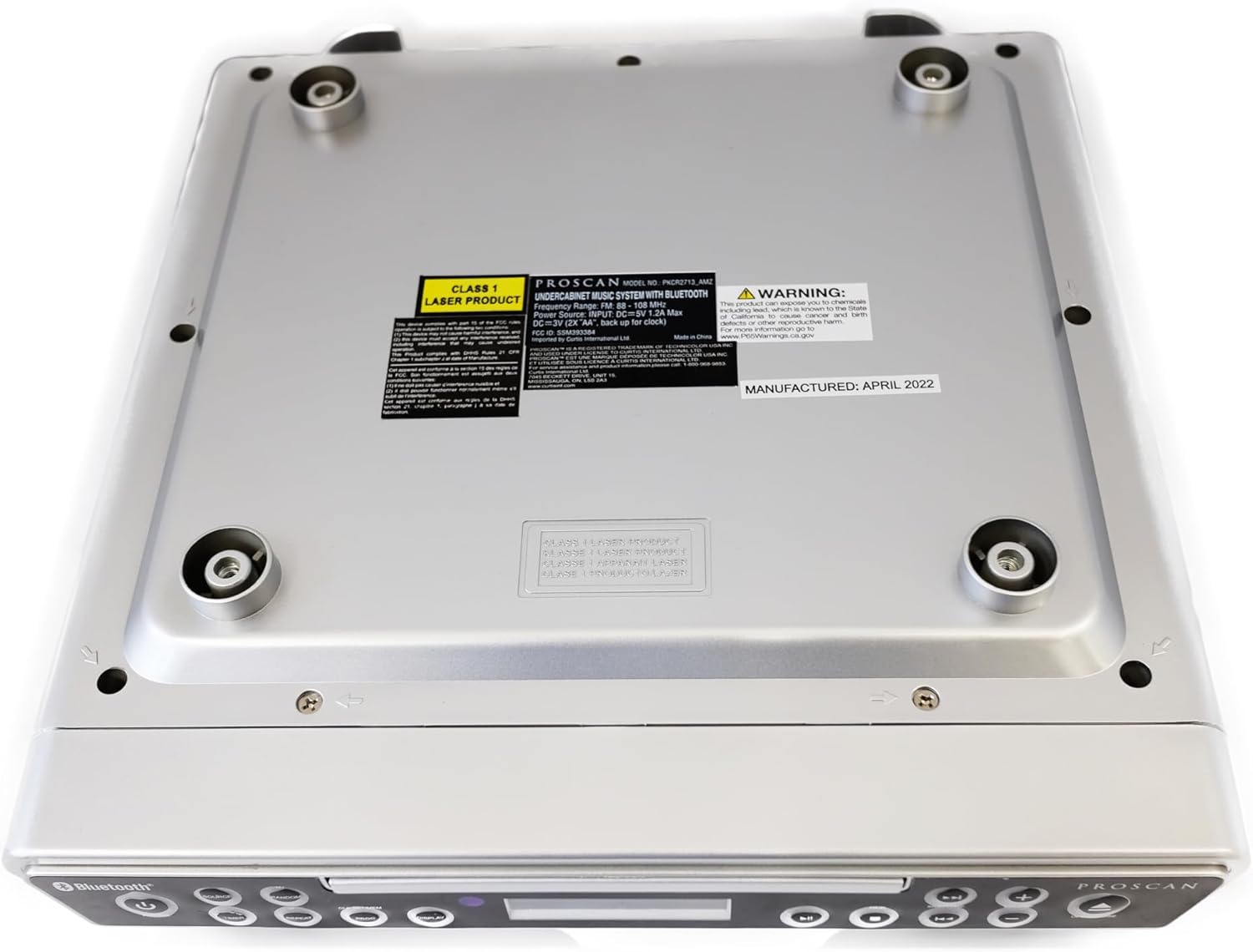
Obraz: Dół view of the unit, illustrating the mounting points and product information label.
Instrukcja obsługi
Elementy sterujące na panelu przednim

Image: Front panel of the unit, showing the display, CD tray, and various control buttons.
- Przycisk zasilania: Naciśnij, aby włączyć lub wyłączyć urządzenie.
- Przycisk ŹRÓDŁO: Cycle through available modes: CD, FM Radio, Bluetooth.
- Przyciski GŁOŚNOŚCI +/-: Dostosuj poziom wyjściowy dźwięku.
- Przycisk OTWÓRZ/ZAMKNIJ: Eject or retract the CD tray.
- SKIP/TUNE Buttons:
- In CD mode: Skip to the next/previous track.
- In FM mode: Tune to the next/previous radio station.
- Przycisk ODTWARZANIA/PAUZY: Play or pause CD playback.
- Przycisk PARUJ: Initiate Bluetooth pairing mode.
- Przycisk WYŚWIETL: Adjust display brightness or cycle through display information.
- CLK SET/MEM Button: Set the clock or save/recall radio presets.
- Przycisk TIMERA: Set sleep timer or alarm functions.
- Przycisk POWTARZAJ: Repeat current track or entire CD.
- Przycisk PROG: Program CD playback order.
- Przycisk LOSOWY: Play CD tracks in random order.
Obsługa odtwarzacza CD
- Naciśnij OTWÓRZ/ZAMKNIJ przycisk otwierający szufladę na płytę CD.
- Połóż płytę CD na tacy etykietą do góry.
- Naciśnij OTWÓRZ/ZAMKNIJ Naciśnij przycisk ponownie, aby zamknąć tackę. Urządzenie automatycznie rozpocznie odtwarzanie płyty CD.
- Użyj ODTWÓRZ/PAUZA, POMIŃ/STROJENIE, POWTARZAĆ, ŻARCIE, I LOSOWY przyciski do sterowania odtwarzaniem.
Obsługa radia FM
- Naciśnij ŹRÓDŁO Naciskaj przycisk, aż na wyświetlaczu pojawi się napis „FM”.
- Użyj POMIŃ/STROJENIE buttons to manually tune to a desired frequency or press and hold to auto-scan for the next available station.
- Aby zapisać ustawienia wstępne: Dostrój się do żądanej stacji, a następnie naciśnij i przytrzymaj CLK SET/MEM Naciskaj przycisk, aż numer ustawienia zacznie migać. Użyj POMIŃ/STROJENIE przyciski, aby wybrać numer ustawienia wstępnego, a następnie naciśnij CLK SET/MEM jeszcze raz, aby potwierdzić.
- Aby przywołać ustawienie wstępne: Naciśnij krótko przycisk CLK SET/MEM przycisk i użyj POMIŃ/STROJENIE buttons to select the desired preset.
Działanie Bluetooth
- Naciśnij ŹRÓDŁO button until "BT" or "Bluetooth" appears on the display. The unit will enter pairing mode, indicated by a flashing Bluetooth icon.
- Na urządzeniu z włączoną funkcją Bluetooth (smartfonie, tablecie itp.) włącz Bluetooth i wyszukaj dostępne urządzenia.
- Select "PROSCAN ELITE" or similar from the list of devices.
- Once paired, the Bluetooth icon on the unit's display will stop flashing, and you can stream audio from your device to the unit.
- To disconnect, either turn off Bluetooth on your device or press and hold the PARA przycisk na urządzeniu.

Obraz: Bok view of the unit, highlighting the 'LINE IN' auxiliary input port.
Konserwacja
- Czyszczenie: Przetrzyj urządzenie miękką, suchą ściereczką. Nie używaj środków czyszczących o właściwościach ściernych ani rozpuszczalników.
- Pielęgnacja płyt CD: Handle CDs by the edges. Keep them clean and free of scratches to ensure optimal playback.
- Wymiana baterii: Replace backup batteries (AA) annually or when the clock/presets are not retained during power outagt.j.
Rozwiązywanie problemów
| Problem | Możliwa przyczyna | Rozwiązanie |
|---|---|---|
| Urządzenie nie włącza się. | No power, AC adapter not connected. | Sprawdź, czy zasilacz sieciowy jest prawidłowo podłączony do urządzenia i do sprawnego gniazdka ściennego. |
| Brak dźwięku z głośników. | Volume too low, incorrect source selected, muted. | Increase volume. Press SOURCE to select correct mode (CD, FM, BT). Check if unit is muted. |
| Płyta CD przeskakuje lub nie odtwarza się. | Dirty or scratched CD, CD inserted incorrectly. | Clean the CD with a soft cloth. Ensure CD is inserted label-side up. Try a different CD. |
| Słaby odbiór radia FM. | Weak signal, internal antenna position. | Reposition the unit for better reception. Note: This unit does not have an AM feature. |
| Problemy z parowaniem Bluetooth. | Device too far, Bluetooth not enabled on device, unit not in pairing mode. | Ensure device is within range. Enable Bluetooth on your device. Press PAIR button on unit. |
Specyfikacje
- Wymiary produktu: 14 x 4 x 12.5 cali (dł. x szer. x wys.)
- Waga przedmiotu: 0.035 uncji
- Marka: PROSKAN
- Numer modelu: PKCR2713_AMZ
- Technologia łączności: Bluetooth
- Kolor: Srebrny
- Typ głośnika: Stereofoniczny
- Moc wyjściowa: 2 x 1.2 W
- Źródło zasilania: AC Adapter with Battery Backup (2 x AA, not included)
- Cechy: Under-cabinet mounting, CD player, FM radio, Bluetooth 3.0, LED display, remote control.
Gwarancja i wsparcie
For warranty information and technical support, please refer to the documentation included with your purchase or visit the official PROSCAN webZachowaj dowód zakupu na wypadek roszczeń gwarancyjnych.
Zasoby internetowe:
- Official PROSCAN Store: PROSCAN ELITE Store
- Instrukcja obsługi (PDF): Plik do pobrania w formacie PDF
Ask a question about this manual
Ask about setup, troubleshooting, compatibility, parts, safety, or missing instructions. Manuals+ will review the question and use this page’s manual context to help answer it.