
Garmina 010-01161-00
Instrukcja obsługi nawigacji GPS Garmin Edge 1000 Color Touchscreen
Model: 010-01161-00
Wstęp
The Garmin Edge 1000 is a color touchscreen GPS bike computer designed to enhance your cycling experience with advanced navigation and performance tracking features. This manual provides comprehensive instructions for setting up, operating, and maintaining your device.
Główne cechy:
- Duży wyświetlacz 3.0": A glove-friendly, touchscreen display that automatically adjusts for varying light conditions.
- Segmenty: Compete on Garmin Connect Segments with real-time results and leaderboard rankings.
- Inteligentne powiadomienia: Receive text, email, and call notifications from your iPhone 4s or later directly on the device.
- Bike-Specific Navigation: Utilize preloaded maps and points of interest (POIs) for optimal cycling routes. Features include Round-trip Routing and on-device Route Planner.
Organizować coś
Zawartość pudełka:
- Garmin Edge 1000 Device
- Preloaded Maps
- Extended Out-Front Mount
- Standardowy uchwyt
- Pęta
- Kabel USB
- Instrukcje
Montaż urządzenia:
The Edge 1000 comes with two mounting options: an extended out-front mount and a standard mount. Choose the mount that best suits your bicycle and riding preference.
- Select the desired mount (extended out-front or standard).
- Securely attach the mount to your bicycle's handlebars or stem using the provided rubber bands or screws, ensuring a firm fit.
- Align the tabs on the back of the Edge 1000 device with the slots on the mount.
- Press down lightly and twist the device clockwise until it locks securely into place.
- Attach the tether to the device and your bicycle for added security.

Obraz: Bok view of the Garmin Edge 1000, illustrating the device's profile and the mounting interface.
Initial Power-On and Configuration:
- Naciśnij i przytrzymaj przycisk zasilania (znajdujący się z boku urządzenia), aż ekran się podświetli.
- Follow the on-screen prompts to select your language, set up user profiles, and configure basic settings.
- Connect the device to your computer via the provided USB cable to ensure it has the latest software updates and map data.
Operating the Garmin Edge 1000
Wyświetlacz i interfejs:
The Edge 1000 features a large 3.0-inch color touchscreen. The interface is designed for easy navigation, even while wearing gloves. The display automatically adjusts brightness for optimal visibility in various lighting conditions, including tunnels and shaded areas.
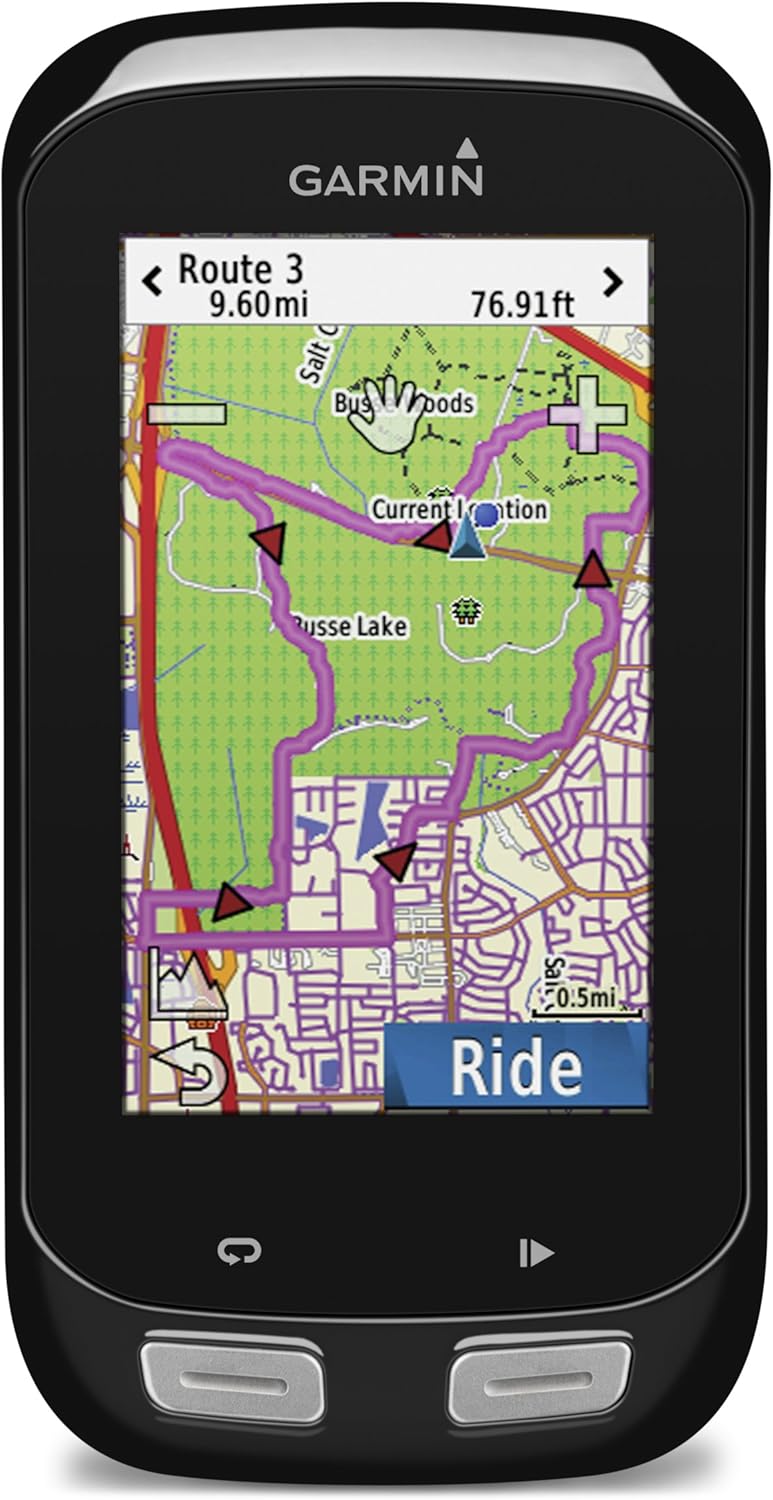
Obraz: Przód view of the Garmin Edge 1000 displaying a detailed map route with current location and distance information.
Nawigacja:
Utilize the preloaded maps for bike-specific navigation. The device supports various navigation functions:
- Planowanie trasy: Create routes directly on the device using the map or points of interest (POIs).
- Trasa w obie strony: Enter a desired distance, and the device will suggest up to three round-trip routes.
- Instrukcje krok po kroku: Receive clear prompts for upcoming turns and street names.
- Off-Course Recalculation: If you deviate from your planned route, the device will automatically recalculate to guide you back.

Image: Garmin Edge 1000 showing a navigation screen with a route, current position, and a "Personal Best" overlay indicating distance to go and time ahead.
Performance Tracking and Training:
The Edge 1000 offers extensive data tracking capabilities to monitor your performance:
- Możliwość dostosowania pól danych: Display various metrics such as speed, distance, time, heart rate, cadence, and power (with compatible sensors).
- Garmin Connect Segments: Compete against other riders on pre-defined segments and view your real-time performance against the leaderboard.
- Aktywność Profiles: Utwórz i dostosuj profiles for different ride types (e.g., road, mountain, indoor) with specific data screens and settings.

Image: Garmin Edge 1000 displaying current speed, heart rate, and a map view of the surrounding streets.
Inteligentne powiadomienia:
Pair your Edge 1000 with a compatible iPhone (4s or later) to receive smart notifications directly on your device. This allows you to see incoming calls, text messages, and email alerts without needing to check your phone.
Konserwacja
Czyszczenie urządzenia:
- Przetrzyj urządzenie miękką, damp płótno.
- Unikaj stosowania środków czyszczących o działaniu ściernym lub rozpuszczalników, które mogą uszkodzić ekran lubasing.
- Aby zachować wodoodporność, należy upewnić się, że osłona portu USB jest szczelnie zamknięta.
Pielęgnacja baterii:
- The Edge 1000 uses a rechargeable Lithium Ion battery.
- Charge the device fully before its first use and regularly thereafter.
- Avoid exposing the device to extreme temperatures, as this can affect battery life.
- For optimal battery longevity, store the device with a partial charge if it will not be used for an extended period.
Rozwiązywanie problemów
Problemy z sygnałem GPS:
- Upewnij się, że znajdujesz się na otwartej przestrzeni z czystym powietrzem. view of the sky when acquiring a GPS signal.
- Allow several minutes for the device to locate satellites, especially after being off for an extended period or moved a significant distance.
- If signal acquisition is consistently slow, try syncing the device with Garmin Connect to update satellite prediction data.
Urządzenie nie odpowiada:
- Perform a soft reset by holding down the power button for 10-15 seconds until the device turns off. Then, power it back on.
- Upewnij się, że bateria jest naładowana. Podłącz urządzenie do źródła zasilania za pomocą kabla USB.
Connectivity Problems (Bluetooth/ANT+):
- Ensure Bluetooth is enabled on your smartphone and the Edge 1000.
- Verify that sensors (heart rate, cadence, power) are properly paired and within range of the device.
- Try unpairing and re-pairing devices if connection issues persist.
Specyfikacje
| Atrybut | Wartość |
|---|---|
| Wymiary produktu | 4.4 x 2.3 x 0.8 cala |
| Waga przedmiotu | 4 uncji |
| Numer modelu przedmiotu | 010-01161-00 |
| Baterie | Wymagane 1 baterie litowo-jonowe (w zestawie) |
| Technologie łączności | USB, Bezprzewodowy |
| Cechy specjalne | Lightweight, Water resistant |
| Wejście interfejsu ludzkiego | Ekran dotykowy |
| Rozdzielczość ekranu | 240 x 400 pikseli |
| Rozmiar ekranu | 3 cali |
| Typ mapy | Ameryka Północna |
| Żywotność baterii | Do 15 godzin |
| Typ montażu | Uchwyt na kierownicę |
Gwarancja i wsparcie
For warranty information, product registration, and technical support, please visit the official Garmin website or contact Garmin customer service. Refer to the included manuals for detailed warranty terms and conditions specific to your region.
No seller-created product videos were available for this specific model in the provided data.
Ask a question about this manual
Ask about setup, troubleshooting, compatibility, parts, safety, or missing instructions. Manuals+ will review the question and use this page’s manual context to help answer it.