
1. Wprowadzenie
The Attop YD-719 Quad-Copter is an 8-inch remote-controlled aerial vehicle designed for recreational flight. It features a 4-channel remote control system, 3-axis flight control for stable operation, and a built-in camera capable of recording video and capturing still images. The quad-copter utilizes 2.4 GHz wireless technology for reliable communication and is powered by a rechargeable battery.
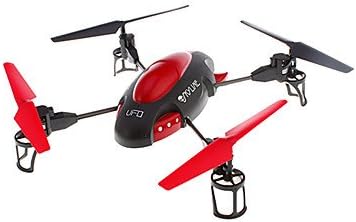
Image 1.1: The Attop YD-719 Quad-Copter, showcasing its red and black design with four propellers.
2. Środki ostrożności
- Always operate the quad-copter in open areas, away from people, animals, buildings, and power lines.
- Nie lataj przy silnym wietrze lub niesprzyjających warunkach pogodowych.
- Upewnij się, że akumulator jest w pełni naładowany przed każdym lotem.
- Trzymaj palce i luźne części odzieży z dala od obracających się śmigieł.
- W przypadku młodszych użytkowników zaleca się nadzór osoby dorosłej.
- Do not attempt to modify the quad-copter or its components.
- Unikaj lotów w pobliżu lotnisk lub przestrzeni powietrznej o ograniczonym dostępie.
3. Zawartość opakowania
Sprawdź, czy w opakowaniu znajdują się wszystkie elementy:
- Attop YD-719 Quad-Copter
- Zdalne sterowanie
- Rechargeable Battery (for quad-copter)
- Four (4) Extra Rotor Blades
- Two (2) USB Charging Cables
- Podręcznik użytkownika (ten dokument)
4. Koniec komponentówview
4.1 Quad-Copter
The quad-copter features four rotors, a central body housing the electronics and camera, and landing gear. The built-in camera is located on the underside of the main body.

Obraz 4.1: Bok view of the YD-719 Quad-Copter, showing the sleek body and propeller arms.
4.2 Pilot zdalnego sterowania
The remote control is a 4-channel device operating on 2.4 GHz frequency, providing precise control over the quad-copter's movements. It typically includes two joysticks for flight control and various buttons for functions like trim adjustments, photo/video capture, and power.
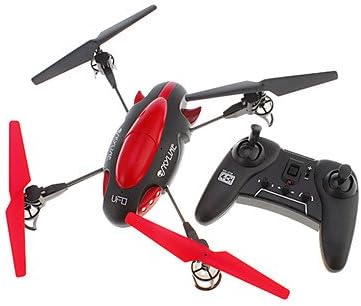
Image 4.2: The Attop YD-719 Quad-Copter alongside its remote control, illustrating their relative sizes.
5. Konfiguracja
5.1 Quad-Copter Battery Charging
- Locate the rechargeable battery within the quad-copter's compartment.
- Connect one end of the provided USB charging cable to the battery and the other end to a USB power source (e.g., computer USB port, USB wall adapter).
- The charging indicator light will illuminate during charging and typically turn off or change color when fully charged. Refer to the specific indicator behavior in the product documentation if available.
- Czas ładowania wynosi około 60–90 minut. Nie przeładowuj.

Obraz 5.1: Spód view of the YD-719 Quad-Copter, showing the battery compartment and wiring.
5.2 Instalacja baterii w pilocie zdalnego sterowania
- Otwórz komorę baterii znajdującą się z tyłu pilota.
- Włóż trzy (3) baterie AAA, zwracając uwagę na prawidłową biegunowość (+/-).
- Dokładnie zamknij komorę baterii.
5.3 Montaż/wymiana śmigła
The quad-copter comes with four extra rotor blades. If replacement is necessary:
- Ostrożnie zdejmij uszkodzone śmigło, delikatnie pociągając je ku górze od wału silnika.
- Note the direction of rotation for each propeller. Propellers are typically marked (e.g., A or B) and must be installed on the correct motor.
- Press the new propeller firmly onto the motor shaft until it is seated securely.

Image 5.2: Close-up of a propeller and motor assembly on the YD-719 Quad-Copter.
6. Instrukcja obsługi
6.1 Parowanie pilota
- Place the quad-copter on a flat, level surface.
- Turn on the quad-copter's power switch. The LED lights will flash.
- Włącz pilota.
- Push the left joystick (throttle) all the way up, then all the way down. The quad-copter's LED lights will stop flashing and remain solid, indicating successful pairing.
6.2 Start i lądowanie
- Startować: After pairing, slowly push the left joystick (throttle) upwards to increase motor speed and lift the quad-copter off the ground.
- Lądowanie: Slowly pull the left joystick (throttle) downwards to decrease motor speed and gently land the quad-copter. Once landed, pull the throttle all the way down to stop the motors.
6.3 Podstawowe sterowanie lotem
- Wspinaczka/Spadanie: Left joystick (throttle) up/down.
- Naprzód wstecz: Right joystick up/down.
- Skręć w lewo/prawo (odchylenie): Left joystick left/right.
- Fly Left/Right (Roll): Right joystick left/right.
6.4 Nagrywanie wideo i robienie zdjęć
The YD-719 is equipped with a built-in camera. Refer to the remote control diagram (if provided in a physical manual) for specific buttons to activate video recording or still photo capture. Typically, a short press activates photo mode, and a long press activates video recording.
7. Konserwacja
7.1 Czyszczenie
Use a soft, dry cloth to wipe down the quad-copter after use. Avoid using water or cleaning solvents, as they may damage electronic components.
7.2 Pielęgnacja śmigła
Regularly inspect propellers for damage (bends, cracks, chips). Replace any damaged propellers immediately to ensure stable flight and prevent further damage to the quad-copter.
7.3 Przechowywanie baterii
When not in use for extended periods, store the quad-copter battery at approximately 50% charge in a cool, dry place. Remove batteries from the remote control if it will not be used for a long time.
8. Rozwiązywanie Problemów
- Quad-Copter not responding: Ensure both quad-copter and remote control are powered on and successfully paired. Check remote control batteries.
- Niestabilny lot: Check for damaged propellers and replace if necessary. Ensure the quad-copter is placed on a level surface before pairing. Perform trim adjustments on the remote control if the quad-copter drifts.
- Krótki czas lotu: Ensure the quad-copter battery is fully charged. Battery performance may degrade over time.
- Kamera nie nagrywa: Ensure the quad-copter is powered on and the camera function is correctly activated via the remote control. Check if the memory card (if applicable) is inserted and has sufficient space.
9. Specyfikacje
| Funkcja | Specyfikacja |
|---|---|
| Numer modelu | YD-719 |
| Producent | Na szczycie |
| Wymiary (w przybliżeniu) | 36.83 x 34.93 x 11.43 cm (14.5 x 13.75 x 4.5 cala) |
| Waga (w przybliżeniu) | 680.39 g (1.5 funta) |
| Kanały sterujące | 4-kanałowy |
| Kontrola lotu | 3-osiowy |
| Technologia bezprzewodowa | 2.4 GHz |
| Bateria Quadcopter | 600 mAh akumulator |
| Bateria do pilota zdalnego sterowania | 3 x AAA (brak w zestawie) |
| Funkcja specjalna | Built-in Camera (Video/Photo) |
10. Gwarancja i wsparcie
For warranty information or technical support, please refer to the contact details provided with your purchase documentation or visit the manufacturer's official webZachowaj dowód zakupu na wypadek roszczeń gwarancyjnych.