
Wstęp
The Seco-Larm E-37EV Alarm Pager System is designed to monitor up to three zones for premises or vehicles, providing alerts via a portable receiver. This system features a 4W output transmitter for extended range and a belt-clip receiver with code-learning capabilities. It is compatible with various alarm control panels and communication systems.
Cechy
- Monitors up to three zones per premises or vehicle, including manual paging.
- Transmitter can page an unlimited number of receivers.
- Up to ½-mile range in ideal conditions.
- Connects to nearly any type of burglar alarm control panel, vehicle alarm, or communication panel.
- One positive and two negative instant trigger inputs.
- Automatic power antenna control.
- Connects to a CB antenna, car AM radio antenna (cable included), or optional external antenna (E-37ANT).
- Over two million possible coding combinations.
- Belt-clip receiver included.
- Code-learning receiver learns up to three transmitters.
- Color LEDs on the receiver indicate triggered zone (Green, Orange, or Red).
- Audible or vibration page indicator.
- EEPROM memory stores codes for up to one year without power.
- Stores the last six pages for easy recall.
- Unattended page indicator.
- Wskaźnik niskiego poziomu naładowania baterii.
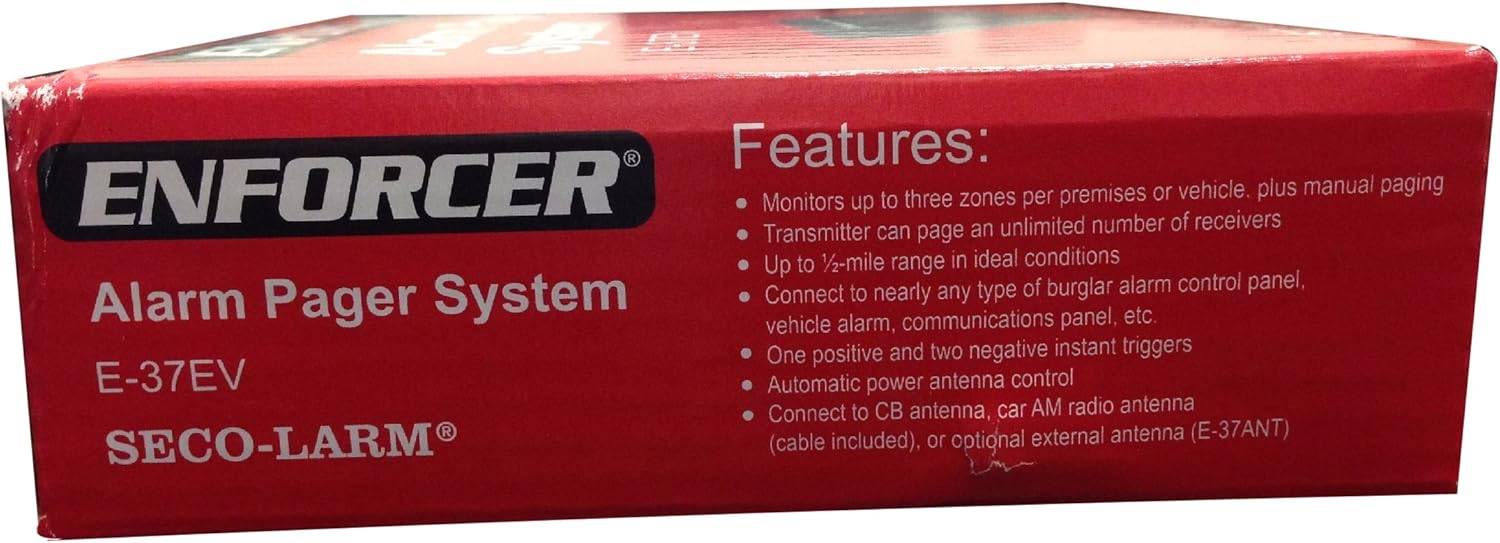
Image: Features list on the product packaging for the Seco-Larm E-37EV Alarm Pager System.
Zawartość opakowania
Sprawdź, czy w opakowaniu znajdują się wszystkie komponenty:
- 1 Nadajnik
- 1 Vibrating Receiver (Batteries not included)
- 1 Radio Antenna Adapter Cord (18")

Image: Front of the Seco-Larm E-37EV Alarm Pager System box, showing the transmitter, receiver, and kit contents.
Organizować coś
Instalacja przetwornika
- Podłączenie zasilania: Connect the transmitter to a 12VDC power source. Ensure proper polarity.
- Połączenie antenowe: Connect the provided radio antenna adapter cord to the transmitter. For optimal range, consider connecting to a CB antenna, car AM radio antenna, or the optional E-37ANT external antenna. Ensure the antenna body is properly grounded for best performance.
- Wejścia wyzwalające: Connect the alarm system's trigger outputs to the transmitter's one positive and two negative instant trigger inputs. Refer to your alarm system's manual for specific wiring instructions.
Konfiguracja odbiornika
- Montaż baterii: The receiver requires two AAA batteries (not included). Open the battery compartment and insert the batteries, observing correct polarity.
- Nauka kodu: The receiver is designed to learn up to three transmitter codes. Follow the specific instructions provided with the product for the code-learning procedure. This typically involves activating the transmitter while the receiver is in a learning mode.
- Wybór trybu: Select between audible or vibration page indication using the switch on the receiver.
Działanie
Manual Paging
The system supports manual paging. Consult the specific product documentation for instructions on how to initiate a manual page from the transmitter, if applicable.
Wskaźnik strefy
When an alarm is triggered, the receiver's color LEDs will illuminate to indicate which zone was activated:
- Zielona dioda LED: Indicates Zone 1 trigger.
- Pomarańczowa dioda LED: Indicates Zone 2 trigger.
- Czerwona dioda LED: Indicates Zone 3 trigger.
Page Recall
The receiver stores the last six pages received. Use the recall function (refer to receiver buttons) to review poprzednie alerty.
Unattended Page Indicator
If a page is received and not acknowledged, the receiver will provide an unattended page indication (e.g., a flashing LED or repeated alert) until it is cleared.
Wskaźnik niskiego poziomu baterii
The receiver features a low battery indicator to alert you when the AAA batteries need replacement.
Konserwacja
Wymiana baterii
When the low battery indicator activates on the receiver, replace the two AAA batteries promptly. Ensure correct polarity during installation.
Czyszczenie
Clean the units with a soft, dry cloth. Avoid using abrasive cleaners or solvents, which may damage the casing lub komponentów wewnętrznych.
Rozwiązywanie problemów
| Problem | Możliwa przyczyna | Rozwiązanie |
|---|---|---|
| No page received | Receiver batteries low or dead | Replace receiver batteries. |
| No page received | Transmitter not powered | Check 12VDC power connection to the transmitter. |
| No page received | Transmitter not triggered | Verify alarm system trigger output is connected correctly and functioning. |
| Zmniejszony zasięg | Poor antenna connection or grounding | Ensure antenna is securely connected and properly grounded. Avoid obstructions. |
| Receiver not responding to transmitter | Receiver not coded to transmitter | Perform the code-learning procedure for the receiver. |
Specyfikacje
| Funkcja | Nadajnik | Odbiornik |
|---|---|---|
| Liczba kodów | Over 2 million factory pre-set | Up to 3 transmitter codes |
| Moc | 12 V prądu stałego | 3 V DC (2 baterie AAA) |
| Moc wyjściowa RF | Maksymalnie 4 W | Brak |
| Aktualny drenaż | Standby: 10mA, Active: 1A | Standby: 1mA, Active: 50mA |
| Częstotliwość | 27MHz | 27MHz |
| Impedancja anteny | 50Ω | Brak |
| Zakres | Up to ½ mile1 | Up to ½ mile1 |
| Wymiary | 4⅛"x3⅛"x1⅝" (105x79x33mm) | 3"x2⅛"x⅝" (76x54x16mm) |
| Waga | 5.1 uncji (145g) | 1.6-oz (45g) (without battery) |
| Battery Life (Receiver) | Brak | Około. 1 miesiąc2 |
1Actual range may vary depending on the environment, installation, and/or antenna.
2Based on 5 transmissions/day.

Image: Back of the Seco-Larm E-37EV Alarm Pager System box, detailing transmitter and receiver specifications.
Informacje o gwarancji
This Seco-Larm E-37EV Alarm Pager System comes with a 1-letnia gwarancja from the date of purchase. This warranty covers defects in materials and workmanship under normal use. For warranty claims or service, please contact Seco-Larm customer support.
Wsparcie
For further assistance, technical support, or to inquire about optional accessories such as the E-37RV extra vibrating receiver or E-37ANT external antenna, please refer to the official Seco-Larm website or contact their customer service department. Always ensure to follow local regulations and safety guidelines during installation and operation.


