
1. Wprowadzenie
This manual provides essential instructions for the safe and efficient operation of your ICOM BC-152 charger. Please read this manual thoroughly before using the charger to ensure proper setup, operation, and maintenance. Keep this manual for future reference.
2. Informacje dotyczące bezpieczeństwa
Always observe the following safety precautions to prevent injury, damage to the charger, or damage to the device being charged.
- Use only with compatible ICOM battery packs. Using incompatible batteries may cause fire, explosion, or injury.
- Nie wystawiaj ładowarki na działanie deszczu, wilgoci ani ekstremalnych temperatur.
- Nie rozmontowuj ani nie modyfikuj ładowarki. Wszelkie czynności serwisowe powierzaj wykwalifikowanemu personelowi.
- Upewnij się, że gniazdko elektryczne ma odpowiednią głośnośćtage jest zgodny ze specyfikacją ładowarki.
- Trzymaj ładowarkę z dala od źródeł ciepła i bezpośredniego światła słonecznego.
- Odłączaj ładowarkę od gniazdka elektrycznego, gdy nie używasz jej lub przed czyszczeniem.
3. Konfiguracja
3.1 Rozpakowanie
Carefully remove the ICOM BC-152 charger from its packaging. Verify that all components are present:
- ICOM BC-152 Charger Unit
- AC Adapter (if included)
- Instrukcja obsługi (ten dokument)
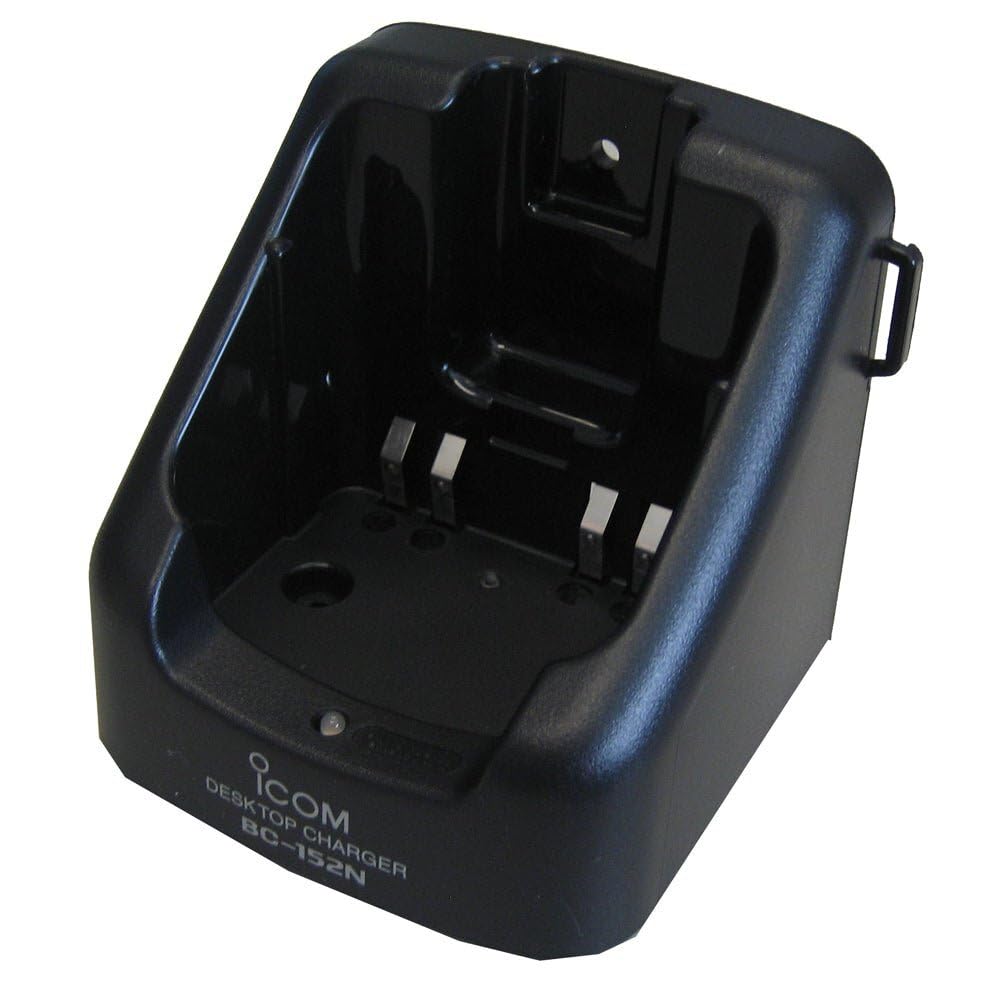
Figure 1: The ICOM BC-152 charger unit. This image shows the compact black charger with a single slot for a battery pack.
3.2 Podłączanie zasilania
- Connect the AC adapter cable to the DC input jack on the rear of the BC-152 charger unit.
- Podłącz zasilacz sieciowy do standardowego gniazdka ściennego.
- Ładowarka jest teraz gotowa do użycia.
4. Instrukcja obsługi
4.1 Charging a Battery Pack
Follow these steps to charge a compatible ICOM battery pack:
- Upewnij się, że ładowarka jest podłączona do źródła zasilania, zgodnie z opisem w rozdziale 3.2.
- Carefully insert the battery pack into the charging slot of the BC-152 charger. Ensure it is seated firmly.
- Observe the charging indicator light.
4.2 kontrolki
The BC-152 charger features an LED indicator to show the charging status:
- Czerwony (stały): Trwa ładowanie akumulatora.
- Zielony (stały): Charging is complete. The battery pack is fully charged.
- Migające czerwone: Charging error or battery fault. Remove the battery and re-insert. If the error persists, consult the troubleshooting section.
- Brak światła: Charger is not connected to power, or no battery is inserted.
Charging time may vary depending on the battery's capacity and its current charge level. Typically, a fully depleted battery will take approximately 2-4 hours to charge.
5. Konserwacja
5.1 Czyszczenie
Aby zachować optymalną wydajność i wygląd:
- Przed czyszczeniem należy zawsze odłączać ładowarkę od gniazdka elektrycznego.
- Do czyszczenia zewnętrznej części ładowarki należy używać miękkiej, suchej ściereczki.
- Nie należy używać środków czyszczących o działaniu ściernym, rozpuszczalników ani silnych środków chemicznych.
- Ensure no moisture enters the charging slot or power input.
5.2 Przechowywanie
When not in use for extended periods, store the charger in a cool, dry place, away from direct sunlight and extreme temperatures. Disconnect it from the power supply.
6. Rozwiązywanie Problemów
If you encounter issues with your BC-152 charger, refer to the table below for common problems and solutions.
| Problem | Możliwa przyczyna | Rozwiązanie |
|---|---|---|
| Kontrolka ładowarki jest wyłączona. | No power supply or battery not inserted. | Check AC adapter connection. Ensure battery is correctly inserted. |
| Indicator light flashes red. | Battery fault or charging error. | Remove and re-insert the battery. Try a different compatible battery if available. |
| Akumulator się nie ładuje. | Faulty battery, charger, or power supply. | Verify power connection. Test with a known good battery. If problem persists, contact support. |
7. Specyfikacje
| Marka | ICOM |
| Model | BC-152 |
| Wejście Voltage | 12-16V DC (via AC adapter) |
| Objętość wyjściatage | 8.4V prądu stałego |
| Prąd ładowania | Około. 450mA |
| Wymiary (szer. × wys. × gł.) | Approx. 80 × 50 × 90 mm (3.1 × 2.0 × 3.5 inches) |
| Waga | 0.18 funta (ok. 82 g) |
| Kolor | Czarny |
Uwaga: Specyfikacje mogą ulec zmianie bez powiadomienia w celu wprowadzenia ulepszeń.
8. Informacje o gwarancji
ICOM products are manufactured with high-quality components and are subject to rigorous quality control. This product is covered by a limited warranty against defects in materials and workmanship. The specific terms and duration of the warranty may vary by region. Please refer to the warranty card included with your purchase or visit the official ICOM webStrona zawiera szczegółowe informacje o gwarancji.
Niniejsza gwarancja nie obejmuje uszkodzeń powstałych na skutek niewłaściwego użytkowania, wypadku, nieautoryzowanej modyfikacji lub nieprawidłowej instalacji.
9. Obsługa klienta
If you have any questions, require technical assistance, or need to report a problem that cannot be resolved using the troubleshooting guide, please contact ICOM customer support.
ICOM America Inc.
Visit ICOM America's Contact Page
Please have your product model (BC-152) and serial number ready when contacting support.