
1. Wprowadzenie
The 1byone OUS00-01861 Amplified HDTV Antenna is designed to receive digital over-the-air (OTA) television broadcasts. This antenna allows access to local news, weather, sitcoms, children's programming, and sports channels without requiring cable or satellite subscriptions. Its slim design and detachable amplifier provide flexibility for optimal reception.

Image: The 1byone OUS00-01861 Amplified HDTV Antenna, showcasindzięki kompaktowej i eleganckiej konstrukcji.
2. Co znajduje się w pudełku
Sprawdź, czy w opakowaniu znajdują się wszystkie komponenty:
- Amppodłączona antena HDTV
- Odłączany Ampzestaw lifier
- 10 Feet Coaxial Cable

Image: Contents of the 1byone TV Antenna package, including the antenna, amplifier, and coaxial cable.
3. Konfiguracja i instalacja
Follow these steps to set up your 1byone HDTV Antenna:
Step 1: Place the Antenna
Position the antenna in an area with good reception. Higher placement, such as on a window or wall, is often recommended. Consider locations facing the direction of broadcast towers for optimal signal strength.
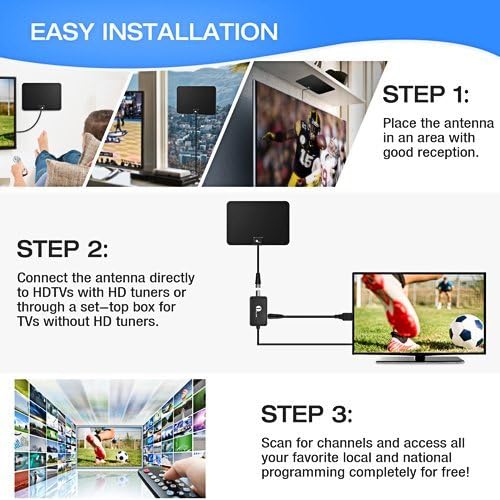
Image: Step 1 of installation, showing the antenna being placed on a wall or window for optimal reception.
Krok 2: Podłącz antenę
Connect the antenna's coaxial cable to the "CABLE/ANT IN" port on the back of your HDTV. If your TV does not have a built-in HD tuner or if you are using an older TV, connect the antenna through a separate digital converter box (not included). The detachable amplifier can be used for extended range (up to 50 miles) or removed if you are closer to broadcast towers and experience signal interference.

Image: Diagram illustrating how to connect the antenna to an HDTV with or without a digital converter box, including the amppodłączenie lifier.
Step 3: Power the Amplifier (if used)
If using the detachable amplifier, connect its USB cable to a USB port on your TV or to a USB power adapter (5V/100mA) plugged into a wall outlet.
Krok 4: Skanuj w poszukiwaniu kanałów
Access your TV's menu and navigate to the "Channel Search" or "Auto Program" function. Select "Antenna" or "Air" as the input source. Initiate the channel scan to find available local and national programming.
4. Instrukcja obsługi
Once channels are scanned, you can begin watching free over-the-air television. Use your TV remote to change channels as you normally would. The antenna provides access to all available digital and HD broadcasts in your area.
5. Placement Optimization
Signal quality is highly dependent on antenna placement. Experiment with different locations to find the best reception:
- Higher is Better: Generally, placing the antenna higher on a wall or window can improve reception.
- Near Windows: Windows often provide clearer line-of-sight to broadcast towers.
- Directional Alignment: Try to orient the antenna towards the nearest broadcast towers. Webstrony takie jak fcc.gov/media/engineering/dtvmap can help locate towers in your area.
- Unikaj przeszkód: Large metal objects, concrete walls, and other electronic devices can interfere with signals.
- Re-scan After Moving: Always perform a channel scan after repositioning the antenna to update the channel list.

Image: Various placement options for the 1byone TV Antenna, including wall, window, table, and flat on a surface.
6. Rozwiązywanie Problemów
- Brak sygnału lub słaba jakość obrazu:
- Sprawdź, czy wszystkie połączenia są bezpieczne.
- Reposition the antenna and perform a new channel scan.
- Try placing the antenna in a different location, such as higher up or closer to a window.
- Jeśli używasz amplifier, try removing it. In some cases, if you are very close to broadcast towers, the amplifier can cause over-amplification and signal interference.
- Jeśli nie używasz amplifier, try connecting it.
- Check if your TV has a built-in digital tuner. If not, a separate ATSC digital converter box is required.
- Brakujące kanały:
- Perform a new channel scan. Broadcast signals can change, and re-scanning periodically ensures you receive all available channels.
- Adjust antenna orientation. Slight changes in angle can significantly impact channel reception.
- Consult online resources (e.g., fcc.gov/media/engineering/dtvmap) to confirm available channels and tower locations in your area.
- Przerywana utrata sygnału:
- Weather conditions (heavy rain, snow) can temporarily affect signal strength.
- Ensure the antenna is not obstructed by new structures or foliage.
7. Specyfikacje
| Funkcja | Szczegół |
|---|---|
| Numer modelu | OUS00-01861 |
| Zakres częstotliwości | 47-230MHz, 470-862MHz |
| Zakres odbioru | UKF/UKF/UHF |
| Osiągać | 28dB |
| Poziom wyjściowy | 100 dBµV |
| Impedancja | 75Ω |
| Współczynnik szumów | ≤3dB |
| Zasilacz | Via USB Power Adapter (5V/100mA) |
| Maksymalny zasięg | 50 mil |
| Wymiary produktu | 13.3 x 9.3 x 0.2 cala |
| Waga przedmiotu | 1 funt |
8. Konserwacja
The 1byone TV Antenna requires minimal maintenance. Keep the antenna clean and free from dust. If necessary, gently wipe it with a soft, dry cloth. Avoid using harsh chemicals or abrasive cleaners. Ensure the coaxial cable and amplifier connections remain secure.
The antenna can be safely painted to match your home décor without affecting reception or signal quality.
9. Gwarancja i pomoc techniczna
1byone TV Antennas come with a 90-day money-back guarantee and a 24-month warranty. For any issues or support inquiries, please contact 1byone customer service. Refer to the product packaging or the official 1byone webstrona dla danych kontaktowych.