
Wstęp
This manual provides detailed instructions for the safe and efficient operation of your Ozeri 360 Oscillation Micro-Blade Noise Reduction Technology Tower Fan, Model OZF5. Please read all instructions carefully before use and retain this manual for future reference.
Informacje dotyczące bezpieczeństwa
Aby zmniejszyć ryzyko pożaru, porażenia prądem lub obrażeń ciała, zawsze należy przestrzegać poniższych podstawowych środków ostrożności:
- Aby zapobiec przewróceniu się wentylatora, należy ustawić go na stabilnej i równej powierzchni.
- Nie wkładaj palców ani ciał obcych do otworów wentylatora.
- Keep the fan away from water or moist areas.
- Przed czyszczeniem lub jakąkolwiek konserwacją należy odłączyć wentylator od gniazdka elektrycznego.
- Nie uruchamiaj wentylatora z uszkodzonym przewodem lub wtyczką.
- To urządzenie jest przeznaczone wyłącznie do użytku wewnątrz pomieszczeń.
Zawartość opakowania
Sprawdź, czy wszystkie komponenty są obecne:
- Ozeri 360 Oscillation Tower Fan Unit
- Baza fanów (2 połowy)
- Zdalne sterowanie
- Screws for Base Assembly (3 pieces)
- Instrukcja obsługi
Organizować coś
Follow these steps to assemble your Ozeri Tower Fan:
- Carefully remove all packaging materials from the fan unit and its components.
- Connect the two halves of the fan base. Ensure they fit together securely.
- Align the assembled base with the bottom of the fan unit.
- Secure the base to the fan unit using the 3 provided screws. Hand assembly is sufficient; no special tools are required.
- Ustaw wentylator na stabilnej i równej powierzchni.
- Podłącz przewód zasilający do standardowego gniazdka elektrycznego.
Instrukcja obsługi
Your Ozeri Tower Fan can be operated using the control panel on top of the unit or the included remote control.
Funkcje panelu sterowania:

- Przycisk zasilania: Włącza lub wyłącza wentylator.
- Przycisk prędkości: Cycles through 3 whisper-quiet speed settings. The LCD display will show the current speed level.
- Przycisk trybu: Selects between 3 preprogrammed airflow patterns (e.g., normal, natural, sleep).
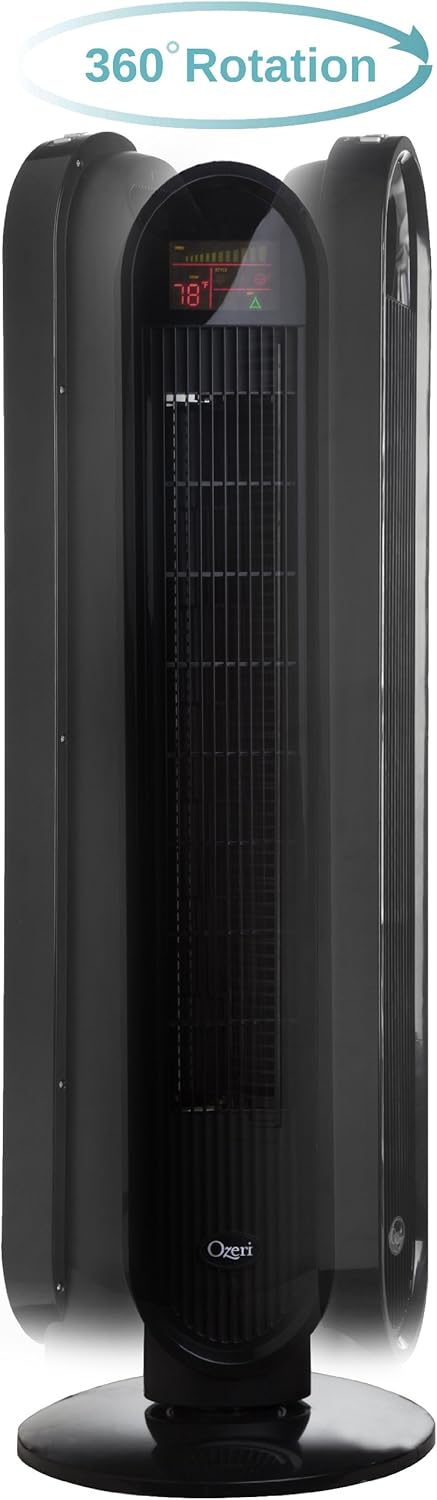
- Przycisk oscylacji (OSC): Activates or deactivates the oscillation feature. You can select oscillation angles of 60, 90, 120, or 360 degrees for partial to complete air circulation.
- Przycisk timera: Sets the 8-hour programmable timer in 30-minute increments.
- Przycisk automatyczny: Engages the auto mode, which adjusts fan speed based on room temperature.
Wyświetlacz LCD:

The multi-colored LCD displays all active fan functions and the current room temperature, allowing for easy monitoring and control.
Zdalne sterowanie:
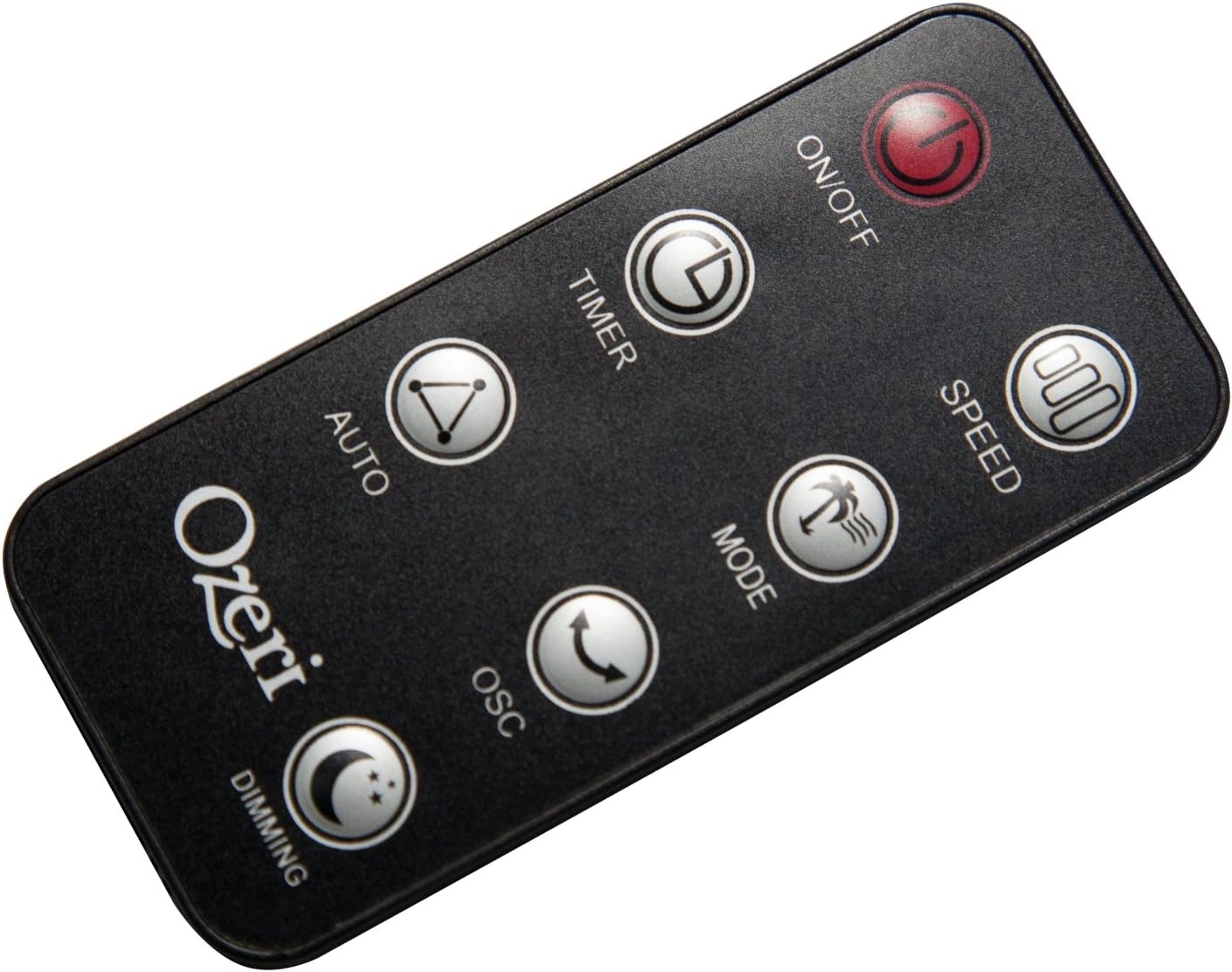
The extended-range remote control provides convenient access to all fan features from a distance. It includes buttons for On/Off, Speed, Timer, Mode, Auto, Oscillation, and Dimming (for the LCD display). The remote can be stored in a dedicated slot on the fan unit.

Oficjalny film o produkcie:
Video: This official product video demonstrates the Ozeri 360 Oscillation Tower Fan, highlighting its micro-blade noise reduction technology and various features.
Konserwacja
Regular cleaning ensures optimal performance and longevity of your fan:
- Zawsze odłączaj wentylator od zasilania przed czyszczeniem.
- Użyj miękkiego, damp Do czyszczenia powierzchni zewnętrznych należy używać ściereczki. Nie należy używać środków czyszczących o właściwościach ściernych ani rozpuszczalników.
- Za pomocą odkurzacza wyposażonego w końcówkę szczotkową delikatnie usuń kurz z kratek wlotu i wylotu powietrza.
- Nie zanurzaj wentylatora w wodzie ani nie pozwól, aby woda kapała do obudowy silnika.
- Kiedy wentylator nie jest używany, przechowuj go w chłodnym i suchym miejscu.
Rozwiązywanie problemów
Jeśli masz problemy z wentylatorem, zapoznaj się z poniższymi typowymi problemami i rozwiązaniami:
- Wentylator nie włącza się: Ensure the power cord is securely plugged into a working outlet. Check if the power button on the fan or remote has been pressed.
- Słaby przepływ powietrza: Check the fan speed setting and increase it if necessary. Ensure the air intake and exhaust grilles are not obstructed by dust or other objects.
- Fan makes unusual noise: Turn off and unplug the fan. Inspect for any foreign objects caught in the grilles or internal components. If the noise persists after clearing any obstructions, contact customer support.
- Pilot nie działa: Ensure the remote control batteries are correctly installed and not depleted. Point the remote directly at the fan's receiver.
Specyfikacje
| Funkcja | Szczegół |
|---|---|
| Marka | Ozeri |
| Numer modelu | OZF5 |
| Kolor | Czarny |
| Projekt wentylatora elektrycznego | Wentylator podłogowy |
| Źródło zasilania | Elektryczny przewodowy |
| Funkcja specjalna | Oscillating (60, 90, 120, 360 degrees) |
| Liczba prędkości | 3 |
| Cotage | 60 watów |
| Przepływ powietrza | 5000 stóp sześciennych na minutę |
| Tomtage | 127 wolty |
| Metoda kontroli | Remote Control, Electronic Touch Controls |
| Tworzywo | Plastikowy |
| Waga przedmiotu | 9 funtów |
Gwarancja i wsparcie
This Ozeri Tower Fan comes with a 1-year no questions asked warranty. For warranty claims, technical support, or any inquiries, please refer to the contact information provided on the Ozeri official webwitryny lub dokumentacji zakupu.