
Wstęp
This manual provides essential information for the safe and effective use of your T POWER 24V AC DC Adapter. Please read this manual thoroughly before using the product and retain it for future reference.
The T POWER 24V AC DC Adapter is designed to provide reliable power to a wide range of compatible Epson photo printers and document scanning systems. It features an input voltage range of AC 100V - 240V and an output of 24V DC.

Image: T POWER 24V AC DC Adapter with power cord.
Zgodność
This adapter is compatible with numerous Epson models. Verify your device's model number or part number against the list below to ensure compatibility.
Compatible Epson Series:
- Epson FastFoto Series: FF-640 (J351B), FF-680W Wireless (A441H, A421H, A411B, A461H, A311B, A221B)
- Epson PictureMate Series: PM-400 Wireless Compact Color Photo Printer (C11CE84201)
- Epson WorkForce Scanner Series: DS-510 / DS510 (B11B209201), WorkForce Pro GT-S50 / GTS50, GT-D1000, GT-1500, GT-2500
- Epson Perfection Scanner Series:
- V Series: V500, V600, V700, V750, V750-M Pro, V800, V850 (Part Numbers: B11B224201, B11B223201, B11B178061)
- 4000 Series: 4490 Photo Scanner (J192A, J211A, B12B813391)
- Flatbed Scanners: A110B, A171B, A221B (2115842-00), A311B (B11B172011, B11B178011, B11B189071, B11B189081), A411B, A411E, 2124947-01, 212494701, 2125592-00
- Additional Models: 640U, 1240U, 1650, 2400, 2480, 2580, 3170, 3490, 3590, 10000X, G812A, J111A, J161A, J221A
- Epson RapidReceipt Series: RR-600W
- Epson POS Printers (AC Adapter Part Numbers): PN: DA-36E24, PN: EADP-31AB C, PN: A411E, A411B, PN: 2125592-00, 2124947-01, 212494701
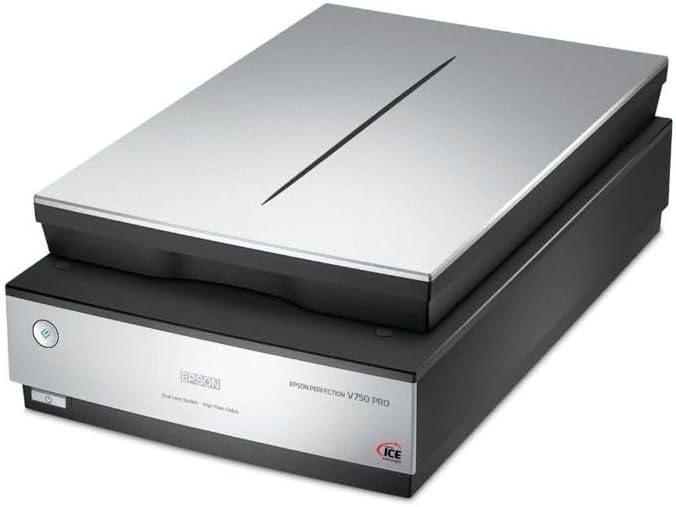
Image: Epson FastFoto FF-680W Wireless Scanner, a compatible device.

Image: Epson PictureMate PM-400 Wireless Compact Color Photo Printer, a compatible device.

Image: Epson Perfection V750 Pro Scanner, a compatible device.
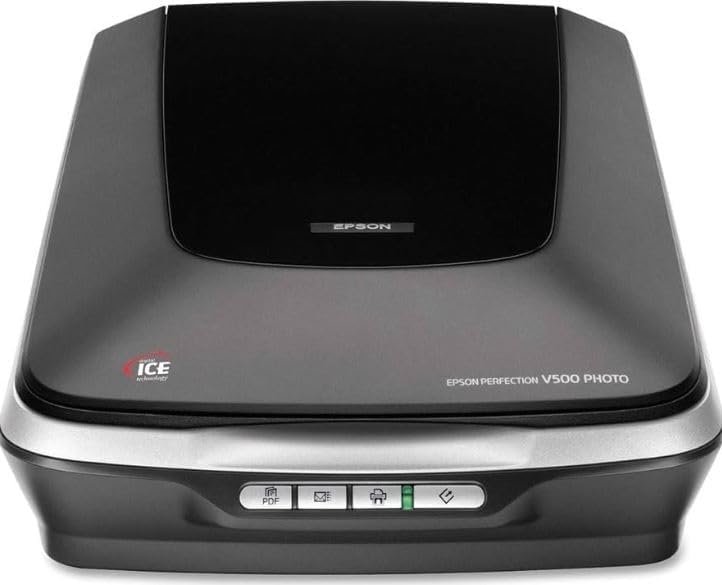
Image: Epson WorkForce Pro Printer, another compatible device.

Image: Epson Perfection V500 Photo Scanner, another compatible device.
Instrukcje konfiguracji
Follow these steps to correctly set up your T POWER AC DC Adapter with your compatible Epson device.
- Rozpakuj adapter: Carefully remove the T POWER AC DC Adapter and its power cord from the packaging.
- Podłącz przewód zasilający: Insert the 2-pin end of the AC power cord into the corresponding receptacle on the T POWER adapter brick. Ensure it is firmly seated.
- Podłącz do gniazdka elektrycznego: Plug the other end of the AC power cord into a standard wall power outlet (AC 100V - 240V). The adapter may have an indicator light to show it is receiving power.
- Połącz z urządzeniem: Locate the power input port on your Epson scanner or printer. Insert the DC output connector (center pin connector) from the T POWER adapter into this port. Ensure a secure connection.
- Urządzenie włączające: Once connected, you can power on your Epson device.
Ważna uwaga dotycząca bezpieczeństwa:
- • Upewnij się, że gniazdko elektryczne jest łatwo dostępne.
- • Do not force connections. If the plug does not fit, check its orientation.
- • Avoid plugging and unplugging the adapter rapidly, as this can cause wear or damage.
Instrukcja obsługi
The T POWER AC DC Adapter operates automatically once connected. It converts the incoming AC voltage to the required 24V DC for your Epson device.
- Tomtage Kompatybilność: The adapter is designed for universal input voltage (AC 100V-240V), making it suitable for use in various regions with appropriate plug adapters (not included).
- Wyjście: Provides a stable 24V DC output, 3 Amps, z maksymalnym watemtage of 90 watts, matching the power requirements of compatible Epson devices.
- Kontrolka: Some adapter models may feature an LED indicator to confirm power is being supplied.
- Odłączenie: To disconnect power, first turn off your Epson device, then unplug the adapter from the wall outlet, and finally disconnect the DC connector from your device.
Konserwacja i pielęgnacja
Proper maintenance ensures the longevity and safe operation of your T POWER AC DC Adapter.
- Czyszczenie: Disconnect the adapter from all power sources and devices before cleaning. Use a soft, dry cloth to wipe the adapter. Do not use liquid cleaners or aerosols.
- Składowanie: When not in use, store the adapter in a cool, dry place, away from direct sunlight and extreme temperatures. Avoid tightly coiling the cables to prevent damage.
- Kontrola kabla: Regularly inspect the power cords and adapter for any signs of damage, such as cuts, fraying, or bent pins. Do not use if damaged.
- Wentylacja: Ensure the adapter is placed in a well-ventilated area during operation to prevent overheating. Do not cover the adapter.
Rozwiązywanie problemów
If you encounter issues with your T POWER AC DC Adapter, refer to the following common problems and solutions.
| Problem | Możliwa przyczyna | Rozwiązanie |
|---|---|---|
| Urządzenie się nie włącza. |
|
|
| Adapter feels hot during use. |
|
|
| Sparking when plugging into outlet. |
|
|
Specyfikacja produktu
| Funkcja | Szczegół |
|---|---|
| Marka | T POWER |
| Numer modelu | TP- Epson DA-36E24 EADP-31AB C A411E |
| Wejście Voltage Zakres | Prąd zmienny 100 V - 240 V |
| Objętość wyjściatage | 24 V (prąd stały) |
| Prąd wyjściowy | 3 Amps |
| Cotage | 90 watów |
| Typ złącza | Center Pin Connector |
| Źródło zasilania | Elektryczny przewodowy |
| Zakres częstotliwości | 50-60 XNUMX Hz |
| Typ głównego złącza zasilania | 2 Pin (North American Type A plug for AC cord) |
| Waga przedmiotu | 4 uncji |
| Tworzywo | Plastikowy |
| Certyfikaty | Certyfikat CE/FCC/RoHS |
Informacje o gwarancji
This T POWER AC DC Adapter comes with a 1-letnia ograniczona gwarancja od daty zakupu. Niniejsza gwarancja obejmuje wady produkcyjne i zapewnia, że produkt spełnia określone standardy wydajności przy normalnym użytkowaniu.
For warranty claims or inquiries, please retain your proof of purchase and contact customer support.
Obsługa klienta
If you have any questions, require assistance, or need to report an issue with your T POWER AC DC Adapter, please contact our customer support team.
For the quickest resolution, please have your product model number (TP- Epson DA-36E24 EADP-31AB C A411E) and purchase details ready.
Informacje kontaktowe dotyczące pomocy technicznej można zazwyczaj znaleźć u sprzedawcy. website where you purchased the product or on the T POWER brand webstrona.