
Wstęp
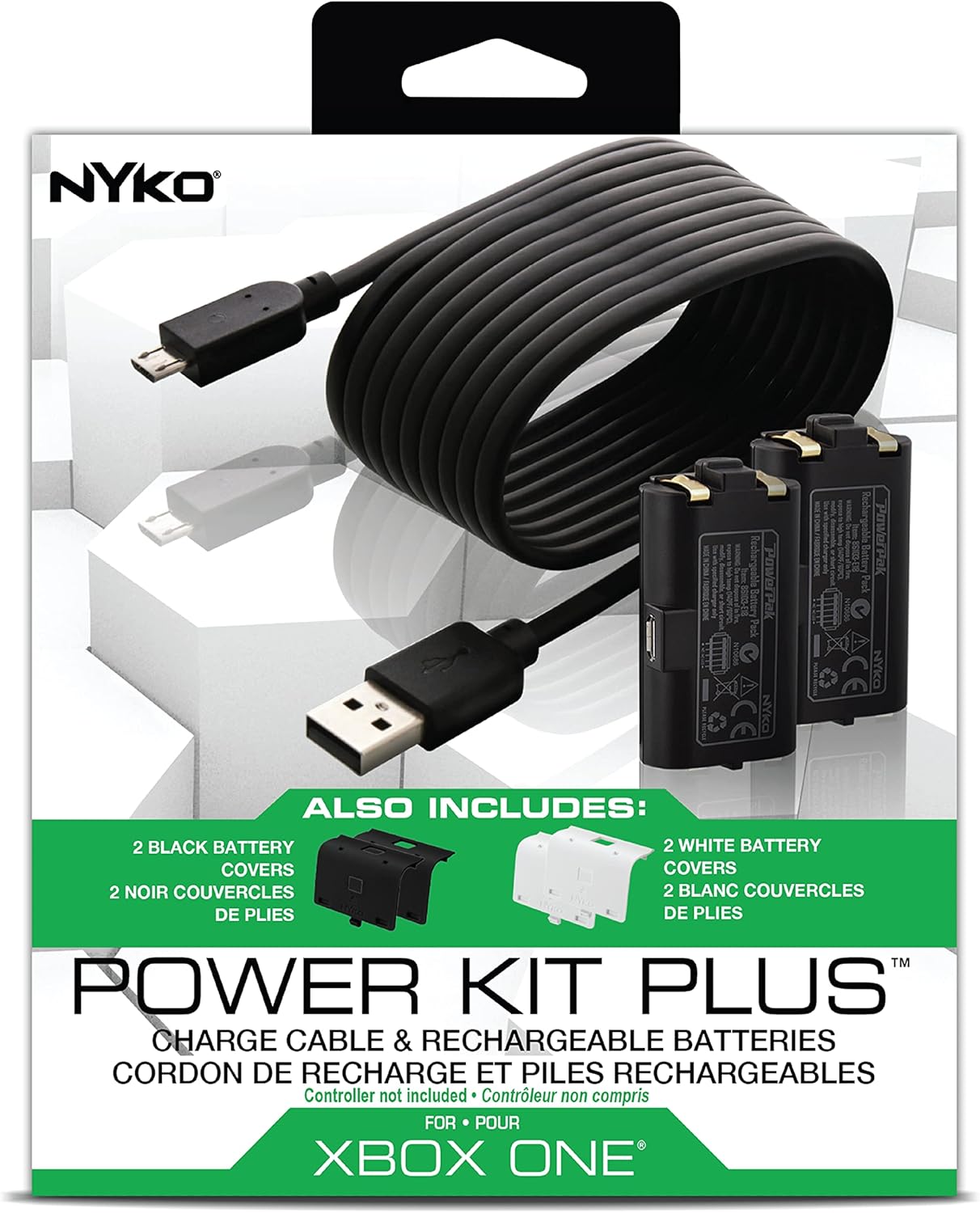
The Nyko Xbox One Power Kit Plus provides a convenient and reliable rechargeable power solution for your Xbox One wireless controllers. This kit includes two rechargeable battery packs, four replacement battery covers (two black and two white), and an 8-foot Micro-USB charge cable with an LED indicator. It is designed to eliminate the need for disposable batteries, offering extended gameplay sessions.
Zgodność
This Power Kit Plus is specifically designed for original Xbox One wireless controllers ONLY. To jest niekompatybilny with Xbox Series S/X controllers or any Xbox controllers that feature a dedicated Home button on the battery cover itself.
Co jest zawarte
Sprawdź, czy w opakowaniu znajdują się wszystkie poniższe elementy:
- 2 x Nyko Rechargeable Battery Packs (1200 mAh NiMH)
- 2 x Black Replacement Battery Covers
- 2 x White Replacement Battery Covers
- 1 x 8-foot Micro-USB Charge Cable with LED Indicator

Instrukcje konfiguracji
Follow these steps to install the rechargeable battery pack and cover into your Xbox One wireless controller:
- Włóż akumulator: Open the battery compartment on the back of your Xbox One controller. Carefully insert one of the Nyko rechargeable battery packs, ensuring the contacts align correctly. The battery pack is labeled "THIS SIDE UP" for proper orientation.
- Załóż okładkę: Select a matching or preferred color battery cover (black or white) and snap it securely into place over the installed battery pack. Ensure it clicks firmly to prevent dislodging during use.
Instrukcje ładowania
The Nyko Power Kit Plus offers two methods for charging your rechargeable battery packs:
- Direct Charging with Micro-USB Cable: Connect the included 8-foot Micro-USB charge cable directly to the port on the rechargeable battery pack while it is installed in the controller. Plug the other end of the cable into a powered USB port (e.g., on your Xbox One console, a wall adapter, or a PC). The LED indicator on the cable will illuminate to show charging status.
- Charging with Nyko Charge Base (Sold Separately): If you own a Nyko Charge Base, you can place the controller with the installed battery pack onto the base. Ensure the battery charge contacts on the controller align with the contacts on the charge base. The base will indicate when charging is active.
The LED indicator on the Micro-USB cable will typically show a red light during charging and turn green when the battery is fully charged. Each battery pack provides up to 25 hours of gameplay per charge.

Działanie
Once the battery pack is installed and charged, your Xbox One wireless controller will function as usual. The rechargeable battery provides power for gameplay, and the 8-foot Micro-USB cable allows for continued play while charging, effectively turning your wireless controller into a wired one if needed.
Konserwacja
- Keep the battery packs and charging cable dry. Avoid exposure to moisture or extreme temperatures.
- Clean the battery contacts periodically with a dry cloth to ensure optimal connection.
- Store unused battery packs in a cool, dry place.
Rozwiązywanie problemów
- Akumulator nie ładuje się:
- Ensure the Micro-USB cable is securely connected to both the battery pack and the power source.
- Wypróbuj inny port USB lub zasilacz.
- Verify the LED indicator on the cable is illuminated (red for charging).
- Kontroler się nie włącza:
- Check that the battery pack is fully inserted and the battery cover is securely attached.
- Ensure the battery pack is charged. If not, connect the charging cable.
- Try using a different, fully charged battery pack.
- Ładowanie podczas gry: If the battery is completely depleted, plugging in the charge cable might not immediately allow for continuous play without interruption. It is recommended to plug in the controller when a low battery alert appears, rather than waiting for the battery to fully die.
Specyfikacje
| Funkcja | Szczegół |
|---|---|
| Marka | Nyko |
| Numer modelu | 86103 |
| UPC | 743840861034 |
| Typ baterii | NiMH (niklowo-wodorkowy) |
| Pojemność baterii | 1200 mAh (per pack) |
| Objętość wyjściatage | 3.7 V (prąd stały) |
| Prąd wyjściowy | 1 Amps |
| Wejście Voltage | 5 V (prąd stały) |
| Ampwymazać | 0.5 Amps |
| Cotage | 10 watów |
| Długość kabla | 8 stopy (ok. 2.43 metra) |
| Typ złącza | Mikro USB |
| Tworzywo | Plastikowy |
| Waga | 0.18 kilograma |
| Orzecznictwo | Zatwierdzone przez CE |
Gwarancja i wsparcie
This product comes with a manufacturer's warranty. For detailed warranty information, support, or service inquiries, please refer to the official Nyko website or contact Nyko customer support directly. Keep your proof of purchase for warranty claims.