
1. Wprowadzenie
The Yatour YTM06-RD3 Digital Music Changer is an advanced solution designed to integrate USB, SD card, and AUX input capabilities into your vehicle's original car radio system. This adapter allows you to enjoy high-quality digital music directly through your car's audio system, controlled conveniently via the existing radio buttons. It provides a seamless upgrade without altering the car's interior aesthetics.
2. Koniec produktuview
The Yatour YTM06-RD3 connects directly to the CD changer port of compatible car radios, ensuring no loss of sound quality. It supports various digital audio formats, primarily MP3 and WMA, from USB sticks and SD/SDHC cards up to 32GB. An additional 3.5mm AUX input allows connection of external audio devices like MP3 players or smartphones. The compact design ensures easy installation and discreet placement within your vehicle, such as in the glove compartment.
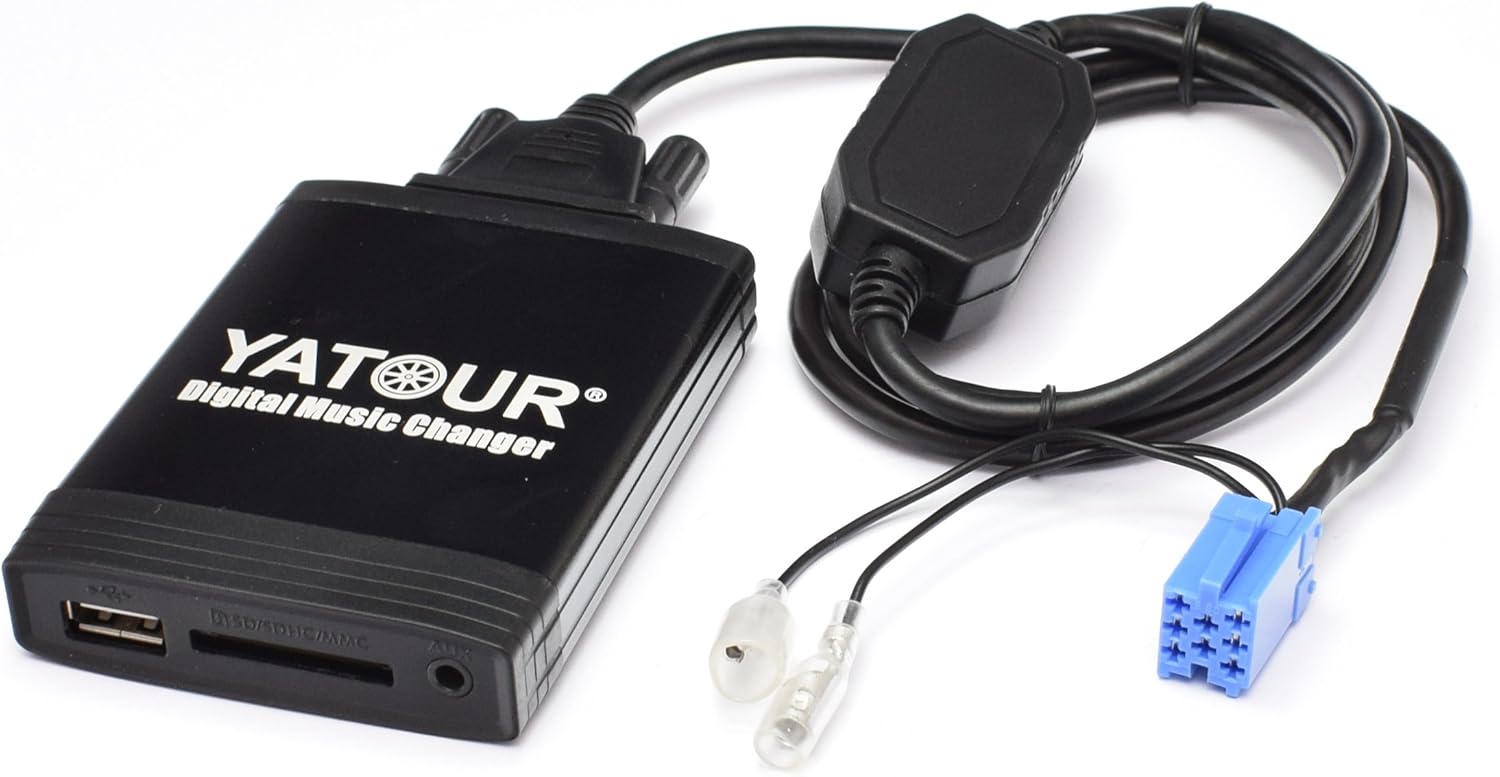
Rysunek 1: The Yatour YTM06-RD3 Digital Music Changer unit, showing the main module, USB, SD, and AUX ports, and the connection cables with the blue mini-ISO connector.
3. Zgodność
3.1 Compatible Vehicle Models (with OEM RD3 Radios)
- Fiat / Alfa Romeo / Lancia: Vehicles equipped with OEM RD3 radios.
- Peugeot:
- 106 (1997-2004)
- 2006 (1997-2004)
- 206 (1998-2007)
- 206CC (2004-2007)
- 307 (2002-2004)
- 307SW (2004-2005)
- 406 (2002-2004)
- 407SW (2004-2005)
- 806 (1997-2001)
- 807 (2002-2004)
- Citroen:
- C3 (2002-2004)
- C4 (up to 2002)
- C5 (2001-2004)
- C8 (up to 2004)
- Xsara (2001-2005)
3.2 Compatible Radio Models
- Clarion: RM2 Radio, RD3 Radios (e.g., PU1633A, PU1646A, PU2184A, PU2294A, PU2380B, PU2473A)
- Blaupunkt: RD3 Radio
- VDO: RB3 Radio
3.3 Incompatible Radio Models
- PU-2471A
- RD3-01
- PU2295A
4. Zawartość opakowania
The Yatour YTM06-RD3 package typically includes the following items:
- 1 x USB/SD/AUX Interface Box (YTM06-RD3)
- 1 x Connection Cable for AUX RD3.5
- 1 x Instrukcja obsługi
5. Konfiguracja i instalacja
Proper installation is crucial for the optimal performance of your Yatour Digital Music Changer. Please follow these steps carefully:
- Odłącz akumulator samochodowy: Before starting any electrical work, always disconnect the negative terminal of your car battery to prevent short circuits or damage.
- Usuń radio samochodowe: Carefully remove your car's existing radio from the dashboard. Consult your vehicle's service manual for specific instructions on how to do this.
- Zlokalizuj port zmieniarki CD: Identify the CD changer port on the back of your car radio. This is typically a mini-ISO connector, often blue.
- Podłącz adapter Yatour: Plug the Yatour adapter's main connector cable into the CD changer port on the back of the radio. Ensure a secure connection.
- Trasa kabli: Route the Yatour unit and its cables to a suitable location, such as the glove compartment or center console, where it can be easily accessed but remains discreet.
- Reinstall Radio: Carefully slide the car radio back into its slot and secure it.
- Ponowne podłączenie akumulatora samochodowego: Podłącz ponownie zacisk ujemny akumulatora samochodowego.
- Activate CD Changer Function: It is essential that the CD changer function is enabled or activated on your car radio. In some cases, this may require a visit to a car dealership or using diagnostic software. Without this activation, the Yatour adapter will not be recognized by the radio.

Rysunek 2: Installation diagram illustrating the connection of the Yatour unit to the car radio's CD changer input, and the use of USB, SD, and AUX inputs.
6. Instrukcja obsługi
Once installed and the CD changer function is activated, operating the Yatour YTM06-RD3 is straightforward:
- Włączanie: Włącz radio samochodowe.
- Select CD Changer Mode: Press the 'CD' or 'CDC' button on your car radio to switch to the CD changer mode. The radio should now recognize the Yatour adapter.
- Włóż media: Insert a USB stick or SD card containing MP3/WMA files into the corresponding slot on the Yatour unit. Alternatively, connect an external audio device to the 3.5mm AUX input.
- Kontrola odtwarzania: Use the standard radio buttons (e.g., track up/down, folder up/down) to navigate through your music files and folders. The Yatour unit emulates a multi-disc CD changer, with folders on your USB/SD card appearing as virtual CDs.
- Wejście AUX: When using the AUX input, the audio playback is controlled directly from the connected external device. The car radio's controls will not manage track selection or volume for AUX input.
Notatka: For optimal performance, organize your music files into folders (e.g., CD01, CD02) on your USB stick or SD card. Each folder can contain up to 99 files, and the device typically supports up to 6-9 folders, depending on the radio model.
7. Konserwacja
The Yatour YTM06-RD3 Digital Music Changer requires minimal maintenance. Follow these guidelines to ensure longevity:
- Utrzymywać w suchości: Ensure the unit is kept away from moisture and liquids.
- Unikaj ekstremalnych temperatur: Do not expose the unit to extreme heat or cold, as this can affect electronic components.
- Czyść delikatnie: W razie konieczności czyszczenia należy użyć miękkiej, suchej ściereczki. Nie należy używać silnych środków chemicznych ani materiałów ściernych.
- Bezpieczne połączenia: Periodically check that all cables are securely connected to prevent intermittent audio issues.
8. Rozwiązywanie Problemów
If you encounter issues with your Yatour YTM06-RD3, refer to the following troubleshooting tips:
- No Sound / Device Not Recognized:
- Ensure the car battery was disconnected and reconnected during installation.
- Verify that the CD changer function is activated on your car radio. This is a common requirement for the adapter to be recognized.
- Check all cable connections, especially the main connector to the radio's CD changer port.
- Try a different USB stick or SD card to rule out media issues. Ensure media is formatted to FAT32.
- Przerywany dźwięk:
- Sprawdź, czy połączenia nie są luźne.
- Ensure the USB stick or SD card is fully inserted and not damaged.
- Cannot Control Playback via Radio Buttons:
- This is normal when using the AUX input; control must come from the external device.
- If using USB/SD, ensure files are in MP3/WMA format and organized into folders (e.g., CD01, CD02).
- Zniekształcony dźwięk:
- Check the audio source (USB/SD file quality or external device).
- Ensure volume levels are not excessively high on both the radio and the external device (if using AUX).
9. Specyfikacje
| Funkcja | Szczegół |
|---|---|
| Numer modelu | YTM06-RD3 |
| Typ złącza | Auxiliary (Mini-ISO) |
| Wymiary (dł. x szer. x wys.) | 9.4 x 6.6 x 1.6 cm (approximately 90 x 65 x 16 mm) |
| Wsparcie USB | Up to 32 GB USB sticks |
| Obsługa kart SD | Up to 32 GB SD/SDHC cards |
| Formaty audio | MP3, WMA |
| Wejście AUX | 3.5mm jack (no control via radio) |
| Liczba portów | 3 (USB, SD, AUX) |
10. Gwarancja i wsparcie
For warranty information and technical support, please refer to the documentation provided with your purchase or contact your retailer. Yatour products typically come with a standard manufacturer's warranty covering defects in materials and workmanship. Keep your proof of purchase for any warranty claims.