
Naddźwiękowy SC-25
SuperSonic SC-25 2.0 Channel DVD Player with USB Input User Manual
Model: SC-25
Wstęp
Dziękujemy za zakupasing the SuperSonic SC-25 2.0 Channel DVD Player with USB Input. This manual provides essential information for the safe and efficient operation of your new device. Please read it thoroughly before use and retain it for future reference.
Środki ostrożności
- Aby uniknąć pożaru lub porażenia prądem, nie wystawiaj urządzenia na działanie deszczu i wilgoci.
- Nie otwierać casing. Wszelkie prace serwisowe powierzaj wykwalifikowanemu personelowi.
- Zapewnij odpowiednią wentylację wokół urządzenia.
- Unikaj umieszczania urządzenia na niestabilnych powierzchniach.
- Odłączaj przewód zasilający podczas burzy z piorunami lub jeśli nie używasz urządzenia przez dłuższy czas.
Zawartość opakowania
Before setup, please verify that all items are present:
- 1 SuperSonic SC-25 DVD Player Unit
- 1 Pilot zdalnego sterowania
- 1 Instrukcja obsługi (ten dokument)
- Kabel zasilający
- Kabel audio/wideo (AV)
Instrukcje konfiguracji
1. Podłączanie do telewizora
- Ensure both the DVD player and your television are powered off.
- Connect one end of the AV cable (red, white, yellow connectors) to the corresponding output jacks on the back of the DVD player.
- Connect the other end of the AV cable to the corresponding input jacks on your television.
- For optimal video quality, ensure the television input is set to the correct AV channel (e.g., Video 1, AV1). The player supports NTSC video format.
2. Podłączenie zasilania
- Plug the power cable into the AC IN port on the back of the DVD player.
- Podłącz drugi koniec kabla zasilającego do standardowego gniazdka elektrycznego.
3. Pierwsze włączenie zasilania
- Press the Power button on the front panel of the DVD player or on the remote control.
- Turn on your television and select the correct input source (e.g., AV1, Video 1) to see the DVD player's display.
Instrukcja obsługi
1. Odtwarzanie płyt
- Aby otworzyć tackę na płytę, naciśnij przycisk OTWÓRZ/ZAMKNIJ na panelu przednim lub pilocie.
- Place a compatible disc (DVD, CD, VCD, SVCD, MP3, Picture CD, CD-R, CD-RW) onto the disc tray with the label side facing up.
- Naciśnij ponownie przycisk OTWÓRZ/ZAMKNIJ, aby zamknąć tackę na płytę. Odtwarzacz automatycznie rozpocznie odczyt płyty.
- Do zarządzania odtwarzaniem służą przyciski PLAY, PAUSE, STOP, FAST FORWARD i REWIND na pilocie.
- The player supports multi-level fast forward and backward scan functionalities.
2. Odtwarzanie USB
- Insert a USB flash drive into the USB input port on the front of the DVD player.
- The player should automatically detect the USB device and display its contents. If not, use the SOURCE or USB button on the remote to switch to USB mode.
- Poruszaj się po swoim files using the arrow keys and SELECT/ENTER button on the remote.
- The player supports MP3 file format for audio playback.
3. Language and Subtitle Settings
- During DVD playback, press the AUDIO button on the remote to cycle through available audio languages (up to 8 languages supported).
- Press the SUBTITLE button on the remote to cycle through available subtitle languages (up to 32 subtitles supported).
Konserwacja
1. Czyszczenie urządzenia
- Wipe the exterior of the DVD player with a soft, dry cloth.
- Nie należy używać środków czyszczących w płynie ani aerozolu, gdyż mogą one uszkodzić wykończenie lub wewnętrzne elementy.
2. Dyski czyszczące
- Trzymaj płyty za krawędzie, aby uniknąć pozostawienia odcisków palców.
- Jeśli płyta jest brudna, wytrzyj ją delikatnie od środka na zewnątrz miękką, niepozostawiającą włókien ściereczką.
- Nie należy używać do czyszczenia płyt środków czyszczących o właściwościach ściernych ani rozpuszczalników.
3. Przechowywanie
- Store the DVD player in a cool, dry place away from direct sunlight and extreme temperatures.
- When not in use, store discs in their cases to protect them from dust and scratches.
Rozwiązywanie problemów
| Problem | Możliwa przyczyna | Rozwiązanie |
|---|---|---|
| Brak zasilania | Przewód zasilający nie jest podłączony; gniazdko elektryczne nie jest aktywne. | Sprawdź, czy przewód zasilający jest prawidłowo podłączony. Sprawdź gniazdko, podłączając do niego inne urządzenie. |
| Brak obrazu i dźwięku | AV cables incorrectly connected; Incorrect TV input selected. | Check AV cable connections. Select the correct input source on your TV. |
| Dysk nie odtwarza się | Disc is dirty or scratched; Disc is incompatible; Disc inserted incorrectly. | Clean the disc. Ensure the disc type is supported. Insert disc with label side up. |
| Urządzenie USB nie zostało rozpoznane | USB device not properly inserted; Unsupported file format on USB. | Re-insert the USB device. Ensure files są w formacie MP3. |
Specyfikacje
- Marka: Naddźwiękowy
- Numer modelu: SC-25
- Typ nośnika: CD, DVD (Compatible with DVD/CD/VCD/SVCD/MP3/Picture/CD-R/CD-RW)
- Technologia łączności: Powerline (Implies standard AC power connection)
- Kolor: Czarny
- Waga przedmiotu: 1.9 funtów
- Zgodne urządzenia: Telewizja
- Zgodność z wejściem wideo: NTSC
- Liczba kanałów: 2
- Analogowy format wideo: NTSC
- Rodzaj kontrolera: Zdalne sterowanie
- File Format (USB): MP3
- Kod UPC: 639131000254
- Producent: SUPERSONIC INC.
- Wymiary opakowania: 7.874 wys. x 24.13 dł. x 24.13 szer. (centymetry)
- Waga paczki: 2.160 funta
- Kraj pochodzenia: Chiny
Gwarancja i wsparcie
This SuperSonic SC-25 DVD Player is covered by a Gwarancja producenta. For specific details regarding warranty terms and conditions, please refer to the documentation included with your purchase or contact SuperSonic customer support.
For technical assistance or customer service inquiries, please visit the official SuperSonic website or contact their support channels. Keep your purchase receipt for warranty claims.
Produkt ponadview
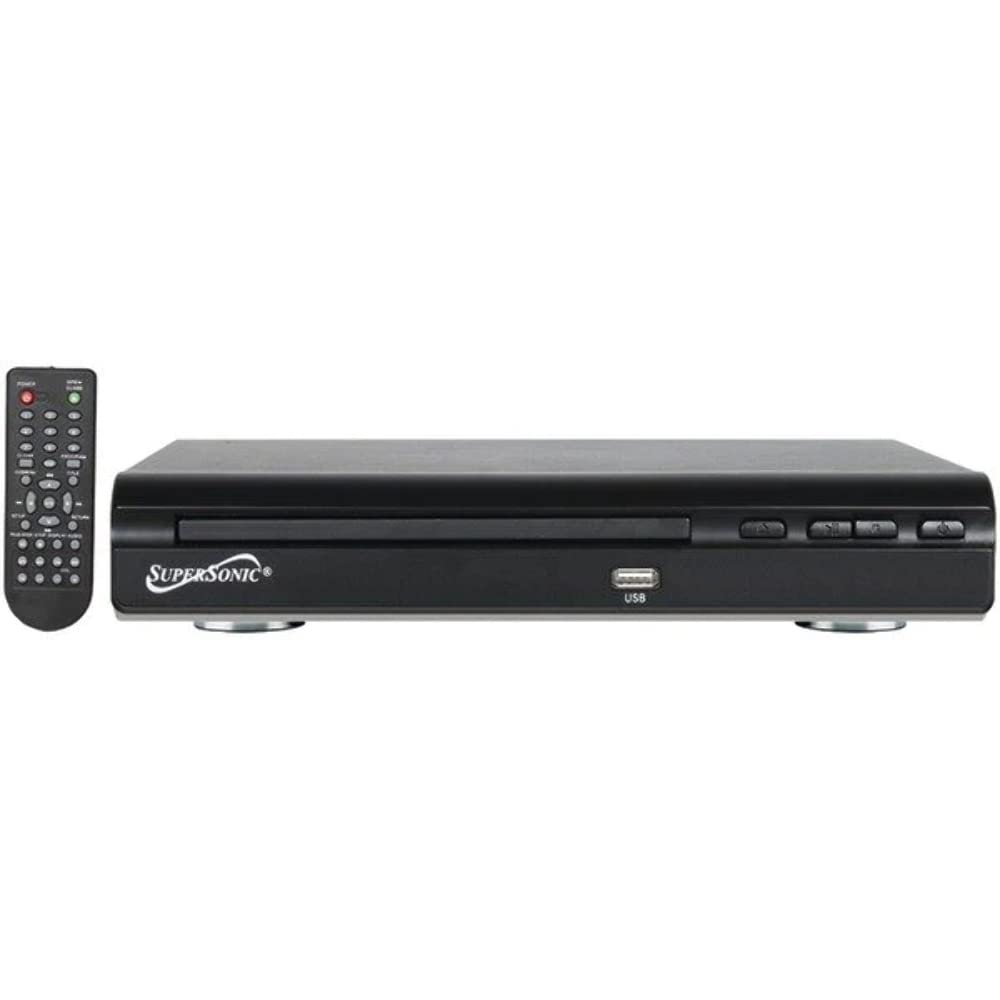
Przód view of the SuperSonic SC-25 DVD player, showing the disc tray, USB port, and control buttons.
Ask a question about this manual
Ask about setup, troubleshooting, compatibility, parts, safety, or missing instructions. Manuals+ will review the question and use this page’s manual context to help answer it.