
Sungale PF1501
Sungale PF1501 14-Inch Digital Photo Frame User Manual
Model: PF1501
1. Wprowadzenie
This manual provides detailed instructions for the setup, operation, and maintenance of your Sungale PF1501 14-Inch Digital Photo Frame. This device is designed to display digital photos, play videos, and play music, offering a versatile way to enjoy your media.
Przed użyciem produktu należy dokładnie przeczytać tę instrukcję, aby mieć pewność, że działa on prawidłowo i zapewnić sobie jak najlepsze wrażenia użytkownika.
2. Zawartość opakowania
Sprawdź, czy w przesyłce znajdują się wszystkie elementy wymienione poniżej:
- Sungale PF1501 14-Inch Digital Photo Frame
- Zasilacz sieciowy
- Zdalne sterowanie
- Szybki przewodnik
- Limited Warranty Card
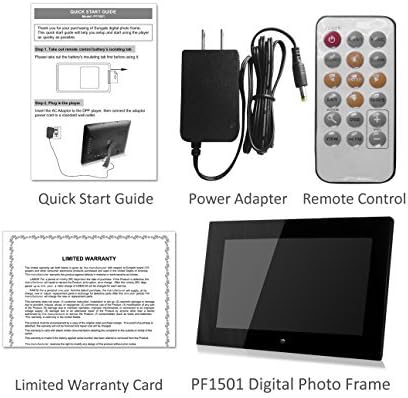
Image 2.1: Included accessories and the digital photo frame.
3. Koniec produktuview
3.1 Przód View

Obraz 3.1: Przód view of the digital photo frame.
3.2 Tył View i porty

Obraz 3.2: Tył view with labeled ports and controls.
The rear of the frame features various ports and controls for connectivity and operation:
- Klawisze funkcyjne: Buttons for navigation and control (Enter, Left, Right, Up, Down, Exit).
- Możliwość montażu na ścianie: Mounting points for wall installation.
- Wbudowany głośnik: Do odtwarzania dźwięku.
- Port zasilania prądem stałym 12 V: Tutaj podłącz zasilacz sieciowy.
- Removable Bracket: Stand for desktop placement.
- Przycisk zasilania: To turn the frame on or off.
- Port hosta USB: Do podłączania dysków flash USB.
- Gniazdo kart SD/SDHC: For inserting SD or SDHC memory cards.
- Port urządzenia USB: Do podłączenia do komputera.
4. Konfiguracja
4.1 Początkowe włączenie zasilania
- Podłącz zasilanie: Insert the AC power adapter into the DC 12V Power Port on the back of the frame. Plug the other end into a standard electrical outlet.
- Włączanie: Press the Power button located on the back of the frame. The frame will power on and display the initial setup screen or default content.
4.2 Inserting Memory Cards or USB Drives
The frame supports SD/SDHC cards and USB flash drives (up to 32GB). It also has 4GB of internal memory.
- For SD/SDHC Card: Gently insert an SD or SDHC card into the SD/SDHC Card Slot until it clicks into place. Ensure the card is inserted in the correct orientation.
- For USB Flash Drive: Insert a USB flash drive into the USB Host Port.
The frame should automatically detect the inserted media and begin displaying content or prompt you to select a source.
4.3 Montaż na ścianie (opcjonalnie)
The frame can be wall-mounted using the designated mounting points on the rear. Ensure appropriate wall anchors and screws are used for secure installation.
5. Instrukcja obsługi
The digital photo frame can be operated using the function keys on the back or the included remote control.
5.1 Funkcje zdalnego sterowania
The remote control provides convenient access to all features. Point the remote control directly at the frame's sensor.
5.2 Poruszanie się po menu
Use the directional buttons (Up, Down, Left, Right) to navigate through menu options. Press the "Enter" button to confirm a selection. The "Exit" button typically returns to the previous screen or the main menu.
5.3 Wyświetlanie zdjęć
The frame supports JPG and BMP photo file formaty.
- Wybierz źródło: From the main menu, select the desired media source (Internal Memory, SD Card, or USB Drive).
- Wybierz tryb zdjęć: Select "Photo" to enter photo display mode.
- Pokaz slajdów: The frame can automatically start a slideshow of all photos on the selected source. You can adjust transition effects and interval times in the settings.
- Single Photo Display: Navigate to a specific photo and press "Enter" to display it individually.
- Zoom and Rotate: Use the remote control or function keys to zoom in/out or rotate displayed photos.
5.4 Odtwarzanie plików wideo
The frame supports video playback. Note that some users have reported compatibility primarily with .AVI video files.
- Wybierz źródło: From the main menu, select the desired media source.
- Choose Video Mode: Select "Video" to enter video playback mode.
- Select Video: Przejdź do żądanego filmu file and press "Enter" to begin playback.
5.5 Odtwarzanie muzyki
The frame can play background music during photo slideshows or as standalone audio.
- Wybierz źródło: From the main menu, select the desired media source.
- Wybierz tryb muzyki: Select "Music" to enter music playback mode.
- Wybierz Audio File: Navigate to the desired audio file and press "Enter" to begin playback.
- Muzyka w tle: In photo settings, you can enable background music to play during slideshows.
5.6 Calendar and Alarm Clock
Access the calendar and alarm clock functions through the main menu. Follow on-screen prompts to set the date, time, and alarm preferences.
6. Konserwacja
6.1 Czyszczenie ekranu
- Turn off and unplug the frame before cleaning.
- Do delikatnego przecierania ekranu należy używać miękkiej, niepozostawiającej włókien ściereczki, np. ściereczki z mikrofibry.
- W przypadku uporczywych plam delikatnieampPrzetrzyj ściereczkę wodą lub specjalnym płynem do czyszczenia ekranów przeznaczonym do urządzeń elektronicznych. Nie rozpylaj płynu bezpośrednio na ekran.
- Avoid using abrasive cleaners, solvents, or alcohol-based solutions, as these can damage the screen surface.
6.2 Ogólna opieka
- Keep the frame away from direct sunlight, heat sources, and excessive moisture.
- Avoid dropping or subjecting the frame to strong impacts.
- Do not block the ventilation openings on the back of the frame.
- Unplug the frame during lightning storms or when unused for extended periods.
7. Rozwiązywanie Problemów
If you encounter issues with your digital photo frame, refer to the following common problems and solutions:
| Problem | Możliwa przyczyna / rozwiązanie |
|---|---|
| Ramka się nie włącza. |
|
| "File not supported" error or media not displaying. |
|
| Pilot zdalnego sterowania nie działa. |
|
| Photos are stretched or distorted. |
|
| Slideshow not playing randomly. |
|
8. Specyfikacje
| Funkcja | Szczegół |
|---|---|
| Numer modelu | PF1501 |
| Rozmiar ekranu | 14 cali |
| Rezolucja | 1366x768 pikseli |
| Pamięć wewnętrzna | 4 GB |
| Obsługa pamięci zewnętrznej | SD/SDHC Card (up to 32GB), USB Flash Drive (up to 32GB) |
| Obsługiwane formaty zdjęć | JPG, BMP |
| Obsługiwane formaty wideo | Primarily AVI (as reported by users) |
| Wyjście audio | 2 Channel Stereo Speakers |
| Wymiary produktu | 13.8 x 1 x 9.5 cala |
| Waga przedmiotu | 2 funta |
| Kolor | Czarny |
| Producent | Sungale |
9. Gwarancja i wsparcie
9.1 Ograniczona gwarancja
This product comes with a Limited Warranty. Please refer to the "Limited Warranty Card" included in your package for detailed terms and conditions, including coverage period and claim procedures. Keep your proof of purchase for warranty claims.
9.2 Obsługa klienta
For technical assistance, troubleshooting beyond this manual, or warranty inquiries, please contact Sungale customer support.
- Producent: Sungale
- Webstrona: Visit the Sungale Store on Amazon (dla ogólnych informacji o marce)
- Specific contact information (phone, email) may be found on the warranty card or the official Sungale webstrona.