
Wstęp
This manual provides detailed instructions for the installation, operation, and maintenance of your VTech VTCS6619 DECT 6.0 Expandable Speakerphone with Caller ID. Please read this manual thoroughly before using your new telephone system to ensure proper functionality and to take full advantage jego funkcji.
Zawartość opakowania
Sprawdź, czy w przesyłce znajdują się następujące elementy:
- Cordless Phone with Caller ID/Call Waiting
- Jednostka bazowa telefonu
- Zasilacz sieciowy
- Przewód telefoniczny
- Akumulator do telefonu komórkowego
- Obudowa słuchawki
Organizować coś
Follow these steps to set up your VTech VTCS6619 telephone system.
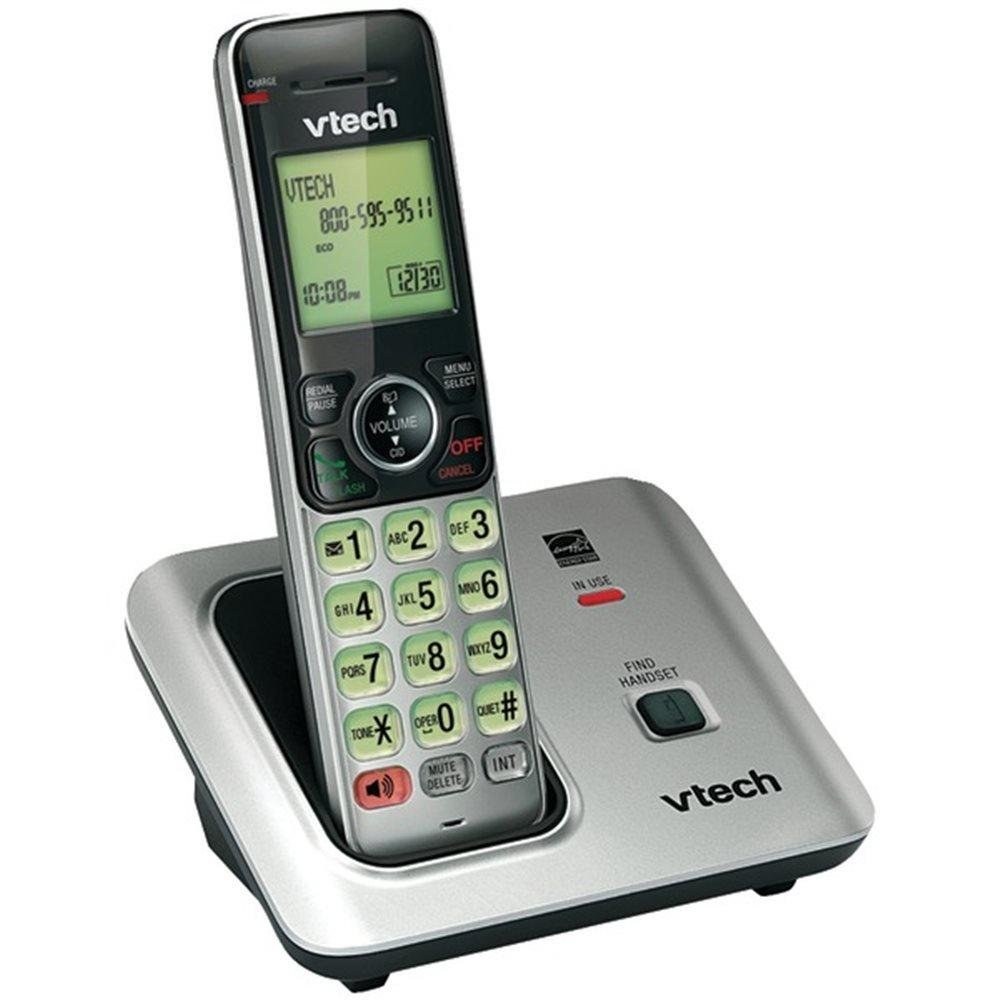
Image: The VTech VTCS6619 DECT 6.0 Cordless Speakerphone with Caller ID, showing the black handset and base unit.
1. Instalacja baterii
- Otwórz pokrywę komory baterii z tyłu słuchawki.
- Podłącz wtyczkę akumulatora do gniazda wewnątrz komory.
- Umieść akumulator etykietą do góry i starannie ułóż przewody wewnątrz komory.
- Zamknij pokrywę komory baterii.
2. Podłączenie jednostki bazowej
- Podłącz mniejszą wtyczkę zasilacza sieciowego do gniazda zasilania z tyłu podstawy telefonu.
- Podłącz większy koniec zasilacza sieciowego do gniazdka ściennego, którego nie można kontrolować za pomocą przełącznika ściennego.
- Podłącz jeden koniec przewodu telefonicznego do gniazda TEL LINE z tyłu podstawy telefonu.
- Podłącz drugi koniec przewodu telefonicznego do gniazdka telefonicznego w ścianie.
3. Ładowanie słuchawki
Once the battery is installed and the base unit is connected, place the handset on the telephone base. The CHARGE light on the handset will illuminate, indicating that the battery is charging. Allow the handset to charge for at least 10 hours before initial use.
Instrukcja obsługi
This section details the basic functions and features of your VTech VTCS6619 phone.
Wykonywanie i odbieranie połączeń
- Zadzwonić: Naciskać ROZMOWA/BŁYSK or GŁOŚNIK, a następnie wybierz numer telefonu.
- Aby odebrać połączenie: Gdy telefon zadzwoni, naciśnij ROZMOWA/BŁYSK or GŁOŚNIK.
- Aby zakończyć połączenie: Naciskać WYŁ./KAS lub odłóż słuchawkę na podstawę telefonu.
Funkcja głośnika
Aby włączyć głośnik podczas połączenia, naciśnij przycisk GŁOŚNIK przycisk. Naciśnij go ponownie, aby powrócić do słuchania muzyki przez słuchawkę.
Identyfikacja dzwoniącego i połączenie oczekujące
The phone displays the caller's name and number (if available) before you answer. If you subscribe to Call Waiting service, the phone will alert you to an incoming call while you are on another call. Press BŁYSK aby przełączać się między połączeniami.
Rozmowy konferencyjne
The VTech VTCS6619 supports 3-way conference calls. While on a call, you can add a third party by pressing the BŁYSK button, dialing the new number, and then pressing BŁYSK ponownie, aby połączyć wszystkie strony.
Cyfrowy system zgłoszeniowy
The integrated digital answering system records incoming messages when you are unavailable. Access messages by pressing the ODTWÓRZ/ZATRZYMAJ button on the base or through the handset menu. Refer to the full user guide for detailed instructions on setting up your outgoing message and managing messages.
Konserwacja
Proper care ensures the longevity of your telephone system.
Czyszczenie
Wyczyść telefon i jednostkę bazową miękką,amp cloth. Do not use cleaning sprays or liquid cleaners, as they may damage the finish or electrical components.
Pielęgnacja baterii
To maintain optimal battery performance, avoid exposing the handset to extreme temperatures. If the phone will not be used for an extended period, remove the battery to prevent leakage.
Rozwiązywanie problemów
If you experience any issues with your phone, refer to the following common problems and solutions:
| Problem | Rozwiązanie |
|---|---|
| Brak sygnału wybierania | Upewnij się, że przewód telefoniczny jest prawidłowo podłączony zarówno do jednostki bazowej, jak i do gniazda ściennego. Sprawdź, czy zasilacz sieciowy jest prawidłowo podłączony. |
| Słaba jakość dźwięku | Move the handset closer to the base unit. Check for interference from other electronic devices. Ensure the battery is fully charged. |
| Słuchawka się nie ładuje | Verify the handset is correctly placed on the base unit. Clean the charging contacts on both the handset and base with a dry cloth. Check the power connection to the base unit. |
| Identyfikator dzwoniącego nie jest wyświetlany | Ensure you have subscribed to Caller ID service from your telephone service provider. The feature may not work if the caller has blocked their number. |
Specyfikacje
- Marka: VTech
- Model: VTCS6619
- Typ telefonu: Bezprzewodowy
- Kolor: Czarny
- Liczba baterii: Wymagane 1 baterie AAA (w zestawie)
- Tworzywo: Plastikowy
- Źródło zasilania: Zasilany bateryjnie
- Typ dialera: Ton
- Wymiary przedmiotu (dł. x szer. x wys.): 6.9 x 5.2 x 6.7 cala
- Typ systemu zgłoszeniowego: Cyfrowy
- Waga przedmiotu: 1 funt
- Zgodne urządzenia: VTech CS6619 handsets, basic answering machines
- Możliwość połączeń konferencyjnych: 3-drożny
- Operacja wieloliniowa: Praca jednoliniowa
- Czas czuwania telefonu: 7200 minut
- Identyfikator dzwoniącego: Tak
Gwarancja i wsparcie
Your VTech VTCS6619 telephone system is covered by a 1-roczna ograniczona gwarancja from the date of purchase. This warranty covers defects in material and workmanship under normal use. For warranty service or technical support, please refer to the contact information provided in your product packaging or visit the official VTech webstrona zawierająca szczegóły dotyczące obsługi klienta.
Proszę zachować paragon jako dowód zakupu na wypadek reklamacji.