
1. Wprowadzenie
This manual provides instructions for the OEM RMT-B119A remote control, designed as a replacement or secondary remote for various Sony Blu-ray player models. This remote offers full functionality for controlling your Blu-ray player's features.
Compatible Sony Blu-ray Player Models:
- BDP-BX59
- BDP-S390
- BDP-S590
- BDP-BX110
- BDP-S1100
- BDP-S3100
- BDP-BX310
2. Konfiguracja
2.1 Instalacja baterii
The remote control requires two (2) AAA batteries (not included). Follow these steps to install the batteries:
- Znajdź pokrywę komory baterii z tyłu pilota.
- Aby otworzyć komorę, naciśnij zakładkę i przesuń pokrywę w dół.
- Włóż dwie baterie AAA, upewniając się, że bieguny dodatni (+) i ujemny (-) są prawidłowo ustawione względem oznaczeń wewnątrz komory.
- Przesuń pokrywę komory baterii z powrotem na miejsce, aż zatrzaśnie się pewnie.
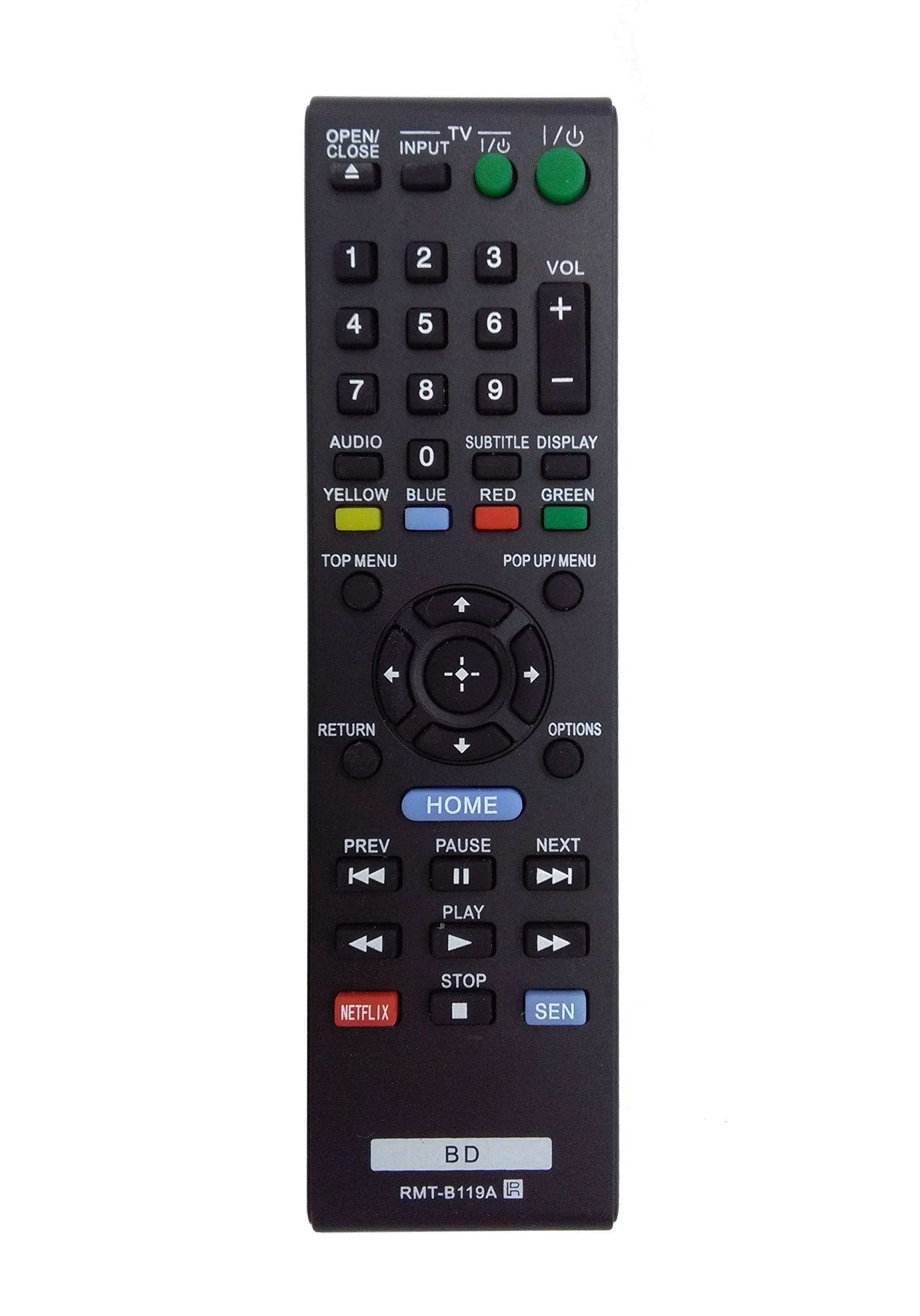
Image: The OEM RMT-B119A remote control, showing the full button layout on the front and a partial view of the open battery compartment on the back, revealing the battery terminals.
3. Instrukcja obsługi
3.1 Remote Control Layout and Button Functions
Familiarize yourself with the buttons on your RMT-B119A remote control. Below is a description of each button's primary function.
Image: The OEM RMT-B119A remote control, displaying all buttons and their labels.
- Zasilanie (wejście/wyjście): Turns the Blu-ray player on or off.
- OPEN/CLOSE (▲): Otwiera lub zamyka szufladę na płytę.
- WEJŚCIE: Switches the input source on the connected TV (if programmed).
- TELEWIZJA: Switches the remote to TV control mode (if programmed).
- Klawiatura numeryczna (0-9): Used for direct track selection, chapter selection, or entering numerical data.
- GŁOŚNOŚĆ (+/-): Adjusts the volume level (typically for the connected TV, if programmed).
- AUDIO: Changes the audio track or language during playback.
- SUBTITLE DISPLAY: Toggles subtitle display on or off, or cycles through available subtitle languages.
- YELLOW, BLUE, RED, GREEN: Color-coded function buttons, typically used for specific features within menus or interactive content. Their function varies depending on the disc or menu.
- GÓRNE MENU: Accesses the main menu of the Blu-ray disc.
- POP UP/MENU: Displays the pop-up menu during disc playback.
- Directional Pad (↑↓←→): Nawigacja po menu i opcjach.
- Center Button (Enter/Select): Potwierdza wybór lub otwiera pozycję menu.
- POWRÓT: Wraca do poprzedniego ekranu lub menu.
- OPCJE: Displays context-sensitive options or settings.
- DOM: Accesses the Blu-ray player's home menu.
- POPRZEDNI (◀◀): Przechodzi do początku bieżącego utworu/rozdziału lub poprzedniego utworu/rozdziału.
- PAUSE (▌▌): Wstrzymuje odtwarzanie.
- DALEJ (▶▶): Przechodzi do następnego utworu lub rozdziału.
- GRAJ (▶): Rozpoczyna lub wznawia odtwarzanie.
- STOP (■): Zatrzymuje odtwarzanie.
- PL: Direct access button for the Netflix streaming service.
- Sen: Direct access button for the Sony Entertainment Network (now PlayStation Video/Music).
- BD: Likely a dedicated button for Blu-ray Disc functions or to switch to Blu-ray mode.
4. Konserwacja
Aby zapewnić długowieczność i prawidłowe działanie pilota, należy przestrzegać poniższych wskazówek dotyczących konserwacji:
- Czyszczenie: Przetrzyj pilota miękką, suchą ściereczką. W przypadku uporczywych zabrudzeń delikatnie przetrzyj.ampPrzetrzyj ściereczkę wodą lub delikatnym, nieściernym środkiem czyszczącym. Unikaj stosowania silnych środków chemicznych i rozpuszczalników.
- Wymiana baterii: Replace batteries when the remote's response becomes sluggish or it stops functioning. Always replace both batteries at the same time with new ones of the same type.
- Składowanie: Store the remote in a cool, dry place away from direct sunlight, extreme temperatures, and high humidity. If the remote will not be used for an extended period, remove the batteries to prevent leakage.
- Unikaj kropli: Chroń pilota przed uderzeniami, gdyż upuszczenie go może spowodować uszkodzenie podzespołów wewnętrznych.
5. Rozwiązywanie Problemów
If you experience issues with your remote control, refer to the following table for common problems and solutions:
| Problem | Możliwa przyczyna | Rozwiązanie |
|---|---|---|
| Pilot nie działa. | Baterie rozładowane lub nieprawidłowo włożone. | Wymień baterie na nowe, zwracając uwagę na prawidłową biegunowość (+/-). |
| Praca zdalna odbywa się okresowo. | Niski poziom naładowania baterii lub przeszkoda. | Replace batteries. Ensure no objects are blocking the remote's signal path to the Blu-ray player. |
| Pilot nie steruje telewizorem. | Remote not programmed for TV or TV mode not selected. | This remote is primarily for Blu-ray players. TV control functionality may require specific programming not covered by this manual, or may not be supported by this OEM model. |
| Przyciski nie reagują lub są lepkie. | Brud lub zanieczyszczenia pod przyciskami. | Clean the remote control surface. Avoid spilling liquids on the remote. |
6. Specyfikacje
- Marka: Producent OEM
- Numer modelu: RMT-B119A
- Technologia łączności: Podczerwieni (IR)
- Zgodne urządzenia: Sony Blu-ray Players (specific models listed in Introduction)
- Źródło zasilania: Baterie 2 x AAA (brak w zestawie)
- Maksymalny zasięg: Około 10 metrów (33 stóp)
- Dodatek specjalny: Ergonomiczna konstrukcja
7. Gwarancja i wsparcie
This OEM RMT-B119A remote control comes with a 30-dniowa gwarancja Gwarancja obowiązuje od daty zakupu i obejmuje wady produkcyjne. Prosimy zachować dowód zakupu na wypadek roszczeń gwarancyjnych.
For technical support or warranty inquiries, please contact the retailer or manufacturer directly. Refer to your purchase documentation for specific contact information.