
Wstęp
This manual provides essential instructions for the safe and efficient operation of your VisionTek Pitbull RockDoc Power Portable MP3 Speaker. Please read this manual thoroughly before using the device and retain it for future reference.
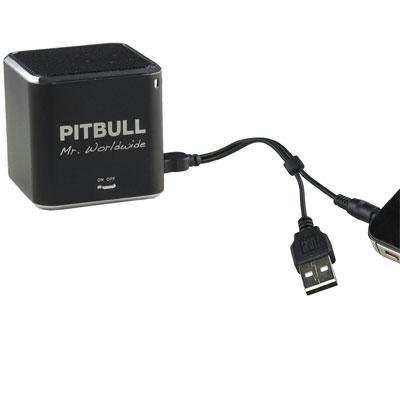
This image displays the compact, black cube-shaped Pitbull RockDoc Power Portable MP3 Speaker. The front face features the 'PITBULL Mr. Worldwide' logo and an 'ON OFF' switch. An integrated cable with a USB connector and a 3.5mm audio jack is shown connected to the speaker, ready for charging or audio input.
Cechy produktu
- Przenośna konstrukcja: Kompaktowy i lekki, co ułatwia transport.
- Zintegrowany odtwarzacz MP3: Features 4GB of internal memory for direct music playback.
- Połączenie bezprzewodowe: Supports Bluetooth for audio streaming from compatible devices.
- Wired Audio Input: Includes a 3.5 mm audio jack for connecting non-Bluetooth devices.
- Zasilany bateryjnie: Operates on an internal battery for cordless use.
- System głośników dwudrożnych: Zapewnia czysty dźwięk.
Organizować coś
Ładowanie głośnika
- Locate the integrated USB cable attached to the speaker.
- Podłącz koniec USB-A kabla do zasilanego portu USB (np. w komputerze, zasilaczu ściennym USB).
- The speaker's indicator light will illuminate to show charging status. Refer to the device for specific light indications.
- Po pełnym naładowaniu odłącz kabel USB.
Włączanie/wyłączanie
- To power on, slide the 'ON OFF' switch to the 'ON' position.
- To power off, slide the 'ON OFF' switch to the 'OFF' position.
Podłączanie źródeł dźwięku
Your speaker supports three primary methods for audio input:
1. Using Internal 4GB Memory (MP3 Playback)
- To load music onto the internal 4GB memory, connect the speaker to a computer using the USB cable. The speaker should appear as a removable storage device.
- Przeciągnij i upuść plik audio MP3 files into the speaker's storage.
- Raz files are transferred, safely eject the speaker from your computer.
- The speaker will automatically play files from its internal memory when powered on and no other audio source is connected.
2. Połączenie Bluetooth
- Upewnij się, że głośnik jest włączony.
- Aktywuj Bluetooth na swoim smartfonie, tablecie lub innym kompatybilnym urządzeniu.
- Szukaj available Bluetooth devices. The speaker should appear as "Pitbull RockDoc" or similar.
- Select the speaker from the list to pair. A confirmation sound or light indication may occur upon successful pairing.
3. 3.5 mm Audio Jack Connection
- Locate the integrated 3.5 mm audio jack on the speaker's cable.
- Connect this jack to the headphone output or audio-out port of your external audio device (e.g., MP3 player, phone, laptop).
- Ensure the speaker is powered on. Audio will be routed through this connection.
Instrukcja obsługi
Podstawowe elementy sterujące odtwarzaniem
The speaker features basic controls for media playback. These controls typically include:
- Odtwórz/Pauza: Press to start or pause audio playback.
- Następny utwór: Press to skip to the next audio file.
- Poprzedni utwór: Naciśnij, aby powrócić do początku bieżącego utworu lub do poprzedniego utworu.
- Regulacja głośności: Adjust the volume level. (Specific button layout not provided, assume standard controls).
Note: When connected via Bluetooth or 3.5mm audio jack, playback controls on the speaker may control the connected device, or you may need to control playback directly from the source device.
Konserwacja
Czyszczenie
- Przetrzyj zewnętrzną część głośnika miękką, suchą i niepozostawiającą włókien ściereczką.
- Nie należy używać środków czyszczących o działaniu ściernym, rozpuszczalników ani silnych środków chemicznych.
- Unikaj dostania się wilgoci do otworów.
Składowanie
- Przechowuj głośnik w chłodnym, suchym miejscu, z dala od bezpośredniego światła słonecznego i ekstremalnych temperatur.
- Jeśli akumulator będzie przechowywany przez dłuższy okres, należy upewnić się, że jest częściowo naładowany (około 50%), aby wydłużyć jego żywotność.
Rozwiązywanie problemów
| Problem | Możliwa przyczyna | Rozwiązanie |
|---|---|---|
| Brak zasilania | Bateria jest rozładowana | Naładuj głośnik za pomocą kabla USB. |
| Brak dźwięku z głośnika | Volume too low; Incorrect input source; Device not paired (Bluetooth); Cable not connected (3.5mm) | Increase speaker volume; Ensure correct mode (internal MP3, Bluetooth, or AUX); Re-pair Bluetooth device; Check 3.5mm cable connection. |
| Parowanie Bluetooth nie powiodło się | Głośnik nie jest w trybie parowania; Urządzenie jest za daleko; Zakłócenia | Ensure speaker is discoverable; Move device closer to speaker; Turn off other Bluetooth devices. |
| Nie można przenieść files to 4GB memory | Incorrect USB connection; Driver issue; Memory full | Ensure speaker is connected to computer via USB; Try a different USB port/cable; Check available memory space. |
Specyfikacje
| Funkcja | Szczegół |
|---|---|
| Numer modelu | 900584 |
| Typ głośnika | 1-Way Portable Speaker |
| Pamięć wewnętrzna | 4 GB (do odtwarzania plików MP3) |
| Łączność | Bluetooth, 3.5 mm Audio Jack |
| Źródło zasilania | Zasilany bateryjnie |
| Maksymalna moc wyjściowa głośnika | 3 watów |
| Waga przedmiotu | 159 gramów |
| Wymiary produktu (dł. x szer. x wys.) | Wymiary 5 x 5 x 4.9 cm |
| Producent | VISIONTEK MASS STORAGE |
Informacje o gwarancji
For detailed warranty information regarding your VisionTek Pitbull RockDoc Power Portable MP3 Speaker, please refer to the warranty card included with your purchase or contact the manufacturer directly. Amazon's buying options mention a 'Warranty Policy', indicating manufacturer coverage.
Wsparcie
If you require technical assistance or have questions not covered in this manual, please contact VisionTek Mass Storage, the manufacturer of this product. Contact details can typically be found on their official webwitryny lub opakowania produktu.