
Wstęp
Niniejsza instrukcja zawiera instrukcje dotyczące bezpiecznej i wydajnej obsługi systemu zdalnego sterowania kominkiem SkyTech 1410T/LCD Timer. System ten został zaprojektowany z myślą o wygodnym zdalnym sterowaniu urządzeniami grzewczymi na gaz, wyposażonymi w funkcję timera oraz wyświetlacz LCD pokazujący temperaturę w pomieszczeniu.
Informacje dotyczące bezpieczeństwa
- Przed instalacją i użyciem należy uważnie przeczytać wszystkie instrukcje.
- Aby zapobiec porażeniu prądem lub pożarowi, należy zadbać o to, aby wszelkie prace związane z instalacją elektryczną wykonał wykwalifikowany specjalista.
- Nie wystawiaj pilota ani odbiornika na działanie wody ani nadmiernej wilgoci.
- Niezwłocznie wymień baterie, gdy na wyświetlaczu pilota pojawi się wskaźnik niskiego poziomu naładowania baterii.
- Przechowuj pilota poza zasięgiem dzieci, aby zapobiec przypadkowemu uruchomieniu kominka.
- Przed uruchomieniem kominka należy zawsze upewnić się, że w jego pobliżu nie ma materiałów łatwopalnych.
Zawartość opakowania
Sprawdź, czy w pakiecie znajdują się wszystkie komponenty:
- 1 x nadajnik zdalnego sterowania (4-przyciskowy: włączanie/wyłączanie/timer/ustawianie, z wyświetlaczem LCD)
- 1 x odbiornik (110 V AC, z funkcją uczenia i suwakowym przełącznikiem włączania/wyłączania)
- 2 baterie alkaliczne AAA (do nadajnika)
Konfiguracja i instalacja
1. Montaż baterii (nadajnika)
Otwórz komorę baterii znajdującą się z tyłu pilota. Włóż dwie baterie alkaliczne AAA, zwracając uwagę na prawidłową polaryzację (+/-). Zamknij komorę szczelnie.
2. Umiejscowienie i okablowanie odbiornika
Odbiornik działa pod napięciem 110-120 V AC i zapewnia wyjście „bezpotencjałowe” do kominka. Można go umieścić na palenisku lub dyskretnie pod kominkiem, za panelem sterowania.
Ostrzeżenie: Instalację powinien wykonać wykwalifikowany technik. Przed przystąpieniem do jakichkolwiek prac związanych z okablowaniem należy zawsze upewnić się, że zasilanie kominka jest odłączone od wyłącznika automatycznego.
Podłącz przewody odbiornika do odpowiednich zacisków w urządzeniu do ogrzewania gazowego. Zaciski te zazwyczaj służą do podłączenia przełącznika ściennego lub istniejącego odbiornika zdalnego sterowania. Odbiornik jest wyposażony w złącza męskie i żeńskie, co ułatwia integrację.
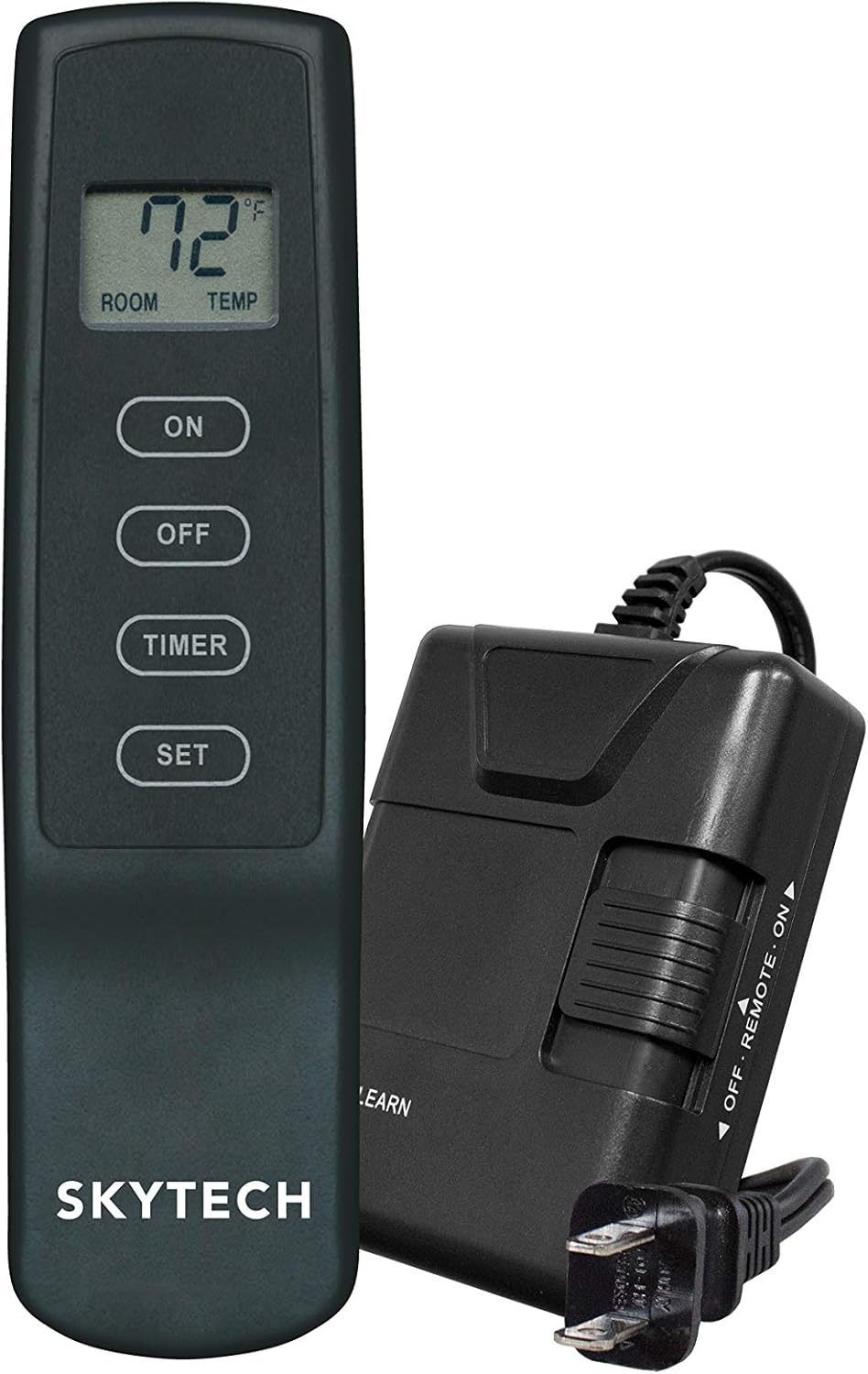
Zdjęcie: Nadajnik zdalnego sterowania SkyTech 1410T/LCD wraz z odbiornikiem. Odbiornik posiada przewód zasilający i suwak do wyboru trybów WŁ./ZDALNE/WYŁ.

Obraz: Przód view nadajnika zdalnego sterowania SkyTech 1410T/LCD, przedstawiającego wyświetlacz LCD i cztery przyciski sterujące: ON, OFF, TIMER i SET.
3. Parowanie nadajnika i odbiornika (funkcja uczenia)
- Sprawdź, czy odbiornik jest włączony i czy przełącznik suwakowy jest ustawiony w pozycji „REMOTE”.
- Znajdź przycisk „LEARN” na obudowie odbiornika. Naciśnij i przytrzymaj ten przycisk, aż usłyszysz sygnał dźwiękowy lub zobaczysz migającą kontrolkę.
- W ciągu 20 sekund od naciśnięcia przycisku „LEARN” naciśnij przycisk „ON” na pilocie zdalnego sterowania.
- Sygnał dźwiękowy z odbiornika oznacza pomyślne sparowanie. System działa w oparciu o jeden z 65 536 kodów bezpieczeństwa zaprogramowanych fabrycznie.
Instrukcja obsługi
Podstawowa obsługa
- Przycisk ON: Naciśnij, aby włączyć kominek. Na wyświetlaczu LCD pojawi się aktualna temperatura w pomieszczeniu.
- Przycisk WYŁĄCZENIA: Naciśnij, aby WYŁĄCZYĆ kominek.
Funkcja timera
Pilot zdalnego sterowania wyposażony jest w wygodny 3-godzinny timer odliczający czas do automatycznego wyłączenia kominka.
- Po włączeniu kominka naciśnij przycisk „TIMER”. Na wyświetlaczu LCD pojawi się „3:00” i rozpocznie się odliczanie.
- Aby ustawić czas trwania timera, naciśnij przycisk „SET”, gdy timer jest aktywny. Każde naciśnięcie spowoduje wyświetlenie dostępnych czasów trwania timera (np. 1 godzina, 2 godziny, 3 godziny).
- Kominek wyłączy się automatycznie, gdy timer dojdzie do zera.
- Aby anulować timer w dowolnym momencie, naciśnij przycisk „OFF”.
Wyświetlacz temperatury
Wyświetlacz LCD na nadajniku wyświetla aktualną temperaturę otoczenia w pomieszczeniu w stopniach Fahrenheita (°F) lub Celsjusza (°C). Należy pamiętać, że urządzenie to nie jest termostatem i nie steruje kominkiem na podstawie ustawionej temperatury. Zapewnia jedynie odczyt temperatury w pomieszczeniu.
Funkcja zabezpieczenia przed dziećmi
Aby aktywować zabezpieczenie przed dziećmi, naciśnij i przytrzymaj jednocześnie przyciski „ON” i „OFF” przez około 5 sekund, aż na wyświetlaczu LCD pojawi się symbol „CP”. Po aktywacji pilot nie będzie reagował na naciskanie przycisków. Aby dezaktywować zabezpieczenie, powtarzaj tę czynność, aż symbol „CP” zniknie z wyświetlacza.
Konserwacja
Wymiana baterii
Gdy na wyświetlaczu LCD pojawi się wskaźnik niskiego poziomu naładowania baterii, należy niezwłocznie wymienić dwie baterie AAA w nadajniku. Aby zapewnić optymalną wydajność i długą żywotność, należy używać wyłącznie baterii alkalicznych.
Czyszczenie
Przetrzyj pilota i odbiornik miękką, suchą ściereczką. Nie używaj środków czyszczących o właściwościach ściernych ani rozpuszczalników, ani nie zanurzaj urządzeń w płynach, ponieważ może to spowodować ich uszkodzenie.
Rozwiązywanie problemów
| Problem | Możliwa przyczyna | Rozwiązanie |
|---|---|---|
| Kominek nie włącza się/wyłącza za pomocą pilota | 1. Przełącznik suwakowy odbiornika w niewłaściwej pozycji. 2. Baterie nadajnika są słabe lub wyczerpane. 3. Pilot i odbiornik nie są sparowane. 4. Odbiornik nie jest zasilany. | 1. Upewnij się, że przełącznik odbiornika jest w pozycji „REMOTE”. 2. Wymień baterie w nadajniku. 3. Ponownie sparuj pilota z odbiornikiem (patrz sekcja „Parowanie”). 4. Sprawdź podłączenie zasilania prądem zmiennym 110 V do odbiornika. |
| Wyświetlacz LCD jest pusty lub przyciemniony | Niski poziom baterii w nadajniku. | Wymień baterie nadajnika. |
| Zasięg pilota jest słaby | Przeszkody lub zakłócenia częstotliwości radiowych. | Zbliż się do odbiornika i upewnij się, że żadne duże metalowe przedmioty nie blokują ścieżki sygnału. |
| Kominek niespodziewanie się wyłącza | Aktywowano timer lub uruchomiono funkcję bezpieczeństwa. | Sprawdź, czy timer jest ustawiony. Niektóre systemy kominkowe posiadają zabezpieczenia, które odcinają dopływ gazu w przypadku utraty sygnału z pilota na dłuższy czas. |
Specyfikacje
| Marka | SkyTech |
| Nazwa modelu | Pilot zdalnego sterowania kominkiem SkyTech 1410T/LCD Timer (SKY-1410T-LCD-A) |
| Wymiary produktu | 3.6" gł. x 6.4" szer. x 3" wys. |
| Typ kontrolera | Naciśnij przycisk |
| Cechy specjalne | Ekran LCD, wskaźnik niskiego poziomu baterii, zabezpieczenie przed dziećmi |
| Źródło zasilania | Zasilany bateryjnie (nadajnik), prąd zmienny 110 V (odbiornik) |
| Baterie | Wymagane 2 baterie AAA (w zestawie) |
| Technologia łączności | RF (częstotliwość radiowa) |
| Tworzywo | Plastikowy |
| Waga przedmiotu | 12 uncji |
Gwarancja i wsparcie
Aby uzyskać informacje o gwarancji lub pomocy technicznej, skontaktuj się z działem obsługi klienta SkyTech. Zapoznaj się z informacjami na opakowaniu produktu lub oficjalną instrukcją producenta. webAktualne dane kontaktowe znajdziesz na stronie. Zalecamy zachowanie paragonu jako dowodu zakupu na wypadek ewentualnych roszczeń gwarancyjnych.