
Wstęp
This manual provides comprehensive instructions for the safe and efficient use of your Marmitek BoomBoom 560 Bluetooth Over-Ear Headphones. These headphones offer excellent digital sound quality with clear mid-tones and deep bass, along with passive noise reduction for an immersive audio experience. Please read this manual thoroughly before operating the device.

Image: Marmitek BoomBoom 560 Bluetooth Over-Ear Headphones, black, shown from a slight angle.
Zawartość opakowania
Sprawdź, czy w przesyłce znajdują się wszystkie wymienione poniżej elementy:
- 1x Marmitek BoomBoom 560 Bluetooth Over-Ear Headphones
- 1x Micro USB to USB charging cable
- 1x 3.5mm Mini-jack audio cable (160 cm)
- 1x Instrukcja obsługi (ten dokument)

Image: Visual representation of the Marmitek BoomBoom 560 package contents, including the headphones, charging cable, audio cable, and user manual.
Produkt ponadview: Sterowanie i porty
Familiarize yourself with the controls and ports on your BoomBoom 560 headphones:
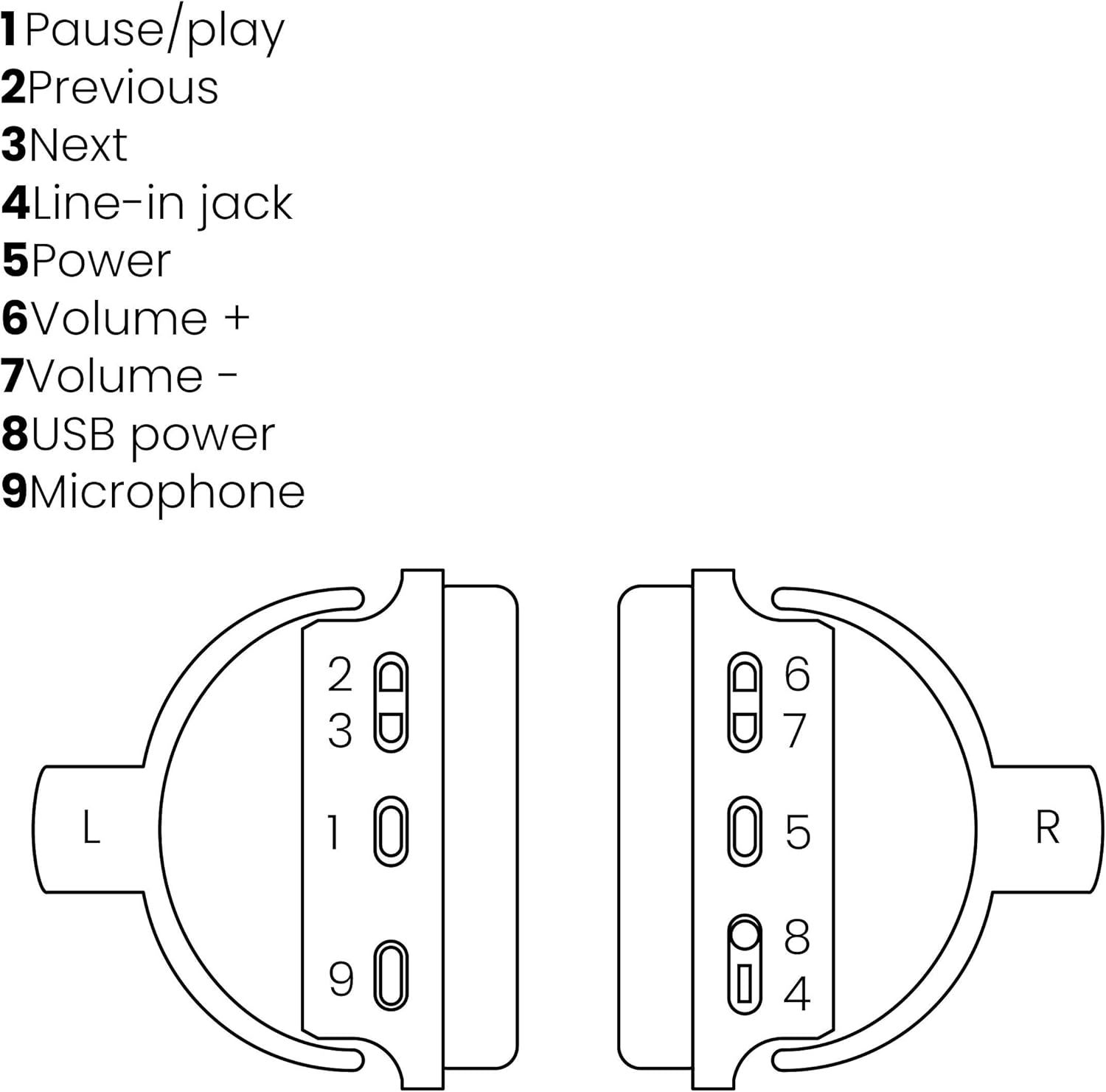
Image: A line drawing illustrating the left and right ear cup controls and ports, numbered for identification.
- Przycisk pauzy/odtwarzania: Steruje odtwarzaniem muzyki.
- Przycisk poprzedniego utworu: Przechodzi do poprzedniej piosenki.
- Przycisk następnego utworu: Przechodzi do następnej piosenki.
- Wejście liniowe: For wired audio connection using the 3.5mm cable.
- Przycisk zasilania: Turns the headphones on/off and initiates Bluetooth pairing.
- Głośność + przycisk: Zwiększa głośność.
- Głośność - Przycisk: Zmniejsza głośność.
- Port zasilania USB: For charging the headphones using the Micro USB cable.
- Mikrofon: Wbudowany mikrofon do rozmów w trybie głośnomówiącym.
Organizować coś
1. Ładowanie słuchawek
Before first use, fully charge your headphones. Connect the Micro USB end of the charging cable to the USB Power Port (8) on the headphones and the standard USB end to a USB power adapter (not included) or a computer's USB port. The LED indicator will show charging status. A full charge provides over 8 hours of playback time.
2. Parowanie Bluetooth
Aby bezprzewodowo połączyć słuchawki z urządzeniem obsługującym technologię Bluetooth:
- Upewnij się, że słuchawki są wyłączone.
- Naciśnij i przytrzymaj Przycisk zasilania (5) until the LED indicator flashes blue and red, indicating pairing mode.
- Na smartfonie, tablecie lub innym urządzeniu Bluetooth włącz Bluetooth i wyszukaj dostępne urządzenia.
- Select "BoomBoom 560" from the list of found devices.
- Po podłączeniu wskaźnik LED zacznie powoli migać na niebiesko.

Image: Illustration depicting various Bluetooth-enabled devices (laptop, smartphone, tablet) wirelessly transmitting audio to the headphones.
3. Połączenie przewodowe
If Bluetooth is not available or the battery is depleted, you can use the included 3.5mm audio cable. Connect one end of the cable to the Line-in Jack (4) on the headphones and the other end to the audio output of your device.
Instrukcja obsługi
Włączanie/wyłączanie zasilania
- Włączanie: Naciśnij i przytrzymaj Przycisk zasilania (5) for approximately 3 seconds until the LED indicator flashes blue.
- Aby wyłączyć: Naciśnij i przytrzymaj Przycisk zasilania (5) for approximately 3 seconds until the LED indicator turns off.
Odtwarzanie muzyki
- Odtwórz/Pauza: Naciśnij Pause/Play Button (1) raz.
- Następny utwór: Naciśnij Next Track Button (3) raz.
- Poprzedni utwór: Naciśnij Previous Track Button (2) raz.
Zarządzanie połączeniami
When connected via Bluetooth, you can manage phone calls using the built-in microphone (9):
- Odbieranie/kończenie połączeń: Naciśnij Pause/Play Button (1) raz.
- Odrzuć połączenie: Naciśnij i przytrzymaj Pause/Play Button (1) przez około 2 sekundy.
Kontrola głośności
- Zwiększ głośność: Naciśnij Volume + Button (6).
- Zmniejsz głośność: Naciśnij Volume - Button (7).

Image: A user enjoying music or media with the Marmitek BoomBoom 560 headphones while relaxing at home.
Konserwacja
Aby zapewnić długą żywotność i optymalną wydajność słuchawek:
- Czyść słuchawki miękką, suchą ściereczką. Nie używaj środków czyszczących o właściwościach ściernych ani rozpuszczalników.
- Unikaj wystawiania słuchawek na działanie ekstremalnych temperatur, wilgoci lub bezpośredniego światła słonecznego.
- Przechowuj słuchawki w chłodnym, suchym miejscu, gdy nie są używane.
- Nie należy podejmować prób samodzielnego rozmontowywania lub naprawy słuchawek, gdyż spowoduje to utratę gwarancji.
Rozwiązywanie problemów
If you encounter issues with your BoomBoom 560 headphones, refer to the following common solutions:
- Brak zasilania: Upewnij się, że słuchawki są w pełni naładowane. Podłącz je do źródła zasilania za pomocą kabla USB.
- Nie można sparować przez Bluetooth:
- Upewnij się, że słuchawki są w trybie parowania (dioda LED miga na niebiesko i czerwono).
- Ensure your Bluetooth device's Bluetooth function is enabled and within range (typically 10 meters).
- Try turning off and on both the headphones and your Bluetooth device.
- Delete "BoomBoom 560" from your device's Bluetooth list and attempt to pair again.
- Brak dźwięku:
- Sprawdź poziom głośności zarówno na słuchawkach, jak i na podłączonym urządzeniu.
- Ensure the headphones are properly paired or the 3.5mm audio cable is securely connected.
- Jeśli używasz Bluetooth, spróbuj rozłączyć się i połączyć ponownie.
- Słaba jakość dźwięku:
- Zbliż się do urządzenia Bluetooth, aby zmniejszyć zakłócenia.
- Upewnij się, że między słuchawkami a urządzeniem nie ma żadnych przeszkód.
- Sprawdź źródło dźwięku pod kątem jakości.
- Loose Earcup Bracket: If the earcup bracket feels loose, handle the headphones with care. Avoid excessive force when adjusting or folding. If the issue persists and affects functionality, contact customer support.
Specyfikacje
| Nazwa modelu | Wysięgnik Wysięgnik 560 |
| Numer modelu | 8122 |
| Marka | Marmitek |
| Technologia łączności | Wireless (Bluetooth), Wired (3.5mm jack) |
| Zgodność z Bluetooth | Tak |
| Współczynnik kształtu | Nauszne |
| Tworzywo | Skóra (nauszniki) |
| Cechy specjalne | Redukcja szumów |
| Technologia mikrofonowa | Omni (Built-in) |
| Opis baterii | Litowo-jonowy (Li-Ion) |
| Żywotność baterii | Over 8 hours (approx.) |
| Stosunek sygnału do szumu (SNR) | 82dB |
| Wymiary produktu | 23 x 5 x 18 cm; 100 g |
Gwarancja i wsparcie
Marmitek products are designed and manufactured to high quality standards. For information regarding warranty terms and conditions, please refer to the documentation provided with your purchase or visit the official Marmitek webstrona.
Aby uzyskać dalszą pomoc lub wsparcie techniczne, odwiedź stronę Marmitek Store on Amazon or the official Marmitek support channels.

Image: Logo indicating "Dutch Quality" and compliance with "EU European Standards".