
Panasonic DMC-FZ200
Instrukcja obsługi aparatu cyfrowego Panasonic Lumix DMC-FZ200
Model: DMC-FZ200
Marka: Panasonic
1. Wprowadzenie i koniecview
The Panasonic Lumix DMC-FZ200 is a high-performance digital camera designed to capture stunning photos and videos with ease. Featuring a 12.1 MP CMOS sensor and a powerful 24x optical zoom LEICA DC VARIO-ELMARIT lens with a constant F2.8 aperture across the entire 25-600mm equivalent focal range, this camera excels in various shooting conditions, including low light and long distances.
Key features include rapid 12 frames per second continuous shooting, 1080p HD video recording, a versatile 3.0-inch articulated LCD, and a high-resolution electronic viewfinder (EVF). Its advanced imaging technologies, such as the Venus Engine and Intelligent Noise Reduction, ensure clear and crisp imagery. The DMC-FZ200 offers both automatic and extensive manual controls, catering to both beginners and advanced photographers.
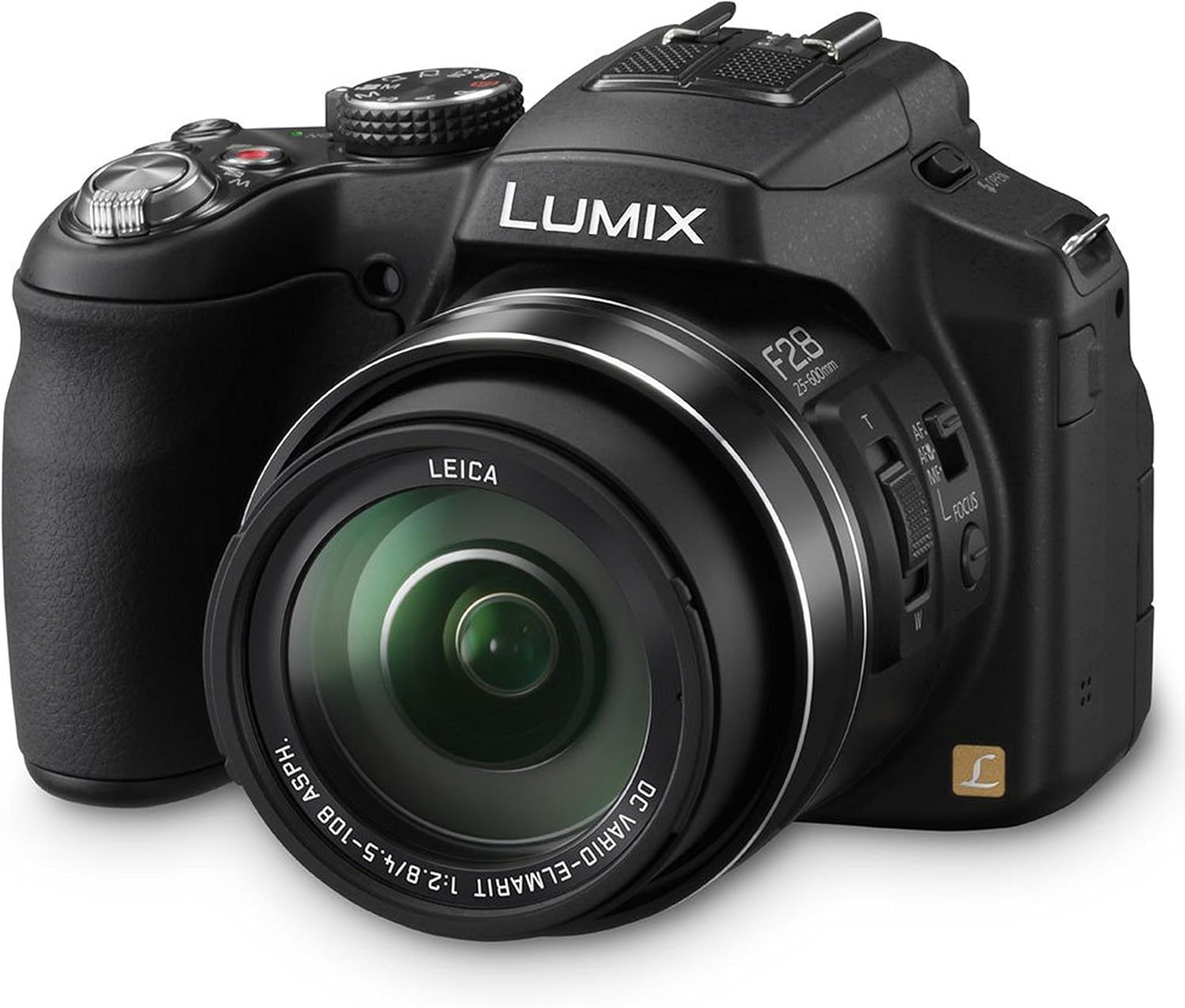
Rysunek 1.1: Przód-prawa strona view of the Panasonic Lumix DMC-FZ200 camera.
2. Konfiguracja
2.1. Rozpakowanie i wstępna kontrola
Ostrożnie wypakuj wszystkie elementy z pudełka. Upewnij się, że znajdują się w nim następujące elementy:
- Panasonic Lumix FZ200 Digital Camera
- Akumulator litowo-jonowy
- Ładowarka baterii
- Kabel USB
- Pasek na ramię
- CD-ROM (for software)
- Osłona obiektywu
- Sznurek do dekielka obiektywu
- Osłona obiektywu
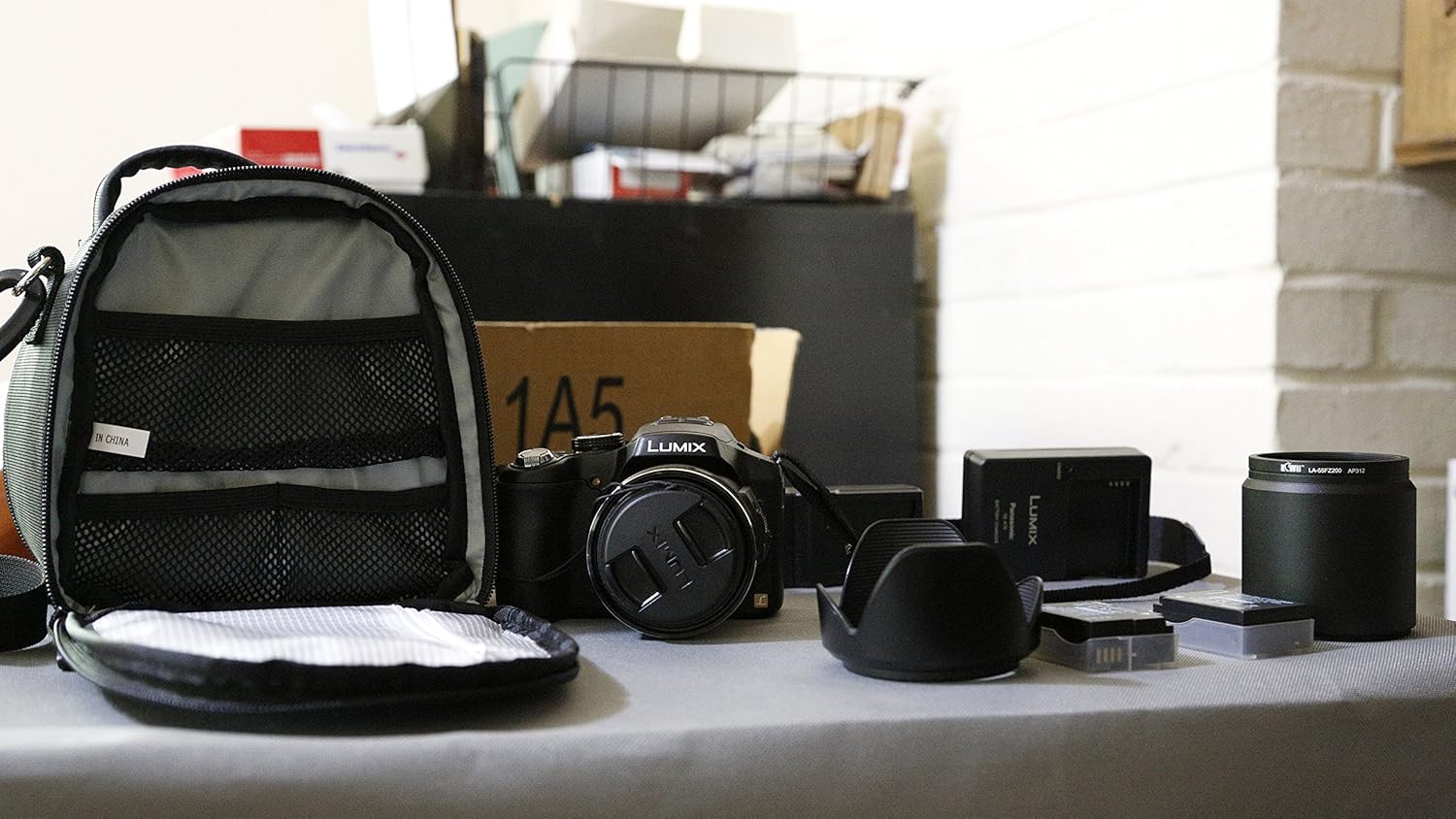
Figure 2.1: Unpacked components of the camera kit.
2.2. Ładowanie i instalacja akumulatora
Before first use, fully charge the supplied Li-ion Battery Pack. Insert the battery into the charger and connect the charger to a power outlet. The charging indicator will show the charging status. Once fully charged, insert the battery into the camera's battery compartment, ensuring it clicks into place.
2.3. Wkładanie karty pamięci
The DMC-FZ200 supports SD, SDHC, and SDXC memory cards. Open the memory card slot cover and insert the memory card with the label facing the correct direction until it clicks. Close the cover securely. A high-speed card (Class 10 or UHS-I) is recommended for optimal performance, especially for video recording and continuous shooting.
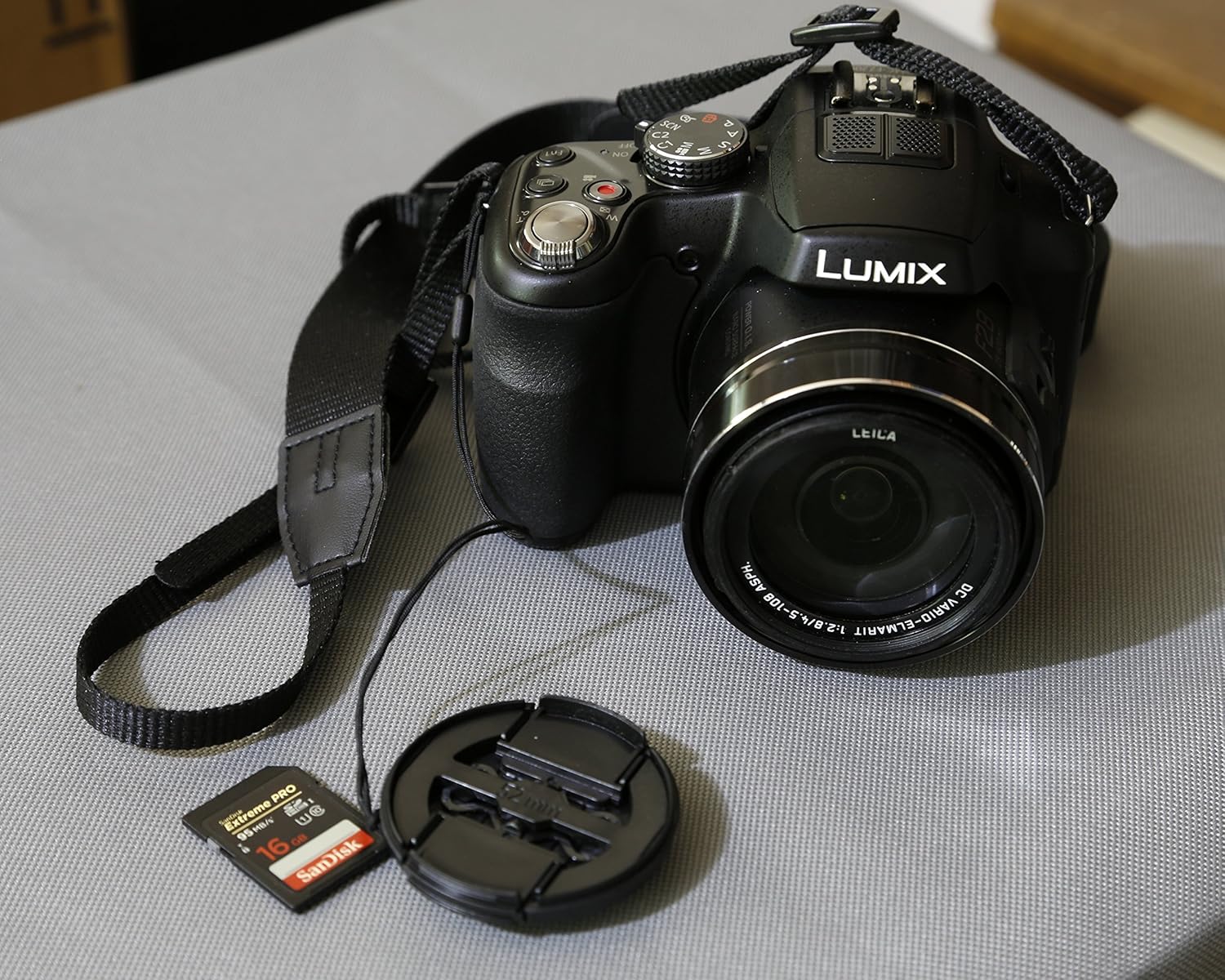
Figure 2.2: Camera with an SD card, ready for use.
2.4. Mocowanie paska na ramię i osłony obiektywu
Attach the shoulder strap to the camera's strap lugs for secure carrying. Secure the lens cap to the lens using the provided string to prevent loss. The lens hood can be attached to the front of the lens to reduce flare and protect the lens.
3. Obsługa aparatu
3.1. Włączanie/wyłączanie zasilania
To power on the camera, rotate the power switch located on the top of the camera. To power off, rotate the switch back to the OFF position. The camera has a quick start-up time of approximately 0.95 seconds.
3.2. Tryby fotografowania
Pokrętło trybów znajdujące się na górze aparatu umożliwia wybór różnych trybów fotografowania:
- Inteligentny tryb automatyczny (iA): The camera automatically detects the scene and adjusts settings for optimal results.
- Program AE (P): Aparat ustawia przysłonę i czas otwarcia migawki, ale możesz dostosować inne ustawienia.
- Priorytet przysłony AE (A): You set the aperture, and the camera sets the shutter speed. Ideal for controlling depth of field.
- Priorytet migawki AE (S): You set the shutter speed, and the camera sets the aperture. Ideal for controlling motion blur.
- Ekspozycja ręczna (M): Możesz kontrolować zarówno przysłonę, jak i czas otwarcia migawki, co zapewnia pełną kontrolę twórczą.
- Kontrola kreatywna: Apply various artistic filters and effects to your photos and videos (e.g., Expressive, Retro, High Key, Low Key, Sepia, Dynamic Monochrome, Impressive Art, High Dynamic, Cross Process, Toy Effect, Miniature Effect, Soft Focus, Star Filter, One Point Color).
- Tryb sceny: Select from predefined scene settings (e.g., Portrait, Soft Skin, Scenery, Panorama Shot, Sports, Panning, Night Portrait, Night Scenery, Handheld Night Shot, HDR, Food, Baby, Pet, Sunset, High Sensitivity, Glass Through, 3D photo).
- Tryb kreatywnego wideo: Adjust shutter speed and aperture while recording videos.
- Tryby niestandardowe (C1, C2): Zapisz preferowane ustawienia aparatu, aby móc je szybko przywołać.
3.3. Zoom and Focusing
The 24x optical zoom lens (25-600mm equivalent) allows for versatile shooting from wide-angle to super-telephoto. Use the zoom lever around the shutter button to adjust the zoom. A redesigned side lever also provides smoother zooming control and can be used to change focus.
The camera features Light Speed Auto Focus for quick and precise focusing. In addition, the AF Flexible mode automatically resets when your subject moves. For close-up shots, utilize the AF Macro mode. Manual focus is also available for precise control.
3.4. Stabilizacja obrazu
The POWER O.I.S. (Optical Image Stabilizer) minimizes blur caused by camera shake, especially at longer focal lengths. The Active Mode further suppresses handshake vibrations during video recording, ensuring smooth footage.
3.5. Nagrywanie wideo
Record full HD videos in 1920x1080 60p in AVCHD Progressive (MPEG-4) and MP4 formats. A dedicated Motion Picture button allows you to start recording instantly without switching modes. The 24x optical zoom is fully functional during video recording. High-speed video recording (1280x720 pixels at 120fps or 640x480 pixels at 240fps) is available for dramatic slow-motion playback.
3.6. Wyświetlacz i Viewznalazca
The 3.0-inch articulated LCD screen can rotate 180° on its side and tilt 270° up and down, offering flexibility for various shooting angles. The 0.2-inch EVF (Electronic Viewfinder) provides a 100% field-of-vision with high resolution, useful for shooting in bright sunlight or for more precise framing.
3.7. Zaawansowane funkcje
- High Sensitivity MOS Sensor & Venus Engine: Deliver high-speed response, sensitivity, and superb image quality, even in low-light conditions.
- Inteligentna redukcja szumów: Adjusts photos and videos taken in sensitive areas to create clear, crisp imagery.
- Intelligent HDR (High Dynamic Range): Overlays multiple exposures to produce a single composite picture, avoiding over or underexposure.
- Ciągłe strzelanie: Capture fast-moving subjects with 12 fps full resolution, or 5.5 fps/2 fps with AF Tracking.
- Fotografowanie w formacie RAW: For advanced users who desire maximum post-processing flexibility.
- Nano Surface Coating: Minimizes light reflection within the zoom range, reducing glare and producing clear pictures.
4. Konserwacja i pielęgnacja
Proper maintenance ensures the longevity and optimal performance of your Panasonic Lumix DMC-FZ200 camera.
- Czyszczenie obiektywu: Użyj miękkiej, niepozostawiającej włókien ściereczki lub szczoteczki do soczewek, aby delikatnie usunąć kurz. W przypadku smug użyj specjalnego środka do czyszczenia soczewek nałożonego na ściereczkę, a nie bezpośrednio na soczewkę.
- Czyszczenie korpusu aparatu: Przetrzyj korpus aparatu miękką, suchą ściereczką. Unikaj stosowania silnych środków czyszczących i rozpuszczalników.
- Składowanie: When not in use, store the camera in a cool, dry place, away from direct sunlight and extreme temperatures. Use a camera bag for protection during transport.
- Pielęgnacja baterii: Store batteries in a cool, dry place. If storing for extended periods, charge them periodically to maintain their health.
- Avoid Moisture and Dust: While the camera is robust, it is not water-resistant. Avoid exposing it to rain, splashes, or excessive dust.
5. Rozwiązywanie Problemów
This section addresses common issues you might encounter with your DMC-FZ200 camera.
5.1. Camera Does Not Power On or Shuts Off Immediately
If your camera fails to power on or turns off shortly after being switched on, accompanied by a motor sound, consider the following:
- Ładowanie akumulatora: Ensure the battery is fully charged. A low battery can cause the camera to power off unexpectedly.
- Wkładanie baterii: Verify that the battery is inserted correctly and securely in its compartment.
- Stan baterii: If the battery is old or frequently used, its capacity might have degraded. Try using a different, fully charged battery if available.
- Przeszkoda w soczewce: Check if there is any obstruction preventing the lens from extending or retracting properly. Dust or debris can interfere with the lens mechanism.
- Karta pamięci: Although less common, a faulty memory card can sometimes interfere with camera operation. Try removing the memory card and powering on the camera.
If the issue persists after checking these points, it may indicate an internal malfunction. Please refer to the "7. Warranty and Support" section for further assistance.
5.2. Rozmazane obrazy
- Drżenie kamery: Ensure you are holding the camera steady. Use the POWER O.I.S. feature, or a tripod for very slow shutter speeds or long zoom shots.
- Centrum: Confirm the camera has achieved focus on your subject. Re-focus if necessary.
- Słabe oświetlenie: In dim conditions, the camera might struggle to focus or require a slower shutter speed. Increase ISO or use the flash if appropriate.
- Czystość soczewek: A dirty lens can cause blurry or hazy images. Clean the lens as described in the Maintenance section.
5.3. Błąd karty pamięci
- Włóż ponownie kartę: Wyjmij i ponownie włóż kartę pamięci.
- Formatuj kartę: If the error persists and you have backed up your data, format the card using the camera's menu.
- Try Another Card: Test with a different memory card to determine if the issue is with the card or the camera.
6. Specyfikacje
| Funkcja | Specyfikacja |
|---|---|
| Nazwa modelu | Panasonic Lumix FZ200 |
| Efektywna rozdzielczość obrazu nieruchomego | 12.1 MP |
| Typ czujnika foto | CMOS (1/2.3 cala) |
| Zoom optyczny | 24x |
| Długość ogniskowej | 25-600 mm (ekwiwalent 35 mm) |
| Maksymalna apertura | F2.8 (stała) |
| Czułość ISO | 100-3200 (z możliwością rozszerzenia do 6400) |
| Rozdzielczość wideo | FHD 1080p (60p) |
| Typ wyświetlacza | 3.0-calowy przegubowy wyświetlacz LCD |
| Rozdzielczość wyświetlacza | 460,000 XNUMX XNUMX punktów |
| Viewznalazca | Electronic (0.2-inch, 100% coverage) |
| Stabilizacja obrazu | Optical (POWER O.I.S.) |
| Ciągłe fotografowanie | 12 fps (full resolution) |
| Utrzymany File Formaty | JPEG (DCF/Exif2.3), RAW, MPO (for 3D) |
| Gniazdo karty pamięci | Karty SD/SDHC/SDXC |
| Typ baterii | Litowo-jonowy |
| Średnia żywotność baterii | 540 Photos (CIPA standard) |
| Łączność | USB,HDMI |
| Waga | 1.3 funta (ok. 589 g) |
| Kolor | Czarny |
7. Gwarancja i wsparcie
Your Panasonic Lumix DMC-FZ200 camera comes with a 30-day warranty from the manufacturer. For detailed warranty terms and conditions, please refer to the documentation included with your product.
For comprehensive information and advanced usage instructions, you can download the official User Manual in PDF format:
Pobierz instrukcję obsługi (PDF)
For additional support, product information, and accessories, please visit the official Panasonic Store:
Ask a question about this manual
Ask about setup, troubleshooting, compatibility, parts, safety, or missing instructions. Manuals+ will review the question and use this page’s manual context to help answer it.