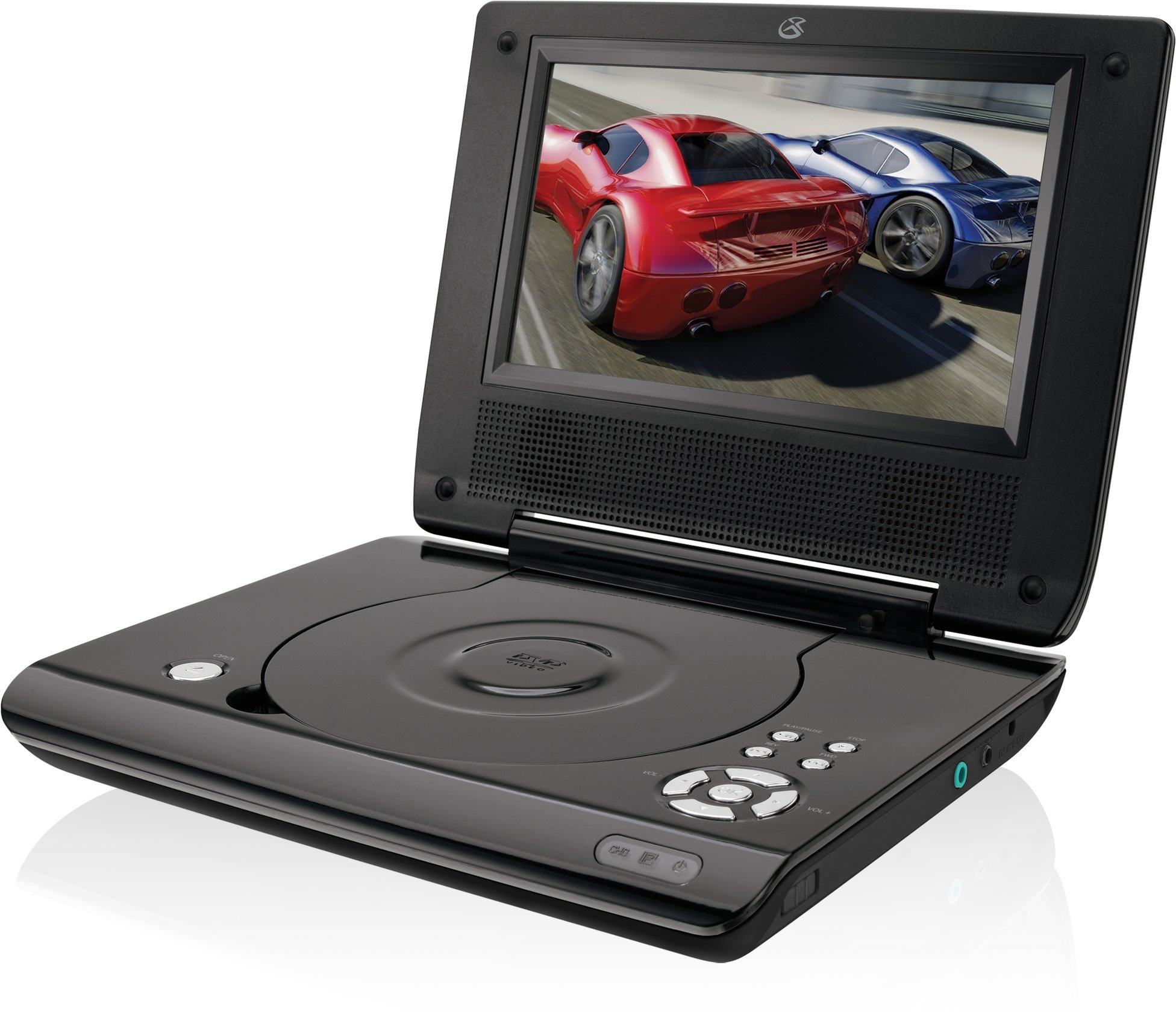
This manual provides essential instructions for the safe and efficient operation of your GPX PD730B 7-inch Portable DVD Player. Please read this manual thoroughly before using the device and retain it for future reference. The GPX PD730B is designed for portable entertainment, allowing you to enjoy DVDs, CDs, and JPEG files on its 7-inch TFT LCD screen.
Zawartość opakowania
Sprawdź, czy w przesyłce znajdują się wszystkie elementy wymienione poniżej:
GPX PD730B Portable DVD Player
Zasilacz AC/DC
DC Car Adapter (12V)
Słuchawki douszne stereo
Pilot zdalnego sterowania (z 2 bateriami AAA)
Instrukcja obsługi (ten dokument)
Produkt ponadview
Figure 1: GPX PD730B Portable DVD Player (Closed)
This image shows the GPX PD730B portable DVD player in its closed position, highlighting its compact and sleek design. The top surface is smooth and black, with control buttons visible on the right edge.
Sterowanie i połączenia
Familiarize yourself with the various controls and connection ports on your portable DVD player.
Przycisk zasilania: Włącza lub wyłącza urządzenie.
Przycisk Odtwórz/Pauza: Rozpoczyna lub wstrzymuje odtwarzanie.
Przycisk stopu: Zatrzymuje odtwarzanie.
Przyciski Pomiń/Szukaj: Navigates tracks or chapters, or fast-forwards/rewinds.
Regulacja głośności: Dostosowuje poziom wyjściowy dźwięku.
Gniazdo słuchawkowe: For private listening with stereo earbuds or headphones.
DC w porcie: Connects to the AC/DC or car power adapter for charging and power.
Organizować coś
1. Ładowanie akumulatora
Before initial use, fully charge the built-in rechargeable battery. A full charge provides approximately 2 hours of playback time.
Connect the AC/DC power adapter to the DC In port on the DVD player.
Podłącz zasilacz AC/DC do standardowego gniazdka ściennego.
The charging indicator light (if present) will illuminate. Charging is complete when the light changes color or turns off (refer to device for specific indicator behavior).
Alternatively, use the 12V DC car adapter to charge the player in a vehicle.
2. Włączanie/wyłączanie zasilania
Naciśnij i przytrzymaj Moc button on the unit to turn the player on or off. The screen will illuminate when powered on.
Instrukcja obsługi
1. Inserting and Removing Discs
Gently open the disc compartment lid.
Place a DVD or CD onto the spindle with the label side facing up. Press down gently on the center of the disc until it clicks into place.
Close the disc compartment lid firmly.
To remove a disc, open the lid, gently press the spindle button (if present) or lift the disc from the edges, avoiding touching the data surface.
2. Podstawowe odtwarzanie
After inserting a disc, the player will typically begin playback automatically.
Użyj Odtwórz/Pauza przycisk, aby wstrzymać lub wznowić odtwarzanie.
Naciśnij Zatrzymywać się aby zatrzymać odtwarzanie.
Użyj Pominąć buttons (usually labeled with arrows) to navigate between chapters or tracks.
Użyj Szukaj buttons (often combined with Skip) to fast-forward or rewind.
3. Korzystanie z pilota zdalnego sterowania
The included remote control provides convenient access to all player functions from a distance. Ensure the 2 AAA batteries are correctly installed. Point the remote control directly at the player's remote sensor.
4. Podłączanie słuchawek
For private listening, plug the stereo earbuds (or your own headphones) into the Gniazdo słuchawkowe on the side of the player. The built-in speakers will automatically mute when headphones are connected.
Figure 2: Portable DVD Player in use (Bedroom)
This image illustrates the portable DVD player being used by a girl in a bedroom setting, demonstrating its suitability for personal entertainment at home.
Figure 3: Portable DVD Player in use (Vehicle)
This image shows a boy watching the portable DVD player in the back seat of a car, highlighting its utility for entertainment during travel.
Figure 4: Portable DVD Player in use (Airplane)
This image depicts a woman using the portable DVD player with headphones on an airplane, showcasing its versatility for quiet, personal entertainment during flights.
Konserwacja
Czyszczenie odtwarzacza
Disconnect the player from all power sources before cleaning.
Do przecierania powierzchni zewnętrznych należy używać miękkiej, suchej ściereczki. Nie należy używać środków czyszczących o właściwościach ściernych, wosków ani rozpuszczalników.
For the screen, use a soft, lint-free cloth specifically designed for LCD screens. Avoid excessive pressure.
Utrzymuj komorę na płytę w czystości, bez kurzu i zanieczyszczeń.
Pielęgnacja baterii
Aby przedłużyć żywotność baterii, należy unikać częstego całkowitego rozładowywania baterii.
If the player will not be used for an extended period, charge the battery to about 50% before storing.
Store the player in a cool, dry place.
Rozwiązywanie problemów
If you encounter issues with your GPX PD730B, refer to the following common problems and solutions:
Problem
Możliwa przyczyna
Rozwiązanie
Odtwarzacz się nie włącza.
Battery is discharged; Power adapter not connected properly.
Charge the battery; Ensure power adapter is securely connected to both the player and power source.
Brak możliwości odtwarzania płyty.
Disc inserted incorrectly; Disc is dirty or scratched; Incorrect disc format.
Reinsert disc correctly (label side up); Clean disc with a soft cloth; Ensure disc is DVD, CD, or JPEG CD format.
Brak dźwięku z głośników/słuchawek.
Volume too low; Headphones not fully plugged in; Mute function active.
Increase volume; Ensure headphones are fully inserted; Check if mute is active on remote or player.
Pilot nie działa.
Baterie są rozładowane lub nieprawidłowo włożone; Przeszkoda między pilotem a odtwarzaczem.
Replace remote batteries; Ensure correct polarity; Remove any obstructions and point remote directly at sensor.
Specyfikacje
Numer modelu
PD730B
Rozmiar ekranu
7 cali
Typ wyświetlacza
Wyświetlacz TFT-LCD
Rozdzielczość natywna
480x234
Proporcje obrazu
16:9
Zgodne nośniki
DVD, DVD+R/RW, CD, CD-R/RW, JPEG CD
Czas pracy baterii (średni)
2 godzin
Moc wejściowa
AC/DC Adapter, 12V DC Car Adapter
Łączność
Auxiliary (Headphone Jack)
Waga przedmiotu
1.72 funtów
UPC
047323007309
Gwarancja i wsparcie
For warranty information, technical support, or service inquiries, please refer to the warranty card included with your product or visit the official GPX webZachowaj paragon jako dowód zakupu na wypadek reklamacji.
Ask about setup, troubleshooting, compatibility, parts, safety, or missing instructions. Manuals+ will review the question and use this page’s manual context to help answer it.