
1. Wprowadzenie
The Aputure Amaran AHL-N60 LED Ring Flash is a versatile lighting accessory designed for macro photography and other close-up applications. It provides consistent, uniform illumination, offering both continuous light and flash modes. This manual details the proper setup, operation, maintenance, and troubleshooting for your AHL-N60 unit, ensuring optimal performance and longevity.
2. Informacje dotyczące bezpieczeństwa
- Do not look directly into the LED lights when they are active, as this may cause eye strain or damage.
- Aby zapobiec porażeniu prądem elektrycznym lub awarii, trzymaj urządzenie z dala od wody i innych płynów.
- Do not attempt to disassemble or modify the unit. Repairs should only be performed by authorized service personnel.
- Ensure proper battery installation and use only recommended battery types. Remove batteries during extended periods of non-use.
- Przechowywać w miejscu niedostępnym dla dzieci.
3. Zawartość opakowania
Sprawdź, czy w przesyłce znajdują się wszystkie elementy:
- Amaran AHL-N60 LED Ring Flash Unit
- Jednostka kontrolera
- Set of Lens Adapter Rings (various sizes)

Figure 3.1: Complete Aputure Amaran AHL-N60 LED Ring Flash kit, including the ring light, controller, and adapter rings.
4. Koniec produktuview
The AHL-N60 consists of an LED ring light, a control unit, and various lens adapter rings for compatibility with different camera lenses.
4.1 Składniki
- Pierścień świetlny LED: Houses the LED array for illumination. Attaches to the lens via an adapter ring.
- Jednostka Kontrolna: Connects to the camera's hot shoe and the LED ring light. Contains controls for power, mode selection, and brightness adjustment.
- Pierścienie adapterowe: Thread onto your camera lens, allowing the LED ring light to be securely mounted.
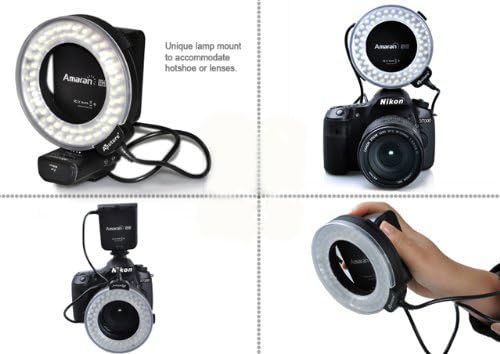
Figure 4.1: Various mounting options for the Amaran AHL-N60, showcasing jego elastyczności.
4.2 Controls on the Controller Unit
- Przycisk zasilania: Włącza lub wyłącza urządzenie.
- Przycisk trybu: Cycles through different lighting modes (e.g., full, left side, right side, flash).
- Pokrętło jasności: Reguluje intensywność światła LED.
- Flash/Continuous Switch: Toggles between continuous illumination and flash mode.
5. Konfiguracja
5.1 Instalacja baterii
The controller unit requires batteries for operation. Open the battery compartment on the controller unit and insert the specified number and type of batteries, ensuring correct polarity. Close the compartment securely.
5.2 Montaż do kamery
- Select the appropriate adapter ring that matches the filter thread size of your camera lens.
- Nakręć wybrany pierścień adaptera na przedni gwint filtra obiektywu aparatu.
- Slide the LED ring light onto the adapter ring until it clicks into place or is securely fastened.
- Attach the controller unit to your camera's hot shoe and tighten the locking mechanism.
- Connect the cable from the LED ring light to the designated port on the controller unit.

Figure 5.1: The Amaran AHL-N60 LED Ring Flash correctly mounted on a DSLR camera.
6. Tryby pracy
The Amaran AHL-N60 offers multiple lighting modes to suit various photographic needs.
- Włączanie/wyłączanie: Press the Power button on the controller unit to turn the device on or off.
- Continuous Light Mode: Set the Flash/Continuous switch to the 'Continuous' position. The LEDs will remain lit.
- Tryb z błyskiem: Set the Flash/Continuous switch to the 'Flash' position. The LEDs will only illuminate when the camera's shutter is triggered.
- Regulacja jasności: Rotate the Brightness Dial to increase or decrease the light intensity.
- Tryby oświetlenia: Press the Mode button to cycle through the available lighting patterns:
- Pełna jasność: All LEDs illuminate evenly.
- Left Side Only: Only the LEDs on the left half of the ring illuminate.
- Right Side Only: Only the LEDs on the right half of the ring illuminate.

Figure 6.1: Visual comparison of a subject photographed without and with the Amaran AHL-N60 ring flash, highlighting its effect.
7. Konserwacja
- Czyszczenie: Do czyszczenia zewnętrznej części urządzenia należy używać miękkiej, suchej ściereczki. W przypadku uporczywych zabrudzeń należy użyć delikatnegoamp Można użyć ściereczki, a następnie natychmiast wysuszyć. Nie należy używać silnych środków chemicznych ani ściernych środków czyszczących.
- Składowanie: Store the AHL-N60 in a cool, dry place, away from direct sunlight and extreme temperatures. If storing for an extended period, remove the batteries from the controller unit.
- Pielęgnacja baterii: Replace batteries when performance diminishes. Dispose of used batteries responsibly according to local regulations.
8. Rozwiązywanie Problemów
- Jednostka nie włącza się:
- Sprawdź, czy baterie są prawidłowo zainstalowane i całkowicie naładowane.
- Upewnij się, że przycisk zasilania jest mocno wciśnięty.
- LEDs are dim or uneven:
- Adjust the brightness dial.
- Jeśli baterie są słabe, wymień je.
- Ensure the ring light is securely connected to the controller unit.
- Flash mode not working:
- Verify the Flash/Continuous switch is set to 'Flash'.
- Ensure the controller unit is properly seated in the camera's hot shoe and making good contact.
- Sprawdź ustawienia aparatu i upewnij się, że zewnętrzna lampa błyskowa jest włączona.
If problems persist, contact Aputure customer support for further assistance.
9. Specyfikacje
| Funkcja | Specyfikacja |
|---|---|
| Marka | Aputacja |
| Numer modelu | AHL-C60 (also known as AHL-N60 series) |
| Wymiary produktu | Wymiary 21.01 x 5.99 x 10.01 cm |
| Waga przedmiotu | 421.84 gramów |
| Typ lampy błyskowej aparatu | Makro |
| Prędkość synchronizacji błysku | 1/20000 sekundy |
| Technologia komunikacji bezprzewodowej | Impuls optyczny |
| Pierwsza dostępna data | 27 czerwca 2014 r. |
10. Gwarancja i wsparcie
Warranty information for the Aputure Amaran AHL-N60 LED Ring Flash is typically provided with the product packaging at the time of purchase. Please refer to the documentation included with your unit for specific warranty terms and conditions.
For technical support, service, or inquiries regarding your product, please contact Aputure customer service. You can usually find contact information on the official Aputure weblub za pośrednictwem sprzedawcy produktu.