
Produkt ponadview
The iSound Twist Portable Bluetooth Wireless Speaker offers a unique design combined with superior sound quality. Its compact form factor allows for portability, while its advanced features enable wireless music streaming and hands-free calling. The speaker features full stereo sound with 6 watts total output from two 40mm drivers and a passive radiator for enhanced bass.
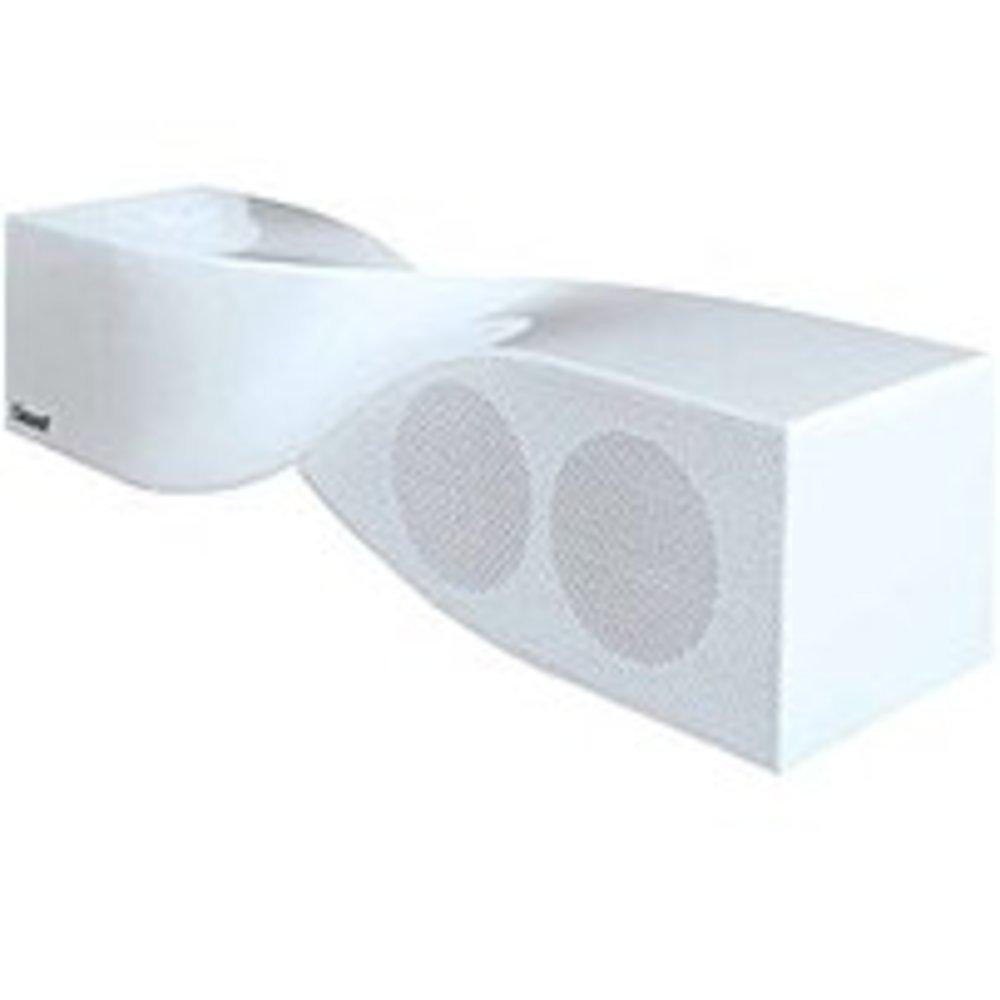
Image: The iSound Twist Portable Bluetooth Wireless Speaker in white, showcasing its unique twisted design.
Zawartość opakowania
- iSound Twist Portable Bluetooth Wireless Speaker
- Kabel ładujący USB
- 3.5mm AUX Input Cable
- Instrukcja obsługi (ten dokument)
Organizować coś
1. Ładowanie głośnika
Before initial use, fully charge the iSound Twist speaker. Connect the provided USB charging cable to the speaker's USB charging port and the other end to a powered USB source (e.g., computer, USB wall adapter). The charging indicator light will illuminate during charging and turn off when fully charged. A full charge provides up to 5 hours of continuous play.

Image: Rear panel of the speaker, highlighting the USB charging port, ON/OFF switch, and AUX IN port.
2. Włączanie/wyłączanie zasilania
Locate the ON/OFF switch on the rear panel of the speaker. Slide the switch to the "ON" position to power on the device. Slide it to the "OFF" position to power off.
3. Parowanie Bluetooth
- Ensure the speaker is powered on and within close proximity to your Bluetooth-enabled device (e.g., smartphone, tablet, laptop).
- The speaker will automatically enter Bluetooth pairing mode. A blue indicator light will flash, indicating it is discoverable.
- On your device, navigate to the Bluetooth settings and enable Bluetooth.
- Szukaj available devices. The iSound Twist speaker should appear in the list, typically named "iSound Twist" or similar.
- Select the speaker from the list to initiate pairing. If prompted for a password, enter "0000".
- Once successfully paired, the blue indicator light on the speaker will stop flashing and remain solid. You will hear an audible confirmation.
- Your device is now connected, and you can stream audio wirelessly.
4. Złącze wejściowe AUX
For devices without Bluetooth capability, or if you prefer a wired connection, use the provided 3.5mm AUX cable.
- Connect one end of the 3.5mm AUX cable to the AUX IN port on the rear of the speaker.
- Podłącz drugi koniec kabla do gniazda słuchawkowego lub portu wyjściowego audio w urządzeniu audio.
- Głośnik automatycznie przełączy się na tryb wejścia AUX.
Instrukcja obsługi
Funkcje panelu sterowania
The speaker features onboard controls located on its top surface for convenient operation.
- Przycisk zasilania / trybu: Press and hold to power on/off. Short press to switch between Bluetooth and AUX modes.
- Przycisk Odtwórz/Pauza/Połącz: Short press to play or pause music. During an incoming call, short press to answer or end the call. Press and hold to reject an incoming call.
- Przycisk zwiększania głośności/następnego utworu: Naciśnij krótko, aby zwiększyć głośność. Naciśnij i przytrzymaj, aby przejść do następnego utworu.
- Przycisk zmniejszania głośności/poprzedniego utworu: Naciśnij krótko, aby zmniejszyć głośność. Naciśnij i przytrzymaj, aby przejść do poprzedniego utworu.
Rozmowy bez użycia rąk
When connected via Bluetooth, the iSound Twist speaker's built-in microphone allows for hands-free phone calls.
- Odbieranie połączenia: When a call comes in, the music will pause. Press the Play/Pause/Call button once to answer.
- Zakończenie połączenia: During a call, press the Play/Pause/Call button once to end the call.
- Odrzucenie połączenia: Naciśnij i przytrzymaj przycisk Odtwórz/Pauza/Połącz, aby odrzucić połączenie przychodzące.
Konserwacja
- Trzymaj głośnik z dala od wody, wilgoci i ekstremalnych temperatur.
- Czyść głośnik miękką, suchą ściereczką. Nie używaj środków czyszczących o właściwościach ściernych ani rozpuszczalników.
- Unikaj upuszczania głośnika i narażania go na silne uderzenia.
- Jeśli głośnik nie będzie używany przez dłuższy czas, należy przechowywać go w chłodnym, suchym miejscu i okresowo go ładować, aby zachować sprawność akumulatora.
Rozwiązywanie problemów
| Problem | Rozwiązanie |
|---|---|
| Głośnik nie włącza się. | Upewnij się, że bateria jest naładowana. Podłącz głośnik do źródła zasilania za pomocą kabla USB i spróbuj ponownie. |
| Nie można sparować przez Bluetooth. |
|
| Brak dźwięku lub niski poziom głośności. |
|
| Jakość połączeń jest słaba. |
|
Specyfikacje
| Funkcja | Szczegół |
|---|---|
| Nazwa modelu | ISO-1691 |
| Marka | brzmie |
| Typ głośnika | Wieża |
| Funkcja specjalna | Wbudowany mikrofon |
| Zalecane zastosowania | For Smartphones or Tablets, Music Players |
| Kompatybilne urządzenia | Komputer stacjonarny, laptop, odtwarzacz MP3, projektor, smartfon, tablet, telewizor |
| Konfiguracja kanału dźwięku przestrzennego | 2.0 |
| Kolor | Biały |
| Waga przedmiotu | 13.6 uncji |
| jest wodoodporny | FAŁSZ |
| Technologia komunikacji bezprzewodowej | Bluetooth |
| Rozmiar głośnika | 0.75 cali |
| Źródło zasilania | Zasilany bateryjnie |
| Liczba baterii | Wymagana jest 1 bateria litowo-jonowa. (w zestawie) |
| Typ sterownika audio | Dynamiczny sterownik |
| Rozmiar sterownika audio | 40 milimetrów |
| Wymiary produktu | 5 x 4 x 11.75 cala |
| Maksymalna moc wyjściowa głośnika | 6 watów |
| Technologia łączności | Bezprzewodowy |
| Tryb wyjścia audio | Stereofoniczny |
| Typ montażu | Uchwyt na blat |
Oficjalny film o produkcie
Video: Official product video for the iSound Twist Bluetooth Speaker, demonstrating its features and design. This video showcases the speaker's ability to stream audio from various devices and handle calls.
Gwarancja i wsparcie
The iSound Twist Portable Bluetooth Wireless Speaker comes with a Ograniczona gwarancja. For specific warranty terms, conditions, and support inquiries, please refer to the warranty card included in your product packaging or visit the official iSound webstrona.
For further assistance, please contact iSound customer support.