
Wstęp
This manual provides essential instructions for the setup, operation, maintenance, and troubleshooting of your Insignia 6.1-Channel 600W Digital Home Theater Receiver, model IS-HC040917. Please read this manual thoroughly before using the receiver to ensure proper and safe operation.
Ważne instrukcje bezpieczeństwa
- Nie zasłaniaj żadnych otworów wentylacyjnych. Montaż należy wykonać zgodnie z instrukcją producenta.
- Nie należy instalować w pobliżu źródeł ciepła, takich jak grzejniki, kratki wentylacyjne, piece lub inne urządzenia (w tym amp(lifiers) wytwarzające ciepło.
- Chroń przewód zasilający przed deptaniem i przytrzaśnięciem, zwłaszcza przy wtyczkach, gniazdkach i miejscach, w których wychodzi z urządzenia.
- Stosować wyłącznie dodatki/akcesoria wskazane przez producenta.
- Odłączaj urządzenie od zasilania podczas burzy z piorunami lub jeśli nie używasz go przez dłuższy czas.
- Wszelkie czynności serwisowe należy powierzyć wykwalifikowanemu personelowi serwisowemu. Serwis jest wymagany, gdy urządzenie zostało w jakikolwiek sposób uszkodzone.
Przewodnik po konfiguracji
1. Rozpakowywanie
Carefully remove the receiver and all accessories from the packaging. Ensure all components are present:
- Insignia IS-HC040917 Receiver
- Zdalne sterowanie
- Antena pętlowa AM
- Antena przewodowa FM
- Instrukcja obsługi (ten dokument)
2. Podłączanie głośników
The IS-HC040917 receiver supports a 6.1-channel speaker configuration. Connect your speakers to the corresponding terminals on the rear panel. Ensure correct polarity (+ to + and - to -) for each speaker.
- Przód lewy/prawy: Do głównego dźwięku stereo.
- Centrum: Do dialogu.
- Dźwięk przestrzenny lewy/prawy: For ambient sound effects.
- Tył surround: For additional rear channel effects in 6.1 setups.
- Subwoofer (Pre-out): Connect to a powered subwoofer's LFE input.
Note: The receiver is designed for speakers with an impedance of 8 ohms.
3. Connecting Audio/Video Sources
Connect your external devices (e.g., DVD player, Blu-ray player, game console, cable box) to the appropriate input jacks on the receiver.
- HDMI: Use HDMI cables for high-definition audio and video signals. The receiver has 3 HDMI input ports.
- Dźwięk cyfrowy (optyczny/koncentryczny): For digital audio from devices like CD players or set-top boxes.
- Dźwięk analogowy (RCA): For standard stereo audio connections from devices like VCRs or older CD players.
- S-wideo: For video signals from compatible devices.
4. Podłączenie anteny
Connect the supplied AM loop antenna and FM wire antenna to their respective terminals on the rear panel for radio reception.
5. Podłączenie zasilania
Once all audio/video and speaker connections are made, plug the receiver's power cord into a standard AC wall outlet.
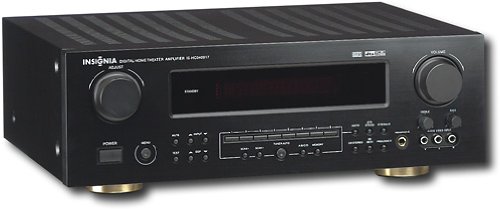
Obraz: Rear panel of the Insignia IS-HC040917 receiver, showing various input and output connections for speakers, audio/video sources (HDMI, RCA, S-Video, Digital), and antenna terminals. This diagram is crucial for correctly wiring the home theater system.
Instrukcja obsługi
1. Włączanie/wyłączanie zasilania
Naciśnij MOC przycisk na panelu przednim lub pilocie, aby włączyć lub wyłączyć odbiornik.
2. Wybór wejścia
Użyj WYBÓR WEJŚCIA knob/buttons on the front panel or the remote control to choose the desired audio/video source (e.g., HDMI 1, DVD, CD, Tuner).
3. Regulacja głośności
Dostosuj głośność główną za pomocą dużego pokrętła TOM pokrętło na panelu przednim lub GŁOŚNOŚĆ +/- przyciski na pilocie.
4. Tryby audio
The receiver supports various audio modes, including 6.1-channel surround sound. Use the TRYB or DSP buttons on the remote to cycle through available sound modes (e.g., Stereo, Dolby Digital, DTS, Pro Logic).
5. Tuner Operation (AM/FM Radio)
Select the "Tuner" input. Use the ZESPÓŁ button to switch between AM and FM. Use the DOSTOSUJ +/- buttons to manually tune to stations or USTAWIENIA PRESET +/- to select stored stations. Refer to the remote control for specific tuner functions.
Konserwacja
1. Czyszczenie
Wipe the exterior of the receiver with a soft, dry cloth. Do not use liquid cleaners or aerosol sprays, as they may damage the finish or internal components. Ensure the unit is unplugged before cleaning.
2. Wentylacja
Ensure that the ventilation openings on the top and sides of the receiver are not blocked. Proper airflow is essential to prevent overheating and ensure long-term performance.
3. Zarządzanie kablami
Periodically check all cable connections to ensure they are secure. Loose connections can lead to poor audio or video quality.
Rozwiązywanie problemów
| Problem | Możliwa przyczyna | Rozwiązanie |
|---|---|---|
| Brak zasilania | Przewód zasilający odłączony; gniazdko elektryczne nieaktywne. | Sprawdź podłączenie przewodu zasilającego; spróbuj użyć innego gniazdka. |
| Brak dźwięku | Wybrano nieprawidłowe wejście; poluzowane przewody głośnikowe; zbyt niski poziom głośności; włączono wyciszenie. | Wybierz właściwe wejście, sprawdź połączenia głośników, zwiększ głośność, wyłącz wyciszenie. |
| Brak wideo | Incorrect input selected; video cables loose or incorrect. | Select correct input; check video cable connections (HDMI, S-Video, RCA). |
| Pilot nie działa | Rozładowane baterie; przeszkoda pomiędzy pilotem i odbiornikiem; nieprawidłowy tryb pracy pilota. | Replace batteries; remove obstructions; ensure remote is in the correct operating mode. |
Specyfikacje
- Model: IS-HC040917
- Marka: INSIGNIA
- Moc wyjściowa: 600 watów
- Liczba kanałów: 6.1 kanały
- Tryb wyjścia audio: Otaczać
- Całkowita liczba portów HDMI: 3
- Typy złączy: 3.5mm Jack, HDMI, RCA, USB
- Zgodne urządzenia: Głośnik
- Metoda sterowania: Zdalny
- Kolor: Czarny
- Kod UPC: 799530659962
- ASIN: B0075C3DN2
Gwarancja i wsparcie
Aby uzyskać informacje o gwarancji i obsłudze klienta, zapoznaj się z kartą gwarancyjną dołączoną do produktu lub odwiedź oficjalną stronę internetową firmy Insignia webstrona. Zachowaj dowód zakupu na potrzeby roszczeń gwarancyjnych.
For further assistance, you may contact Insignia customer service. Contact details are typically available on the manufacturer's webmiejscu lub w opakowaniu produktu.