
Cen-Tech CT-750-12
Cen-Tech 750W Continuous/1500W Peak Power Inverter User Manual
Model: CT-750-12 | Brand: Cen-Tech
1. Wprowadzenie
This manual provides essential information for the safe and efficient operation of your Cen-Tech 750W Continuous/1500W Peak Power Inverter. This device converts 12V DC battery power into 115V AC household power, allowing you to operate various electronics and small appliances from your vehicle or other 12V power sources. Please read this manual thoroughly before installation and use, and retain it for future reference.
2. Ważne informacje dotyczące bezpieczeństwa
OSTRZEŻENIE: Failure to follow these instructions may result in electric shock, fire, serious injury, or death. Always exercise extreme caution when working with electrical equipment.
- Ryzyko porażenia prądem elektrycznym: Nie otwierać falownika casing. There are no user-serviceable parts inside. Contact qualified service personnel for repairs.
- Zagrożenie pożarem: Do not operate the inverter near flammable materials, gases, or vapors. Ensure adequate ventilation around the inverter.
- Prawidłowa wentylacja: The inverter generates heat during operation. Ensure it is placed in a well-ventilated area, away from direct sunlight or heat sources.
- Prawidłowa polaryzacja: Always connect the inverter to a 12V DC battery with the correct polarity (red to positive, black to negative). Incorrect connection can damage the inverter and battery.
- Zabezpieczenie przed przeciążeniem: Nie należy przekraczać ciągłej mocy znamionowej falownika (750 W) ani mocy szczytowej (1500 W). Przeciążenie może spowodować uszkodzenie i pożar.
- Narażenie na wilgoć: Do not expose the inverter to rain, moisture, or water. This can cause electric shock or damage.
- Dzieci i zwierzęta: Przechowywać falownik poza zasięgiem dzieci i zwierząt domowych.
- Urządzenia medyczne: This inverter is not designed for use with life-support systems or other medical devices.
3. Funkcje produktu
The Cen-Tech 750W Power Inverter is designed for reliable performance and includes the following key features:
- Ciągła moc: Provides up to 750 watts of continuous power.
- Moc szczytowa: Capable of handling up to 1500 watts for starting products with high surge requirements.
- Modified Sine Wave Output: Efficiently converts 12V DC to 115V AC with up to 87% efficiency.
- Wiele gniazdek: Features two 115V AC power outlets for connecting various devices.
- Port ładowania USB: Includes a 5V/500mA USB port for charging compatible devices.
- Kompleksowa ochrona: Built-in safeguards against low/high voltage, low/high temperatures, low/high currents, short circuits, and overloads.
- Łatwe połączenie: Comes with heavy-duty input cables equipped with alligator clips for direct battery connection.
- Wskaźnik statusu: An LED indicator light provides operational status.
4. Zawartość opakowania
Proszę sprawdzić, czy w paczce znajdują się następujące elementy:
- Cen-Tech 750W Continuous/1500W Peak Power Inverter
- Heavy-duty input cables with alligator clips
- Instrukcja obsługi (ten dokument)
5. Konfiguracja i instalacja
Follow these steps to properly set up your power inverter:
- Wybierz lokalizację: Select a dry, well-ventilated area for the inverter. Ensure it is away from direct sunlight, heat sources, and flammable materials. The inverter should be placed on a stable, flat surface.
- Przygotuj baterię: Ensure the 12V DC battery is fully charged and in good condition. Turn off any loads connected to the battery.
- Connect Input Cables:
- Połącz CZERWONY alligator clip cable to the POZYTYWNE (+) zacisk akumulatora 12V.
- Połącz CZARNY alligator clip cable to the NEGATYWNY (-) zacisk akumulatora 12V.
WAŻNY: Ensure connections are secure and correct polarity is observed to prevent damage to the inverter or battery. A loose connection can cause overheating.
- Włączanie: Once the battery connections are secure, turn on the inverter using its power switch (if applicable). The LED indicator light should illuminate.
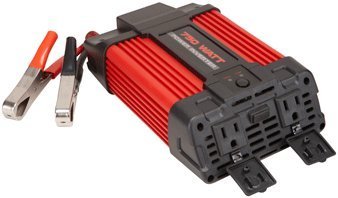
Image 1: Cen-Tech 750W Power Inverter connected to a 12V battery using the provided alligator clips. The image shows the compact design and the input/output ports.
6. Instrukcja obsługi
After successful setup, you can begin using your power inverter:
- Włącz falownik: Ensure the inverter's power switch is in the "ON" position. The LED indicator should confirm it is powered.
- Podłącz urządzenia prądu zmiennego: Plug your 115V AC devices into the inverter's AC outlets. Ensure the total wattage of all connected devices does not exceed 750 watts continuously or 1500 watts peak.
- Podłącz urządzenia USB: For charging USB-powered devices, plug them into the 5V/500mA USB port.
- Monitoruj poziom naładowania baterii: Keep an eye on your 12V battery's charge level. Prolonged use can drain the battery. The inverter has low voltage protection and will shut down if the battery voltagZbyt niskie krople.
- Wyłączone: When finished, first disconnect all AC and USB devices from the inverter. Then, turn off the inverter's power switch. Finally, disconnect the alligator clips from the battery, starting with the black (negative) clip, then the red (positive) clip.
Notatka: Some sensitive electronic devices may not operate correctly with a modified sine wave inverter. Consult your device's manufacturer for compatibility if issues arise.
7. Konserwacja
Regularna konserwacja zapewnia optymalną wydajność i długowieczność falownika:
- Czyszczenie: Keep the inverter clean and free of dust and debris. Use a dry cloth to wipe the exterior. Do not use liquid cleaners.
- Wentylacja: Periodically check that the ventilation openings are not blocked. Clear any obstructions to ensure proper airflow.
- Połączenia kablowe: Regularly inspect the input cables and alligator clips for any signs of wear, damage, or corrosion. Ensure connections remain tight and secure.
- Składowanie: When not in use for extended periods, store the inverter in a cool, dry place, away from direct sunlight and extreme temperatures. Disconnect it completely from the battery.
8. Rozwiązywanie Problemów
Jeśli napotkasz problemy z falownikiem, zapoznaj się z poniższymi typowymi problemami i rozwiązaniami:
| Problem | Możliwa przyczyna | Rozwiązanie |
|---|---|---|
| Brak mocy wyjściowej / Falownik się nie włącza |
|
|
| Falownik niespodziewanie się wyłącza |
|
|
| AC devices not working correctly |
|
|
9. Specyfikacje
| Funkcja | Szczegół |
|---|---|
| Numer modelu | CT-750-12 |
| Ciągła moc | 750 watów |
| Moc szczytowa | 1500 watów |
| Wejście Voltage | 12V prądu stałego |
| Objętość wyjściatage | 115 V prądu zmiennego |
| Przebieg wyjściowy | Modyfikowana fala sinusoidalna |
| Efektywność | Do 87% |
| Gniazda prądu przemiennego | 2 |
| Port USB | 5V / 500mA |
| Funkcje ochronne | Niska/wysoka objętośćtage, Low/High Temperature, Low/High Current, Short Circuit, Overload |
| Waga przedmiotu | 2.11 funta |
| Wymiary (w przybliżeniu) | Nie określono w podanych danych |
10. Gwarancja i wsparcie
Information regarding product warranty and customer support was not provided in the available product data. For warranty details or technical assistance, please refer to the product packaging or contact the manufacturer directly.
Ask a question about this manual
Ask about setup, troubleshooting, compatibility, parts, safety, or missing instructions. Manuals+ will review the question and use this page’s manual context to help answer it.