
Scantronic 9448
Instrukcja obsługi panelu alarmowego Scantronic 9448
Model: 9448
Wstęp
This manual provides comprehensive instructions for the installation, operation, and maintenance of the Scantronic 9448 Alarm Panel. Please read this manual thoroughly before attempting any installation or operation to ensure proper functionality and safety.
The Scantronic 9448 is a robust alarm panel designed for home security, offering reliable protection and ease of use.
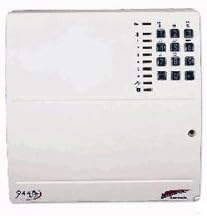
Rysunek 1: Przód view of the Scantronic 9448 Alarm Panel, showing the white casing and integrated numeric keypad on the right side.
Konfiguracja i instalacja
The Scantronic 9448 Alarm Panel is designed for straightforward installation. It is recommended that installation be performed by a qualified professional. Ensure all power is disconnected before beginning installation.
Montaż panelu
- Choose a secure, central location within the premises, away from direct sunlight and moisture.
- Mark the mounting points on the wall using the panel as a template.
- Drill appropriate holes and secure the panel firmly to the wall using suitable screws and wall plugs.
Połączenia okablowania
Refer to the wiring diagram provided inside the panel cover for specific terminal connections. Key connections include:
- Zasilanie: Connect the main AC power supply to the designated terminals.
- Zapas baterii: Install the backup battery (not included) into its compartment and connect it to the battery terminals.
- Wejścia strefowe: Connect detection devices (e.g., PIRs, door contacts) to the numbered zone terminals.
- Wyjście syreny: Connect the external siren to the alarm output terminals.
- Keypad/Communicator: Connect any external keypads or communication modules as per their respective manuals.
Ensure all connections are secure and correctly polarized to prevent damage or malfunction.
Instrukcja obsługi
Uzbrajanie systemu
- Ensure all protected zones are closed (e.g., doors and windows).
- Enter your 4-digit User Code on the keypad.
- Naciśnij RAMIĘ przycisk.
- The system will provide an exit delay countdown. Exit the premises within this time.
Rozbrajanie systemu
- Upon entry, the system will begin an entry delay countdown.
- Enter your 4-digit User Code on the keypad before the delay expires.
- System zostanie rozbrojony, a wskaźnik stanu ulegnie zmianie.
Zmiana kodów użytkownika
Only the Master User can change user codes.
- Enter the Master User Code.
- Naciśnij ŻARCIE przycisk.
- Follow the on-screen prompts or refer to the detailed programming section for specific code entry sequences.
Konserwacja
Regularna konserwacja gwarantuje ciągłą niezawodność systemu alarmowego.
- Sprawdzenie baterii: Test the backup battery annually. Replace if it fails to hold a charge.
- Testowanie czujnika: Periodically test all connected sensors (e.g., motion detectors, door/window contacts) to ensure they trigger an alarm correctly.
- Czyszczenie paneli: Wipe the panel and keypad with a soft, dry cloth. Avoid abrasive cleaners or solvents.
- Inspekcja profesjonalna: Consider a professional inspection and service every 1-2 years.
Rozwiązywanie problemów
| Problem | Możliwa przyczyna | Rozwiązanie |
|---|---|---|
| Panel nie włącza się | No AC power; Dead backup battery. | Check AC power connection; Replace backup battery. |
| System fails to arm | Open zone (door/window); Incorrect user code. | Check all zones are closed; Re-enter correct user code. |
| Fałszywe alarmy | Faulty sensor; Environmental factors (pets, drafts). | Inspect sensors for damage; Adjust sensor sensitivity or placement. |
| Klawiatura nie reaguje | Loose connection; Keypad fault. | Check keypad wiring; Contact technical support if issue persists. |
Specyfikacje
- Model: Scantronic 9448
- Producent: Skantronik
- Waga przedmiotu: 1.4 kilogramów
- Kolor: Biały
- Źródło zasilania: Elektryczny przewodowy
- Baterie w zestawie: NIE
- Wymagane baterie: No (for operation, but backup battery recommended)
- ASIN: B006WOATSG
- Data pierwszej dostępności: 12 stycznia 2012
Gwarancja i wsparcie
For warranty information, please refer to the documentation provided at the time of purchase or contact your retailer. Scantronic offers technical assistance via email or phone for support queries related to the 9448 Alarm Panel.
W celu uzyskania pomocy technicznej prosimy o kontakt:
- E-mail: support@scantronic.com
- Telefon: Refer to your regional Scantronic support contact details.
Powiązane dokumenty9448


Ask a question about this manual
Ask about setup, troubleshooting, compatibility, parts, safety, or missing instructions. Manuals+ will review the question and use this page’s manual context to help answer it.