
1. Wprowadzenie
The SilverLit 1:16 Enzo Ferrari Bluetooth R/C Car offers an interactive remote control experience using your iOS device (iPod touch, iPhone, or iPad). This manual provides essential information for the proper setup, operation, and maintenance of your R/C car.
Produkt przeznaczony jest dla użytkowników w wieku 8 lat i starszych.

Image: The SilverLit 1:16 Enzo Ferrari R/C Car in red, shown alongside an iPhone displaying the car's control dashboard app. The car is depicted in motion, suggesting its remote-controlled nature.
2. Konfiguracja
2.1 Instalacja baterii
- Locate the battery compartment on the underside of the Enzo Ferrari R/C car.
- Otwórz pokrywę komory baterii.
- Insert 4 AA batteries, ensuring correct polarity (+/-). The batteries are included with the product.
- Dokładnie zamknij pokrywę komory baterii.
2.2 Pobieranie i instalacja aplikacji
- Ensure your iOS device (iPod touch, iPhone, or iPad) is connected to the internet.
- Otwórz Apple App Store na swoim urządzeniu.
- Szukaj the "SilverLit Enzo Ferrari" application.
- Download and install the official application.
- Notatka: This product is designed for iOS devices. An Android application is not available for this model.
2.3 Połączenie Bluetooth
- Turn on the Enzo Ferrari R/C car.
- On your iOS device, go to "Settings" and ensure Bluetooth is enabled.
- Open the SilverLit Enzo Ferrari application.
- The app will automatically search for and connect to the R/C car via Bluetooth. No other attachments are required.
- Once connected, the app will display the Ferrari dashboard interface, ready for control.

Image: The product packaging for the SilverLit Interactive Bluetooth R/C Enzo Ferrari car, showing the car model and an iPhone displaying the control app. The box highlights compatibility with iPod touch, iPhone, and iPad.
3. Działanie
The SilverLit Enzo Ferrari R/C Car offers two primary control modes: gesture control and virtual joystick control, both accessible through the dedicated iOS application.
3.1 Sterowanie gestami
- Przyspieszanie/hamowanie: Tilt your iOS device forward to accelerate. Tilt it backward to brake and reverse.
- Sterowniczy: Tilt your iOS device left or right to steer the car in the corresponding direction.
- The app provides force feedback, simulating engine rumble that intensifies with speed.
3.2 Virtual Joystick Control
- Within the app, select the virtual joystick mode for traditional control.
- Use the on-screen joysticks or controls to manage speed and direction.
3.3 Lighting and Sound Effects
- The app dashboard features controls for headlights, tail lights, and signal lights, which are triggered directly from the application.
- Experience authentic Ferrari engine rev sounds directly from your device.
Video: An official demonstration of the SilverLit Enzo Ferrari R/C Car in action, showcasing its Bluetooth connectivity and control via an iOS device. The video highlights gesture control, responsive driving, and the detailed app interface, including lighting functions.
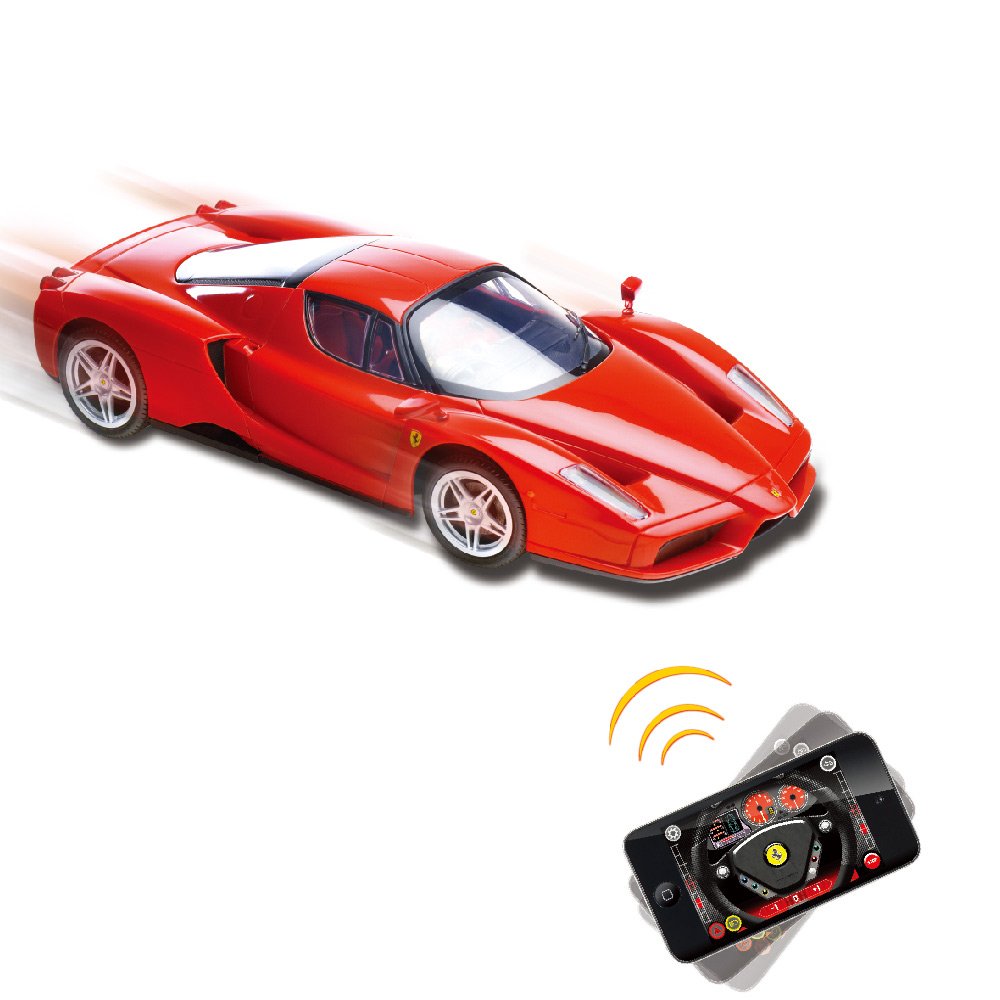
Image: A red SilverLit Enzo Ferrari R/C Car on a white surface, with an iPhone displaying the control app. Blue lines emanate from the phone towards the car, symbolizing the Bluetooth connection and control.
4. Konserwacja
- Czyszczenie: Use a soft, dry cloth to clean the car's exterior. Avoid using water or chemical cleaners, as they may damage the electronics or paint finish.
- Pielęgnacja baterii: Remove batteries from the car if it will not be used for an extended period to prevent leakage.
- Składowanie: Store the R/C car in a cool, dry place away from direct sunlight and extreme temperatures.
- Obsługiwanie: Handle the car with care to avoid damage to its detailed body and internal components.

Zdjęcie: Szczegółowy tył view of the red SilverLit 1:16 Enzo Ferrari R/C Car, showcasing its tail lights, exhaust pipes, and the Ferrari emblem.
5. Rozwiązywanie Problemów
- Samochód nie odpowiada:
- Upewnij się, że wyłącznik zasilania w samochodzie jest w pozycji WŁ.
- Sprawdź, czy baterie są prawidłowo zainstalowane i wystarczająco naładowane. W razie potrzeby wymień je.
- Verify that Bluetooth is enabled on your iOS device.
- Ensure the SilverLit Enzo Ferrari app is open and attempting to connect.
- Move your iOS device closer to the car to ensure it's within Bluetooth range (typically up to 5 feet for optimal performance, as noted in some user reviewS).
- Restart both the car and the app.
- Aplikacja nie łączy się:
- Confirm your device is an iOS device (iPod touch, iPhone, or iPad). The app is not compatible with Android.
- Check your device's Bluetooth settings.
- Zamknij i ponownie otwórz aplikację.
- Upewnij się, że żadne inne urządzenie Bluetooth nie zakłóca połączenia.
- Poor control response:
- Ensure your iOS device's screen is clean and free of obstructions for accurate gesture or joystick input.
- Practice with both gesture and virtual joystick modes to find your preferred control style.
- Check for any physical obstructions or damage to the car's wheels or steering mechanism.
6. Specyfikacje
| Funkcja | Szczegół |
|---|---|
| Marka | SilverLit |
| Nazwa modelu | 86067 |
| Skala | Skala 1: 16 |
| Formularz pojazdu zabawkowego | Samochód |
| Podmiot Znak | Enzo Ferrari |
| Kolor | Czerwony |
| Tryb działania | Kontrola aplikacji (Bluetooth) |
| Źródło zasilania | Zasilany bateryjnie |
| Wymagane baterie | 4 baterie AA (w zestawie) |
| Waga przedmiotu | 1.1 funtów |
| Pozycja Wymiary (dł. x szer. x wys.) | 35.6 x 12.7 x 20.3 centymetrów |
| Wymagany montaż | NIE |
| Opis przedziału wiekowego | Adult (as per product data, though often used by younger users with supervision) |
7. Gwarancja i wsparcie
For warranty information and customer support, please refer to the documentation included in the product packaging or visit the official SilverLit webZachowaj paragon jako dowód zakupu na wypadek ewentualnych roszczeń gwarancyjnych.
Manufacturer: Innovation & Invention LLP