
1. Wprowadzenie
This manual provides essential information for the safe and efficient operation of your SANYO PLC-XK2200 XGA Ultra-Portable Multimedia Projector. Please read this manual thoroughly before using the projector and retain it for future reference.
The SANYO PLC-XK2200 is designed to deliver clear and bright images with 2200 lumens and a 2000:1 contrast ratio, suitable for various presentation environments.
2. Informacje dotyczące bezpieczeństwa
- Źródło zasilania: Używaj wyłącznie zalecanego zasilacza. Upewnij się, że przewód zasilający jest prawidłowo podłączony.
- Wentylacja: Nie zasłaniaj otworów wentylacyjnych. Zapewnij odpowiednią przestrzeń wokół projektora, aby zapewnić prawidłowy przepływ powietrza i zapobiec przegrzaniu.
- Lamp Ostrzeżenie: Projektor lamp operates at high temperatures and pressures. Allow the projector to cool down before moving or performing maintenance. Do not look directly into the lens when the lamp jest włączony.
- Ekspozycja na płyny: Do not expose the projector to rain, moisture, or liquids.
- Serwisowanie: Wszelkie czynności serwisowe należy zlecać wykwalifikowanemu personelowi. Nie należy podejmować prób samodzielnego otwierania ani naprawy projektora.
3. Koniec produktuview
3.1 Elementy sterujące na panelu górnym
The top panel provides access to essential controls for power, menu navigation, focus, and zoom adjustments.

Obraz: Góra view of the SANYO PLC-XK2200 projector. Visible controls include the focus and zoom rings, the power button, and buttons for menu navigation (Menu, Select, Volume, Auto Setup, Lamp Nastawić).
3.2 Połączenia panelu tylnego
The rear panel houses various input and output ports for connecting external devices.

Obraz: Tył view of the SANYO PLC-XK2200 projector. Ports visible include Control Port, Computer In 1 (S-Video In/Component In), Computer In 2 (Monitor Out), Video In, Audio In/Out, and a network port.
3.3 Bok i spód Views
Strona view shows the power input and ventilation, while the bottom view reveals mounting points and product labels.
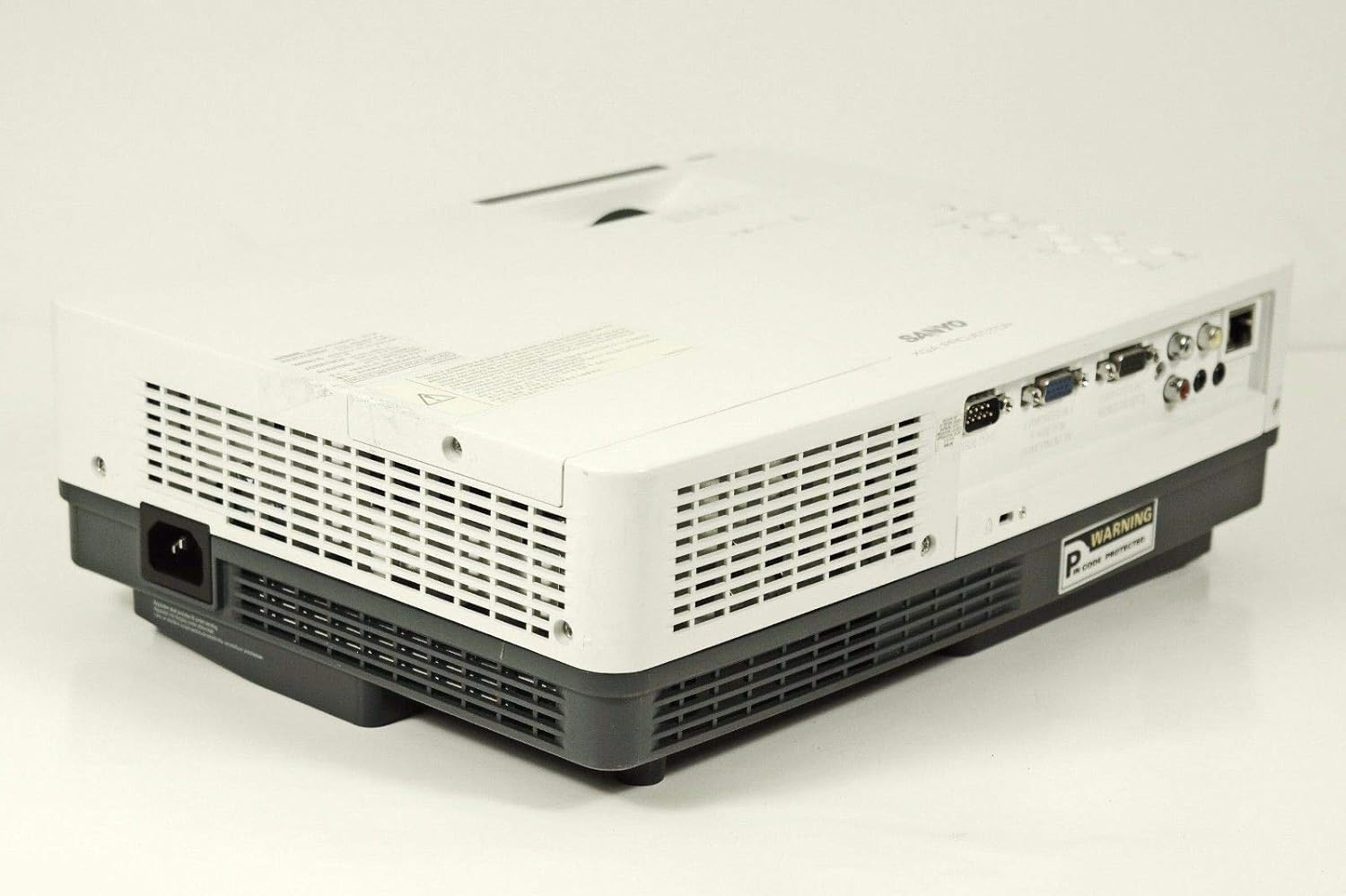
Obraz: Bok view of the SANYO PLC-XK2200 projector, highlighting the power input socket and exhaust vents.

Obraz: Dół view of the SANYO PLC-XK2200 projector, displaying screw holes for mounting, ventilation grilles, and the product information label.
4. Konfiguracja
4.1 Umiejscowienie projektora
Place the projector on a stable, flat surface or mount it securely. Ensure there is sufficient space around the projector for ventilation. Avoid placing it in direct sunlight or near heat sources.
4.2 Podłączanie zasilania
- Connect the power cord to the AC inlet on the projector.
- Podłącz drugi koniec przewodu zasilającego do uziemionego gniazdka elektrycznego.
- The power indicator light will illuminate, typically in amber, indicating standby mode.
4.3 Podłączanie źródeł wejściowych
Connect your video source (e.g., computer, DVD player) to the appropriate input port on the projector's rear panel. The PLC-XK2200 supports various inputs including VGA (Computer In 1/2), S-Video, and Composite Video.
- Komputer: Use a VGA cable to connect your computer's video output to the COMPUTER IN 1 or COMPUTER IN 2 port.
- Urządzenia wideo: For S-Video, connect to the S-VIDEO IN port. For composite video, connect to the VIDEO IN port using an RCA cable.
- Audio: Connect audio cables from your source device to the AUDIO IN ports if you wish to use the projector's internal speaker or audio output.
5. Instrukcja obsługi
5.1 Włączanie/wyłączanie
- Włączanie: Press the POWER button on the projector's top panel or remote control. The power indicator will turn green, and the lamp rozświetli się.
- Aby wyłączyć: Press the POWER button twice. The projector will enter cooling mode, and the power indicator will flash amber. Once cooled, it will return to standby mode (solid amber).
5.2 Regulacja obrazu
- Centrum: Rotate the FOCUS ring on the lens until the image is sharp and clear.
- Brzęczenie: Rotate the ZOOM ring on the lens to adjust the image size.
- Korekcja Keystone'a: Use the AUTO SETUP button or navigate through the menu to adjust vertical keystone distortion, which corrects trapezoidal images.
5.3 Wybór wejścia
Press the INPUT button on the projector or remote control to cycle through available input sources (e.g., Computer 1, Computer 2, Video, S-Video).
5.4 Nawigacja po menu
Press the MENU button to access the on-screen display (OSD) menu. Use the arrow buttons to navigate and the SELECT button to confirm choices. Press MENU again to exit.
6. Konserwacja
6.1 Czyszczenie projektora
- Zewnętrzny: Do czyszczenia projektora należy używać miękkiej, suchej ściereczki.asing. For stubborn dirt, dampen the cloth with a mild detergent solution.
- Obiektyw: Gently wipe the lens with a lens cleaning cloth or lens paper. Avoid harsh chemicals or abrasive materials.
- Filtr powietrza: Regularly clean the air filter to maintain proper ventilation and prevent overheating. Refer to the filter cover for removal instructions.
6.2 Łamp Wymiana
Lamp ma skończony okres życia. Kiedy lamp wskaźnik świeci się lub obraz staje się przyciemniony,amp może wymagać wymiany. Zawsze pozwól projektorowi całkowicie ostygnąć przed próbąamp replacement. Consult a qualified technician for lamp replacement if you are unsure.
Ostrzeżenie: High pressure lamp. Risk of explosion if improperly handled. Refer to the service manual for detailed lamp procedury wymiany.
7. Rozwiązywanie Problemów
| Problem | Możliwa przyczyna | Rozwiązanie |
|---|---|---|
| Obraz nie jest wyświetlany | Incorrect input selected; loose cable connection; projector in standby. | Press INPUT to select correct source; check cable connections; press POWER button to turn on. |
| Obraz jest rozmazany | Nie ustawiono ostrości; projektor jest zbyt blisko/daleko od ekranu. | Adjust the FOCUS ring; reposition the projector or use the ZOOM ring. |
| Obraz ma kształt trapezu | Projektor nie jest ustawiony prostopadle do ekranu. | Use Auto Vertical Keystone correction or manually adjust. |
| Projektor przegrzewa się i wyłącza | Blocked ventilation; dirty air filter. | Zapewnij swobodny przepływ powietrza wokół otworów wentylacyjnych; wyczyść lub wymień filtr powietrza. |
8. Specyfikacje

Obraz: Bok view of the SANYO PLC-XK2200 projector, displaying the model number label (MODEL NO. PLC-XK2200).
- Nazwa modelu: PLC-XK2200
- Marka: SANYO
- Technologia wyświetlania: LCD
- Jasność: 2200 lumenów
- Współczynnik kontrastu: 2000:1
- Rozdzielczość natywna: XGA (1024 x 768)
- Proporcje obrazu: 4:3 (natywny)
- Współczynnik kształtu: Przenośny
- Typ montażu: Uchwyt na blat
- Terminale wejściowe: VGA (x2), S-Video, Composite Video, Audio In (RCA)
- Zaciski wyjściowe: VGA (Monitor Out), Audio Out (RCA)
- Port kontrolny: RS-232C
- Kod UPC: 086483079498
9. Gwarancja i wsparcie
For warranty information, please refer to the warranty card included with your product or contact your local SANYO dealer. Technical support may be available through authorized service centers.
No official product videos were provided in the input data for this manual.