
Wstęp
The iGaging Digital Outside Caliper (Model 35-OD6-H) is a professional-grade precision tool designed for quick and accurate external measurements. It features a large LCD display for easy reading and supports measurements in inch, metric, and fractional units. The spring-loaded travel and friction mechanism ensure consistent and reliable results, making it suitable for various applications including woodworking, carpentry, and metal fabrication.

Image: The iGaging Digital Outside Caliper, Model 35-OD6-H, showcasing its digital display, Eazy-Grip handle, and key specifications.
Cechy produktu
- Duży wyświetlacz LCD: Zapewnia przejrzyste i łatwe do odczytania pomiary.
- Spring-Loaded Travel: Ensures smooth and consistent jaw movement for precise contact.
- Metal Alloy Jaws with Chrome Finish: Trwała konstrukcja zapewniająca długotrwałą wydajność.
- Wiele trybów pomiaru: Displays readings in Inch, Metric, and Fractional units.
- Funkcja wstrzymania: Allows users to freeze the displayed measurement for convenient reading.
Co jest w pudełku
Po otwarciu opakowania produktu w jego wnętrzu powinny znajdować się następujące elementy:
- One (1) iGaging Digital Outside Caliper
- Two (2) CR2 Batteries (pre-installed or included separately)
- One (1) Instruction Manual (this document)
- One (1) Protective Case

Image: The iGaging Digital Outside Caliper shown with its protective storage case.
Organizować coś
- Montaż baterii: The caliper requires two CR2 batteries. If not already installed, locate the battery compartment on the back of the digital display unit. Open the compartment, insert the batteries according to the polarity indicators, and close the cover securely.
- Włączanie: Naciśnij ON/SET button to turn on the caliper. The LCD display should illuminate.
- Zerowanie początkowe: With the caliper jaws fully closed and clean, press the ON/SET button again to set the display to zero. This ensures accurate measurements.
Instrukcja obsługi
Follow these steps to take accurate external measurements with your digital caliper:
- Przygotuj zacisk: Ensure the caliper is clean and the jaws are free of debris. Power on the device and zero it by closing the jaws completely and pressing the ON/SET przycisk.
- Position the Jaws: Gently open the caliper jaws and position them around the external dimension of the object you wish to measure. Ensure the jaws make firm, parallel contact with the object's surface.
- Przeczytaj pomiar: The measurement will be displayed instantly on the large LCD screen.
- Use the Friction Screw: For stable measurements, especially when measuring multiple similar items, you can tighten the friction screw located on the top of the digital unit. This locks the jaws in place, preventing accidental movement. Loosen the screw to adjust the jaws again.

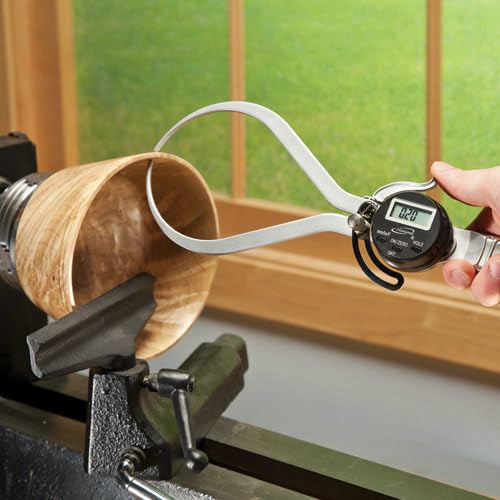
Image: The digital outside caliper in use, measuring the external diameter of a wooden bowl on a lathe.
Tryby pomiaru
The iGaging Digital Outside Caliper supports three measurement units:
- Millimeters (mm): Standard metric unit.
- Inches (in): Standard imperial unit, displayed as decimals.
- Fractions (F): Imperial unit, displayed as fractions (e.g., 1/4", 1/2").
To switch between these modes, press the mm/cale/stopnie Fahrenheita button located on the digital display unit. The current mode will be indicated on the LCD screen.
Obraz: Zbliżenie view of the digital display and control buttons (mm/in/F, ON/SET, HOLD, OFF) on the caliper.
Funkcja przytrzymania
Ten TRZYMAĆ button allows you to freeze the current measurement on the display. This is useful when measuring in awkward positions where reading the display directly might be difficult. Press the TRZYMAĆ button once to activate the function, and press it again to release and resume live measurement.
Konserwacja
- Czyszczenie: Wipe the caliper jaws and body with a clean, dry, lint-free cloth after each use. Avoid using solvents or harsh chemicals, as these can damage the finish or electronic components.
- Składowanie: Store the caliper in its protective case in a dry, cool place, away from direct sunlight and extreme temperatures.
- Wymiana baterii: When the display becomes dim or erratic, it's time to replace the batteries. Follow the battery installation steps in the Setup section. Dispose of old batteries responsibly.
- Kalibrowanie: While the caliper is factory calibrated, periodic checks against known standards are recommended for critical applications to ensure continued accuracy.
Rozwiązywanie problemów
| Problem | Możliwa przyczyna | Rozwiązanie |
|---|---|---|
| Wyświetlacz jest pusty lub przyciemniony. | Niski poziom naładowania baterii lub jej rozładowanie. | Wymień baterie CR2. |
| Niedokładne odczyty. | Jaws are dirty or not fully closed when zeroed. | Clean the jaws and re-zero the caliper. Ensure proper contact with the object. |
| Display shows "Err" or erratic numbers. | Electronic interference or internal error. | Turn the caliper off and then on again. If the problem persists, replace batteries. |
Specyfikacje
| Funkcja | Szczegół |
|---|---|
| Numer modelu | 35-OD6-H |
| Zakres pomiaru | 0-6 cala |
| Dokładność pomiaru | ±0.01" |
| Rezolucja | 0.01" / 0.1 mm / 1/64" |
| Tworzywo | Stal nierdzewna |
| Źródło zasilania | 2 baterie CR2 (w zestawie) |
| Wymiary produktu | Approximately 5"L x 12"W (overall) |
| Waga przedmiotu | 7.7 uncji |
Gwarancja i wsparcie
This iGaging product is typically covered by a manufacturer's warranty against defects in materials and workmanship. For specific warranty details, including duration and terms, please refer to the documentation included with your purchase or contact iGaging customer support directly.
For technical assistance, troubleshooting, or to inquire about replacement parts, please visit the official iGaging webOdwiedź witrynę lub skontaktuj się z działem obsługi klienta. Zachowaj paragon jako dowód zakupu na wypadek reklamacji.
Zasady zwrotu: Products purchased from Amazon.com typically have a 30-day return window. Please check Amazon's return policy for the most current information regarding eligibility and procedures.