
1. Wprowadzenie
Thank you for choosing the Zipro Pacemaker Treadmill. This manual provides essential information for the safe assembly, operation, and maintenance of your new fitness equipment. Please read this manual thoroughly before using the treadmill and keep it for future reference.
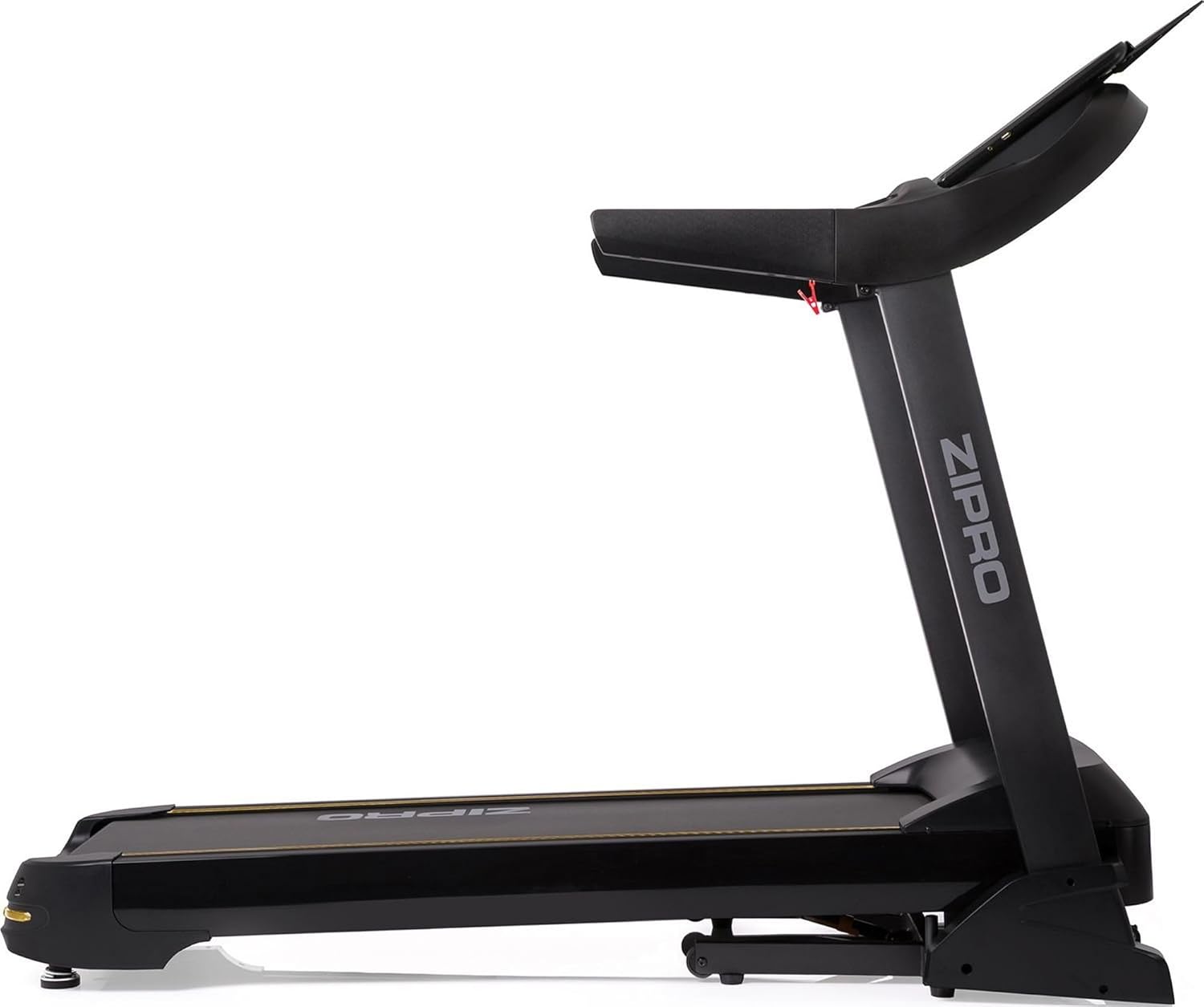
The Zipro Pacemaker Treadmill is designed for home use, offering a robust construction, a wide running belt, and a powerful motor for various training intensities. Its folding design and transport wheels ensure convenient storage and mobility.
2. Instrukcje bezpieczeństwa
WARNING: Before starting any exercise program, consult your physician, especially if you have pre-existing health conditions.
- Always place the treadmill on a flat, stable surface with adequate clearance around it (at least 2 meters behind and 0.6 meters on each side).
- Trzymaj dzieci i zwierzęta z dala od bieżni podczas pracy.
- Noś odpowiednie obuwie i odzież sportową. Unikaj luźnych ubrań, które mogłyby zostać wciągnięte przez ruchome części.
- Always use the safety key/clip. Attach the clip to your clothing before starting your workout. In case of an emergency, pulling the safety key will immediately stop the treadmill.
- Do not step on or off the treadmill while the belt is moving. Start at a slow speed and gradually increase.
- Trzymaj się poręczy, aby zachować równowagę, zwłaszcza podczas ruszania lub zmiany prędkości/nachylenia.
- Do not attempt to service the treadmill yourself. Refer to qualified service personnel for repairs.
- Upewnij się, że przewód zasilający nie jest uszkodzony i nie znajduje się pod bieżnią.
- Maksymalna waga użytkownika: 150 kg.
3. Zawartość opakowania
Sprawdź, czy w opakowaniu znajdują się wszystkie komponenty:
- 1 x Zipro Pacemaker Treadmill (main unit)
- 1 x Instrukcja obsługi
- Narzędzia montażowe (jeśli dotyczy)
- Klucz bezpieczeństwa
4. Instalacja i montaż
The Zipro Pacemaker Treadmill features a convenient folding design for easy setup and storage. Follow these general steps for assembly:
- Rozpakowywanie: Ostrożnie wyjąć wszystkie elementy z opakowania.
- Pozycjonowanie: Place the treadmill on a level surface in your desired workout area. Ensure sufficient space around the unit.
- Rozwijanie: Gently lower the running deck from its folded position until it locks into place. Refer to the specific instructions in your included manual for the exact unfolding mechanism.
- Zabezpieczanie komponentów: Attach any loose components such as the console, handrails, or safety key holder as per the detailed assembly instructions.
- Podłączenie zasilania: Podłącz przewód zasilający do uziemionego gniazdka elektrycznego.


5. Instrukcja obsługi
5.1 Konsola Overview
The treadmill features an intuitive LED display console that shows key workout metrics.


5.2 Rozpoczęcie treningu
- Sprawdź, czy bieżnia jest podłączona do prądu i czy klucz bezpieczeństwa znajduje się na swoim miejscu.
- Stań na bocznych poręczach bieżni.
- Naciśnij START button on the console. The belt will begin to move at a low speed.
- Ostrożnie stań na ruchomym pasie i zacznij iść.
5.3 Regulacja prędkości i nachylenia
- Prędkość: Użyj PRĘDKOŚĆ + I PRĘDKOŚĆ - buttons to adjust the belt speed from 1 km/h to 22 km/h. Quick speed buttons may also be available for instant adjustments.
- Skłonić: Użyj NACHYLENIE + I NACHYLENIE - buttons to adjust the incline level (0-15 levels). Quick incline buttons may also be available.
5.4 Zatrzymanie treningu
- Naciśnij ZATRZYMYWAĆ SIĘ button to gradually slow down and stop the treadmill.
- W nagłym wypadku należy natychmiast zatrzymać bieżnię, pociągając za kluczyk bezpieczeństwa.
5.5 Using Bluetooth and USB
- Bluetooth: The treadmill supports Bluetooth connectivity. Pair your device to stream audio through the integrated speakers or connect to compatible fitness applications like Kinomap for interactive workouts.
- USB: Use the USB port to charge your mobile devices during your workout.

6. Programy i funkcje
The Zipro Pacemaker Treadmill offers a variety of training options to suit your fitness goals:
- Wstępnie ustawione programy: The computer is equipped with 99 pre-set workout programs designed for various fitness levels and goals.
- Programy użytkownika: Create and save up to 3 individual user programs to customize your training experience.
- Monitorowanie częstości akcji serca: Integrated pulse sensors in the handrails allow you to monitor your heart rate during your workout.
- Regulowane nachylenie: Simulate uphill running with 15 levels of electronic incline adjustment.
- Szeroki zakres prędkości: Speeds from 1 to 22 km/h accommodate walking, jogging, and high-intensity running.
7. Konserwacja
Regularna konserwacja zapewnia długowieczność i optymalną wydajność bieżni.
- Czyszczenie: Przetrzyj konsolę i inne powierzchnie za pomocąamp ściereczkę po każdym użyciu. Unikaj środków czyszczących o działaniu ściernym.
- Smarowanie paska: Periodically lubricate the running belt according to the instructions in your specific manual (usually every few months depending on usage). This reduces friction and extends belt life.
- Naciąg i ustawienie paska: Check the running belt tension and alignment regularly. Adjust if necessary to prevent slipping or rubbing.
- Osłona silnika: Keep the motor cover clean and free of dust to ensure proper ventilation.
- Kontrola: Regularly inspect all nuts, bolts, and moving parts for tightness and wear. Tighten or replace as needed.


8. Rozwiązywanie Problemów
If you encounter issues with your Zipro Pacemaker Treadmill, refer to the following common problems and solutions:
- Bieżnia się nie włącza:
- Sprawdź, czy przewód zasilający jest prawidłowo podłączony do sprawnego gniazdka.
- Ensure the safety key is correctly placed in its slot.
- Sprawdź wyłącznik lub bezpiecznik w swoim domu.
- Pas biegowy ślizga się lub zacina:
- The running belt may need lubrication. Refer to the maintenance section.
- The running belt may be too loose. Adjust the tension according to your specific manual.
- Wyświetlacz konsoli nie działa prawidłowo:
- Sprawdź, czy wszystkie połączenia kablowe z konsolą są bezpieczne.
- Try turning the treadmill off and on again.
- Nietypowe dźwięki podczas pracy:
- Sprawdź, czy pod pasem nie ma luźnych części lub ciał obcych.
- Upewnij się, że bieżnia jest ustawiona na równej powierzchni.
For persistent issues not covered here, please contact customer support or refer to the full troubleshooting guide in your included manual.
9. Specyfikacje
| Funkcja | Specyfikacja |
|---|---|
| Numer modelu | 5942805 |
| Marka | ZIPRO |
| Wymiary (rozłożony) | 188 x 82 x 151 cm (dł. x szer. x wys.) |
| Wymiary (złożony) | 118 x 82 x 151 cm (dł. x szer. x wys.) |
| Waga | 81 kilogramów |
| Maksymalna waga użytkownika | 150 kilogramów |
| Zakres prędkości | 1 - 22 kilometrów na godzinę |
| Poziomy nachylenia | 15 (regulowany) |
| Moc silnika | 5 KM (szczyt) |
| Typ wyświetlacza | LED (7 windows) |
| Programy treningowe | 99 Pre-set + 3 User Programs |
| Łączność | Bluetooth, USB |
| Tworzywo | Polyethylene (PE), Metal, Plastic |
| Cechy specjalne | Adjustable incline, Bluetooth app compatibility, Elegant design, Transport wheels |
10. Gwarancja i wsparcie
For information regarding warranty coverage, product registration, or technical support, please refer to the warranty card included with your purchase or visit the official ZIPRO webZachowaj dowód zakupu na wypadek roszczeń gwarancyjnych.