
1. Wprowadzenie
This instruction manual provides essential information for the proper installation, operation, and maintenance of the Morris Products 97434 Clear Insulated Multi-Cable Connector. Please read this manual thoroughly before installation to ensure safe and efficient use. This connector is designed for joining multiple electrical conductors within a specified wire range.
2. Informacje dotyczące bezpieczeństwa
OSTRZEŻENIE: Electrical work should only be performed by qualified personnel. Failure to follow these instructions can result in electrical shock, fire, or serious injury.
- Always disconnect power at the source before installing or servicing electrical connectors.
- Sprawdź, czy objętośćtage and current ratings of the circuit are compatible with the connector's specifications.
- Upewnij się, że wszystkie połączenia są solidne i właściwie zaizolowane, aby zapobiec zwarciom i zagrożeniom elektrycznym.
- Należy nosić odpowiedni sprzęt ochrony osobistej (PPE), w tym rękawice izolacyjne i okulary ochronne.
- Do not use this connector in environments exceeding its specified temperature range or in hazardous locations unless explicitly rated for such use.
3. Funkcje produktu
- Clear Insulation: Allows for visual confirmation of proper conductor insertion, ensuring reliable connections.
- Dual Entry Design: Wires can be inserted from either side of the connector, offering installation flexibility.
- Konstrukcja wieloportowa: Features 3 ports for connecting multiple conductors.
- Wide Wire Range: Accommodates 500-4 AWG wire sizes.
- Dual Rated: Suitable for use with both copper and/or aluminum conductors (CU9AL).
- Pre-filled with Oxide Inhibitor: Reduces oxidation and improves connection integrity, especially with aluminum wires.
- Trwała konstrukcja: Made from 6061-T6 aluminum with rugged high-dielectric Plastisol dipped PVC insulation, resistant to chemicals and abrasion.
- Zakres temperatur: Operates effectively from -49°F to 194°F (-45°C to 90°C).
- Certyfikaty: ANSI C119.4 & cULus 486b Listed. Rated for 600 Volt applications.
4. Konfiguracja i instalacja
Follow these steps for proper installation of the multi-cable connector:
- Odłączenie zasilania: Ensure all power to the circuit is completely disconnected and locked out before beginning installation. Verify with a voltagtester.
- Przygotowanie drutu: Strip the insulation from the conductor ends to the appropriate length, ensuring that the bare wire will fully enter the connector port without excess insulation inside or bare wire exposed outside. Refer to local electrical codes for specific stripping length requirements.
- Conductor Insertion: Insert one prepared conductor into each port of the connector. The clear insulation allows for visual confirmation that the conductor is fully seated and making proper contact with the internal metal barrel.

Rysunek 1: Koniecview of the Morris Products 97434 Multi-Cable Connector.
- Dokręcanie połączeń: Use an appropriate hex wrench to tighten the set screws for each conductor. Tighten until the wire is securely held and the connection is firm. Do not overtighten.
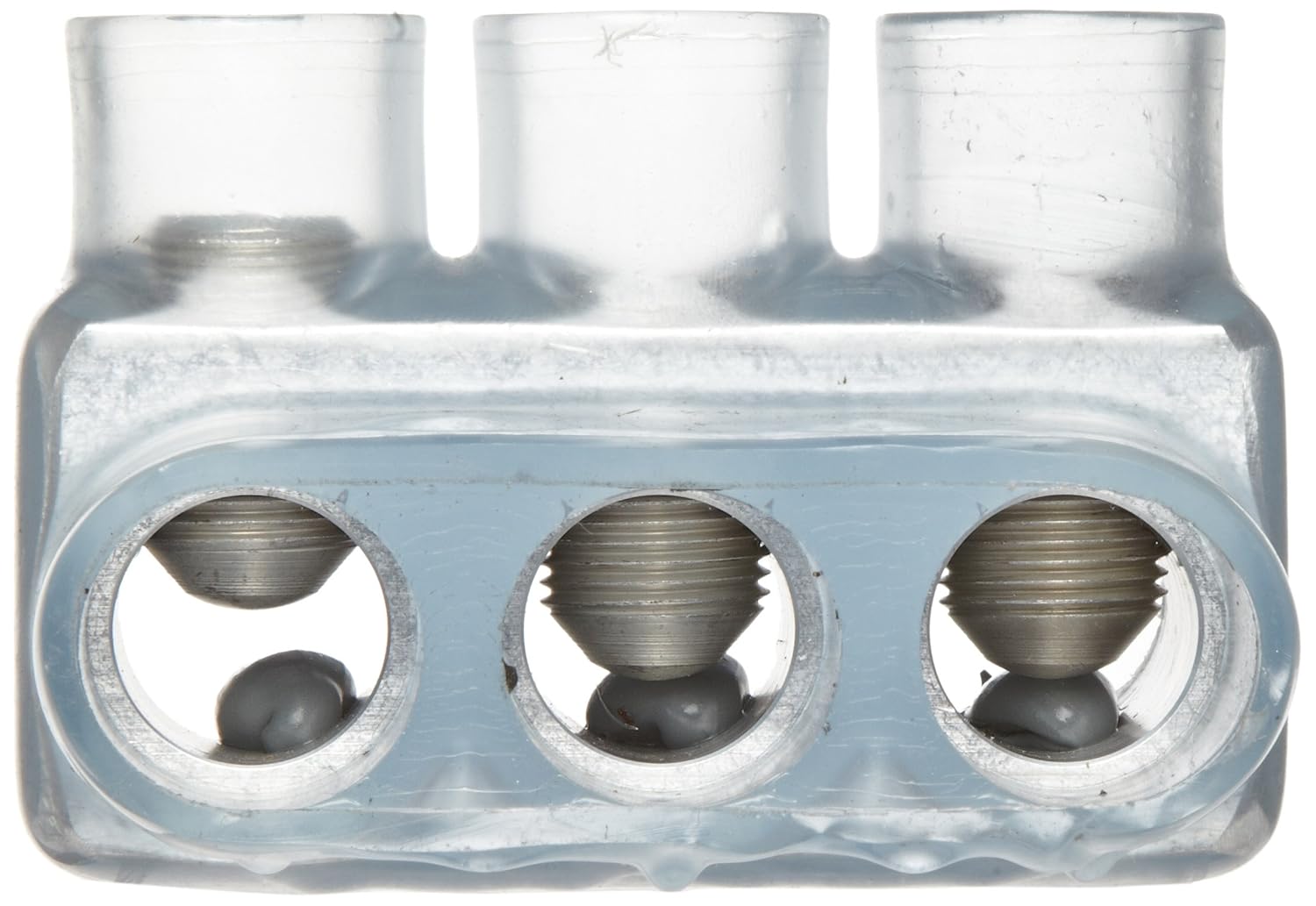
Figure 2: Close-up of connector ports with set screws and oxide inhibitor.
- Kontrola wizualna: After tightening, visually inspect each connection through the clear insulation to confirm that the conductor is properly seated and the connection appears secure.
- Re-entry Plugs: The connector features removable plugs marked with wire size, providing easy access for installation, inspection, or troubleshooting. Ensure these plugs are securely in place after installation.
- Przywrócenie zasilania: Once all connections are verified as correct and secure, restore power to the circuit.
5. Instrukcja obsługi
Once installed, the Morris Products 97434 connector operates passively to maintain electrical continuity. No user interaction is required during normal operation. The clear insulation allows for ongoing visual inspection of the connections without disassembly.
6. Konserwacja
Periodic inspection of the connector is recommended to ensure continued integrity of the electrical connections. Check for:
- Any signs of physical damage to the insulation.
- Discoloration or signs of overheating.
- Loose connections (visually inspect through clear insulation).
If any issues are observed, disconnect power immediately and address the problem by re-terminating the connection or replacing the connector if damaged.
7. Rozwiązywanie Problemów
Most issues related to electrical connectors stem from improper installation. If a circuit connected with the 97434 connector is not functioning correctly:
- Brak zasilania/Przerywane zasilanie: Disconnect power and visually inspect the connections through the clear insulation. Ensure wires are fully inserted and set screws are tight. Re-strip and re-terminate if necessary.
- Przegrzanie: Disconnect power immediately. Overheating can indicate a loose connection, an undersized wire, or an overloaded circuit. Verify wire gauge, circuit load, and re-terminate connections. Replace the connector if it shows signs of heat damage.
8. Specyfikacje
| Specyfikacja | Szczegół |
|---|---|
| Numer modelu | 97434 |
| Zakres przewodów | 500–4 AWG |
| Liczba portów | 3 |
| Tomtage Ocena | 600 wolty |
| Tworzywo | 6061-T6 Aluminum, Copper |
| Materiał izolacyjny | Polichlorek winylu (PCW) |
| Zakres temperatur | -49°F do 194°F (-45°C do 90°C) |
| Wymiary | 4.13 x 3.38 x 2.75 cala |
| Waga | 12.8 uncji |
| Certyfikaty | ANSI C119.4, cULus 486b Listed |
9. Gwarancja i wsparcie
For warranty information or technical support regarding the Morris Products 97434 Clear Insulated Multi-Cable Connector, please contact Morris Products directly through their official website or customer service channels. Keep your purchase receipt for any warranty claims.