1. Wprowadzenie
Thank you for choosing the AMS Pendule 211/1 wall clock. This manual provides comprehensive instructions for the safe and efficient setup, operation, and maintenance of your new clock. Please read this manual thoroughly before use and retain it for future reference.
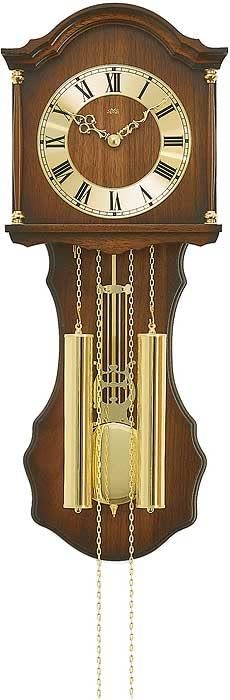
Figure 1: AMS Pendule 211/1 Wall Clock
2. Konfiguracja
2.1 Rozpakowanie
- Ostrożnie wyjmij zegar z opakowania.
- Inspect the clock for any signs of damage. If damaged, do not proceed with setup and contact customer support.
- Remove all protective films or packaging materials from the clock face, hands, and pendulum.
- Zachowaj opakowanie, aby móc je później transportować lub przechowywać.
2.2 Instalacja baterii
The AMS Pendule 211/1 requires batteries (not included) for operation. Please use the specified battery type.
- Znajdź pokrywę komory baterii z tyłu zegara.
- Remove the cover by sliding or unlatching it.
- Insert the required batteries (e.g., 1x AA or 1x C, refer to the compartment label for exact type) according to the polarity indicators (+ and -).
- Dokładnie załóż pokrywę komory baterii.
2.3 Montaż zegara
Ensure the clock is mounted securely on a stable wall surface.
- Choose a suitable location on a wall, away from direct sunlight, extreme temperatures, or vibrations.
- Use an appropriate wall anchor and screw for your wall type (e.g., drywall, concrete). The mounting point should be strong enough to support the clock's weight.
- Hang the clock securely using the keyhole slot on the back. Ensure it is level.
2.4 Ustawianie czasu
Your AMS Pendule 211/1 clock features an analog display. Some models may include a radio-controlled mechanism for automatic time synchronization.
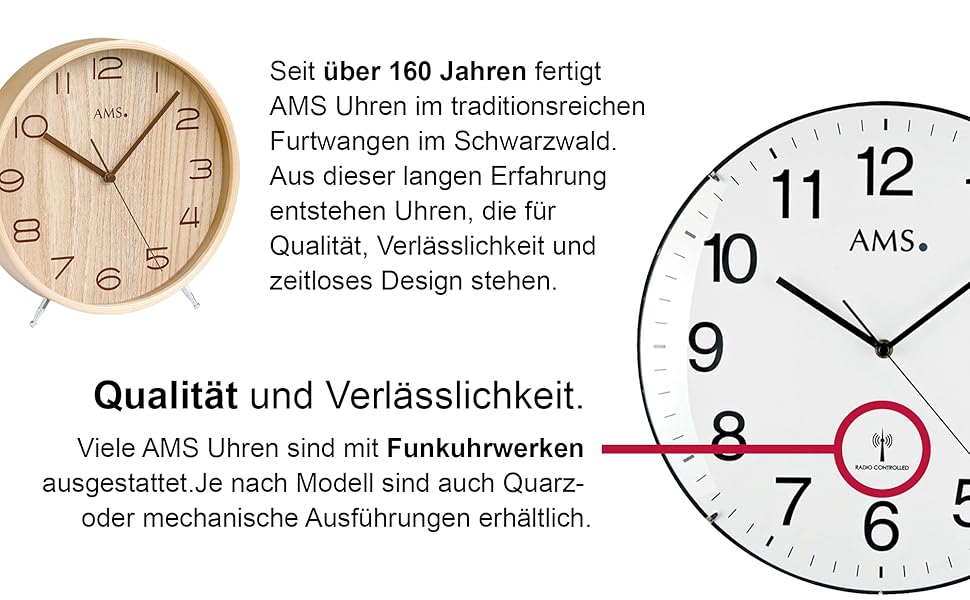
Rysunek 2: Example Clock Face with Radio Controlled Symbol
- Ustawienie ręczne: Locate the time-setting knob or wheel on the back of the clock. Gently turn this knob to move the minute and hour hands clockwise until the correct time is displayed. Avoid turning the hands counter-clockwise.
- Radio-Controlled (if applicable): If your clock is radio-controlled, it will attempt to synchronize with a time signal after battery installation. Place the clock near a window for better signal reception. This process may take several minutes or hours. Once synchronized, the clock will automatically display the correct time.
2.5 Pendulum Setup
The pendulum is a decorative and functional element of your clock.
- Carefully unpack the pendulum if it was separate from the main clock body.
- Attach the pendulum to its hook or hanging mechanism inside the clock case. Ensure it hangs freely and does not touch the sides of the case.
- Gently push the pendulum to one side to start its swing. It should swing evenly.
3. Instrukcja obsługi
3.1 Odczyt czasu
The AMS Pendule 211/1 features a clear analog display with hour, minute, and second hands for precise timekeeping.
- Ten short hand indicates the hour.
- Ten long hand indicates the minute.
- Ten thin sweeping hand indicates the second.
3.2 funkcja alarmu;
Your clock is equipped with an alarm function. Refer to the specific controls on the back or side of your clock for alarm setting.
- Ustaw godzinę alarmu: Locate the alarm setting knob/dial (often separate from the main time setting). Turn it to set the desired alarm time.
- Aktywuj alarm: Find the alarm ON/OFF switch or button. Move it to the "ON" position to activate the alarm.
- Dezaktywuj alarm: To turn off the alarm sound, move the alarm switch to the "OFF" position.
3.3 Pendulum Operation
Once the pendulum is installed and started, it should swing continuously. If it stops, gently restart it.
- Ensure the clock is level on the wall to allow for an even pendulum swing.
- Avoid obstructing the pendulum's movement.
4. Konserwacja
4.1 Czyszczenie
Regular cleaning will help maintain the appearance of your clock. The frame is made of Acrylonitrile Butadiene Styrene (ABS).
- Wipe the clock's exterior with a soft, dry, lint-free cloth.
- W przypadku uporczywych plam, delikatnieampPrzetrzyj szmatkę wodą. Unikaj stosowania silnych środków chemicznych, ściernych środków czyszczących i rozpuszczalników, ponieważ mogą one uszkodzić wykończenie.
- Do not spray cleaning solutions directly onto the clock.
- Keep the clock away from excessive dust and moisture.
4.2 Wymiana baterii
Replace batteries when the clock starts losing time or stops functioning.
- Follow the steps in Section 2.2 "Battery Installation" to replace old batteries with new ones of the correct type.
- Zużytych baterii należy pozbywać się w sposób odpowiedzialny, zgodnie z lokalnymi przepisami.
7. Gwarancja i wsparcie
Aby uzyskać informacje o gwarancji lub pomocy technicznej, zapoznaj się z dokumentacją dołączoną do zakupu lub skontaktuj się ze sprzedawcą. Zachowaj dowód zakupu na wypadek roszczeń gwarancyjnych.
For further assistance, you may visit the official AMS webstronie lub skontaktuj się z działem obsługi klienta.
