
Wstęp
Thank you for choosing the CHH 2 Deck Hand Crank "Welcome To Las Vegas" Card Shuffler. This manual shuffler is designed to provide a quiet and efficient way to shuffle up to two decks of playing cards, ensuring a fair and enjoyable game experience. Its durable, lightweight plastic construction makes it easy to use, transport, and store.

Image: The CHH 2 Deck Hand Crank "Welcome To Las Vegas" Card Shuffler, featuring a red body with a clear central shuffling mechanism and a "Welcome To Las Vegas" logo.
Organizować coś
- Rozpakuj komponenty: Carefully remove the card shuffler unit, crank handle, and card collection tray from the packaging.
- Zamontuj korbę: Locate the crank handle, typically stored underneath the shuffler unit. Insert the square end of the crank handle into the designated shaft on the side of the shuffler. Ensure it is securely fitted.

Image: Step 1 - A hand removing the crank handle from its storage slot on the underside of the card shuffler.
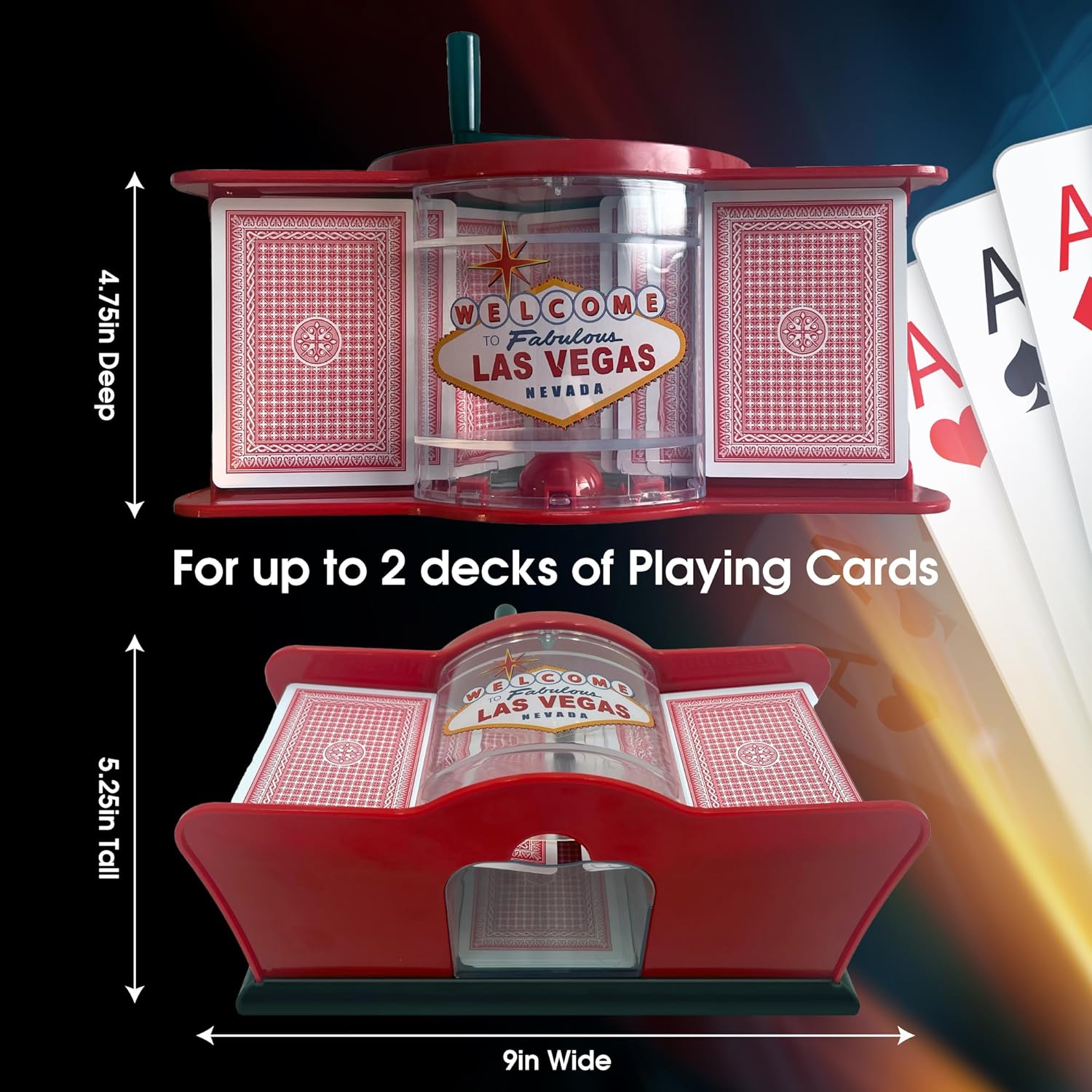
Image: Step 2 - A hand inserting the crank handle into the side shaft of the card shuffler.
Instrukcja obsługi
- Przygotuj karty: Divide your deck(s) of playing cards into two roughly equal halves. The shuffler can accommodate up to two standard decks.
- Load Cards: Place one half of the cards into the left card slot and the other half into the right card slot on top of the shuffler. Ensure the cards are seated properly.
- Begin Shuffling: Hold the shuffler firmly with one hand. With the other hand, rotate the crank handle clockwise. The internal mechanism will draw cards from both stacks and interleave them into the central collection tray.
- Retrieve Shuffled Cards: Once all cards have been shuffled, pull out the clear plastic collection tray from the front of the shuffler. Your cards are now thoroughly shuffled and ready for play.
- Repeat for Thoroughness: For an even more randomized shuffle, you may repeat the process 2-3 times.

Image: Cards are placed into the two side slots of the shuffler, ready for manual operation. Text indicates "Manual Operation, No Batteries Required!"

Image: A hand turning the crank handle, showing cards being interleaved into the central collection tray.
Konserwacja
- Czyszczenie: Wipe the exterior of the shuffler with a soft, dry cloth. For stubborn dirt, a slightly damp cloth can be used, but ensure no moisture enters the internal mechanism.
- Unikaj płynów: Do not immerse the shuffler in water or use harsh chemical cleaners.
- Składowanie: Store the shuffler in a dry place away from direct sunlight and extreme temperatures. Ensure the crank handle is stored securely to prevent loss.
Rozwiązywanie problemów
- Zacinanie się kart: If cards jam, stop cranking immediately. Gently remove any jammed cards. Ensure cards are not bent or damaged, and that the stacks are evenly placed in the slots. Avoid cranking too fast.
- Uneven Shuffle: If one side appears to pull cards faster than the other, try adjusting the speed of your cranking. For best results, shuffle the cards multiple times.
- Crank Handle Issues: If the crank handle feels loose or ineffective, ensure it is fully inserted into the shaft.
Specyfikacje
- Model: LV2628
- Wymiary: 9 x 5.25 x 4.75 cala
- Waga przedmiotu: 15.2 uncji
- Pojemność: Up to 2 decks of standard playing cards
- Działanie: Ręczna korba ręczna
- Tworzywo: Lightweight, sturdy plastic

Image: A diagram illustrating the dimensions of the card shuffler: 9 inches wide, 5.25 inches tall, and 4.75 inches deep.
Gwarancja i wsparcie
For any questions, concerns, or support needs regarding your CHH 2 Deck Hand Crank "Welcome To Las Vegas" Card Shuffler, please contact CHH customer service. Refer to your purchase documentation for specific warranty details and contact information.