
Wstęp
This manual provides comprehensive instructions for the setup, operation, maintenance, and troubleshooting of your Polk Audio SurroundBar 4000 Instant Home Theater system. Please read this manual thoroughly before using the product to ensure proper functionality and to maximize your audio experience.
Ważne informacje dotyczące bezpieczeństwa
Always follow basic safety precautions when using this product to reduce the risk of fire, electric shock, and injury. Keep these instructions for future reference.
- Nie wystawiaj urządzenia na deszcz lub wilgoć.
- Nie blokuj żadnych otworów wentylacyjnych.
- Nie instalować w pobliżu źródeł ciepła.
- Stosować wyłącznie dodatki/akcesoria wskazane przez producenta.
- Wszelkie prace serwisowe należy powierzać wykwalifikowanemu personelowi.
Zawartość opakowania
Sprawdź, czy w opakowaniu znajdują się wszystkie elementy:
- Polk Audio SurroundBar 4000 Soundbar
- Bezprzewodowy subwoofer
- Zdalne sterowanie
- Kable zasilające
- Kabel optyczny
- Wall Mounting Template (if applicable)
- Szybki przewodnik
Organizować coś
1. Umieszczenie
The SurroundBar 4000 can be placed on a shelf below your television or mounted on a wall. Ensure the soundbar is centered with your TV for optimal audio imaging.
The wireless subwoofer can be placed anywhere in the room, ideally within 20-30 feet of the soundbar, for best performance. Avoid placing it directly against a wall or in a corner, which can cause excessive bass.
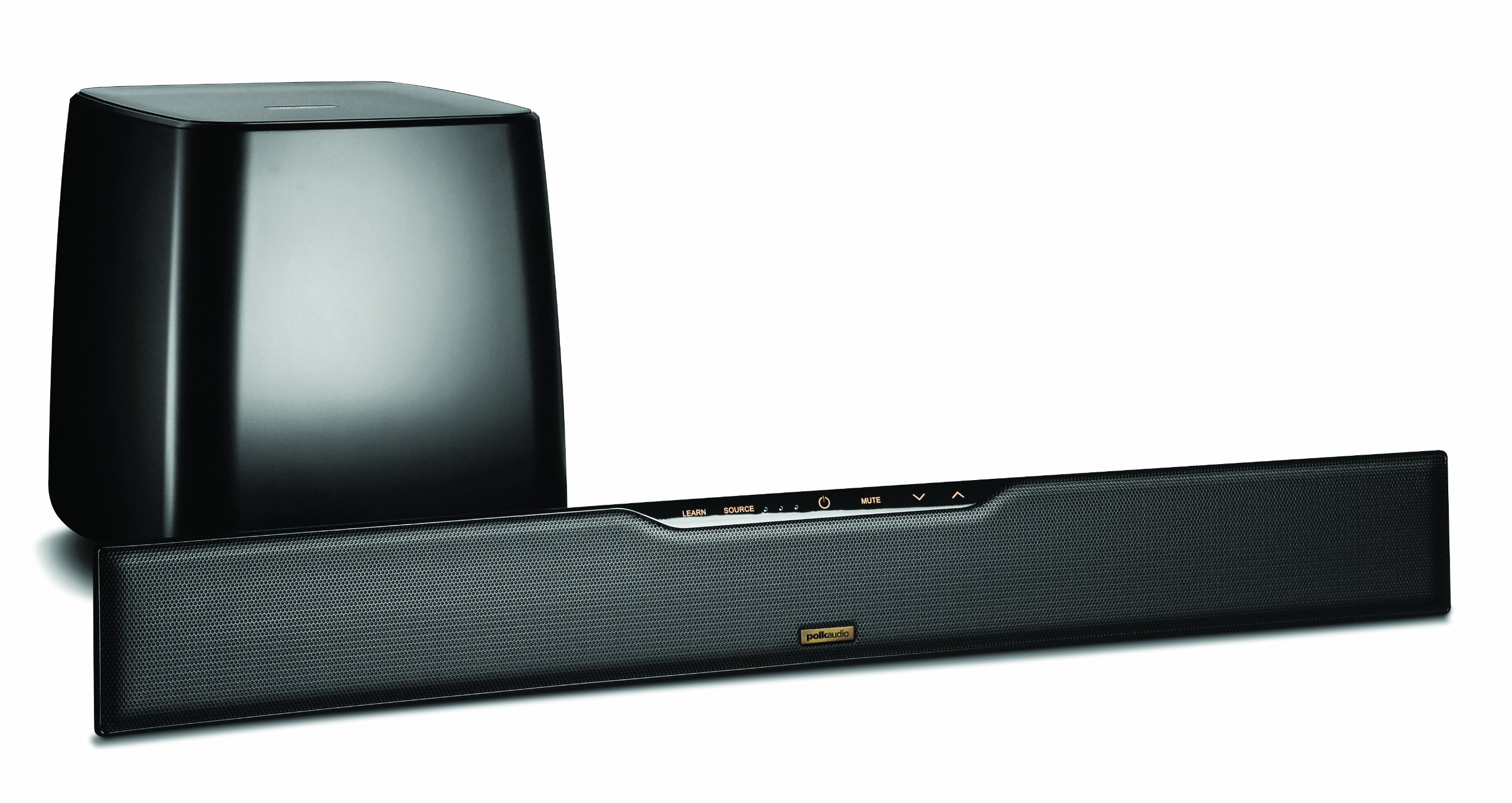
Image: Polk Audio SurroundBar 4000 IHT soundbar and wireless subwoofer. This image illustrates a typical setup with the soundbar positioned below a television and the wireless subwoofer placed nearby.
2. Połączenia
Podłącz soundbar do telewizora lub innego źródła dźwięku, korzystając z jednej z następujących metod:
- Optical Digital Audio (Recommended): Connect one end of the optical cable to the "Optical Out" port on your TV and the other end to the "Optical In" port on the SurroundBar.
- Analog Audio (3.5mm or RCA): If your TV does not have an optical output, use an analog audio cable to connect the TV's audio output to the SurroundBar's analog input.
Podłącz przewody zasilające do soundbara i bezprzewodowego subwoofera, a następnie podłącz je do gniazdka ściennego.
3. Bezprzewodowe parowanie subwoofera
The subwoofer should automatically pair with the soundbar when both are powered on. If pairing does not occur, or if the connection is lost:
- Upewnij się, że zarówno soundbar, jak i subwoofer są włączone.
- Press and hold the "Connect" button on the back of the subwoofer for a few seconds until the status light blinks.
- Press and hold the "Connect" button on the back of the soundbar (or on the remote, if available) until its status light also blinks.
- The lights should become solid once a connection is established.
Instrukcja obsługi
1. Włączanie/wyłączanie zasilania
Naciśnij przycisk zasilania na pilocie lub na soundbarze, aby włączyć lub wyłączyć system.
2. Wybór wejścia
Use the "Source" button on the remote control or soundbar to cycle through available audio inputs (Optical, Analog, Bluetooth).
3. Regulacja głośności
Adjust the master volume using the "Volume Up" and "Volume Down" buttons on the remote or soundbar. The subwoofer volume can be adjusted independently using the "Subwoofer Volume" buttons on the remote.
4. Parowanie Bluetooth
Aby podłączyć urządzenie Bluetooth:
- Select the Bluetooth input on the soundbar.
- On your device, enable Bluetooth and search for "Polk SurroundBar 4000".
- Select the soundbar from the list to pair.
5. Remote Control Learning Feature
The SurroundBar 4000 can learn commands from your TV remote control for power, volume up, volume down, and mute. Refer to the quick start guide for detailed instructions on programming this feature.
Konserwacja
To ensure the longevity and optimal performance of your Polk Audio SurroundBar 4000 IHT:
- Czyszczenie: Do czyszczenia powierzchni soundbara i subwoofera używaj miękkiej, suchej ściereczki. Nie używaj płynnych środków czyszczących ani materiałów ściernych.
- Wentylacja: Ensure that the ventilation openings on the soundbar and subwoofer are not blocked to prevent overheating.
- Przewody zasilające: Regularly inspect power cords for any damage. If damaged, discontinue use and contact customer support.
Rozwiązywanie problemów
| Problem | Możliwa przyczyna | Rozwiązanie |
|---|---|---|
| Brak dźwięku z soundbara |
|
|
| Brak dźwięku z subwoofera |
|
|
| Zniekształcona lub słaba jakość dźwięku |
|
|
| Pilot nie działa |
|
|
Specyfikacje
| Funkcja | Szczegół |
|---|---|
| Marka | Polk Audio |
| Nazwa modelu | SurroundBar 4000 IHT |
| Numer modelu | IHT 4000 |
| Typ głośnika | Soundbar z bezprzewodowym subwooferem |
| Maksymalna moc wyjściowa głośnika | 180 watów |
| Technologia łączności | Bluetooth |
| Tryb wyjścia audio | Otaczać |
| Metoda kontroli | Zdalny |
| Źródło zasilania | Elektryczny przewodowy |
| Kompatybilne urządzenia | Gaming Console, Television |
| UPC | 747192121662 |
Gwarancja i wsparcie
For warranty information and technical support, please refer to the warranty card included with your product or visit the official Polk Audio webZachowaj dowód zakupu na wypadek roszczeń gwarancyjnych.
Polk Audio Webstrona: www.polkaudio.pl
Obsługa klienta: Refer to the Polk Audio webwitryna zawierająca dane kontaktowe dotyczące Twojego regionu.