
1. Wprowadzenie
This manual provides essential information for the safe and efficient operation of your Onkyo TX-NA809 7.1-channel AV receiver. Please read this manual thoroughly before using the unit and retain it for future reference. The TX-NA809 is designed to deliver high-quality audio and video performance for your home theater system, supporting advanced audio formats and multiple connectivity options.
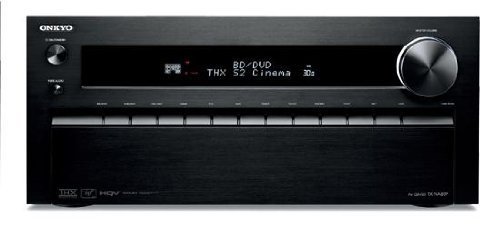
Rycina 1: Przód view of the Onkyo TX-NA809 7.1ch AV Receiver. This image displays the main unit, showcasinz jego czarnym wykończeniem i elementami sterującymi na przednim panelu.
2. Informacje dotyczące bezpieczeństwa
Aby zapewnić bezpieczną obsługę i zapobiec uszkodzeniom, należy przestrzegać następujących środków ostrożności:
- Źródło zasilania: Podłącz urządzenie wyłącznie do gniazdka sieciowego prądu przemiennego.tage określone na tylnym panelu.
- Wentylacja: Zapewnij odpowiednią wentylację. Nie blokuj otworów wentylacyjnych. Zachowaj minimalny odstęp 20 cm (8 cali) nad urządzeniem i 10 cm (4 cale) po bokach.
- Woda i wilgoć: Nie wystawiaj urządzenia na działanie deszczu ani wilgoci. Nie stawiaj na urządzeniu przedmiotów wypełnionych płynami, takich jak wazony.
- Obce przedmioty: Nie wkładaj żadnych obcych przedmiotów do otworów urządzenia.
- Serwisowanie: Nie próbuj samodzielnie naprawiać urządzenia. Wszelkie prace serwisowe zlecaj wykwalifikowanemu personelowi.
- Impedancja głośnika: Ensure that the connected speakers have an impedance rating compatible with the receiver.
3. Zawartość opakowania
Sprawdź, czy w przesyłce znajdują się następujące elementy:
- Onkyo TX-NA809 AV Receiver
- Zdalne sterowanie
- Przewód zasilający
- Antena wewnętrzna FM
- Antena pętlowa AM
- Mikrofon do konfiguracji głośników
- Instrukcja obsługi (ten dokument)
- Szybki przewodnik
4. Konfiguracja
4.1 Połączenia fizyczne
Przed dokonaniem jakichkolwiek podłączeń należy upewnić się, że odbiornik i wszystkie podłączone urządzenia są wyłączone i odłączone od gniazdek ściennych.
- Połączenia głośnikowe: Connect your 7.1 channel speakers to the corresponding speaker terminals on the rear panel. Ensure correct polarity (+ to + and - to -) for each speaker. The receiver supports a 7.1 channel speaker configuration.
- Połączenia HDMI:
- Connect your video sources (e.g., Blu-ray player, game console, cable box) to the HDMI IN ports (8 available).
- Connect your TV or projector to one of the HDMI OUT ports (2 available).
- Połączenia audio cyfrowe: For devices without HDMI, use optical or coaxial digital audio cables. The receiver has 3 optical and 3 coaxial digital audio inputs.
- Połączenie USB: Podłącz urządzenia USB do portu USB w celu odtwarzania multimediów.
- Połączenie internetowe: Connect an Ethernet cable to the LAN port for network features and firmware updates.
- Podłączenie zasilania: After all other connections are made, plug the power cord into the receiver and then into a wall outlet.
Figure 2: Illustrative rear panel connections of the Onkyo TX-NA809. This image represents the various input and output ports for audio, video, and network connections.
4.2 Konfiguracja początkowa
After connecting all components, power on your TV and the TX-NA809 receiver. Follow the on-screen setup wizard to configure basic settings such as speaker calibration, network settings, and input assignments. Use the included speaker setup microphone for automatic speaker calibration (Audyssey MultEQ XT32).
5. Instrukcja obsługi
5.1 Podstawowa obsługa
- Włączanie/wyłączanie: Naciśnij MOC na panelu przednim lub pilocie.
- Wybór wejścia: Użyj WYBÓR WEJŚCIA buttons on the front panel or remote to choose your desired audio/video source (e.g., BD/DVD, GAME, TV/CD).
- Regulacja głośności: Dostosuj głośność za pomocą GŁOŚNOŚĆ pokrętło na panelu przednim lub GŁOŚNOŚĆ +/- przyciski na pilocie.
- Niemy: Naciśnij NIEMY przycisk na pilocie, aby tymczasowo wyciszyć dźwięk.
5.2 Funkcje zaawansowane
- Kontrola aplikacji: The TX-NA809 supports control via a dedicated app for Android and iOS devices. Download the Onkyo Remote App from your device's app store. Ensure your receiver is connected to the same network as your smartphone.
- Tryby dźwięku: The receiver supports various surround sound formats including Dolby TrueHD, DTS-HD Master Audio, and THX Select2 Plus. Use the TRYB SŁUCHANIA buttons on the remote to cycle through available sound modes.
- Łącze HDMI: Utilize the HDMI Link feature for synchronized power on/off and input switching with compatible HDMI-CEC devices. Refer to your TV and source device manuals for HDMI-CEC setup.
- Odtwarzanie z USB: Podłącz urządzenie pamięci masowej USB do przedniego portu USB, aby odtwarzać dźwięk files. Navigate through files using the remote control and on-screen display.
6. Konserwacja
Proper maintenance ensures the longevity and performance of your receiver.
- Czyszczenie: Wipe the unit with a soft, dry cloth. Do not use abrasive cloths, waxes, or solvents.
- Wentylacja: Regularly check that the ventilation openings are not obstructed by dust or other materials.
- Przewód zasilający: Periodically inspect the power cord for any damage. If damaged, contact qualified service personnel for replacement.
7. Rozwiązywanie Problemów
Jeśli napotkasz problemy, zapoznaj się z poniższymi typowymi rozwiązaniami przed skontaktowaniem się z pomocą techniczną.
| Problem | Możliwa przyczyna / rozwiązanie |
|---|---|
| Brak zasilania | Upewnij się, że przewód zasilający jest prawidłowo podłączony do gniazdka ściennego i odbiornika. Sprawdź gniazdko elektryczne za pomocą innego urządzenia. |
| Brak dźwięku |
|
| Brak wideo |
|
| Pilot nie działa | Replace batteries. Ensure there are no obstructions between the remote and the receiver's IR sensor. |
8. Specyfikacje
Key technical specifications for the Onkyo TX-NA809 AV Receiver:
- Model: TX-NA809
- Marka: Onkyo
- Kanały: 7.1 kanały
- Maksymalna moc wyjściowa: 230 W x 7 kanały
- Moc wyjściowa znamionowa: 145 W x 7 kanały
- Supported Surround Sound: Dolby TrueHD, DTS-HD Master Audio, THX Select2 Plus
- Cyfrowe wejścia audio: Optical x 3, Coaxial x 3
- Wejścia HDMI: 8
- Wyjścia HDMI: 2
- Łączność: HDMI, USB, Network (Ethernet)
- Metody kontroli: Remote Control, Smartphone App (Android/iOS)
- Zgodne urządzenia: Smartfony
- Kolor: Czarny
- Waga przedmiotu: 18.3 kilogramów
- Wsparcie AAC: Tak
9. Gwarancja i wsparcie
For warranty information, please refer to the separate warranty card included with your product or visit the official Onkyo website. For technical support, troubleshooting assistance beyond this manual, or service inquiries, please contact Onkyo customer support through their official channels.
Oficjalny Onkyo Webstrona: www.onkyo.pl