1. Wprowadzenie
The Sewell Direct Sound Box SW-29545 is an external USB sound card designed to upgrade your computer's audio capabilities. It connects via a USB 2.0 port, providing 7.1 and 5.1 channel audio output for an enhanced listening experience. This device supports both analog and digital audio, making it suitable for various applications including gaming, music, and home theater setups. It also features dual microphone inputs for recording.
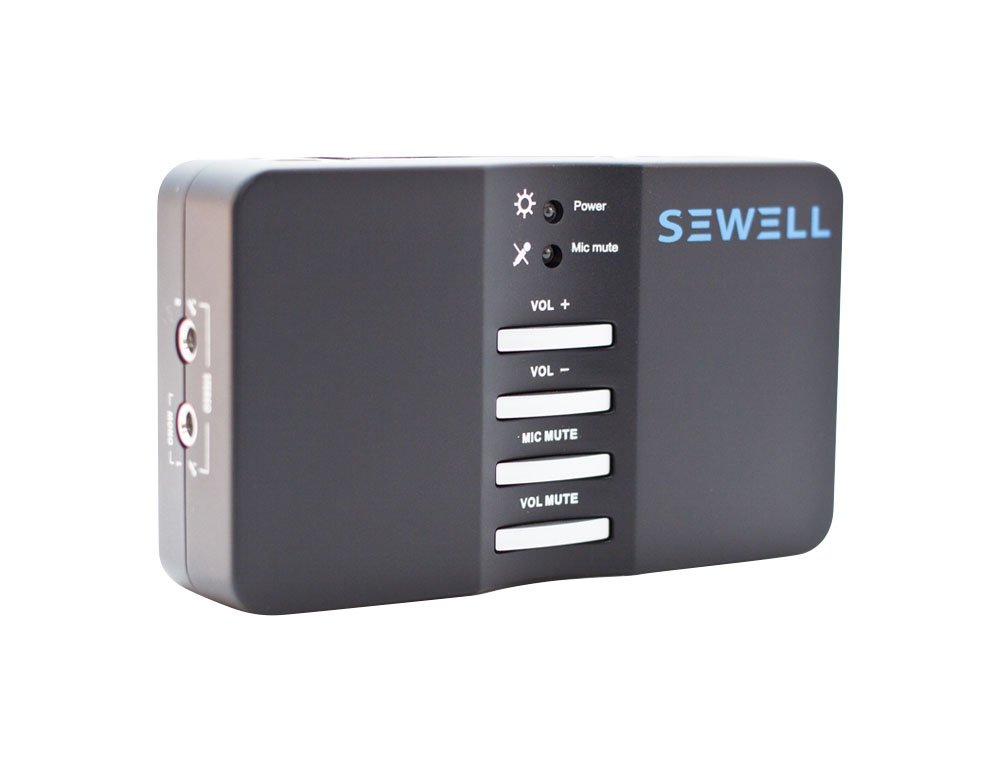
Rysunek 1: The Sewell Direct Sound Box SW-29545 external USB sound card. This image shows the compact design of the device, which is approximately the size of a deck of cards, highlighting its portability.
2. Funkcje
- Full Analog 7.1 Audio: Provides 7.1 channel audio output through 3.5mm jacks.
- Digital 7.1 Audio: Supports digital 7.1 audio via Fiber Optic S/PDIF input and output. Note: Mac OS supports 2.1 audio through S/PDIF.
- Nagrywanie stereo: Features two microphone inputs for stereo recording.
- Kompaktowy i przenośny: Designed for portability, with dimensions comparable to a deck of cards.
- Łatwa regulacja głośności: Integrated, user-friendly volume control buttons.
- Wysoka S.ampStawki: Analog audio supports 48/44.1 KHz sample rates for both recording and playback. S/PDIF supports 48 KHz sampstawka.
- Praca w trybie pełnego dupleksu: Capable of simultaneous recording and playback.
- USB 2.0 Compliant: Connects to your computer via a standard USB 2.0 port.
3. Instrukcje konfiguracji
- Connect the Sound Box: Plug the USB cable from the Sound Box into an available USB 2.0 port on your computer. The device draws power directly from the USB connection.
- Instalacja sterownika:
- Okna: For most modern Windows operating systems (e.g., Windows 10), the device may be recognized automatically, and generic drivers installed. For full functionality, especially for 7.1 channel audio, it is recommended to install the specific drivers provided with the product or downloaded from the manufacturer's website. Note that Windows 8/8.1 may have limited functionality (2.1 audio output only) with some drivers.
- System operacyjny Mac: The device may function as plug-and-play for basic stereo audio. For multi-channel output, specific configuration or drivers might be required. Refer to online resources or manufacturer support for detailed Mac OS setup.
- Podłącz urządzenia audio:
- Analog Speakers/Headphones: Connect your 2.1, 5.1, or 7.1 analog speaker system or headphones to the corresponding 3.5mm jacks on the Sound Box. The jacks are typically color-coded or labeled for front, rear, center/subwoofer, and side channels.
- Mikrofony: Connect microphones to the designated microphone input jacks.
- Dźwięk cyfrowy (S/PDIF): For digital audio output, connect an optical cable from the S/PDIF OUT port on the Sound Box to your digital audio receiver or speakers. For digital input, connect an optical cable from your source to the S/PDIF IN port.
- Konfiguruj ustawienia audio: After connecting, access your computer's sound settings (e.g., Windows Sound Control Panel, Mac OS Sound Preferences) to select the Sewell Sound Box as your default playback and recording device. Configure speaker setup (stereo, 5.1, 7.1) as appropriate for your connected system.
4. Instrukcja obsługi
Once the Sewell Sound Box SW-29545 is set up, operating it is straightforward.
- Regulacja głośności: Use the dedicated volume control buttons on the Sound Box to adjust the master output volume. You can also control volume through your operating system's sound mixer.
- Odtwarzanie nagranego dźwięku: Play any audio content from your computer. Ensure the Sound Box is selected as the default playback device in your system's audio settings. For multi-channel audio, verify that your media player and content support the desired channel configuration (e.g., 5.1 or 7.1).
- Nagranie: When using microphones, ensure the Sound Box is selected as the default recording device in your system's audio settings and within your recording software. Adjust microphone levels as needed. The device supports full-duplex recording and playback.
- Digital vs. Analog Output: Switch between analog and digital (S/PDIF) output modes through your computer's sound control panel or the Sound Box's driver utility software, if installed.
5. Konserwacja
- Czyszczenie: Use a soft, dry cloth to clean the exterior of the Sound Box. Avoid using liquid cleaners or solvents, as they may damage the device.
- Składowanie: When not in use, store the Sound Box in a cool, dry place away from direct sunlight and extreme temperatures.
- Zarządzanie kablami: Ensure USB and audio cables are not excessively bent or strained to prevent damage.
- Aktualizacje oprogramowania: Periodically check the Sewell Direct website for updated drivers or firmware to ensure optimal performance and compatibility with newer operating systems.
6. Rozwiązywanie Problemów
- Brak dźwięku:
- Verify that the Sound Box is correctly connected to a USB port and is powered on (indicated by an LED).
- Check that the Sound Box is selected as the default playback device in your computer's sound settings.
- Ensure your speakers or headphones are properly connected to the correct output jacks on the Sound Box.
- Confirm that the volume levels on the Sound Box, your computer, and your speakers/headphones are not muted or set too low.
- If using digital output (S/PDIF), ensure your receiver is set to the correct input and supports the digital audio format.
- Mikrofon nie działa:
- Ensure the microphone is securely plugged into one of the microphone input jacks.
- Verify that the Sound Box is selected as the default recording device in your computer's sound settings and in your recording application.
- Check microphone input levels in your system's sound settings.
- Limited Functionality on Windows 8/8.1:
- Some users may experience limited 2.1 audio output on Windows 8/8.1. Ensure you have the latest drivers from Sewell Direct. If issues persist, consider checking compatibility forums or contacting support.
- No Full Surround Sound on Windows 10:
- The product description indicates that full surround sound for Windows 10 is not currently supported and an update is planned. Monitor the manufacturer's website for driver updates addressing this.
- LED Light is Too Bright:
- Some users find the power LED to be excessively bright. This is a cosmetic issue and does not affect functionality. A small piece of opaque tape can be used to cover the LED if desired.
7. Specyfikacje
| Marka | Seweryn |
| Numer modelu | SW-29545 |
| Platforma sprzętowa | Laptopy, PC |
| Zgodność z systemem operacyjnym | Mac OS, Windows 8 (limited functionality), Windows 10 (limited surround support) |
| Waga przedmiotu | 7.2 uncji (około 204 gramów) |
| Wymiary produktu (dł. x szer. x wys.) | 8 x 5.5 x 1.5 cala (ok. 20.3 x 14 x 3.8 cm) |
| Interfejs sprzętowy | USB 2.0 |
| Tryb wyjścia audio | Stereo, Surround Sound (5.1, 7.1) |
| Analogowy Sampstawka | 48/44.1 KHz (recording & playback) |
| S/PDIF Sampstawka | 48 KHz (input & output) |
| Producent | Sewell Direct |
| Pierwsza dostępna data | 26 kwietnia 2011 r. |
8. Gwarancja i wsparcie
For detailed warranty information, please refer to the documentation included with your product or visit the official Sewell Direct webstrona.
If you encounter any issues not covered in this manual or require further assistance, please contact Sewell Direct customer support. Contact information can typically be found on the manufacturer's webstrona.