
1. Wprowadzenie
The Powerwerks PW50 PA System is a highly portable and versatile audio solution designed for amplifying vocals, instruments, keyboards, drum machines, and various audio devices. Its compact design and robust construction make it suitable for a wide range of environments, from small venues to personal practice spaces. The PW50 delivers clear and balanced sound through its two 4.5-inch speakers and high-frequency driver, ensuring excellent vocal clarity and minimizing harsh frequencies.
This manual provides detailed instructions for setting up, operating, and maintaining your Powerwerks PW50 PA System. Please read it thoroughly before use to ensure optimal performance and longevity of your device.
2. Informacje dotyczące bezpieczeństwa
- Źródło zasilania: Connect the unit only to the specified power supply (AC 120V~60Hz 80W). Ensure the power cable is not damaged or pinched.
- Wentylacja: Nie zasłaniaj żadnych otworów wentylacyjnych. Zapewnij odpowiedni przepływ powietrza wokół urządzenia, aby zapobiec przegrzaniu.
- Woda i wilgoć: Nie wystawiaj urządzenia na działanie deszczu, wilgoci ani nadmiernej wilgotności. Nie stawiaj na urządzeniu przedmiotów wypełnionych płynami.
- Źródła ciepła: Trzymaj urządzenie z dala od źródeł ciepła, takich jak grzejniki, kratki wentylacyjne, piece i inne urządzenia wytwarzające ciepło.
- Czyszczenie: Czyścić wyłącznie suchą ściereczką. Unikać stosowania płynów czyszczących i aerozoli.
- Serwisowanie: Nie próbuj samodzielnie naprawiać tego produktu. Wszelkie naprawy zlecaj wykwalifikowanemu personelowi serwisowemu. Naprawa jest konieczna, gdy urządzenie uległo uszkodzeniu w jakikolwiek sposób, na przykład gdy uszkodzony jest przewód zasilający lub wtyczka, gdy do urządzenia dostał się płyn lub przedmioty, gdy urządzenie zostało wystawione na działanie deszczu lub wilgoci, gdy nie działa prawidłowo lub zostało upuszczone.
- Umieszczenie: For optimal stability, place the unit on a flat, stable surface. It can also be positioned on a standard speaker stand using the integrated 35mm mounting socket.
3. Zawartość opakowania
Sprawdź, czy w przesyłce znajdują się wszystkie elementy wymienione poniżej:
- Powered PA Tower (Powerwerks PW50)
- Kabel zasilający
- Instrukcja obsługi
4. Koniec produktuview
The Powerwerks PW50 is a compact and powerful PA system. Below are images illustrating its design and the rear control panel, followed by a description of its key components and controls.

Figure 4.1: Powerwerks PW50 PA System (Angled Front View)
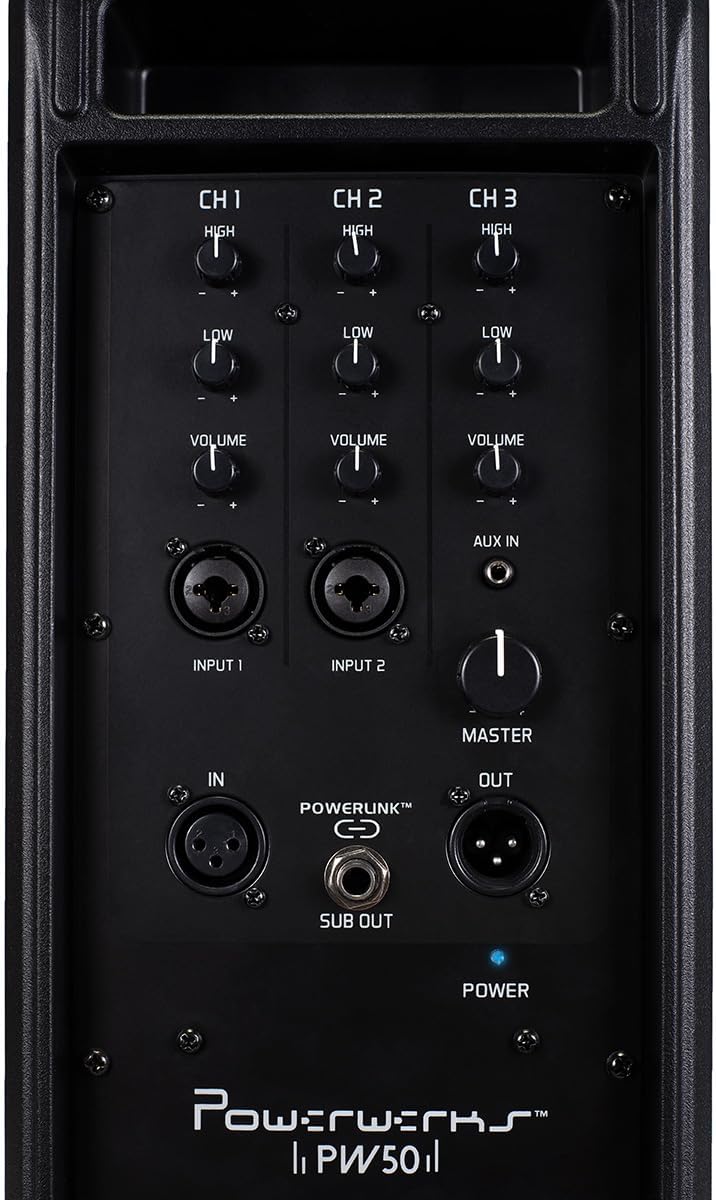
Figure 4.2: Powerwerks PW50 PA System (Rear Control Panel)
Funkcje panelu sterowania:
- Channels 1 & 2 (MIC/Line Inputs): Each channel features XLR and 1/4" line inputs, allowing connection of microphones or line-level instruments. Each channel has independent High (treble) and Low (bass) EQ controls, and a Volume knob. Phantom power is available for XLR inputs.
- Channel 3 (AUX IN): An 1/8" (3.5mm) stereo jack summed to mono, ideal for connecting external audio devices like smartphones or MP3 players. This channel also has independent High (treble) and Low (bass) EQ controls, and a Volume knob.
- Głośność: A global control for the overall output level of the PA system.
- POWERLINK™ (IN/OUT): XLR connections that allow two or more PW50 units to be linked together, functioning as a single, synchronized PA system.
- WYJŚCIE SUB: An output for connecting an external subwoofer, which diverts low frequencies from the PW50's internal speakers to the subwoofer for enhanced bass response.
- POWER Switch and Indicator: Turns the unit on/off. A blue LED indicates power status.
5. Konfiguracja
- Umieszczenie: Position the PW50 on a stable, flat surface or mount it on a standard speaker stand using the 35mm socket. Ensure proper ventilation.
- Podłączenie zasilania: Connect the supplied power cable to the AC input on the rear panel of the PW50 and then to a suitable power outlet. Do not power on the unit yet.
- Podłącz wejścia:
- For microphones, use an XLR cable and connect to Input 1 or 2.
- For instruments (e.g., guitar, keyboard), use a 1/4" TS cable and connect to Input 1 or 2.
- For external audio devices (e.g., smartphone, MP3 player), use an 1/8" (3.5mm) stereo cable and connect to the AUX IN on Channel 3.
- Ustawienia głośności początkowej: Before powering on, ensure all Channel Volume knobs and the Master Volume knob are set to their minimum (fully counter-clockwise) position.
- Włączanie: Flip the POWER switch to the 'ON' position. The blue power indicator LED will illuminate.
6. Instrukcja obsługi
Once the PW50 is set up, follow these steps to begin operation:
- Adjust Channel Volume: Slowly increase the Volume knob for the channel you are using (Channel 1, 2, or 3) until you hear sound at a comfortable level.
- Dostosuj głośność główną: Use the Master Volume knob to control the overall output level of the entire system. This allows you to adjust the total loudness without affecting the individual channel mixes.
- Korekcja (EQ): Use the High and Low EQ knobs on each channel to shape the tone of your input. Turn the High knob clockwise to increase treble, and counter-clockwise to decrease it. Do the same for the Low knob to adjust bass frequencies.
- Using POWERLINK™: To expand your sound system, connect the POWERLINK™ OUT of one PW50 unit to the POWERLINK™ IN of another PW50 unit using an XLR cable. This allows multiple units to function as a single, synchronized PA system.
- Connecting a Subwoofer: For enhanced bass, connect an active subwoofer to the SUB OUT port. This output sends a dedicated low-frequency signal to the subwoofer.
7. Konserwacja
Proper care and maintenance will ensure the longevity and optimal performance of your Powerwerks PW50 PA System:
- Czyszczenie: Regularly wipe the exterior of the unit with a soft, dry, lint-free cloth. Do not use abrasive cleaners, solvents, or waxes.
- Składowanie: Jeśli urządzenie nie będzie używane przez dłuższy czas, należy je przechowywać w chłodnym i suchym miejscu, z dala od bezpośredniego światła słonecznego i ekstremalnych temperatur.
- Wentylacja: Ensure that the ventilation grilles are free from dust and debris. Use a soft brush or vacuum cleaner to gently remove any buildup.
- Pielęgnacja kabli: Inspect all cables regularly for signs of wear or damage. Replace any damaged cables immediately to prevent electrical hazards or signal loss.
8. Rozwiązywanie Problemów
If you encounter issues with your PW50, refer to the following common problems and solutions:
| Problem | Możliwa przyczyna | Rozwiązanie |
|---|---|---|
| Brak dźwięku | Unit not powered on; Volume knobs too low; Incorrect input connection; Damaged cable. | Check power switch and indicator; Increase Master and Channel Volume; Verify cables are securely connected to correct inputs; Test with different cables. |
| Zniekształcony dźwięk | Volume levels too high (clipping); Incorrect EQ settings; Damaged speaker. | Reduce Master or Channel Volume; Adjust High/Low EQ knobs; If distortion persists, contact customer support. |
| Brzęczenie lub buczenie | Ground loop issue; Interference from other electronics; Faulty cable. | Try plugging into a different outlet; Move unit away from other electronic devices; Test with different cables. |
If the issue persists after trying these solutions, please contact Powerwerks customer support.
9. Specyfikacje
| Funkcja | Szczegół |
|---|---|
| Moc wyjściowa | 50 watów |
| Typ głośnika | Przenośny system PA |
| Rozmiar głośnika | Two 4.5-inch Drivers |
| Średnica głośnika wysokotonowego | 4 Inches (High-Frequency Driver) |
| Wejścia | 2 x MIC/Line (XLR/1/4" Combo), 1 x AUX IN (1/8" Stereo Jack) |
| Wyjścia | POWERLINK™ Out, Subwoofer Out |
| Sterownica | High EQ, Low EQ, Volume per channel; Master Volume |
| Tworzywo | Steel Grill and Rigid Corners |
| Kolor | Czarny |
| Waga przedmiotu | 12 funtów |
| Wymiary produktu | 18 x 6.5 x 7.5 cala |
| Numer modelu | PW50 |
| Źródło zasilania | Elektryczny przewodowy |
10. Gwarancja i wsparcie
The Powerwerks PW50 PA System comes with a limited warranty. For specific warranty terms and conditions, please refer to the warranty card included in your product packaging or visit the official Powerwerks website. For technical support, troubleshooting assistance beyond what is provided in this manual, or service inquiries, please contact Powerwerks customer support through their official channels.
